Tax and VAT · 9 min read · Updated:
How to pay taxes and SGK premiums in Türkiye: from the amount due to the receipt, step by step
Your accountant usually files the return, but you make the payment. Once you know which amount to pay, where, and with which number, the last-day rush becomes a five-minute job.
In short
- The exact amount due appears on the tahakkuk fişi (tax assessment slip) produced after the return is filed; the amount in Heyşirket is an estimate based on your invoices.
- KDV (VAT), muhtasar, stamp duty, provisional tax, income tax and corporate tax are paid to the Revenue Administration (GİB), either with your tax ID number in the tax payments section of your bank's mobile app or by card through the Dijital Vergi Dairesi (Digital Tax Office).
- SGK (social security) premiums aren't paid together with tax; they're paid separately with your workplace registration number in your bank's SGK premium payment section.
- MTV (motor vehicle tax) is paid to the Revenue Administration with the plate and tax ID number, while property tax is paid to the municipality where the property is located.
- A debt doesn't appear at the bank until the return is filed; don't leave payment to the evening of the last day, and share the receipt with your accountant.
On the morning of 23 October, Atlas Kahve's founder Deniz Hanım received a notification: 5 days left until the VAT return. Her accountant (mali müşavir) would file the return, but who would make the payment, and where? Last month she had gone to the branch and waited in line for half an hour.
This article is here to cut that half hour down to five minutes. First we explain where to find the amount due, then where and with which number to pay each type of tax, and finally what to do after paying, step by step.
- 26 Muhtasar and stamp duty
- 28 VAT return and payment
- Month end SGK premium payment
- Return — Filed by your accountant
- Assessment — The amount due is created
- Payment — Bank or card
- Receipt — Kept and passed on
- Done — Marked on the calendar
Part 1 · The amount First, find out the amount due
When a return is filed, the system produces a tahakkuk fişi (tax assessment slip). The exact amount due, the tax type and the period are shown on this slip. Your accountant can send you the slip as a PDF after filing the return; if they haven't, ask for it.
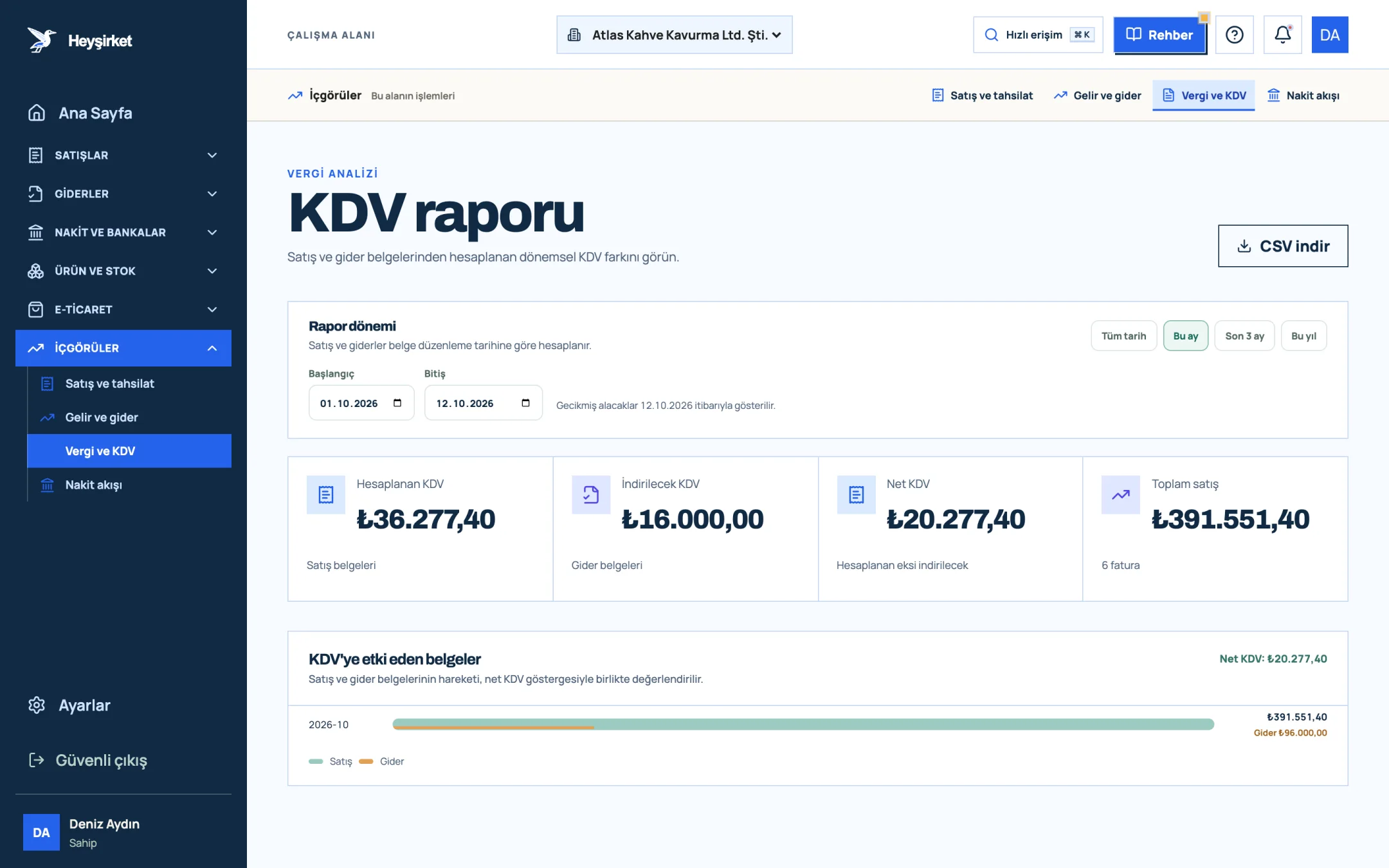
Heyşirket gives you an idea even before the return is filed: it calculates estimated VAT by deducting the VAT on your expenses and incoming invoices from the VAT on your sales invoices. This estimate is for setting the money aside; the figure you enter at the bank is the one on the assessment slip.
- 1. Output VAT
- 2. Deductible VAT
- 3. Net VAT
| Output VAT on sales | ₺36.277,40 |
|---|---|
| Deductible VAT on purchases and expenses | −₺16.000,00 |
| VAT carried forward from the previous month | ₺0,00 |
| Estimated VAT payable | ₺20.277,40 |
An unrecorded expense document, an exemption or carried-forward VAT can change the exact amount.
Part 2 · Revenue Administration How do you pay VAT, muhtasar, stamp duty and provisional tax?
VAT, the tax portion of the muhtasar return (Muhtasar ve Prim Hizmet Beyannamesi, the combined withholding & social security return), stamp duty, provisional tax, annual income tax instalments and corporate tax are paid to the Gelir İdaresi (GİB, Turkish Revenue Administration). The same number is enough for all of them: your company's tax ID number (VKN), or your Turkish ID number (TCKN) for a sole proprietorship.
From your bank's mobile app
Open the payments menu
Under Payments in the app you'll find a section such as Tax payments, Public payments or GİB tax payment. The menu name varies by bank.
Enter your tax ID number
Enter your tax ID number (your Turkish ID number for a sole proprietorship). Debts for which a return has been filed but not yet paid are listed with their tax type and period.
Choose the right item
Check the tax type (e.g. VAT, muhtasar) and the period in the list. The amount should match the assessment slip.
Pay and download the receipt
After confirming, save the receipt as a PDF; you'll need it to pass on to your accountant.
By card: the Digital Tax Office
Go to dijital.gib.gov.tr
Sign in with e-Devlet or your İnternet Vergi Dairesi (Internet Tax Office) password.
List your debts
Unpaid taxes appear in the debt inquiry and payment section.
Pay by card
Pay with a credit or debit card. With some cards an instalment option may appear depending on the tax type; your bank sets the terms.
| Where? | What do you need? | When is it a good fit? |
|---|---|---|
| Your bank's mobile app or online banking | Tax ID no. (Turkish ID no. for a sole proprietorship) | Quick payment from your account; the most practical route |
| Digital Tax Office (dijital.gib.gov.tr) | e-Devlet or GİB password, a card | Paying by credit card, seeing all debts in one place |
| Bank branch, ATM or PTT | Tax ID no. or the assessment slip | If you don't use digital channels |
Part 3 · SGK How do you pay SGK premiums?
If you have employees, you make two separate payments every month. The tax portion of the muhtasar ve prim hizmet return is paid to GİB on the 26th, and the insurance premiums are paid to SGK by the end of the following month. Paying one doesn't mean the other is paid.
SGK premiums from your bank's app
Open the SGK payments section
Under Payments, choose the SGK premium payment or SGK payments section.
Enter your workplace registration number
The premium debt is looked up with the workplace registration number (işyeri sicil numarası). Your accountant or your SGK workplace registration certificate gives you the number; save it once.
Choose the period and pay
Check the period and amount due, then pay; keep the receipt.
Part 4 · Vehicles How do you pay MTV?
Motorlu taşıtlar vergisi (MTV, motor vehicle tax) is paid in two instalments a year, by the end of January and July. For vehicles registered in the company's name the company's tax ID number is used; for vehicles registered to an individual, their Turkish ID number.
- In your bank's app, choose Motor Vehicle Tax in the tax payments section, or sign in to the Digital Tax Office.
- Enter the plate and your tax ID number; the instalment amount is listed.
- Pay and keep the receipt. If you have more than one vehicle, check each plate separately.
Part 5 · Municipality How do you pay property tax?
Emlak vergisi (property tax) is paid not to the Revenue Administration but to the municipality where the property is located. It comes in two instalments: the first by the end of May, the second by the end of November.
- Go to the online payment (e-belediye) page on your municipality's website, or open your bank's municipal payments section.
- Look up the debt with your Turkish ID or tax ID number.
- Pay; if you have several properties in different municipalities, a separate payment is made to each municipality.
Part 6 · Wrapping up What should you do after paying?
Post-payment checklist
- I saved the receipt as a PDF.
- I sent the receipt to my accountant.
- The amount paid matches the amount on the assessment slip.
- I marked the item as "Done" in the Heyşirket Tax calendar; no more reminders will be sent for this item.
Part 7 · Late payment What happens if you miss the deadline?
Late payment interest (gecikme zammı) accrues each month on unpaid taxes and premiums; the rate is set by Presidential decision and changes from time to time. Filing a return late also triggers an irregularity penalty (usulsüzlük cezası). The sooner you pay, the smaller the extra burden.
Can I pay my tax by credit card?
Yes. You can pay by credit or debit card through the Digital Tax Office. Instalment options vary by tax type and by card.
Where do I find the assessment slip?
Your accountant, who files the return, can access the slip and send it to you as a PDF. You can also see it in the returns and assessments section by signing in to the Digital Tax Office.
Should I pay the estimated amount shown in Heyşirket?
No. The estimate is so you can set the money aside in advance. The amount you pay is the one on the assessment slip.
My debt doesn't show at the bank. What should I do?
The return may not have been filed yet. Ask your accountant; the debt appears in the list shortly after the return is filed.
Your own deadlines and estimated amounts The Tax calendar shows the deadlines that apply to your company with estimated amounts, and reminds you by phone and email before the deadline. Open Tax calendar
Author: Heyşirket Editorial Team