Invoicing and tax · 19 min read · Updated:
Foreign currency invoices and exchange differences in Türkiye: the rules for selling in euros and settling in lira
Quoting in euros and getting paid in lira months later gives an invoice a second life. In this article we work through that second life, the exchange difference, from start to finish with a worked example.
In short
- A foreign currency invoice is one whose price is set in a foreign currency and which shows the Turkish lira equivalent and the exchange rate used on the same document; books and KDV (VAT) returns are kept in Turkish lira.
- When the price is set in foreign currency and collected after delivery, the change in the exchange rate between the invoice date and the payment date creates an exchange difference, and that difference is part of the VAT base.
- The seller issues the invoice for an exchange difference in the seller's favour, and the buyer issues it for a difference in the buyer's favour; VAT is calculated at the rate that applied on the date of the original supply.
- No exchange difference invoice is issued for revaluation differences at year end or at the end of provisional tax periods; the invoice is issued when the payment is actually received or made.
- The simplest ways to reduce currency risk are matching foreign currency income and expenses, shortening payment terms, adding an exchange rate clause to contracts, and checking your open currency position every Monday.
Atlas Kahve Kavurma sold a professional espresso machine to Karaköy Pera Otel for its lobby bar. Because the machine came from Italy and was bought in euros, the quote was given in euros too: 4.000 euros plus VAT, payment in 45 days, at the exchange rate on the payment date.
The teammate who issued the invoice relaxed, thinking the job was done. But 45 days later the lira amount the hotel sent would differ from the one on the invoice, and that difference would need an invoice of its own. By the end of this article you'll know who issues that invoice, how to calculate its VAT, and the four habits that shrink your currency risk.
Part 1 · The basics What is a foreign currency invoice, and can you issue one in Türkiye?
A foreign currency invoice (dövizli fatura) is an invoice where the price of the goods or services is written in a foreign currency such as euros or dollars, and the Turkish lira equivalent and the exchange rate used are shown on the same document. You can issue one in Türkiye; however, because books and VAT returns are kept in Turkish lira, every foreign currency transaction is converted to lira sooner or later.
It's important not to mix up two separate questions here. The first is the tax side: can an invoice be in foreign currency? Yes. The second is the contract side: can two companies in Türkiye agree on a price in foreign currency in their contract? That depends on the type of contract.
In the Atlas Kahve example, what's being sold is a machine, i.e. movable goods. That's why setting the price in euros is possible. The barista training provided to the same hotel, however, is a service contract; before pricing it in euros, you should stop and check.
| Field | What to enter | Why it matters |
|---|---|---|
| Document currency | A currency code such as EUR or USD | Shows which currency the receivable arises in |
| Unit price and total | Amounts in foreign currency | Must match the price in the contract exactly |
| Exchange rate used | The source, type and date of the rate | Proves how the TL equivalent was calculated |
| TL equivalent | The lira equivalent of the base, VAT and grand total | Bookkeeping and the VAT return use this amount |
| Payment terms | Payment-date rate or invoice-date rate? | Determines whether an exchange difference will arise |
The last row of the table is the real subject of this article. But first, a clear answer to this question: which exchange rate do you use to find the lira equivalent?
Part 2 · The exchange rate Which TCMB rate is used on a foreign currency invoice?
In practice, the Turkish lira equivalent of a foreign currency invoice is usually calculated using the foreign exchange buying rate of the Central Bank of the Republic of Türkiye (TCMB) valid on the invoice date. For domestic sales, the legislation doesn't explicitly impose a single type of rate; what matters is that the contract states which rate will apply and that the company applies it consistently.
TCMB announces its indicative rates at 15.30 every business day, and those rates apply the following day. So an invoice issued in the morning usually uses the rate announced on the previous business day. For an invoice issued at the weekend, the rate announced on Friday applies.
- Foreign exchange buying rate: The rate the bank applies when buying foreign currency from you. It's the rate used for revaluation and for the export exemption.
- Foreign exchange selling rate: The rate the bank applies when selling foreign currency to you. Some contracts prefer it to reflect the buyer's cost of paying.
- Effective rates: These are for cash banknote transactions and are rarely used for invoice conversion.
You've chosen the rate and issued the invoice. The real movement starts now: the customer sends the money not at the invoice rate, but at the rate on the payment date.
Part 3 · The difference What is an exchange difference, and when does it arise?
An exchange difference (kur farkı) is the difference between the Turkish lira equivalent of a price set in foreign currency on the invoice date and its Turkish lira equivalent on the date it's collected or paid. It only arises if the price was set in foreign currency and payment is made at a later date at that day's rate.
If the lira amount was fixed on the day you issued the invoice and the customer will pay that fixed lira amount, no exchange difference arises, however much the rate moves. The foreign currency amount on the invoice is there for information only. This distinction alone solves half the problem.
- Quote — Price in euros, rate clause included
- Invoice — TL equivalent at the invoice-date rate
- Payment term — The rate moves for 45 days
- Payment — TL at the payment-date rate
- Exchange difference invoice — Issued by the party it favours
The rule is clear: the difference is part of the base and carries VAT. Now let's see it in numbers, because an exchange difference makes sense on a calculator, not on paper.
Part 4 · The calculation How do you calculate an exchange difference? A step-by-step TL example
The exchange difference is calculated by multiplying the foreign currency price excluding VAT by the difference between the two rates; the VAT rate of the original sale is then added to the result. The rates in the example below are illustrative figures chosen only to show the calculation.
| Price excluding VAT | 4.000,00 EUR |
|---|---|
| Invoice-date rate (example) | 50,00 TL |
| Base on the invoice (4.000 × 50,00) | 200.000,00 TL |
| VAT on the invoice (20%) | 40.000,00 TL |
| Invoice grand total | 240.000,00 TL |
| Payment-date rate (example) | 51,50 TL |
| Amount paid by the hotel (4.800 EUR × 51,50) | 247.200,00 TL |
| Exchange difference base (4.000 × 1,50) | 6.000,00 TL |
| VAT on the exchange difference (20%) | 1.200,00 TL |
| Exchange difference invoice total, in the seller's favour | 7.200,00 TL |
The 247.200 TL collected equals the 240.000 TL original invoice plus the 7.200 TL exchange difference invoice. The exchange difference on the VAT amount itself (800 EUR × 1,50 = 1.200 TL) is not added to the base; the VAT on the exchange difference invoice already covers the same amount.
Note that the 7.200 TL isn't all profit for Atlas. 1.200 TL of it is VAT and will be passed on to the state as output VAT in the return. The part booked as income is 6.000 TL, tracked in the foreign exchange gain account in the books.
What if the rate had gone the other way? If the rate on the payment date had been 49,00 TL, the hotel would have sent 4.800 × 49,00 = 235.200 TL. The 4.800 TL shortfall is an exchange difference in the buyer's favour: a 4.000 TL base and 800 TL VAT.
The calculation is done. So what does this invoice look like on paper, when is it issued and which pitfalls should you watch out for?
Part 5 · The document Who issues the exchange difference invoice, and when?
An exchange difference invoice is a separate invoice issued by the party in whose favour the difference arose, after the payment is received or made, containing only the exchange difference amount and its VAT. The seller issues it for a difference in the seller's favour, and the buyer for a difference in the buyer's favour.
| In the seller's favour (rate rose) | In the buyer's favour (rate fell) | |
|---|---|---|
| Issued by | The seller (Atlas Kahve) | The buyer (Karaköy Pera Otel) |
| Addressed to | The buyer | The seller |
| Example base | 6.000 TL | 4.000 TL |
| VAT rate | The rate of the original sale (20%) | The rate of the original sale (20%) |
| Seller's bookkeeping | Foreign exchange gain | Foreign exchange loss |
| Invoice type | Sales invoice | In practice issued like a return invoice |
- Timing: The invoice is issued after the payment date on which the exchange difference becomes final. The safest approach is to count the seven-day issuing period in the VUK (Tax Procedure Law) from that date.
- Partial payments: If the hotel pays in two instalments, a separate exchange difference arises for each one; each is calculated at the rate on its own payment date.
- Description line: The invoice should clearly state the number and date of the related original invoice, the foreign currency amount and both rates. In a tax audit, this is the first place inspectors look.
- Transactions with withholding: If the original transaction is subject to KDV withholding (tevkifat), the same withholding applies to the exchange difference invoice. For details, see our withholding guide.
The paperwork is in order. Now let's move on to the less talked-about but more expensive side: how much the exchange rate can hurt you.
Part 6 · Risk How does currency risk hit a small business?
Currency risk is the risk that the lira value of receivables, payables or future cash flows in foreign currency changes unexpectedly because of exchange rate movements. If your foreign currency receivables exceed your payables, a falling rate costs you; if your foreign currency payables exceed your receivables, a rising rate does.
Atlas Kahve's real currency risk actually lies not in machine sales but in buying green coffee beans. Beans from Brazil and Ethiopia are paid for in dollars, but the price list for roasted coffee sold to cafés is in lira. When the dollar rises, costs rise instantly, while the price list only catches up at the next update.
| Item | USD | EUR |
|---|---|---|
| Foreign currency receivables (open invoices) | 0 | 4.000 |
| Foreign currency account balances | 6.500 | 1.200 |
| Foreign currency payables (suppliers) | 18.000 | 2.500 |
| Net position | −11.500 (short) | +2.700 (long) |
The table is easy to read: Atlas has an 11.500-dollar shortfall on the dollar side. Every time the dollar rises by 1 TL, the company loses 11.500 TL. On the euro side it has a small surplus, so a rising euro works in its favour. Knowing these figures is the first step to managing them.
Four habits that shrink currency risk
- Match foreign currency income and expenses: where possible, sell products you buy in foreign currency at prices indexed to that currency (a natural hedge).
- Shorten payment terms on foreign currency deals; 15 days instead of 45 cuts the time you're exposed to rate swings to a third.
- Write an exchange rate clause into quotes and contracts: which rate, which day, and at what threshold the price is updated.
- For large foreign currency payments, discuss tools such as advance payments, upfront purchases or forward contracts with your bank in advance.
- Update your open currency position in a single line every Monday.
- Update your price lists on a fixed calendar rhythm, not whenever the rate moves.
The risk is mapped. The last question: how do you track all this in Heyşirket, and what can't you do?
Part 7 · In practice How do you track foreign currency transactions in Heyşirket?
In Heyşirket, sales invoices are currently issued in Turkish lira; there's no feature for issuing invoices in foreign currency. On the cash and bank side, however, you can open dollar and euro accounts and track foreign currency transactions in their own currencies.
We say this plainly, because if you need foreign currency invoices often and regularly, you'll need to issue the document itself from your e-document provider's screen. For a business that occasionally quotes in foreign currency and invoices in lira, the flow below is enough.
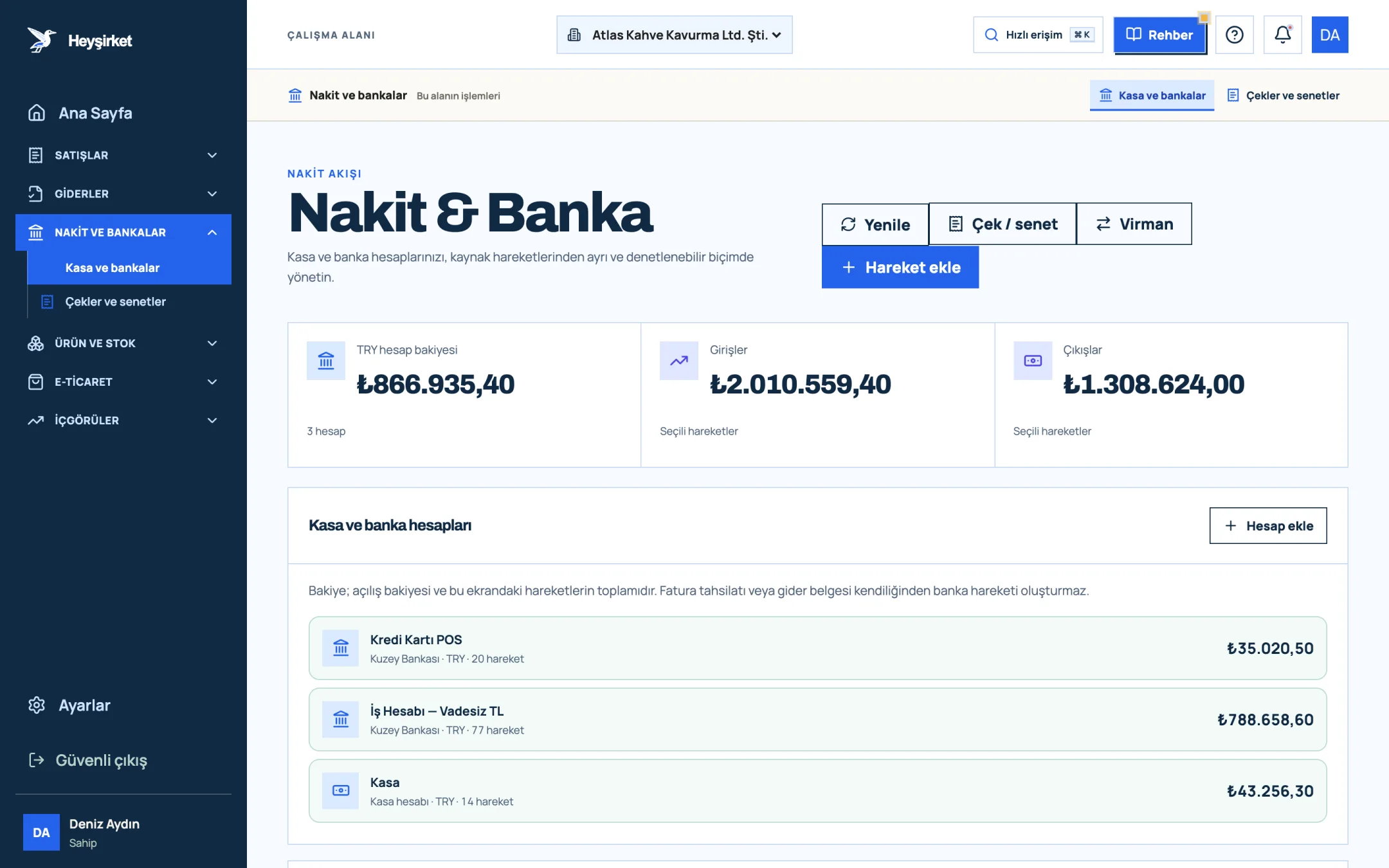
- 1. Add transaction button
- 2. Transfer between accounts
- 3. Total TRY balance
- 4. Cash and bank account list
Step by step: tracking a sale priced in euros, in lira
Set up your foreign currency account
On the Cash & Bank screen, press the Add account button, choose EUR as the Currency and save your euro account at your bank. A Transfer can only be made between accounts in the same currency.
Set up your foreign currency account - 1. Add transaction button
- 2. Transfer between accounts
- 3. Total TRY balance
- 4. Cash and bank account list
Issue the invoice in its lira equivalent
On the New invoice form, enter the unit price as the lira amount you calculated using the rate in the contract. Below the invoice summary, you'll see that the currency is Turkish lira.
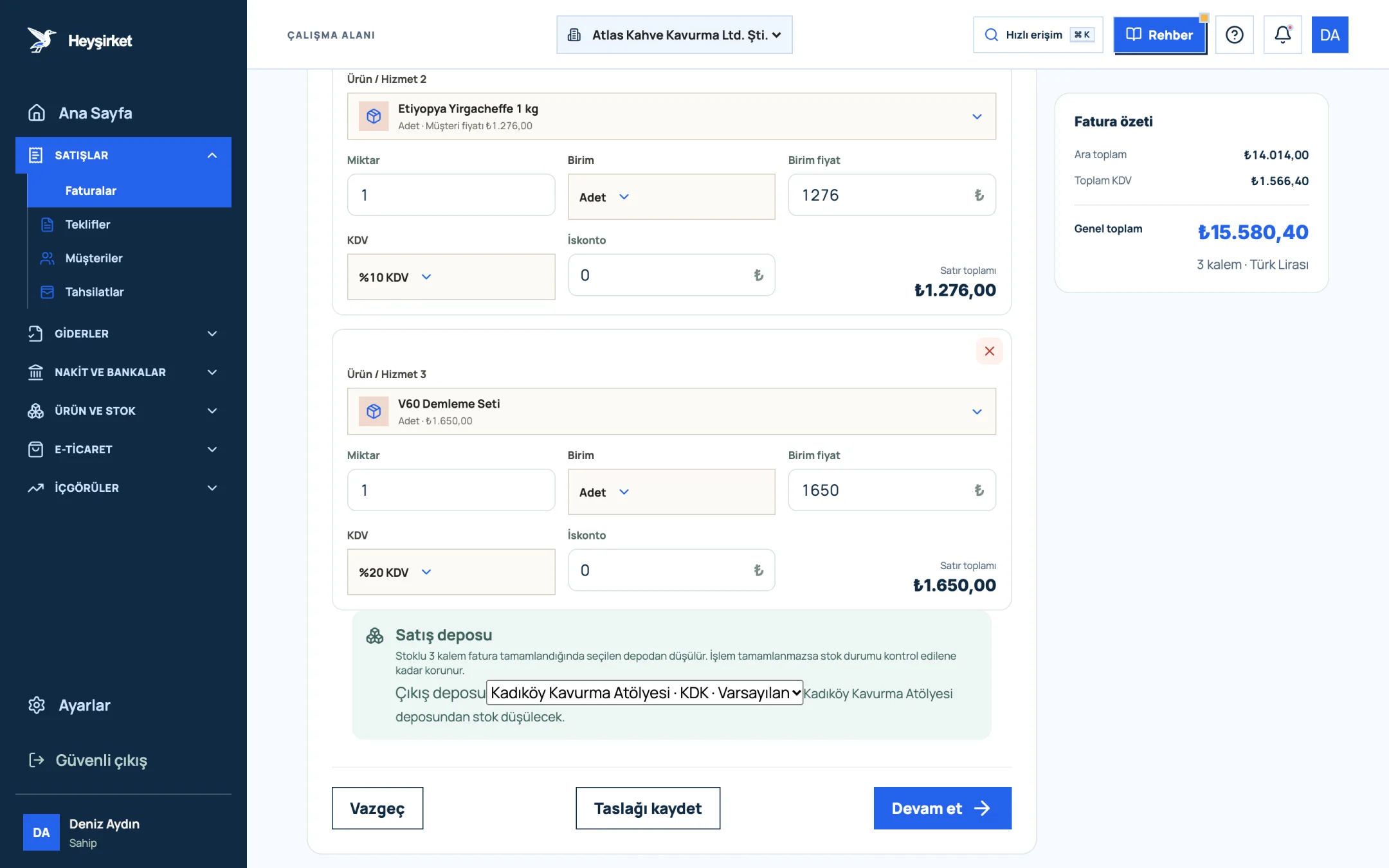
Issue the invoice in its lira equivalent - 1. Grand total
- 2. Continue button
- 3. Save draft button
- 4. Sales warehouse to deduct stock from
Write the currency details in the note field
In the Invoice note field of the second step, Payment and note, write the foreign currency amount, the source of the rate and its date: “4.000 EUR, TCMB foreign exchange buying rate on 22.08.2026: 50,00 TL; the payment-date rate applies.”
Record the payment in lira
When the money arrives, enter the lira amount received in the Record payment window. Don't forget that you'll issue a separate exchange difference invoice for the part that exceeds the invoice amount.
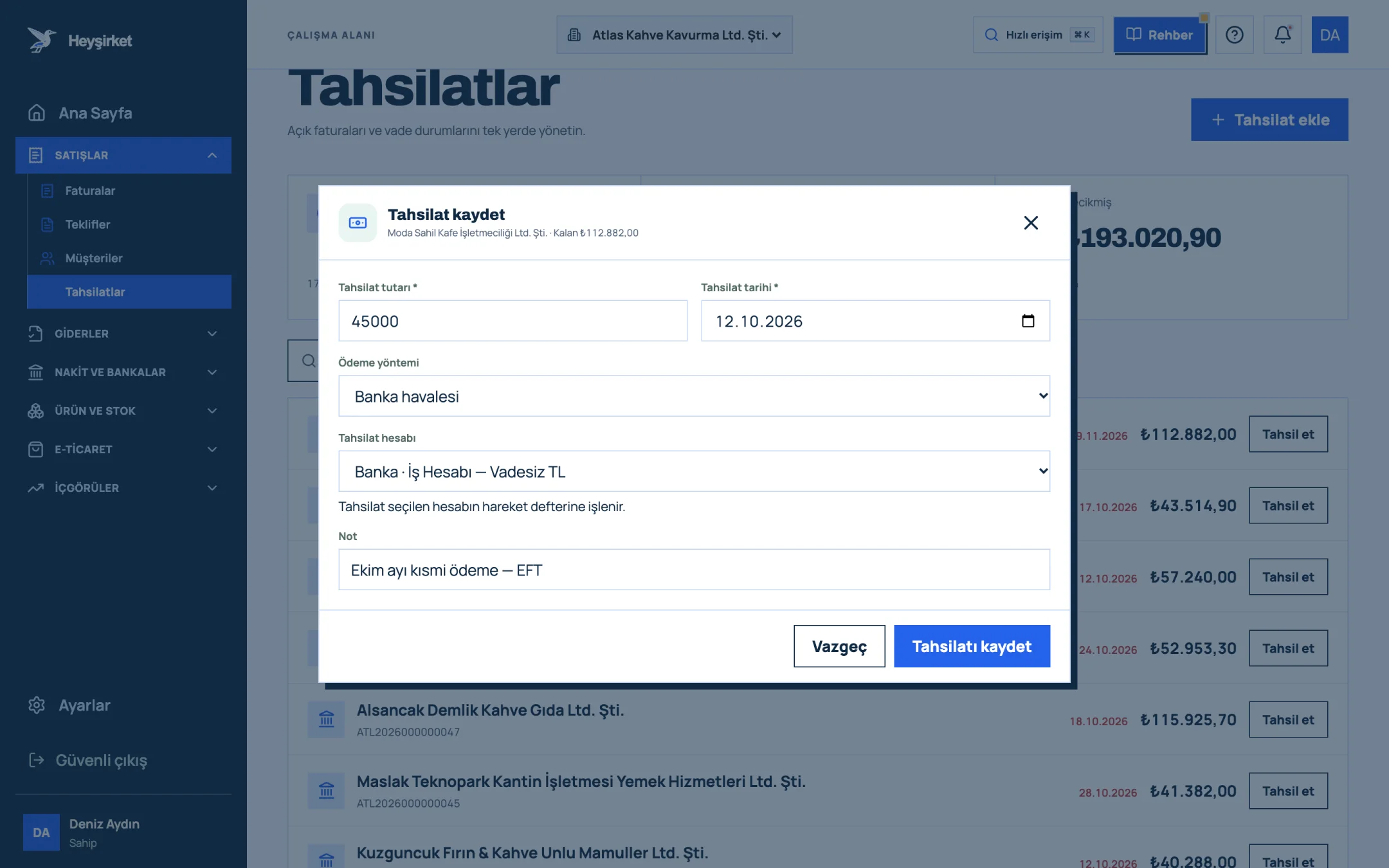
Record the payment in lira - 1. Collection amount
- 2. Payment method
- 3. Cash/bank account receiving the payment
- 4. Save button
Create a service item for exchange differences
On the Products and services screen, use New item to create an item called “Exchange difference” with stock tracking turned off. Issue the exchange difference invoice with this item at the VAT rate of the original sale, and write the original invoice number in the description.
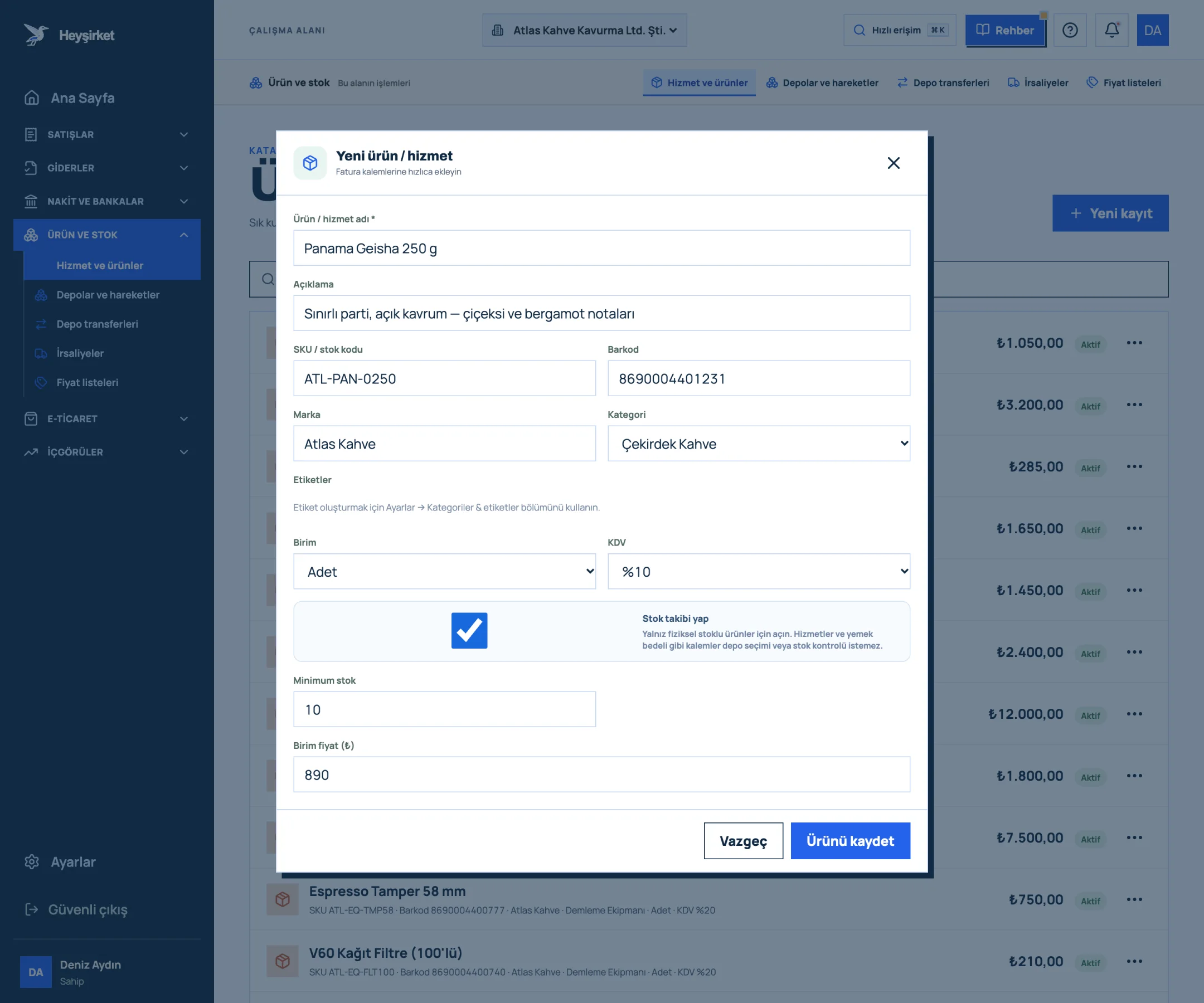
Create a service item for exchange differences - 1. Product / service name
- 2. SKU and barcode
- 3. Category selection
- 4. Track stock option
- 5. Save product
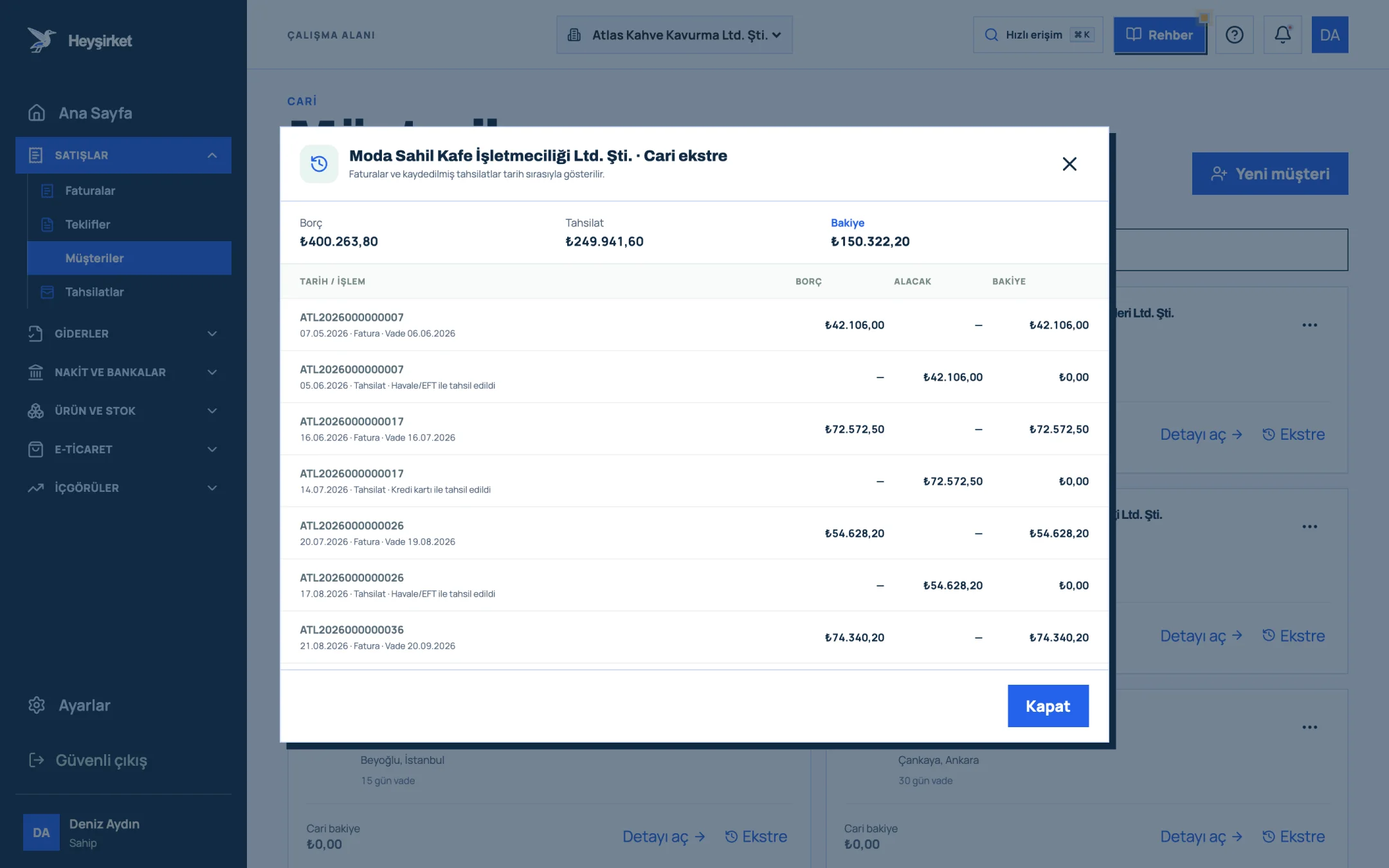
- 1. Account statement window
- 2. Statement transactions and balance
Opening the customer statement after every foreign currency payment is a good habit. In any account reconciliation with a customer, these small exchange differences are the first thing that comes up.
Do I have to issue a foreign currency invoice, or can I invoice in lira?
You don't have to. Even if you discuss the price in foreign currency, you can issue the invoice in lira at the invoice-date rate and collect a fixed lira amount; in that case no exchange difference arises. An exchange difference only arises if payment will be made at the rate on the payment date.
What VAT rate applies on an exchange difference invoice?
The exchange difference takes the VAT rate that applied on the date of the original supply of goods or services. If you sold coffee beans at 10% and the machine at 20%, the exchange difference invoices are issued at 10% and 20% respectively.
What does the seller do when the exchange difference is in the buyer's favour?
The seller doesn't issue an invoice; it receives the exchange difference invoice the buyer issues to it, records it, and deducts or adjusts the VAT. In the seller's books, this amount is tracked as a foreign exchange loss.
Do I issue an exchange difference invoice at year end for an open foreign currency receivable?
No. No invoice is issued and no VAT is calculated for differences arising from period-end revaluation. The invoice is issued when the payment is received. Make the revaluation entry together with your accountant.
Can I issue invoices in dollars or euros in Heyşirket?
No. In Heyşirket, sales invoices are currently issued in Turkish lira. You can open dollar and euro cash or bank accounts and track foreign currency transactions, and you can state the currency details in the invoice's Invoice note field.
Within how many days must an exchange difference invoice be issued?
Since the exchange difference becomes final on the payment date, the safest practice is to count the seven-day issuing period in the Tax Procedure Law from that date. Get your accountant's view for your own transaction.
Make your foreign currency accounts visible today Add your euro or dollar account to the Cash & Bank screen and read your open currency position at a glance every Monday. Open Cash & Bank
Author: Heyşirket Editorial Team