Tax · 18 min read · Updated:
VAT withholding and stopaj in Türkiye: why doesn't the invoice match what you paid?
If the total on an invoice and the amount that leaves your bank account differ, tevkifat or stopaj is probably the reason. Both mean “deducting tax on someone else's behalf and paying it to the state”, but they are different taxes, with different returns and different mistakes.
In short
- KDV tevkifatı (VAT withholding) means part or all of the VAT on an invoice is not paid to the seller; instead the buyer, as the responsible party, declares and pays it on KDV Return No. 2 by the 25th of the following month.
- Partial withholding rates range from two tenths to nine tenths; for example, 2/10 applies to freight transport and 9/10 to labour supply, and in 2026 no withholding applies to transactions that do not exceed 12.000 TL including VAT.
- Gelir vergisi stopajı (income tax withholding) is generally deducted at 20% from payments such as business premises rent and freelance professional fees, and declared on the Muhtasar ve Prim Hizmet Beyannamesi by the 26th of the following month.
- When rent or fees are not agreed on a gross basis, the net amount is grossed up by dividing it by 0,80; the stopaj burden effectively falls on the tenant.
- In Heyşirket, invoices are issued as standard sales invoices; it does not issue invoices with withholding or calculate stopaj, so these are handled together with your accountant (mali müşavir).
Atlas Kahve shipped two pallets of coffee beans to a hotel chain in Bursa, and the haulier issued an invoice for 18.000 TL. The instruction from accounting was: “Pay the haulier 17.400 TL, we'll pay the 600 TL ourselves.”
At first Deniz Hanım thought it was a negotiated discount. It wasn't. It was one of two applications of the Turkish tax system's “collect tax at the source” principle: KDV tevkifatı (VAT withholding). The other is stopaj (income tax withholding), which you meet with rent and freelance professional payments.
In this article we separate the two, lay out the 2026 rates and thresholds in tables, and work through real TL examples. At the end, you'll also see the most common mistake, and the most expensive one.
Part 1 · The distinction Are tevkifat and stopaj the same thing?
Literally, tevkifat and stopaj mean the same thing: the person making a payment deducts the other party's tax before paying and pays it to the tax office themselves. In practice, however, “KDV tevkifatı” is used for VAT, while “stopaj” mostly refers to income tax and corporate tax withholding.
| KDV tevkifatı (VAT withholding) | Gelir vergisi stopajı (income tax withholding) | |
|---|---|---|
| Which tax? | Value added tax (KDV) | Income tax (GVK Article 94) |
| Why is it withheld? | To protect against the risk of the seller not paying the VAT to the state | To tax income at the moment it is earned |
| Typical examples | Freight, labour supply, cleaning, construction work | Business premises rent, freelance professional fees, employee wages |
| Which return? | KDV Return No. 2 | Muhtasar ve Prim Hizmet Beyannamesi |
| Deadline | 25th of the following month | 26th of the following month |
| What does the party subject to withholding do? | Shows the withheld VAT separately from the output VAT on its own return | Offsets the withheld tax on its annual income tax return |
Two deadlines, two returns. Once this distinction is clear, the rest is just rates and thresholds. Let's start with the VAT side.
Part 2 · VAT withholding What is VAT withholding and who applies it?
KDV tevkifatı means that, for certain purchases of goods and services, part or all of the VAT on the invoice is not paid to the seller but is paid to the tax office by the buyer as the responsible party. The rule is based on Article 9 of the VAT Law (KDV Kanunu), and the details on the KDV Genel Uygulama Tebliği (VAT General Implementation Communiqué).
There are two types. With partial withholding, a set share of the VAT (for example two tenths) is paid by the buyer and the rest is paid to the seller. With full withholding, the entire VAT is declared by the buyer; the best-known example is a service bought from a company not resident in Türkiye, such as a software subscription purchased from abroad.
- Seller's invoice — Tax base + VAT, withholding rate stated
- Buyer pays — Tax base + the seller's share of the VAT
- Buyer declares — Withheld VAT, KDV Return No. 2, the 25th
- Buyer deducts — The full VAT as input VAT on KDV Return No. 1
An everyday example of full withholding: services bought from abroad
Atlas Kahve buys monthly advertising and software services for its online store from a platform based abroad. Because these companies are not VAT taxpayers in Türkiye, their invoices carry no Turkish VAT. When the service is used in Türkiye, Atlas Kahve, as the buyer, declares and pays the VAT as the responsible party on KDV Return No. 2.
For example, for a software subscription costing 5.000 TL a month, 1.000 TL of VAT at 20% is paid by the 25th of the following month and, provided the general conditions are met, shown as deductible VAT on the Return No. 1 for the same period. The cash impact is short-lived, but if it isn't declared, the deduction can't be claimed either and late payment interest arises. That's why it matters to list the foreign subscriptions on your credit card statement for your accountant every month.
Who must withhold depends on the type of transaction. For some transactions, all VAT-registered buyers withhold; for others, only “designated buyers” do, such as public bodies, banks and the large businesses listed in the communiqué. Missing this distinction is one of the most common mistakes.
Part 3 · Rates Which withholding rate applies to which work in 2026?
The partial withholding rate is the share of the invoice VAT that the buyer must declare, and it ranges from two tenths to nine tenths. The table below summarises the items SMEs encounter most often.
| Transaction | Rate | Who withholds? |
|---|---|---|
| Freight transport | 2/10 | VAT-registered buyers |
| Commercial advertising services | 3/10 | Designated buyers |
| Construction work and related engineering-architecture | 4/10 | Designated buyers |
| Catering and event organisation, shuttle transport | 5/10 | Designated buyers |
| Machinery and equipment maintenance and repair, printing | 7/10 | Designated buyers |
| Labour supply services | 9/10 | VAT-registered buyers |
| Cleaning, environmental and garden maintenance, private security | 9/10 | Designated buyers |
| Surveys, planning and design, consultancy, auditing | 9/10 | Designated buyers |
What is the withholding threshold in 2026?
Partial withholding applies when the transaction value including VAT exceeds the invoicing threshold. For 2026 this threshold is 12.000 TL (it was 9.900 TL in 2025). The threshold is checked against the total including VAT, not the tax base excluding VAT, and splitting a job into several invoices to stay under it is against the rules.
Part 4 · The calculation How is an invoice with withholding calculated? A real TL example
Calculating an invoice with withholding takes three steps: work out the VAT on the tax base, multiply the VAT by the withholding rate to set aside the amount the buyer pays to the tax office, and pay the remaining VAT to the seller together with the tax base. Let's calculate it with Atlas Kahve's Bursa shipment.
| Transport fee (tax base) | 15.000,00 TL |
|---|---|
| VAT calculated (20%) | 3.000,00 TL |
| Invoice total (incl. VAT, threshold check) | 18.000,00 TL > 12.000 TL |
| Withheld VAT (3.000 × 2/10), paid by Atlas Kahve | 600,00 TL |
| VAT payable to the haulier (3.000 − 600) | 2.400,00 TL |
| Amount credited to the haulier's bank account | 17.400,00 TL |
Atlas Kahve pays the 600 TL on KDV Return No. 2 by the 25th of the following month. On the same month's KDV Return No. 1 it can show the full 3.000 TL as deductible VAT. The haulier, for its part, includes only 2.400 TL in its output VAT on its own return.
Note that the buyer's total cash outflow doesn't change. Atlas Kahve still pays 18.000 TL; it's just that 600 TL of it goes to the tax office rather than the haulier. What changes is who receives the money and when.
Part 5 · Stopaj What is stopaj, and which payments is it deducted from?
Stopaj (income tax withholding) means that the persons and organisations listed in Article 94 of the Income Tax Law (Gelir Vergisi Kanunu, GVK) deduct the other party's income tax from certain payments they make and pay it to the tax office. Companies, individuals keeping commercial books and self-employed professionals are required to make this deduction.
| Payment | Rate (general rule) | When paid to whom? |
|---|---|---|
| Rent (business premises or residence rented by the company) | 20% | Individual property owners (no stopaj on rent paid to a company) |
| Freelance professional fee | 20% | Self-employed professionals such as lawyers, accountants, doctors and architects |
| Employee wages | According to the income tax brackets | Employees (through payroll) |
Gross vs net in rent stopaj
Lease agreements are often written as “40.000 TL net to the landlord”. In that case the base for stopaj is the gross amount, not the net amount, so the tenant actually carries a higher rent cost.
| Net rent payable to the landlord | 40.000,00 TL |
|---|---|
| Gross rent (40.000 ÷ 0,80) | 50.000,00 TL |
| Stopaj (20% × 50.000) | 10.000,00 TL |
| Atlas Kahve's total monthly rent cost | 50.000,00 TL |
The 10.000 TL is declared and paid on the Muhtasar ve Prim Hizmet Beyannamesi by the 26th of the following month. If the landlord is an individual not acting in the course of a business, this rent is usually exempt from VAT; if the landlord is a company, no stopaj is deducted and VAT is charged on an invoice. Confirm your own situation with your accountant.
Stopaj on a freelance professional receipt
When a self-employed professional provides a service to a company, the receipt shows the gross fee, 20% stopaj and VAT together. For example, on a gross legal fee of 10.000 TL, 2.000 TL of stopaj is deducted and 2.000 TL of VAT is added; the amount paid to the lawyer is 10.000 TL. The company pays the stopaj through the muhtasar return, and the lawyer offsets it on their annual return. Details are in our e-SMM guide.
Part 6 · On screen What does Heyşirket do, and not do, for tevkifat and stopaj?
Heyşirket is not a system that calculates or declares withholding and stopaj amounts. It's important to be upfront about this, because a wrong expectation means an incomplete return.
| Task | In Heyşirket | With your accountant |
|---|---|---|
| Issuing a sales invoice with withholding | Not available; invoices are issued as standard sales invoices | Issued another way if needed |
| Viewing an incoming e-invoice with withholding | Available; in the Incoming e-Invoices list | Assessed for the return |
| Calculating stopaj (rent, freelance fees) | Not available | Calculated and declared on the muhtasar return |
| Recording payments to the seller and the tax office | Available; Cash and banks › Add transaction | — |
| Monthly VAT estimate | Available; Tax and VAT report (does not separate out withholding) | Final amount via Returns No. 1 and No. 2 |
If your e-document connection is set up, an e-invoice with withholding issued by your supplier lands in the Incoming e-Invoices tab. Opening the invoice there and checking the withholding line before paying prevents the “paid in full” mistake.
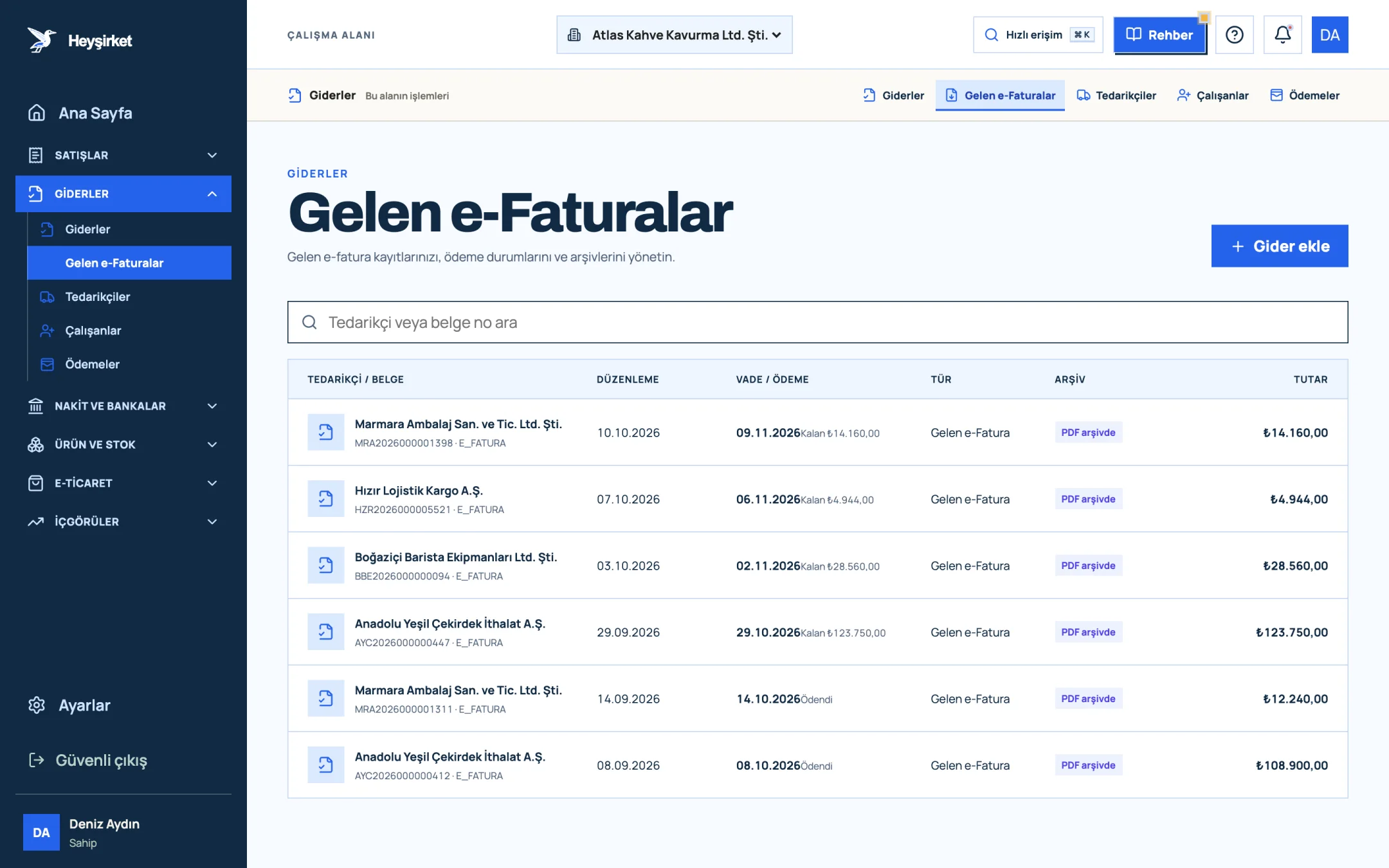
- 1. Incoming e-Faturas tab
- 2. Supplier and document number
- 3. Remaining payment amount
- 4. PDF archive status
For expenses you enter manually, the Add expense record window lets you pick a single VAT rate; there is no withholding or stopaj field. So we suggest a simple rule: record the document in full with the VAT rate on the invoice, and note the withholding and stopaj in the note field.
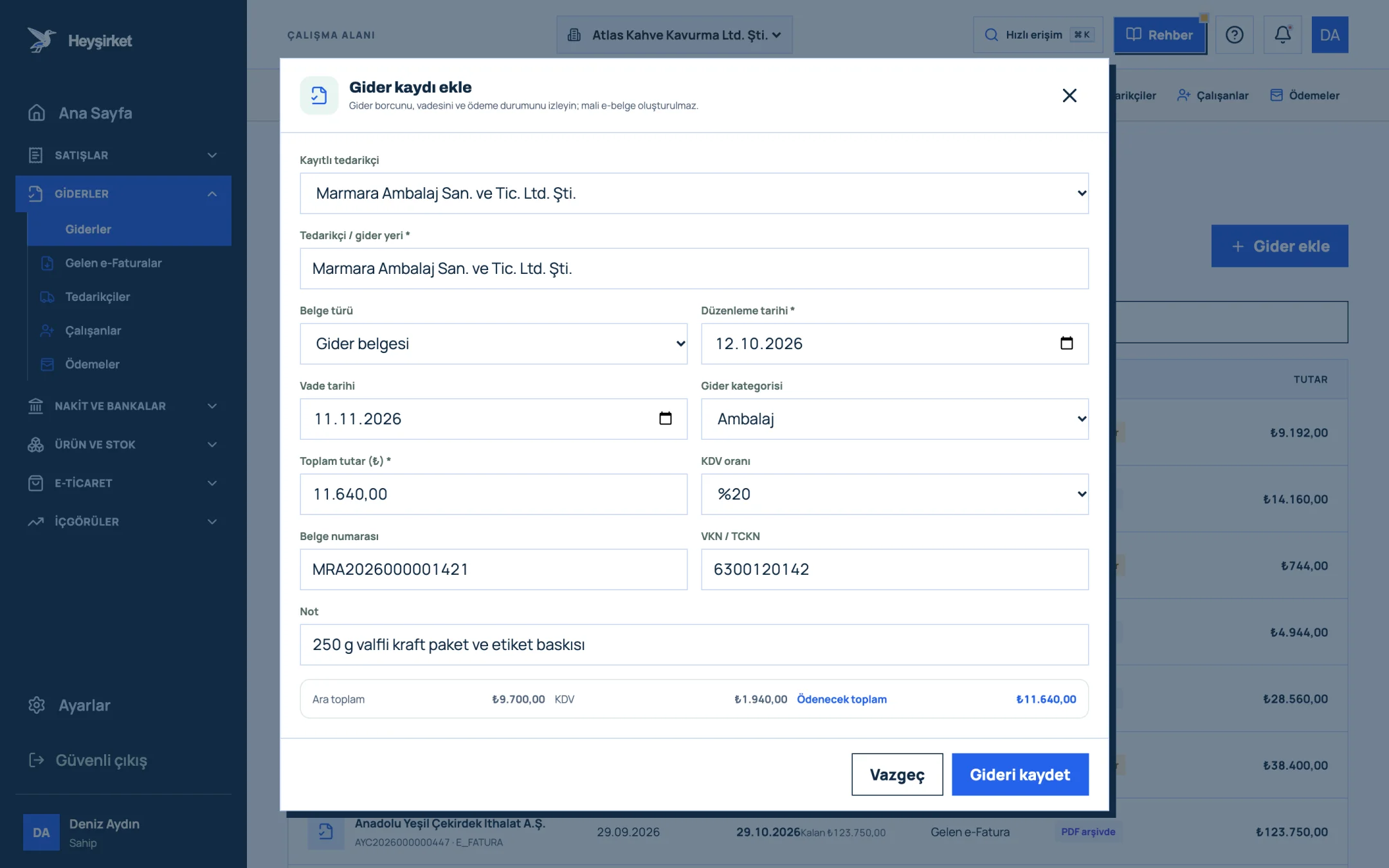
- 1. Supplier selection
- 2. Expense category
- 3. Amount and VAT rate
- 4. Subtotal, VAT and total payable
- 5. Save expense
Tracking a purchase with withholding in Heyşirket
Open the invoice in the right place
If it's an e-Fatura, find it in the Incoming e-Invoices tab under Expenses; if it's a paper or e-Arşiv invoice, record it on the Expenses screen with Add expense.
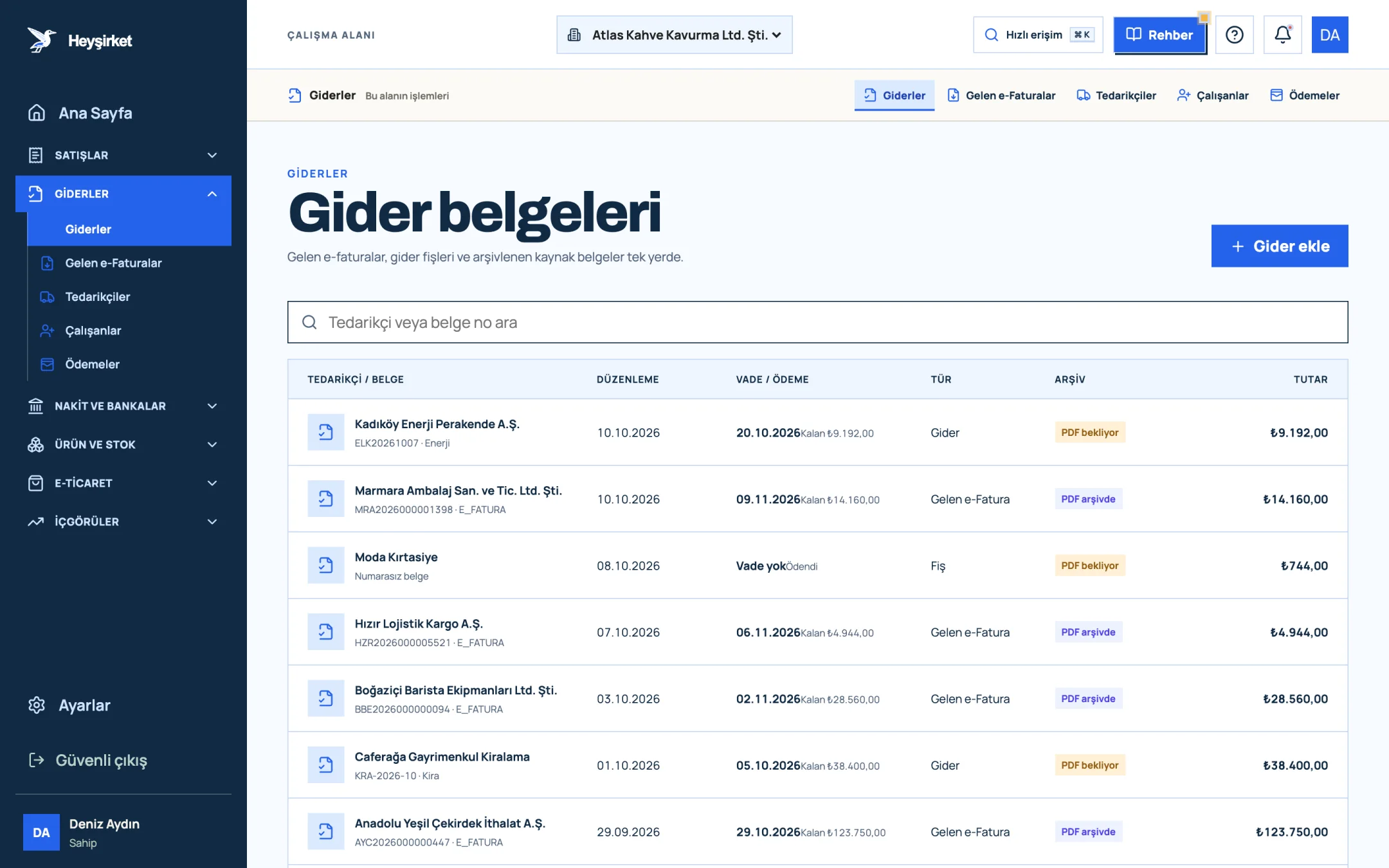
Open the invoice in the right place - 1. Add expense button
- 2. Due date and remaining payment
- 3. Document type (Expense, Incoming e-Fatura, Receipt)
- 4. Expense document row
Enter the amount and VAT rate in full
For a manual record, enter the invoice total in the Total amount (₺) field and the rate on the invoice in the VAT rate field; write the withholding details in the Note field and save with Save expense.
Enter the amount and VAT rate in full - 1. Supplier selection
- 2. Expense category
- 3. Amount and VAT rate
- 4. Subtotal, VAT and total payable
- 5. Save expense
Pay the seller only their share
On the Cash and bank accounts screen, use Add transaction, choose Money out as the transaction type and record the net amount paid to the seller (17.400 TL in the example).
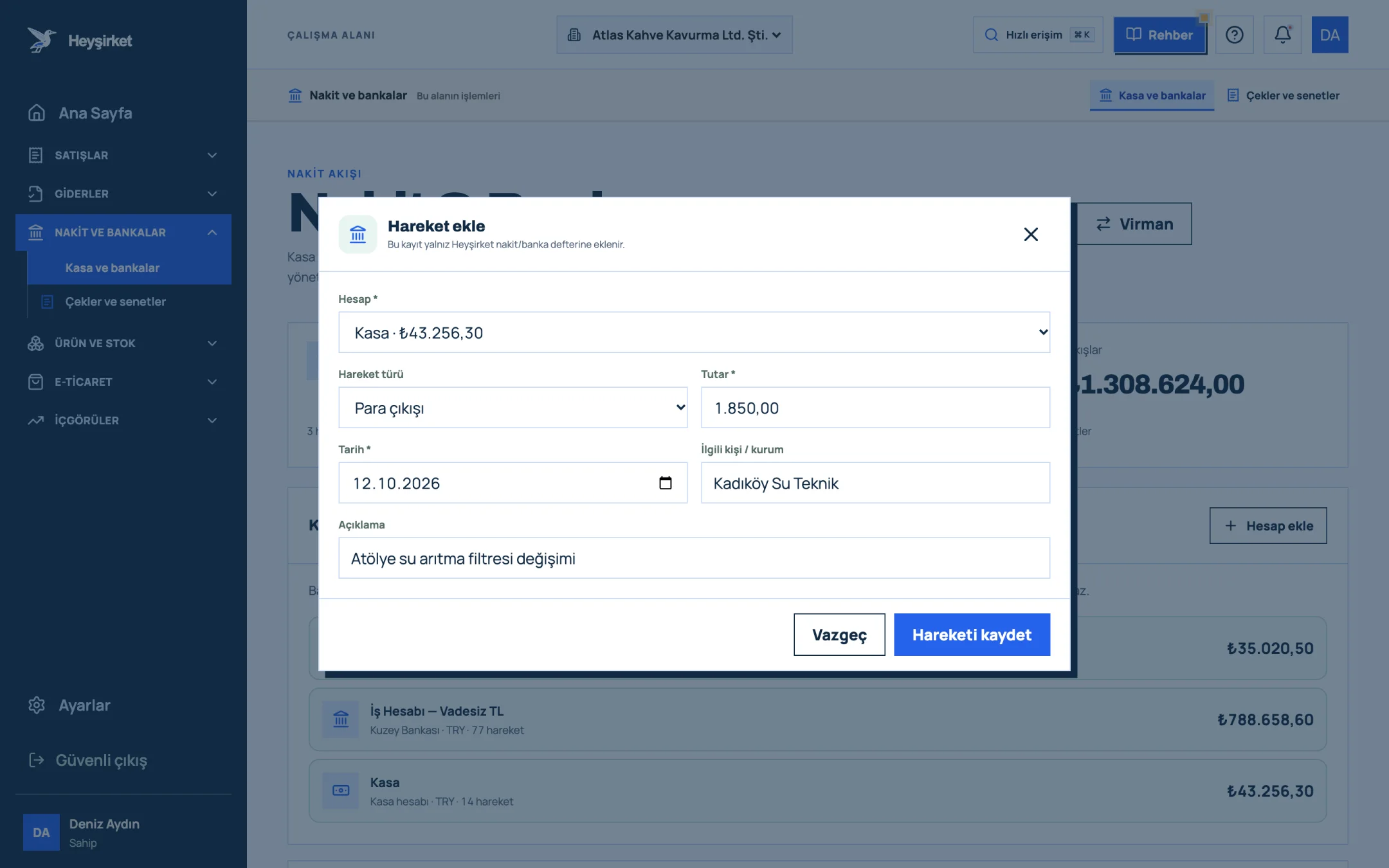
Pay the seller only their share - 1. Account selection
- 2. Amount
- 3. Save button
Track the tax share on a separate line
Record the withholding amount you pay to the tax office on the 25th (600 TL in the example) as a separate money-out transaction, again with Add transaction, entering the tax office in the related organisation field.
Track the tax share on a separate line - 1. Account selection
- 2. Amount
- 3. Save button
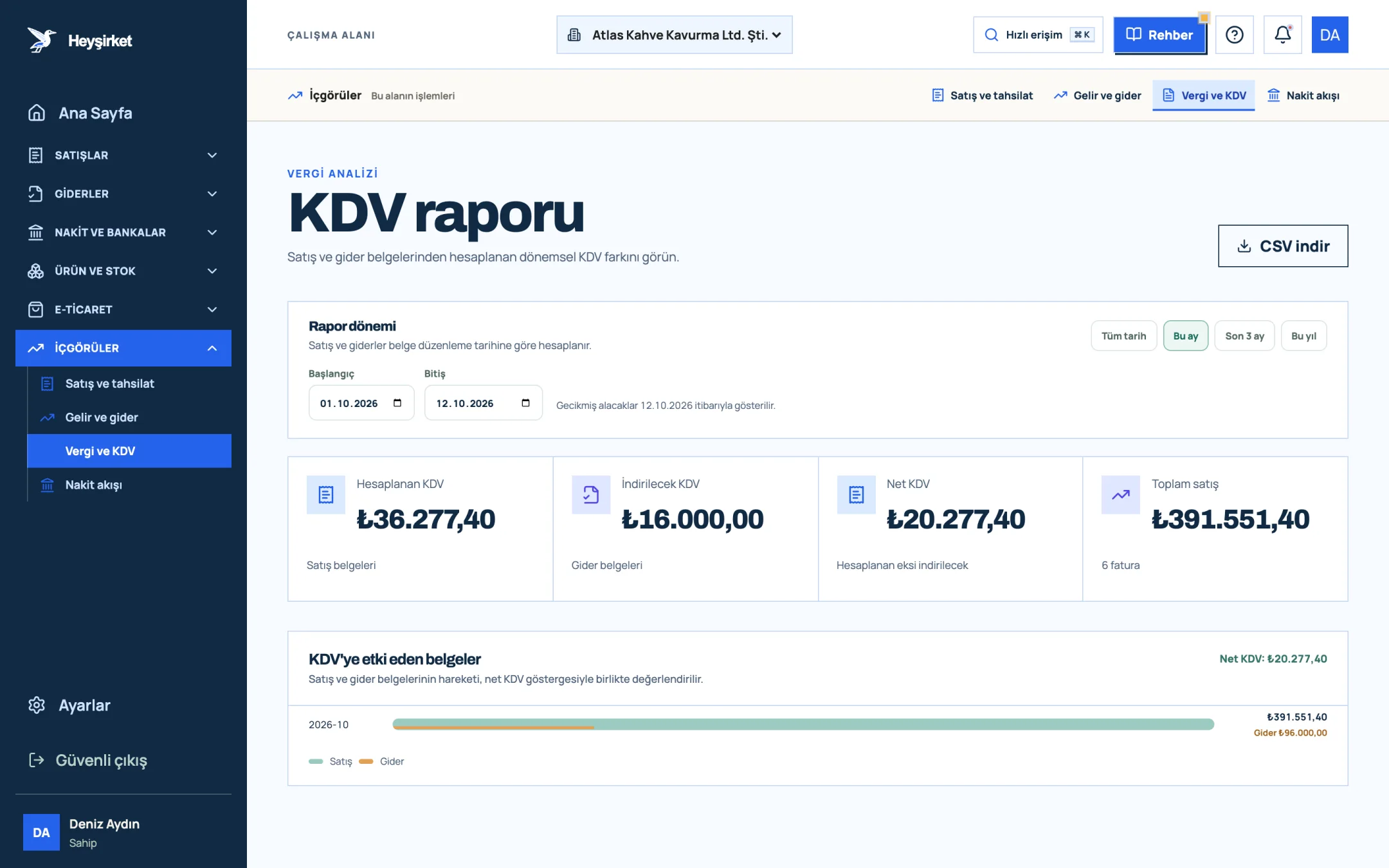
- 1. Output VAT
- 2. Deductible VAT
- 3. Net VAT
In practice, the best results come from keeping two lists side by side: the VAT summary in the report and the invoices with withholding you noted during the month. When you send both to your accountant together at month end, the risk of an invoice being left off Return No. 2 largely disappears.
Part 7 · Routine What should you check every month?
Checking for tevkifat and stopaj means systematically asking “is there a tax deduction on this payment?” before you pay. Correcting things retrospectively at month end is always harder than getting it right at the moment of payment.
Monthly tevkifat and stopaj checklist
- Who received this month's rent payments: an individual (stopaj applies) or a company (VAT applies)?
- Have the receipts and stopaj amounts for freelance payments such as lawyers, accountants and consultants been sent to your accountant?
- Is the withholding rate stated correctly on freight, labour, cleaning, security and maintenance-repair invoices?
- Does the amount including VAT on invoices with withholding exceed the 12.000 TL threshold?
- Was the seller paid only their share of the VAT?
- Have software, advertising and subscription services bought from abroad (full withholding) been listed?
- Is the amount set aside for the 25th (KDV Return No. 2) and the 26th (muhtasar) ready in the bank?
We've shown where these two deadlines fall throughout the year, month by month, in our 2026 tax calendar. For the general logic of VAT, see the VAT guide, and for how to organise the documents you send your accountant, read working with an accountant.
Can I deduct the VAT that was withheld?
Yes. As long as the general conditions are met, the buyer can show the full VAT on the invoice, including the withholding amount it declared and paid on KDV Return No. 2, as deductible VAT on KDV Return No. 1.
If I'm not a designated buyer, do I never withhold?
No. For some transactions, such as freight transport and labour supply, all VAT-registered buyers withhold. The designated buyer condition only applies to the transactions the communiqué lists as such. Check each transaction type separately.
If my company rents a residence, does it have to deduct stopaj?
As a general rule, yes. A company subject to the stopaj obligation also deducts 20% stopaj from the rent it pays for a residence rented from an individual (for example, as staff housing). The absence of stopaj on residential rent applies to cases where the tenant is a private individual. Review every lease signed in the company's name with your accountant.
Can I issue an invoice with withholding from Heyşirket?
No. In Heyşirket, invoices are issued as standard sales invoices; the withholding invoice type is not supported. If you provide services subject to withholding to designated buyers, plan with your accountant how you'll issue these invoices.
I forgot to pay the stopaj. What happens?
If stopaj that should have been deducted is not deducted or declared, the tax is claimed from the payer together with late payment interest and a tax loss penalty (vergi ziyaı cezası). As soon as you notice, talk to your accountant about correcting it through voluntary disclosure (pişmanlık).
Scan this month's incoming invoices for withholding Open the Incoming e-Invoices list and check items such as freight, labour and maintenance-repair before paying. Open Incoming e-Invoices
Author: Heyşirket Editorial Team