e-Documents · 18 min read · Updated:
Return and cancellation invoices in Türkiye: fixing a wrong invoice the right way
A wrongly issued invoice isn't the end of the world, but one fixed the wrong way comes back months later in your VAT return and customer account. That's why it matters to know when you need a cancellation and when you need a return.
In short
- Cancellation treats a faulty invoice as if it had never been issued; a return invoice reverses a sale that did happen, because the goods came back.
- A commercial-scenario e-Fatura can be rejected by the buyer through the system within 8 days; in the basic scenario, objection and cancellation run outside the system, e.g. via a notary, KEP (registered email) or GİB's cancellation/objection request screen.
- As a rule, the return invoice is issued by the buyer sending the goods back; if the buyer is an end consumer, the return is documented with an expense voucher issued by the seller or the return section of the e-Arşiv invoice.
- The seller taking the goods back deducts the VAT on the returned goods in the period of the return, correcting the tax it declared earlier.
- If the invoice has already been included in a VAT return, a return or correction becomes the route instead of cancellation; make this decision together with your accountant.
Monday morning, Atlas Kahve's phone rings. Moda Sahil Kafe's bookkeeper says that on the invoice issued on Friday, the espresso blend's unit price was taken from the list price, when the café's special price should have applied.
The same week, a grinder comes back from Nişantaşı Bistro because it's faulty. Both look like “fixing the invoice”, but one is solved with a cancellation and the other with a return invoice. Choosing the wrong route can lead to VAT being declared twice, or a customer balance that doesn't reconcile for months.
In this article we explain the difference between cancellation, objection and return, how the process differs between e-Fatura (Turkish e-invoice) and e-Arşiv (e-archive invoice), where the deadlines come from and how a return affects VAT. At the end, you'll find a short checklist that helps you pick the right route in five minutes when you run into a faulty invoice.
Part 1 · Three concepts Are cancellation, objection and return the same thing?
No. Cancellation means a faultily issued invoice is legally treated as never having been issued. Objection is the buyer formally notifying the seller that it doesn't accept the invoice's content. A return invoice documents the reversal of a sale that did happen, because the goods physically came back.
| Route | When is it used? | Who starts it? | Outcome |
|---|---|---|---|
| Cancellation | The invoice was issued incorrectly: wrong buyer, wrong amount, duplicate document | As a rule, the seller (for e-Fatura, with the buyer's approval or objection) | The document is void and the correct one is issued again |
| Objection / rejection | The buyer doesn't accept the invoice's content | Buyer | A rejection response in the commercial scenario, an objection outside the system in the basic scenario |
| Return invoice | The sale happened and the goods came back later | As a rule, the buyer sending the goods back | The sale and its VAT are reversed by the returned quantity |
A practical distinction: if the invoice was wrong from the start, cancel; if the invoice was right but the goods came back, return. Moda Sahil Kafe's price error falls into the first group, Nişantaşı Bistro's grinder into the second.
- Did the goods come back? — If yes, a return invoice
- Was the invoice wrong from the start? — Buyer, amount, rate, duplicate
- Which scenario? — Commercial, basic or e-Arşiv
- Within the deadline? — Rejection, objection or cancellation
- The correct document — Reissue and record
The third box in the flow is where things get most confusing, because e-Fatura's two scenarios and e-Arşiv behave very differently when it comes to cancellation.
Part 2 · e-Fatura Can an e-Fatura be cancelled?
An e-Fatura can't be cancelled within the system by the seller's decision alone. For an e-Fatura that has reached the buyer to be voided, depending on the scenario, either the buyer sends a rejection response through the system or objection and cancellation steps are taken outside the system.
Commercial scenario: an 8-day right to reject
With a commercial invoice, the buyer can respond through the e-Fatura system with an acceptance or rejection. The deadline for this response is 8 days from the invoice's issue. A commercial invoice rejected within that period becomes void; the seller issues a new invoice with the correct details.
Once the deadline passes, the system no longer allows a rejection response. From then on, as in the basic scenario, you're left with routes outside the system or, if the goods are coming back, a return invoice.
Basic scenario: objection happens outside the system
A basic invoice has no acceptance or rejection response within the system. The buyer notifies the seller of the objection through channels such as a notary, registered letter, telegram, KEP (registered electronic mail) or the cancellation/objection request screen on GİB's (Turkish Revenue Administration) e-Arşiv Portal. A request opened on the portal requires the other party's approval; simply opening a request doesn't cancel the invoice.
With e-Fatura, the ball is in the buyer's court. With e-Arşiv, it's the other way round and the burden of cancellation shifts to the seller.
Part 3 · e-Arşiv How do you cancel an e-Arşiv invoice?
Because e-Arşiv invoices are issued to buyers not registered in the e-Fatura system, the seller cancels them through its private integrator's panel or the GİB e-Arşiv Portal. The cancelled document is reported to GİB through the integrator and drops out of the seller's records.
In practice, the cancellation period is assessed together with the 8-day objection period in the TTK; some integrators and guides allow a 7-day window. Sources also differ on when the period starts (the issue date or the date it was delivered to the buyer). So go by your provider's rule and GİB's current guide.
Cancelling an e-Arşiv invoice gets you halfway. The other half is reissuing the correct invoice and linking the two documents in your records. If the goods came back, though, you don't deal with cancellation at all; the return invoice takes the stage.
Part 4 · Returns Who issues the return invoice, and how?
A return invoice is issued by a buyer sending goods it bought back to the seller. The document type depends on the buyer's and seller's e-document status, but the logic is always the same: whoever sends the goods back tells the seller “I've sold these goods back to you”.
| Buyer | Seller | Return document |
|---|---|---|
| Registered for e-Fatura | Registered for e-Fatura | The buyer issues an e-Fatura of the return type |
| Registered for e-Fatura | Not registered for e-Fatura | The buyer issues an e-Arşiv return invoice |
| Not registered for e-Fatura (merchant) | Anyone | The buyer issues an e-Arşiv return invoice, or a paper one where permitted |
| End consumer | Anyone | The seller issues an expense voucher (gider pusulası), or the return section of the e-Arşiv invoice is used |
What a return invoice must include
A reference to the original invoice
The return invoice states the number and date of the original sales invoice for the returned goods. This link lets the two documents be matched in the records and traced in an audit.
Only the returned quantity
For a partial return, only the quantity that came back is written. If two of twelve bags of coffee come back, the return invoice is for two bags.
The same unit price and VAT rate
The return is issued with the unit price and VAT rate of the original sale. For example, coffee beans with 10% VAT also appear at 10% on the return invoice.
Physical return and recording
The goods must actually return to the seller's warehouse. When recording the return invoice, the seller also updates stock; keep the delivery note (irsaliye) or delivery record showing the goods came back.
The document is issued correctly. So how does a return move the numbers in the VAT return?
Part 5 · VAT How does a return invoice affect VAT?
A return invoice takes back the VAT calculated on the sale, by the returned quantity. The seller taking the goods back treats the VAT on the return invoice as input VAT in the period the return happens; the buyer returning the goods corrects the VAT it previously deducted by the same amount.
| Sale to Nişantaşı Bistro in September (excl. VAT) | 50.000 TL |
|---|---|
| Output VAT on the sale (20%) | 10.000 TL |
| Grinder returned in October (excl. VAT) | 12.000 TL |
| VAT on the return invoice (20%) | 2.400 TL |
| Added by Atlas to input VAT in October | 2.400 TL |
| Input VAT corrected by the bistro in October | −2.400 TL |
| Final VAT on the sale (10.000 − 2.400) | 7.600 TL |
The September VAT return doesn't change; the correction is made in October, the period of the return. The example is simplified; for a real transaction, check the rate and period with your accountant.
There's an important point here: the September VAT return isn't touched. A return is a transaction of the month it happens in. That makes the return invoice a cleaner tool than cancellation, because you don't need to reopen a closed period.
Part 6 · Deadlines How much time do you have for each step?
Deadlines for returns and cancellations come from both the invoicing rule and objection rights. The table below brings together the most common deadlines; for exceptions such as holidays and GİB extensions, check current announcements.
| Step | Deadline | Basis |
|---|---|---|
| Issuing the invoice | At most 7 days from delivery of the goods or performance of the service | VUK Art. 231/5 |
| Rejection response to a commercial e-Fatura | 8 days from the invoice's issue | VUK General Communiqué No. 509 |
| Objection to an invoice (general) | 8 days from receiving the invoice | TTK Art. 21/2 |
| e-Arşiv cancellation | 7-8 days in practice; the provider's rule and GİB's guide apply | VUK General Communiqué No. 509 and guides |
| Return invoice | When the return happens; the VAT effect goes in the return period | VAT Law Art. 35 |
The 7-day issuing period also matters for invoices that are cancelled and reissued. If the new invoice comes long after the delivery date, a separate question of irregularity can arise. So the earlier you catch the mistake, the fewer documents it takes to fix.
Part 7 · On screen How do cancellations and returns appear in Heyşirket?
In Heyşirket, cancellations and returns are treated not as actions that legally change an invoice, but as the correct reflection in pre-accounting of actions taken at your e-document provider. There's no invoice cancel button in the portal; because cancellation requires checking the document type and legal deadline, it's done in your e-document provider's panel or on the GİB portal.
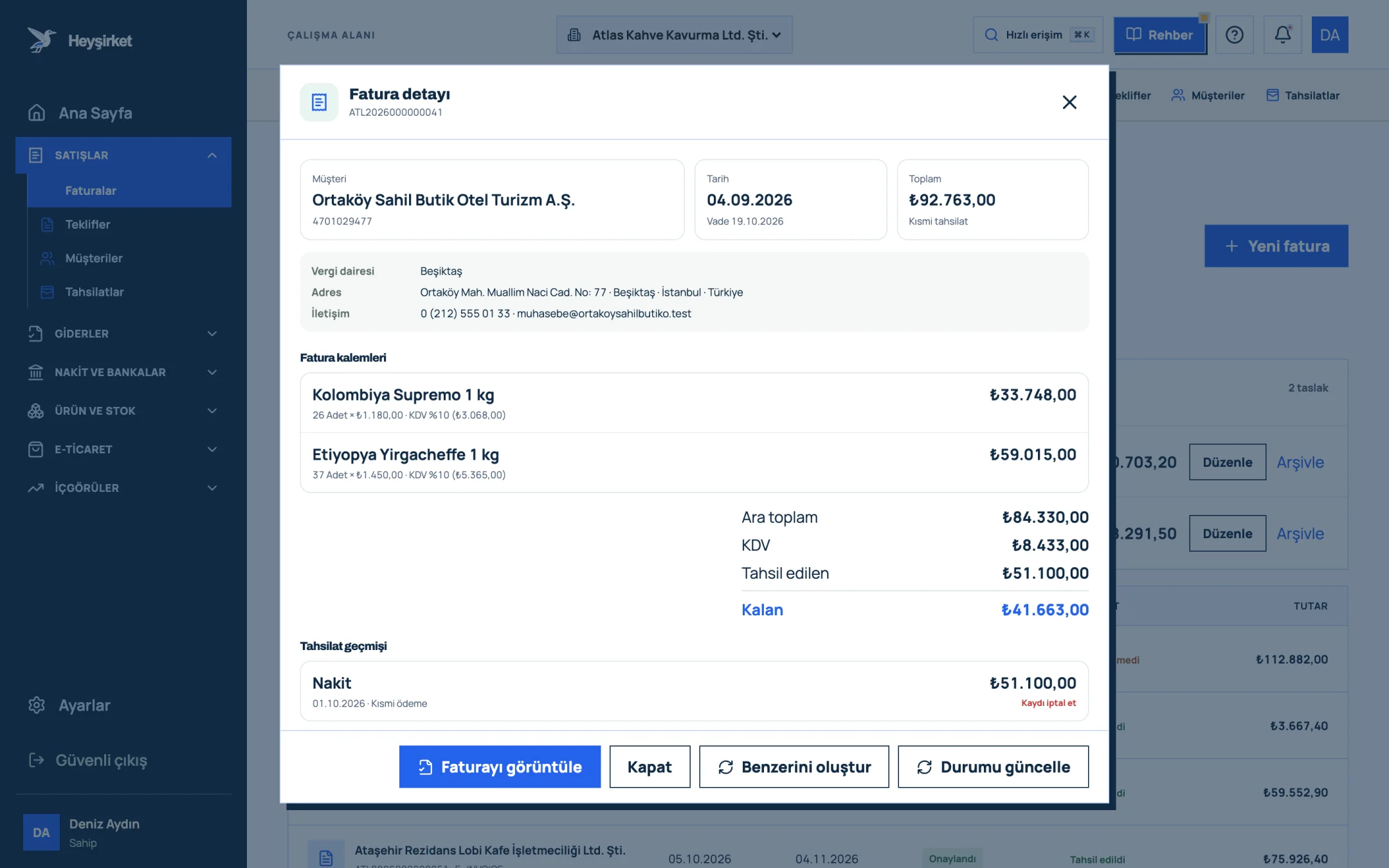
- 1. Invoice details window
- 2. View invoice / PDF
- 3. Collected and remaining amount
- 4. Collection history
- 5. Update status
Closing out a wrongly issued invoice in Heyşirket
Complete the cancellation or rejection at the provider
For a commercial invoice, wait for your customer's rejection response; for e-Arşiv, cancel it in the provider's panel. In the basic scenario, make sure the objection process is complete.
Pull the status into the portal
Open the relevant row in the Invoices list and press the Refresh status button in the invoice details. The result at the provider is reflected in the invoice's status as Rejected or Cancelled.
Pull the status into the portal - 1. Invoice details window
- 2. View invoice / PDF
- 3. Collected and remaining amount
- 4. Collection history
- 5. Update status
Check it in the list
You can view cancelled documents separately by choosing Cancelled in the All statuses filter on the Invoices screen.
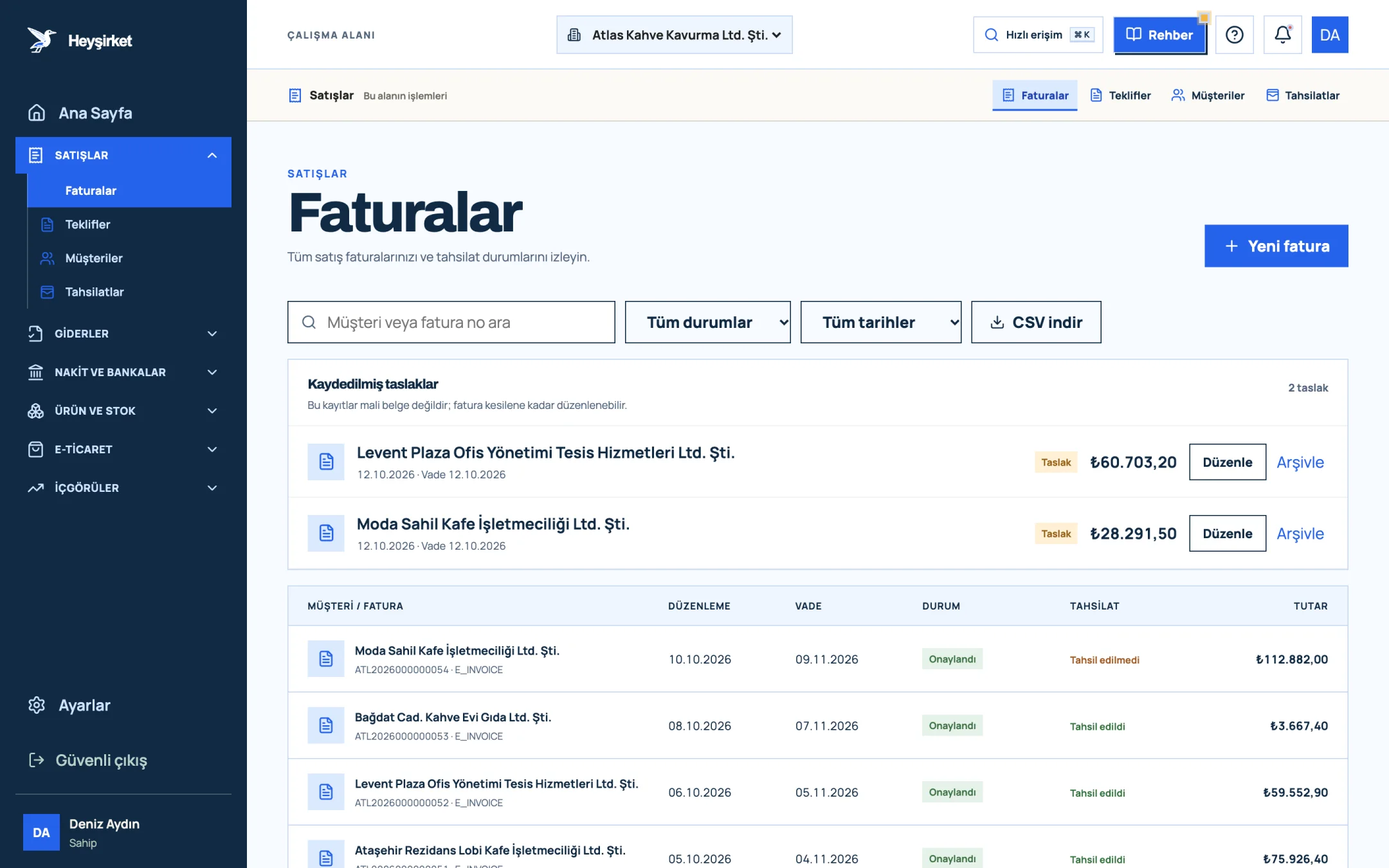
Check it in the list - 1. New invoice button
- 2. Search and filters
- 3. Collection status column
- 4. Saved invoice draft
Reissue the correct invoice
Open a new invoice with Create similar in the invoice details; correct the price or quantity and move on with Continue. In the Moda Sahil Kafe example, the price list linked to the customer is applied automatically on the new invoice.
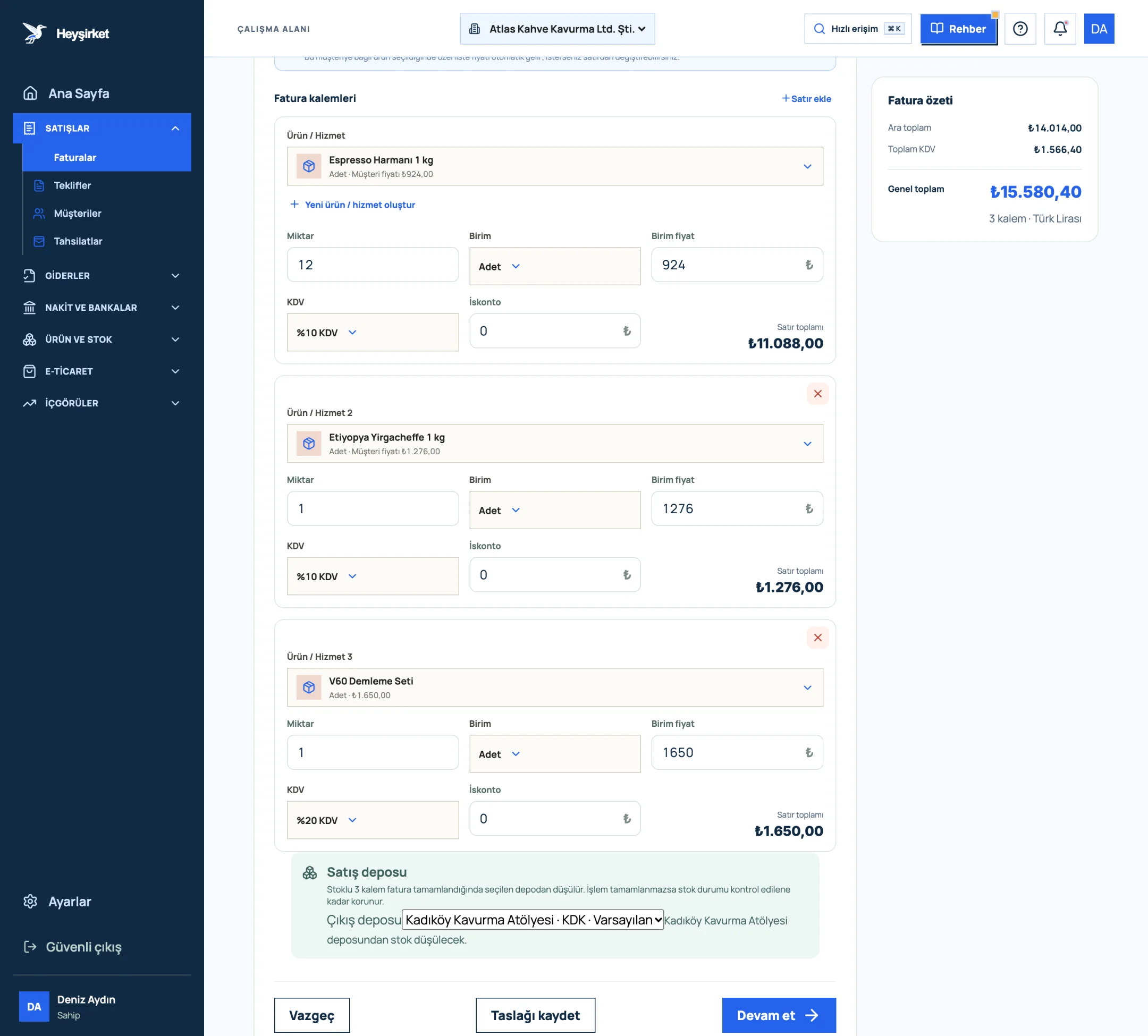
Reissue the correct invoice - 1. First invoice line item
- 2. VAT rate selection
- 3. Add row
- 4. Invoice summary and VAT total
Invoices with the Cancelled status are excluded from the sales, income and expenses and VAT reports, from the customer's account balance and from the overdue collections list. That way, a document you cancelled doesn't show up at month end as an uncollected receivable.
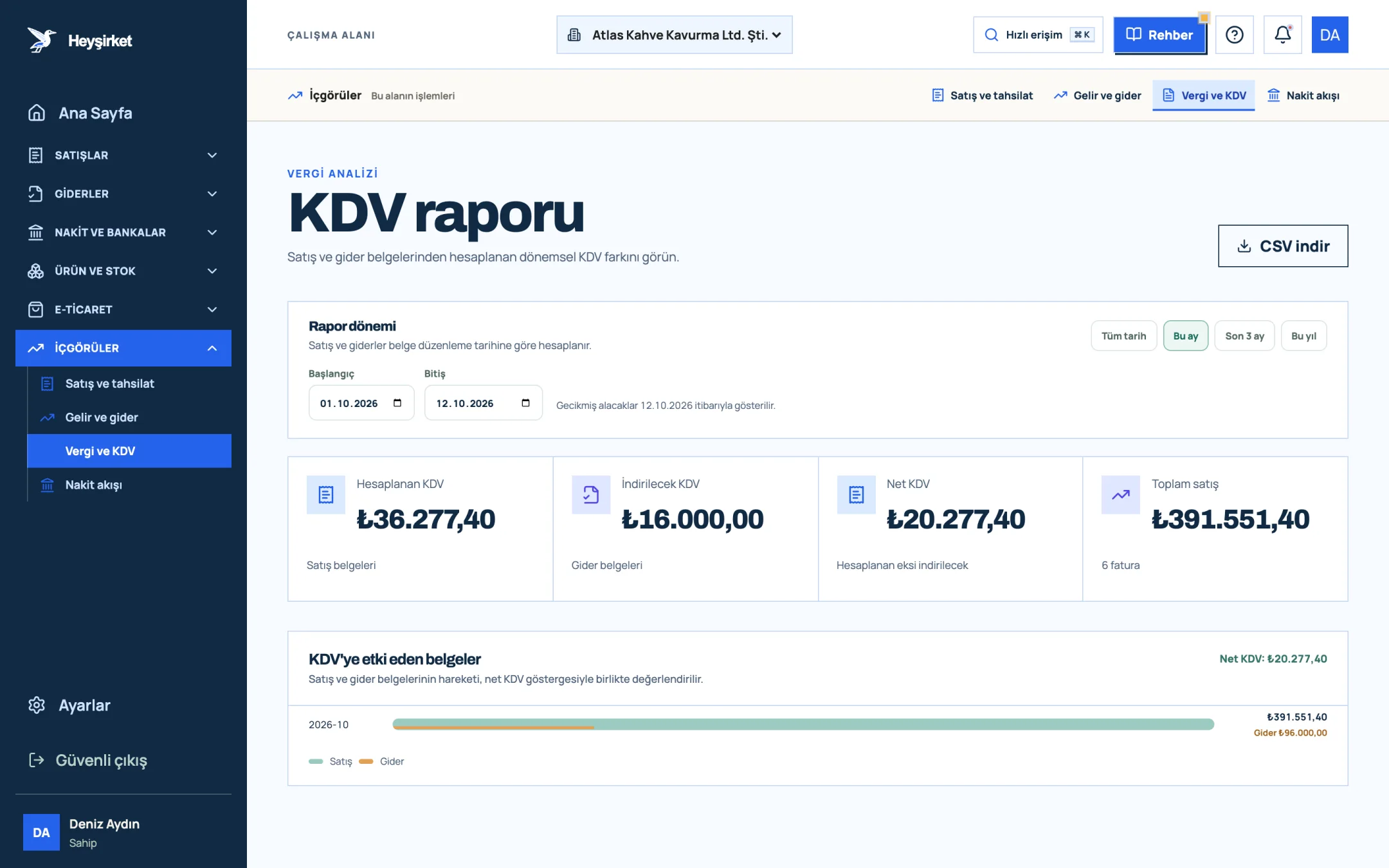
- 1. Output VAT
- 2. Deductible VAT
- 3. Net VAT
On the returns side, there are two things to know. First, the e-documents you issue from Heyşirket are sales invoices; if you need an e-Fatura of the return type or an expense voucher, you issue it in your e-document provider's panel or on the GİB portal. Second, past return documents brought in through data migration are deducted from sales and VAT as negative amounts in reports.
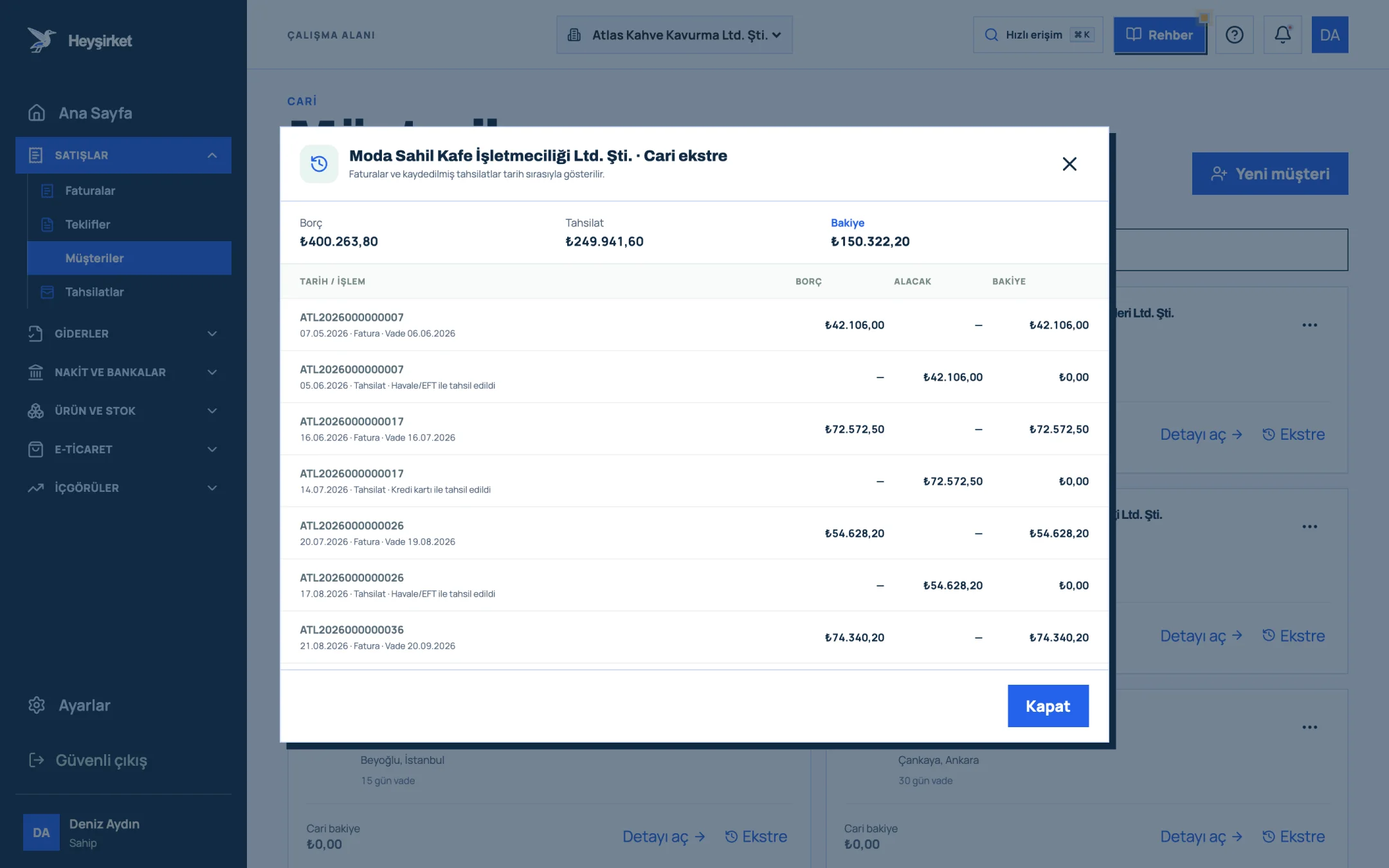
- 1. Account statement window
- 2. Statement transactions and balance
After a cancellation or return, confirming the balance with your customer is a good habit. We explain how step by step in our customer account reconciliation article; to track invoice statuses, see the managing invoices guide.
Part 8 · Five minutes What should you do when you run into a faulty invoice?
The right thing to do with a faulty invoice is to classify the situation first, then act. The list below is the five-minute check we promised at the start of the article.
Faulty invoice checklist
- Did the goods or service actually come back, or is the error only on the document?
- Is the invoice an e-Fatura or e-Arşiv? If e-Fatura, is it commercial or basic?
- In the commercial scenario, has the 8-day rejection period not yet passed?
- Has the VAT return for the invoice's period been filed?
- Has the customer been told in writing which route (rejection, objection, cancellation, return) you'll take?
- After the cancellation or return was completed at the provider, was the status pulled into Heyşirket with Refresh status?
- Was the correct invoice reissued within the 7-day period?
- Were the customer balance and stock confirmed with the customer after the cancellation or return?
The cheapest moment to fix a faulty invoice is the day you issue it. Every day that passes means one more document to fix the same mistake.
Atlas Kahve's accountant
Can I cancel an e-Fatura myself?
A seller can't cancel an e-Fatura that has reached the buyer within the system on its own. In the commercial scenario, the buyer needs to send a rejection response within 8 days; in the basic scenario, routes outside the system such as a notary, KEP or GİB's cancellation/objection request screen are needed. A request on the portal requires the other party's approval.
Within how many days can I cancel an e-Arşiv invoice?
In practice, the 8-day objection period in the TTK is the reference; some providers allow a 7-day window. Sources also differ on when the period starts. Check your provider's rule and GİB's current guide; before cancelling an invoice already included in a VAT return, talk to your accountant.
The customer returned the goods but won't issue a return invoice. What should I do?
If the buyer is a merchant, they must issue the return invoice; ask for the document in writing. If the buyer is an end consumer, the return is documented with an expense voucher you issue or the return section of the e-Arşiv invoice. A return without a document makes the VAT correction and the stock record problematic.
Which month's VAT return does a return invoice go into?
The month the return happens. The VAT return for the period of the original sale isn't changed; the seller deducts the return VAT in the return period, and the buyer corrects the VAT it previously deducted in the same period.
Is there an invoice cancel button in Heyşirket?
No. Because cancellation requires checking the document type and legal deadline, it's done in your e-document provider's panel or on the GİB portal. You then pull the result into Heyşirket with the Refresh status button in the invoice details; the cancelled invoice drops out of reports and the customer balance.
Is a cancelled invoice's number reused?
No. For electronic documents, numbers are assigned in sequence by the provider, and a cancelled document's number isn't passed on to a new invoice. The correct invoice is issued with a new number; link the two documents in your records.
Check your invoice statuses Filter rejected or cancelled invoices, pull the status from your provider and prepare the correct invoice again in one click. Open invoices
Once the difference between cancellation and return clicks, a faulty invoice stops being a crisis and becomes a routine task closed with two phone calls.
Author: Heyşirket Editorial Team