Tax · 17 min read · Updated:
VAT in Türkiye: really understanding output, input and carried-forward VAT
VAT isn't your money, but it touches your cash flow every single month. Once you know which VAT you pay, which you deduct and why it sometimes carries forward, the 28th of the month stops being a surprise for your business in Türkiye.
In short
- VAT payable is calculated by deducting the input VAT paid on purchases and any VAT carried forward from the previous period from the output VAT charged on sales in the period.
- In 2026 the standard VAT rate in Türkiye is 20%, and the reduced rates are 10% and 1%.
- The No. 1 KDV (VAT) return is filed by the evening of the 28th of the month following the period and paid within the same deadline; the No. 2 VAT return is filed by the 25th of the following month.
- Under partial withholding, the buyer declares and pays part of the VAT itself as the responsible party instead of paying it to the seller.
- The right to deduct can be used until the end of the calendar year following the year of the taxable event; however, VAT on non-deductible expenses and on passenger car purchases cannot be deducted.
In Atlas Kahve's first year, on the 27th of October, a message arrived from their mali müşavir (certified financial advisor): "You have 38.000 TL of VAT to pay this month." Deniz was surprised; she knew they'd made profitable sales all month, but there wasn't that much money set aside in the account.
The problem wasn't the maths, it was the mindset. Because the VAT collected from customers landed in the business account, it looked like "our money". In reality it was money held temporarily on behalf of the state.
In this article we'll explain the three core VAT concepts, the 2026 rates, the filing calendar, withholding and return invoices in plain language. At the end you'll also find a simple in-month check that takes the surprise out of the 28th.
Part 1 · The basics What is VAT, and why isn't it your money?
Value added tax (KDV in Turkish) is a consumption tax charged at every stage of the supply of goods and services, only on the value added at that stage, and its burden falls on the final consumer. Businesses collect this tax and pass it on to the state; they don't pay it out of their own pocket.
The mechanism works like a chain. Each business adds VAT to the goods or services it sells and deducts the VAT it paid on the goods or services it bought. It pays the difference to the state. At the end of the chain, the total tax collected equals the amount the consumer paid.
- Importer — Sells the beans, adds VAT
- Atlas Kahve — Pays VAT on purchases, adds VAT on sales
- Moda Sahil Kafe — Does the same
- Consumer — Bears the total VAT
Three concepts stand out in this chain: output VAT, input VAT and carried-forward VAT. Let's look at them in turn.
Part 2 · Three concepts What do output, input and carried-forward VAT mean?
Output VAT (hesaplanan KDV) is the VAT a business invoices to its customers on the sales it makes during the period. Input VAT (indirilecek KDV) is the VAT the business paid to its suppliers on purchases in the same period and is entitled to deduct on the return. Carried-forward VAT (devreden KDV) is the difference that arises when input VAT exceeds output VAT, and it is carried over to the next period.
| Concept | Where does it come from? | What happens on the return? |
|---|---|---|
| Output VAT | Your sales invoices | Increases the amount payable |
| Input VAT | Your purchase and expense documents | Deducted from output VAT |
| Carried-forward VAT | Deductions exceeding output VAT in the previous period | Used as a deduction in the next period |
| VAT payable | Output − input − carried forward | If positive, paid by the 28th of the month following the period |
The formula is simple: VAT payable = Output VAT − Input VAT − VAT carried forward from the previous period. If the result is negative, nothing is payable; the difference carries forward to the next month. Let's look at an example.
| Equipment and training sales (excl. VAT) | 250.000 TL |
|---|---|
| Output VAT (20%) | 50.000 TL |
| Roasting machine spare parts (150.000 TL excl. VAT) · VAT | 30.000 TL |
| Workshop rent (40.000 TL excl. VAT) · VAT | 8.000 TL |
| Electricity and natural gas (10.000 TL excl. VAT) · VAT | 2.000 TL |
| Total input VAT | 40.000 TL |
| VAT carried forward from September | 3.500 TL |
| VAT payable for October | 6.500 TL |
50.000 − 40.000 − 3.500 = 6.500 TL. The example is simplified; all sales are assumed to be at the 20% rate. Actual rates vary by the type of goods and services.
If Atlas Kahve had bought a new roasting machine the same month and input VAT had risen to 70.000 TL, the result would be 50.000 − 70.000 − 3.500 = −23.500 TL. In that case no VAT is paid in October, and 23.500 TL carries forward to November.
Part 3 · Rates What are the VAT rates in 2026?
In 2026 three VAT rates apply in Türkiye: the standard rate of 20% and the reduced rates of 10% and 1%. These rates have not changed since 10 July 2023, when the standard rate was raised from 18% to 20% and the reduced rate from 8% to 10%.
- %20 Standard rate · most goods and services
- %10 Reduced · e.g. food and beverage services, some textile products
- %1 Reduced · e.g. some basic foods, newspapers and magazines
Which goods or services are subject to which rate is determined by the lists annexed to the KDV Law and by Presidential decisions. Even within the same sector the rate can vary by product: the espresso machine Atlas Kahve sells to a café and the cup of coffee the café sells to its customer are subject to different rates.
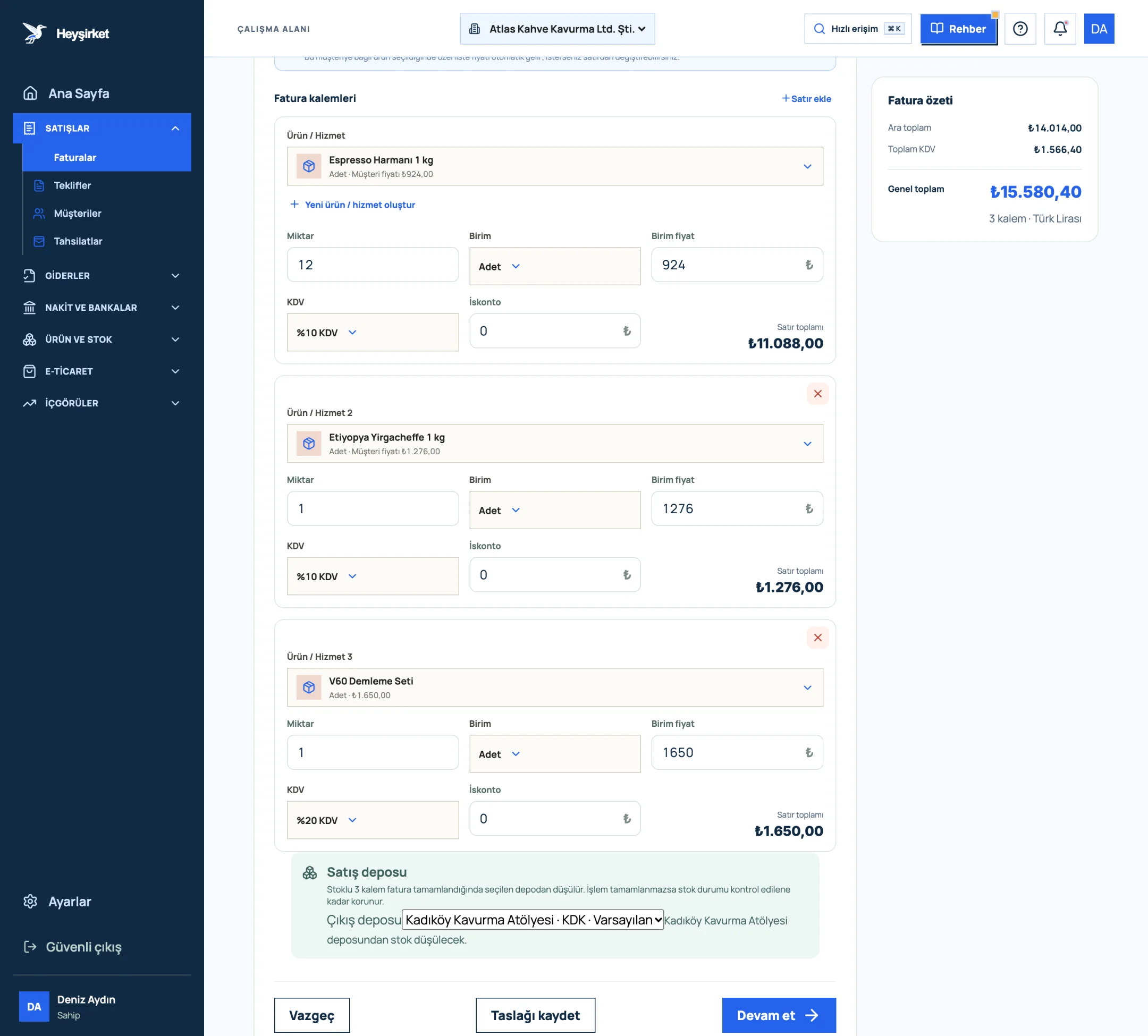
- 1. First invoice line item
- 2. VAT rate selection
- 3. Add row
- 4. Invoice summary and VAT total
You've chosen the right rate. So when do you report this calculation to the state?
Part 4 · Calendar When is the VAT return filed?
For the monthly tax period, the No. 1 KDV return is filed by the evening of the 28th day of the month following the period, and the tax assessed is paid on the same day. For example, VAT for the August 2026 period is declared and paid by the evening of 28 September 2026.
| Return | Who files? | Deadline |
|---|---|---|
| No. 1 KDV | VAT-registered taxpayers | The 28th of the month following the period (payment on the same day) |
| No. 2 KDV | Buyers who apply withholding (as the responsible party) | The 25th of the month following the period |
Your mali müşavir usually prepares the return. Your job is to get the documents to them before the month ends, or at the latest in the first week of the following month. A purchase invoice that arrives late can miss that month's input VAT.
Part 5 · Withholding What is VAT withholding, and who does it affect?
VAT withholding (KDV tevkifatı) means that for certain purchases of goods and services, all or part of the VAT is declared and paid by the buyer instead of the seller. In that case the buyer becomes the "responsible taxpayer" and reports the withheld amount on the No. 2 KDV return.
Partial withholding rates are expressed in tenths. For example, rates such as 4/10 for construction work for designated buyers and 5/10 for catering and event services apply. Which work is subject to withholding, at what rate and for which buyers, is listed item by item in the KDV General Implementation Communiqué.
| Service fee (excl. VAT) | 20.000 TL |
|---|---|
| Output VAT (20%) | 4.000 TL |
| Withheld VAT (4.000 × 5/10) | 2.000 TL |
| VAT paid to the seller | 2.000 TL |
| Total paid to the seller (20.000 + 2.000) | 22.000 TL |
| Paid by Atlas on the No. 2 return | 2.000 TL |
Atlas can take the full 4.000 TL VAT on this transaction into account as input VAT on the No. 1 return. For 2026, withholding applies when the VAT-inclusive value of the transaction exceeds 12.000 TL. Confirm the rate and buyer scope with your mali müşavir.
The most common withholding mistake is paying the full VAT to the seller. The seller then collects too much, and you pay the same amount a second time on the No. 2 return. When a withholding invoice arrives, take the payment amount from the invoice's "amount payable" line.
Part 6 · Returns How does VAT work on a return invoice?
A return invoice is issued by the buyer when purchased goods are sent back to the seller; for VAT purposes it reverses the transaction. The seller who takes the goods back deducts the VAT on the returned goods in the period of the return, correcting the tax it declared earlier.
An example: Nişantaşı Bistro returns a grinder it bought from Atlas Kahve for 10.000 TL + 2.000 TL VAT because it's defective. The Bistro issues a return invoice. Atlas Kahve takes the 2.000 TL into account as input VAT in the month of the return; the Bistro corrects the 2.000 TL it deducted earlier.
- The return invoice is issued by the buyer. If the buyer is a final consumer, the return is documented with a document issued by the seller (an expense voucher or a document with a returns section).
- A return requires the goods to physically come back. Documents issued only for a price difference or a discount are subject to different rules.
- Partial returns are possible. Only the returned quantity and its VAT are corrected.
Part 7 · Limits Which VAT can't be deducted?
Not all VAT on purchase documents is deductible. Article 30 of the KDV Law prohibits deducting the VAT paid in certain cases; that VAT is added to cost or expenses instead.
| Situation | Why? |
|---|---|
| VAT on legally non-deductible expenses | KDV Law Art. 30/d |
| Purchase VAT on the business's passenger cars | KDV Law Art. 30/b; except for businesses whose activity is renting out or operating passenger cars |
| VAT on purchases related to non-taxable or exempt transactions | KDV Law Art. 30/a (subject to the specific provisions of the exemptions) |
| VAT on undocumented or non-business expenses | Can't be substantiated, or isn't related to the business |
That's why document discipline and VAT can't be separated: when you record a personal expense as a business expense, not only the expense but also the VAT deduction is questioned. For details, see our article on expense management and document discipline.
Part 8 · In-month check How do you take the surprise out of the 28th?
In-month VAT tracking means regularly monitoring the net VAT calculated from your sales and purchase documents without waiting for the filing period. The goal isn't to prepare the return yourself, but to be able to estimate the amount payable on the 28th in advance.
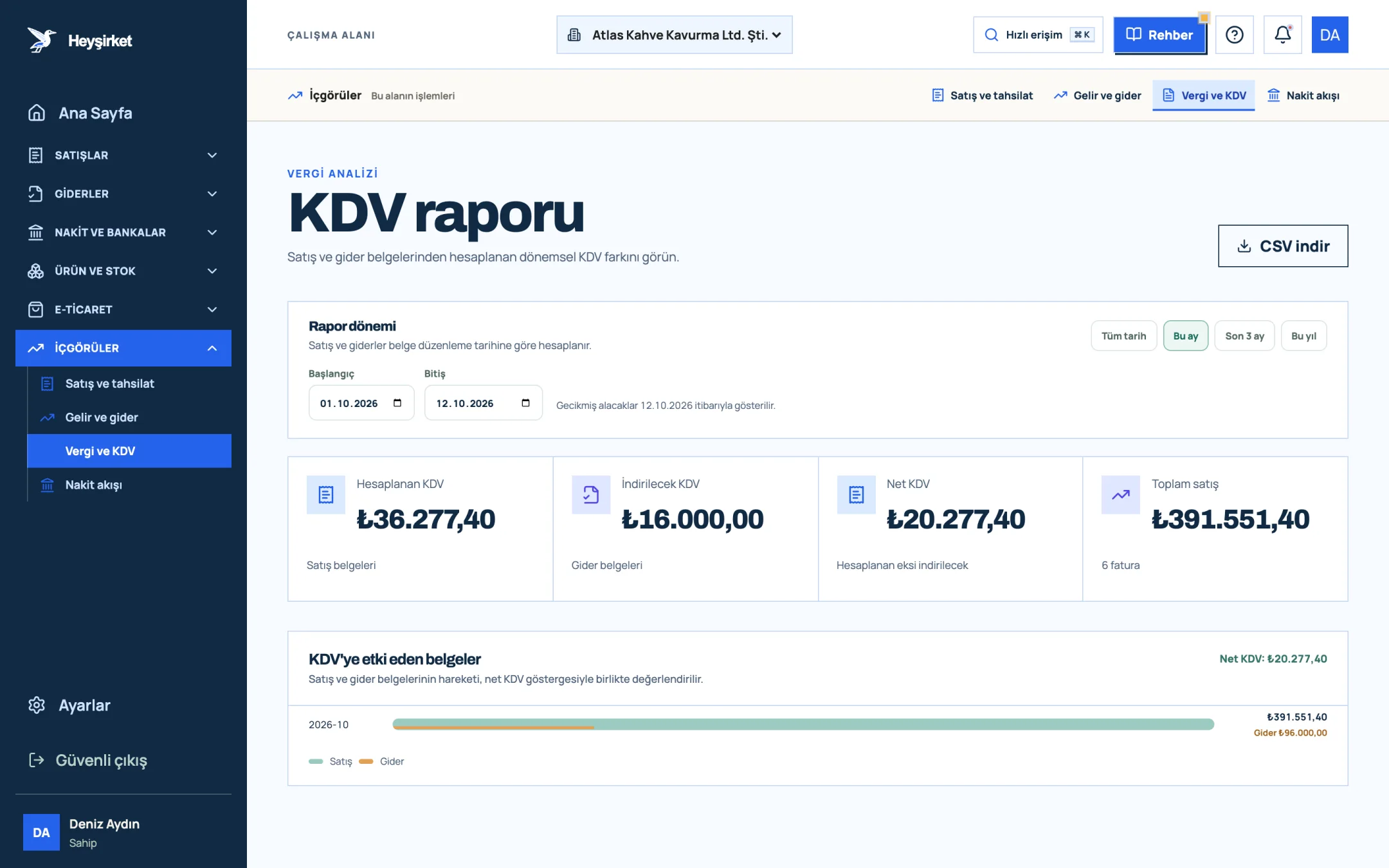
- 1. Output VAT
- 2. Deductible VAT
- 3. Net VAT
In Heyşirket, the Tax and VAT link in the Insights group of the side menu opens this report. You choose the period with preset ranges such as This month and Last 3 months, or with custom dates; sales and expenses are calculated by document issue date. Cancelled invoices are excluded, and sales documents that are returns are counted as negative.
A five-minute VAT check, twice a month
Mid-month check on the 15th
Open Insights › Tax and VAT, press This month and look at the Net VAT card. This figure is your accumulated liability in the middle of the month.
Mid-month check on the 15th - 1. Output VAT
- 2. Deductible VAT
- 3. Net VAT
Complete missing expense documents
If input VAT is lower than you expected, there may be expense documents that haven't been entered. Record the missing ones with Add expense on the Expenses screen, and don't forget to choose the correct VAT rate.
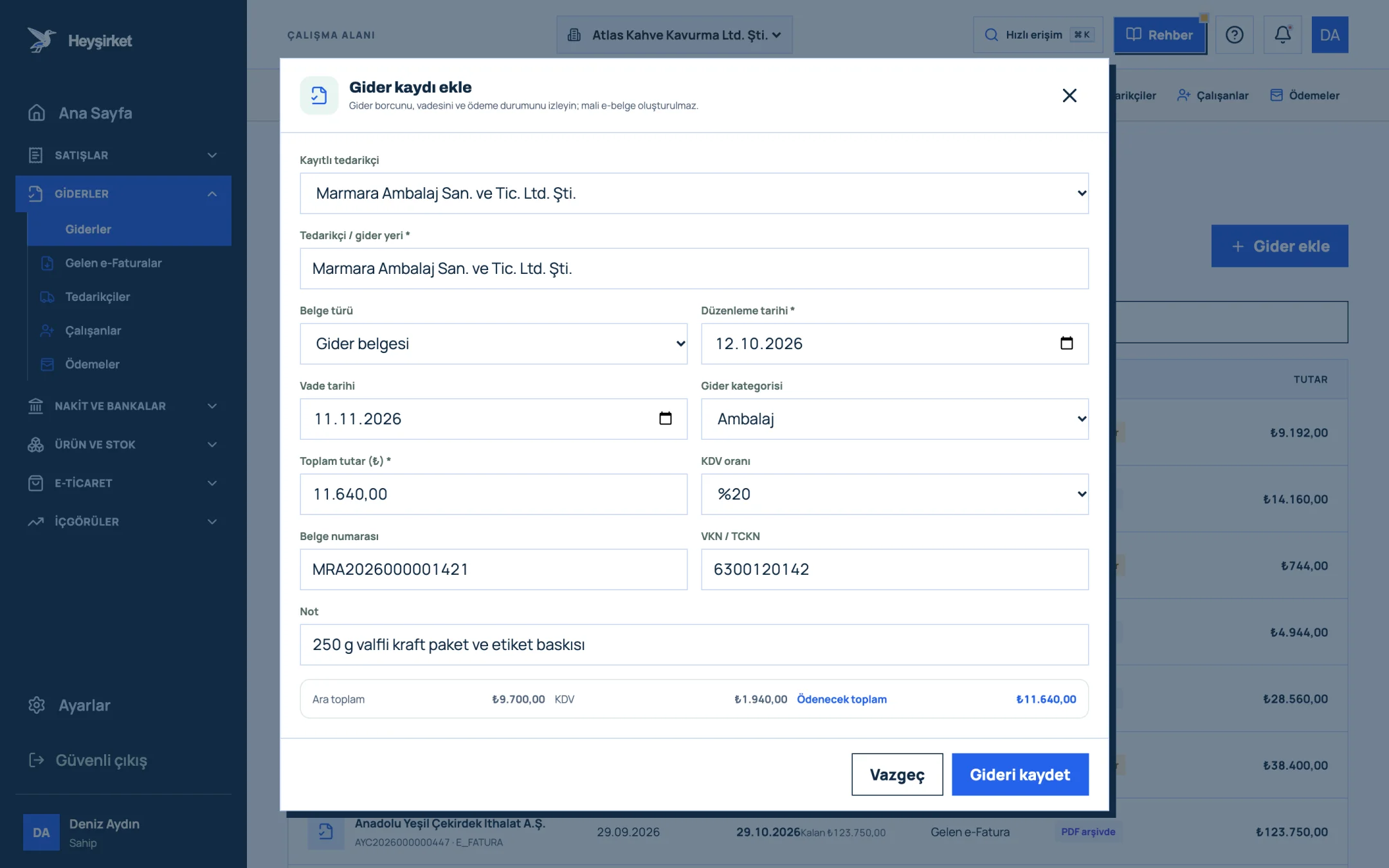
Complete missing expense documents - 1. Supplier selection
- 2. Expense category
- 3. Amount and VAT rate
- 4. Subtotal, VAT and total payable
- 5. Save expense
Check incoming e-invoices
Confirm that your supplier invoices are in the list on the Incoming e-Invoices screen; don't enter the same invoice a second time by hand.
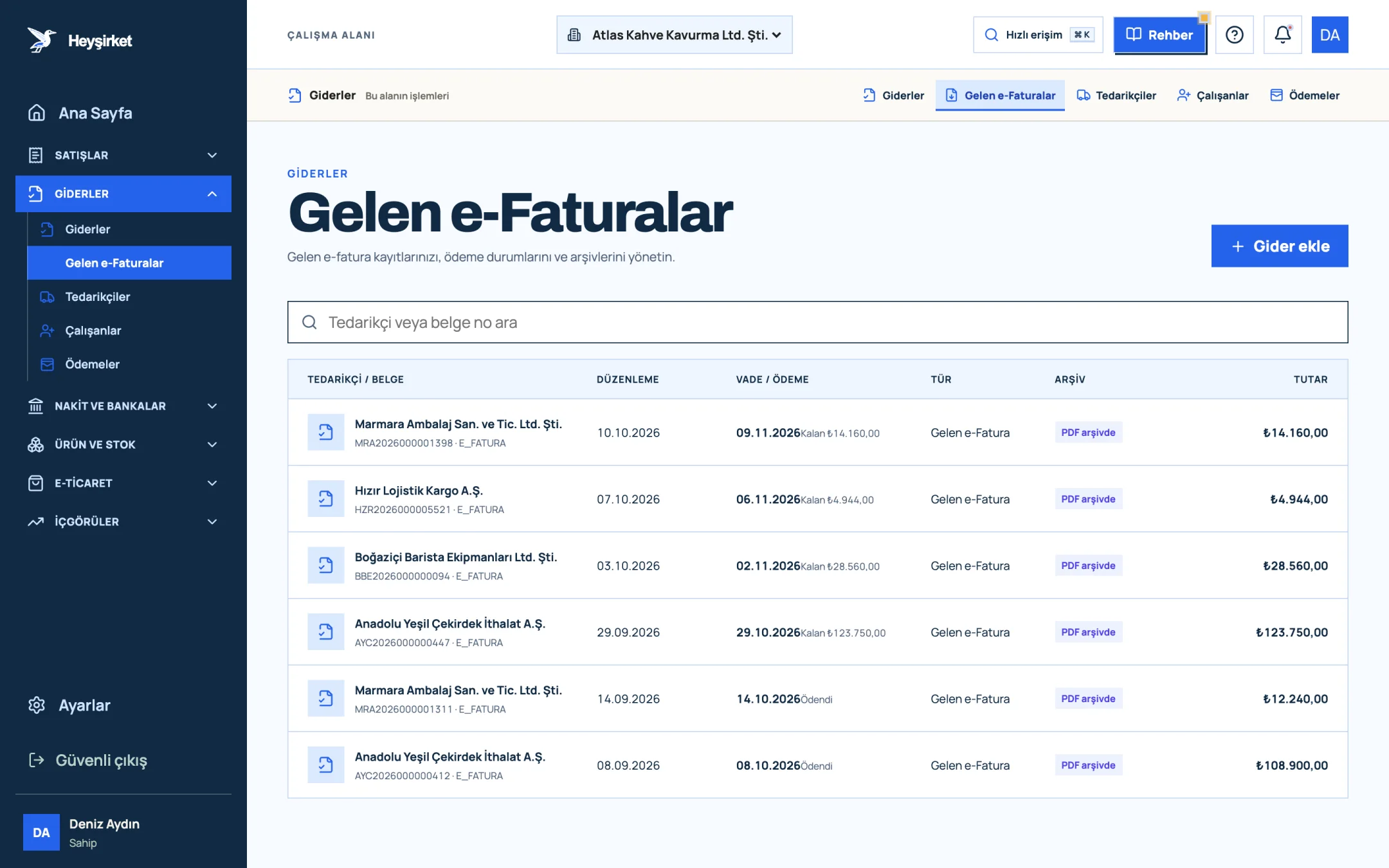
Check incoming e-invoices - 1. Incoming e-Faturas tab
- 2. Supplier and document number
- 3. Remaining payment amount
- 4. PDF archive status
Final estimate at month end
Open the report again on the last day of the month; subtract the amount carried forward from the previous month from Net VAT to get your payment estimate, and set that amount aside. You can send the summary to your mali müşavir with Download CSV.
Final estimate at month end - 1. Output VAT
- 2. Deductible VAT
- 3. Net VAT
VAT period closing checklist
- Have all sales invoices for the period been issued, and cancelled ones separated?
- Have all purchase and expense documents been recorded with the correct VAT rate?
- Have withholding invoices been reported separately to your mali müşavir?
- Have passenger car and KKEG (non-deductible) expenses been flagged?
- Have return invoices been recorded within the period?
- Has the VAT carried forward from the previous period been confirmed with your mali müşavir?
- Is the estimated VAT payable ready in a separate account?
To make these checks part of your month-end close, see the month-end closing checklist article; for a screen-by-screen walkthrough of the report, see the VAT report guide. How to organise the documents you send your mali müşavir is covered in working with your accountant.
Can carried-forward VAT be refunded in cash?
As a general rule, no; carried-forward VAT is used by deducting it from output VAT in later periods. A refund can be claimed in special cases listed in the law, such as exports, certain exemptions and transactions subject to reduced rates; assess these with your mali müşavir.
Do I have to file a VAT return every month?
For VAT taxpayers the tax period is monthly as a rule, and a return is filed even if there were no transactions that month. If there were no sales in the period, the return is still filed and nothing is payable.
Do I still have to pay the VAT if the customer hasn't paid the invoice?
Yes. VAT arises when the invoice is issued or the goods are delivered, not when payment is collected. Even if your customer doesn't pay, the invoice's VAT appears on the return for the period in which it was issued. That's why tracking collections matters for VAT too.
Can I deduct the VAT on purchases made with a till receipt?
For business-related purchases below the invoice threshold, the VAT shown separately on the ÖKC (cash register) receipt can generally be deducted. You need to be able to prove the expense relates to the business, and the document must be properly issued.
Does Heyşirket prepare my VAT return?
No. Heyşirket's VAT report is a pre-check tool that shows the net VAT calculated from your recorded sales and expense documents. The return is prepared by your mali müşavir, who also takes items such as carried-forward VAT and withholding into account.
How do I recognise a withholding invoice?
On withholding invoices, the "withheld VAT" and the withholding rate (e.g. 5/10) are shown separately under the VAT line; the amount payable is the VAT-inclusive total minus the withheld portion.
Check this month's VAT now See output, input and net VAT on one screen. Reach the 28th with no surprises. Open VAT report
Once you understand VAT, only one habit remains: recording every document on time and at the correct rate. The rest is just looking at a number at month end.
Author: Heyşirket Editorial Team