e-Documents · 16 min read · Updated:
The difference between e-Fatura and e-Arşiv invoices in Türkiye: the 2026 rules
You might sell the same product to two customers on the same day and need to issue two different types of invoice. What decides it isn't your preference, but who the buyer is.
In short
- An e-Fatura (Turkish e-invoice) is issued between two taxpayers registered in GİB's e-Fatura system; if the buyer isn't registered, an e-Arşiv invoice is issued for the same sale.
- Taxpayers with gross sales revenue of 3 million TL or more must switch to e-Fatura from 1 July of the year following the year concerned.
- For an e-Fatura under the commercial scenario, the buyer can accept or reject it through the system within 8 days; under the basic scenario, there's no in-system rejection.
- For simplified-method and business-account-basis taxpayers not yet in the e-Arşiv system, the 3.000 TL limit lasts until 31 December 2026; from 1 January 2027, e-Arşiv invoices are issued regardless of amount.
- An invoice must be issued within at most 7 days of delivery or service, and electronic documents must also be kept for at least 5 years under the VUK (Tax Procedure Law).
Atlas Kahve Kavurma makes two sales on the same morning: 30 kilos of coffee to Karaköy Pera Otel, and a hand grinder to an individual customer who wants equipment for their café. Both invoices come from the same screen, but one becomes an e-Fatura and the other an e-Arşiv invoice.
This difference isn't a software choice; it's a result of the legislation. Issuing the wrong type of document can mean the invoice never reaches the buyer, or is treated as never having been issued.
In this article we'll go through the difference between the two document types, the thresholds in force as of 2026, and the objection and issuing deadlines, one by one. At the end you'll find a checklist to rule out the five most common mistakes.
Part 1 · Definitions What is an e-Fatura?
An e-Fatura is an invoice issued and transmitted electronically between two taxpayers registered in the e-Fatura system of the Gelir İdaresi Başkanlığı (GİB, the Turkish Revenue Administration). It has the same legal status as a paper invoice, but it isn't printed and handed over.
An e-Fatura is delivered through GİB to the buyer's mailbox in the system. The buyer receives the document electronically into their own accounting software; no scanning, retyping or courier is needed.
Part 1 · Definitions What is an e-Arşiv invoice?
An e-Arşiv (e-archive) invoice is an electronic invoice issued to buyers who aren't registered in the e-Fatura system, i.e. end consumers or businesses that aren't e-Fatura taxpayers. The seller creates and stores the document electronically and sends it to the buyer by email or, if requested, as a paper printout.
In short, the question is: is the buyer registered in the e-Fatura system? If yes, it's an e-Fatura; if not, an e-Arşiv invoice. The document type is decided by the buyer's taxpayer status, not by the seller's preference.
| Feature | e-Fatura | e-Arşiv invoice |
|---|---|---|
| Who is the buyer? | A taxpayer registered in the e-Fatura system | An unregistered business or end consumer |
| How is it delivered? | Through GİB to the buyer's e-Fatura mailbox | By email, electronically for online sales, or as a paper printout |
| Scenario | Basic or commercial | No scenario choice |
| Accept / reject in the system | Only under the commercial scenario, within 8 days | None |
| Reporting | The document is transmitted through GİB | The document details are reported to GİB |
| Retention | Electronically, for the legal period | Electronically, for the legal period |
So when does a business have to join this system? The answer lies in last year's revenue.
Part 2 · Thresholds Who has to switch to e-Fatura?
Under Tax Procedure Law General Communiqué No. 509, taxpayers with gross sales revenue of 3 million TL or more in 2022 and later accounting periods must switch to e-Fatura from the start of the seventh month of the year following the accounting period concerned.
In practice, this means a business whose 2025 revenue exceeded 3 million TL should have been using e-Fatura from 1 July 2026. A business whose 2026 revenue exceeds the threshold must complete its switch by 1 July 2027.
| 2025 gross sales revenue | 2.700.000 TL |
|---|---|
| Threshold | 3.000.000 TL |
| 2026 gross sales revenue (year-end estimate) | 3.400.000 TL |
| Accounting period in which the threshold is exceeded | 2026 |
| Deadline for switching to e-Fatura | 1 July 2027 |
The threshold is calculated on gross sales revenue; costs and expenses aren't deducted. The figures are illustrative.
Alongside the general threshold, there are lower, special thresholds for certain sectors. Groups such as those selling goods or services online, and those buying, selling or renting real estate and motor vehicles, fall into this category. If you sell on a marketplace or on your own website, be sure to check with your accountant (mali müşavir) whether a lower threshold applies to you.
Businesses below the threshold can also join the e-Fatura system voluntarily if they wish. For small businesses working with large customers, this often becomes a commercial expectation before it's ever a legal requirement.
Part 3 · e-Arşiv limits What's the e-Arşiv invoice amount limit in 2026?
The e-Arşiv invoice limit is the threshold that determines above which amount taxpayers not yet in the e-Arşiv system must issue invoices as e-Arşiv. As of 2026, this limit varies depending on the taxpayer's bookkeeping method.
| Period | Who for? | Rule |
|---|---|---|
| 1 January 2025 – 31 December 2025 | Taxpayers not in the e-Arşiv system | Invoices over 3.000 TL including taxes are issued as e-Arşiv |
| From 1 January 2026 | General rule (other than simplified method and business account basis) | e-Arşiv invoice regardless of amount |
| 1 January 2025 – 31 December 2026 | Those taxed under the simplified method and those keeping books on the business account basis | The 3.000 TL limit continues |
| From 1 January 2027 | Those taxed under the simplified method and those keeping books on the business account basis | e-Arşiv invoice regardless of amount |
Limits such as 5.000 TL and 30.000 TL that you may see in older sources belong to earlier periods. Communiqué No. 573 changed this structure, and Communiqué No. 589, published on 31 December 2025, postponed the switch by one year for simplified-method and business-account-basis taxpayers.
This table makes one thing clear: the era of paper invoices is effectively ending in Türkiye. The question is no longer “should I switch to electronic invoices?” but “which electronic document do I issue to whom?” And there's one more detail in the answer: the scenario.
Part 4 · Scenarios What's the difference between the basic and commercial scenarios?
The scenario is the profile that determines whether the buyer can respond to an e-Fatura from within the system. Under the basic scenario (temel fatura), the buyer can't accept or reject the invoice through the system; under the commercial scenario (ticari fatura), the buyer can accept or reject it through the system within 8 days.
| Basic invoice | Commercial invoice | |
|---|---|---|
| Accept / reject in the system | No | Yes |
| How to object | Outside the system, and GİB's cancellation / objection notifications | A rejection response in the system within 8 days, or outside the system |
| When the document becomes final | As soon as it's delivered | On acceptance, or if no rejection arrives within the period |
| Best suited for | Smooth, routine business relationships | Sales where you want the buyer's approval on record |
Because the commercial scenario records the buyer's explicit acceptance of the invoice, it brings disputes to the surface early. The basic scenario runs more simply, but objections can arrive outside the system, for example via a notary or KEP (registered electronic mail).
Scenarios only apply to e-Fatura. There's no scenario choice for e-Arşiv invoices.
Part 5 · The product Who chooses the document type in Heyşirket?
In Heyşirket you don't choose the document type; when the invoice is sent, the buyer's taxpayer status is checked using their VKN/TCKN (tax ID / Turkish ID number). If the buyer is registered in the e-Fatura system, the document is issued as an e-Fatura; if not, as an e-Arşiv invoice. This removes the risk of issuing the wrong type of document.
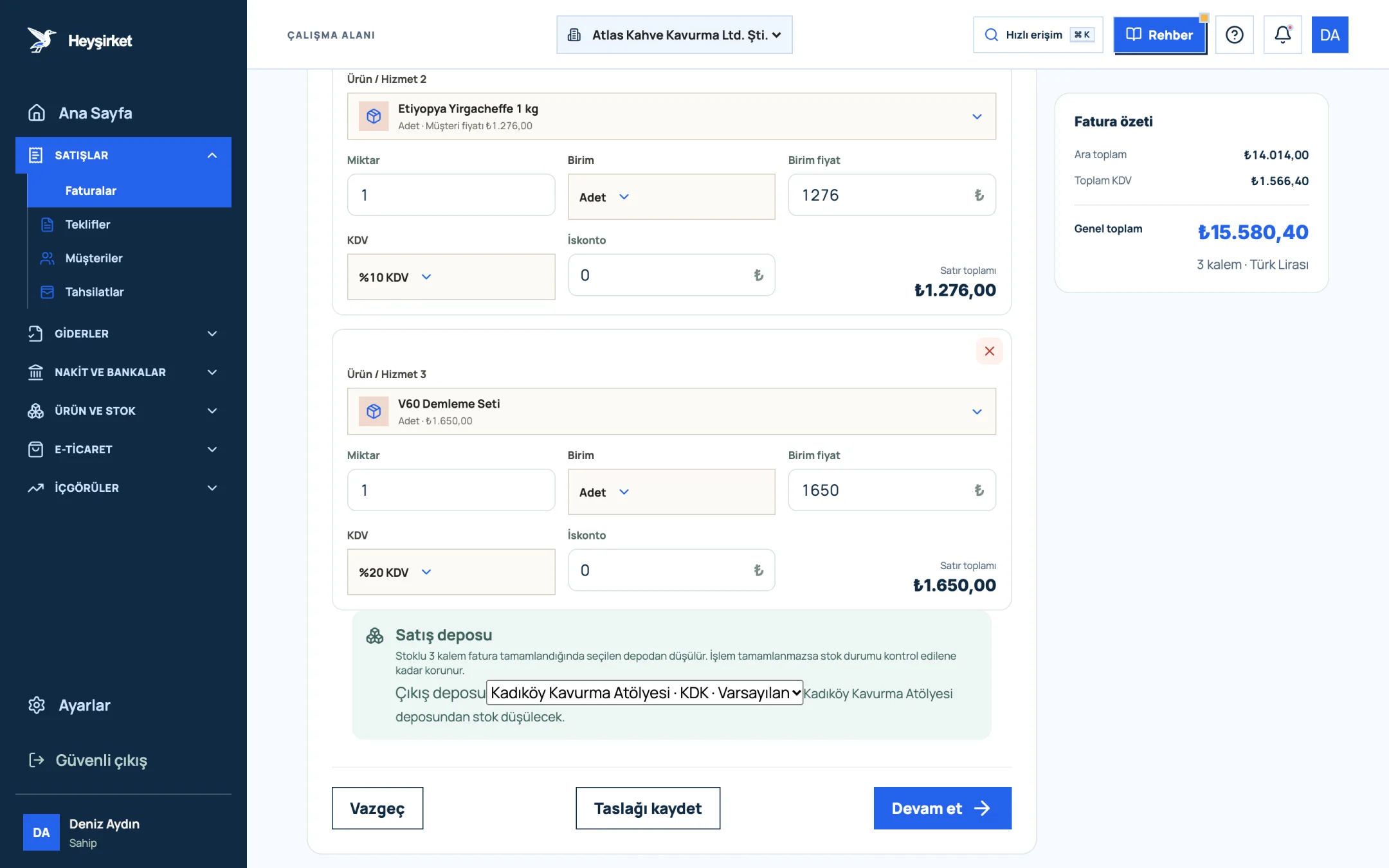
- 1. Grand total
- 2. Continue button
- 3. Save draft button
- 4. Sales warehouse to deduct stock from
Your e-Fatura scenario, on the other hand, is set once in the e-document section of Settings. The E-invoice scenario field offers Commercial invoice and Basic invoice; the default is Commercial invoice. This choice only affects documents issued as e-Fatura.
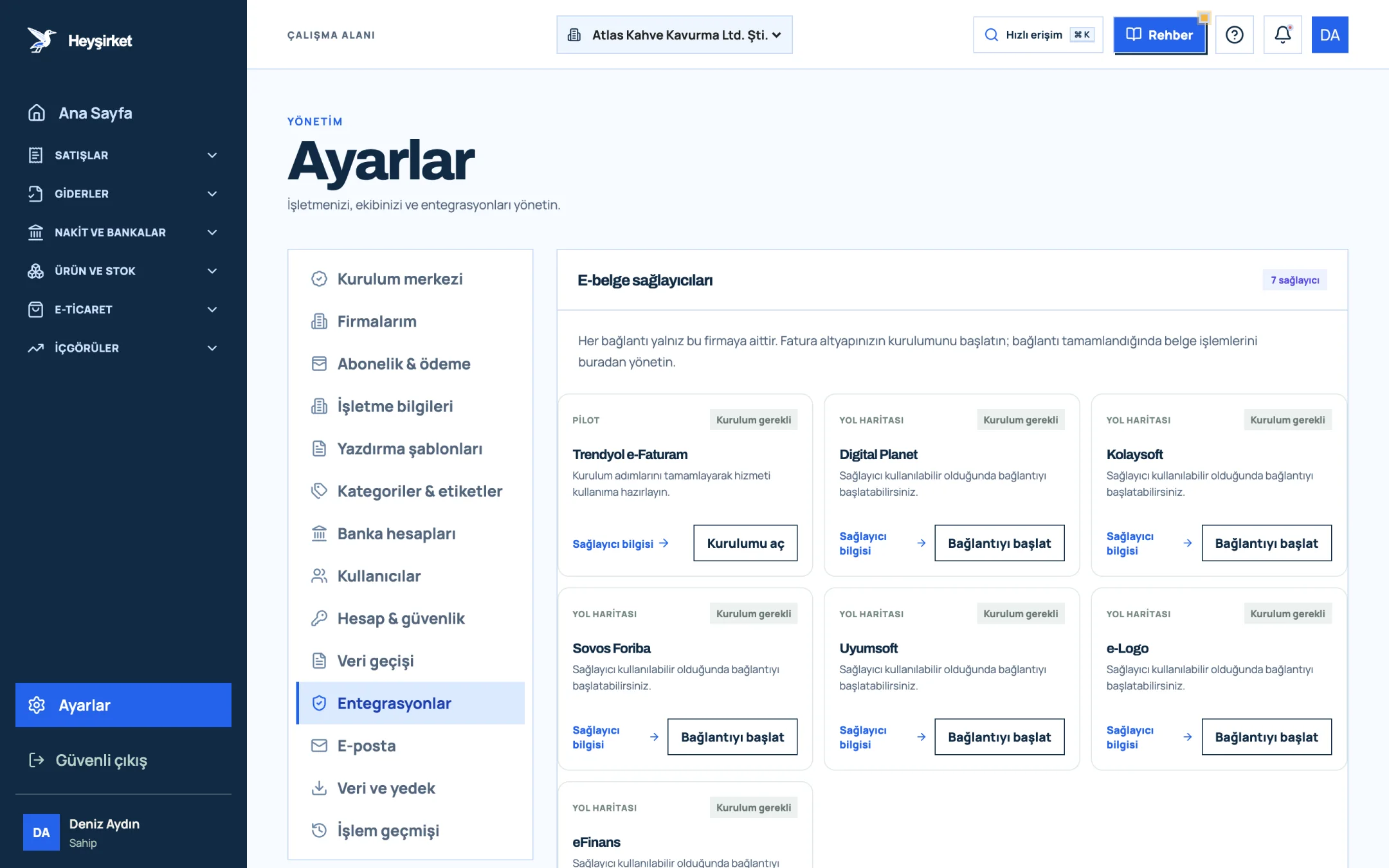
- 1. Integrations tab
- 2. Trendyol e-Faturam card
- 3. Open setup button
- 4. Other e-document providers
Until your e-document connection is complete, the invoice issue button stays disabled; you can still preview the invoice and save it as a draft. For the connection steps, see the e-document connection guide, and for the issuing steps, the how to issue an invoice guide.
Part 6 · Deadlines Within how many days must an invoice be issued?
Under Article 231 of the Tax Procedure Law, an invoice must be issued within at most seven days from the delivery of the goods or the performance of the service. This period applies to e-Fatura and e-Arşiv invoices too.
An invoice not issued on time may be treated by law as never having been issued, and a special irregularity penalty may apply. That's why batching invoices until month end is risky, especially when goods are shipped at the start of the month.
Part 7 · Corrections How do returns and cancellations work for electronic invoices?
An invoice issued electronically can't be torn up and rewritten like a paper invoice. A wrong document is corrected through cancellation, objection or a return invoice, depending on the document type and scenario.
- e-Fatura under the commercial scenario: The buyer can send a rejection response through the system within 8 days. For a rejected invoice, the seller issues a new invoice with the correct details.
- e-Fatura under the basic scenario: There's no in-system rejection; objections and cancellations are handled through the out-of-system routes defined in the legislation and GİB's related notification processes.
- Goods coming back (returns): If the buyer is an e-Fatura taxpayer, the buyer usually issues the return invoice when returning the goods. If the buyer is an end consumer, documenting the return follows different rules.
- e-Arşiv invoice: Cancellation and correction options are limited by your provider's interface and the periods in the legislation.
This is an area where the details change often and small differences have tax consequences. When you notice a wrong document, talk to your accountant before issuing a new invoice; two valid invoices showing the same sale create a second problem.
Part 8 · Archive How long should electronic invoices be kept?
Under Article 253 of the Tax Procedure Law, books and documents are kept for five years starting from the calendar year after the year they relate to. Article 82 of the Turkish Commercial Code, on the other hand, sets a ten-year retention period for commercial books and documents. Electronic documents must also be kept electronically for these periods.
The practical result: an invoice you issue in 2026 must stay accessible until at least the end of 2031 for tax audits, and for longer when it comes to commercial disputes. Leaving the invoice only in your provider's panel can cause access problems if you change provider.
After issuing, Heyşirket automatically transfers the official invoice PDF generated by the provider to your company's private archive; in the Invoice details window you'll see the Permanent PDF archive ready note and the View invoice button. e-Fatura invoices sent to you are listed on the Incoming e-Invoices screen.
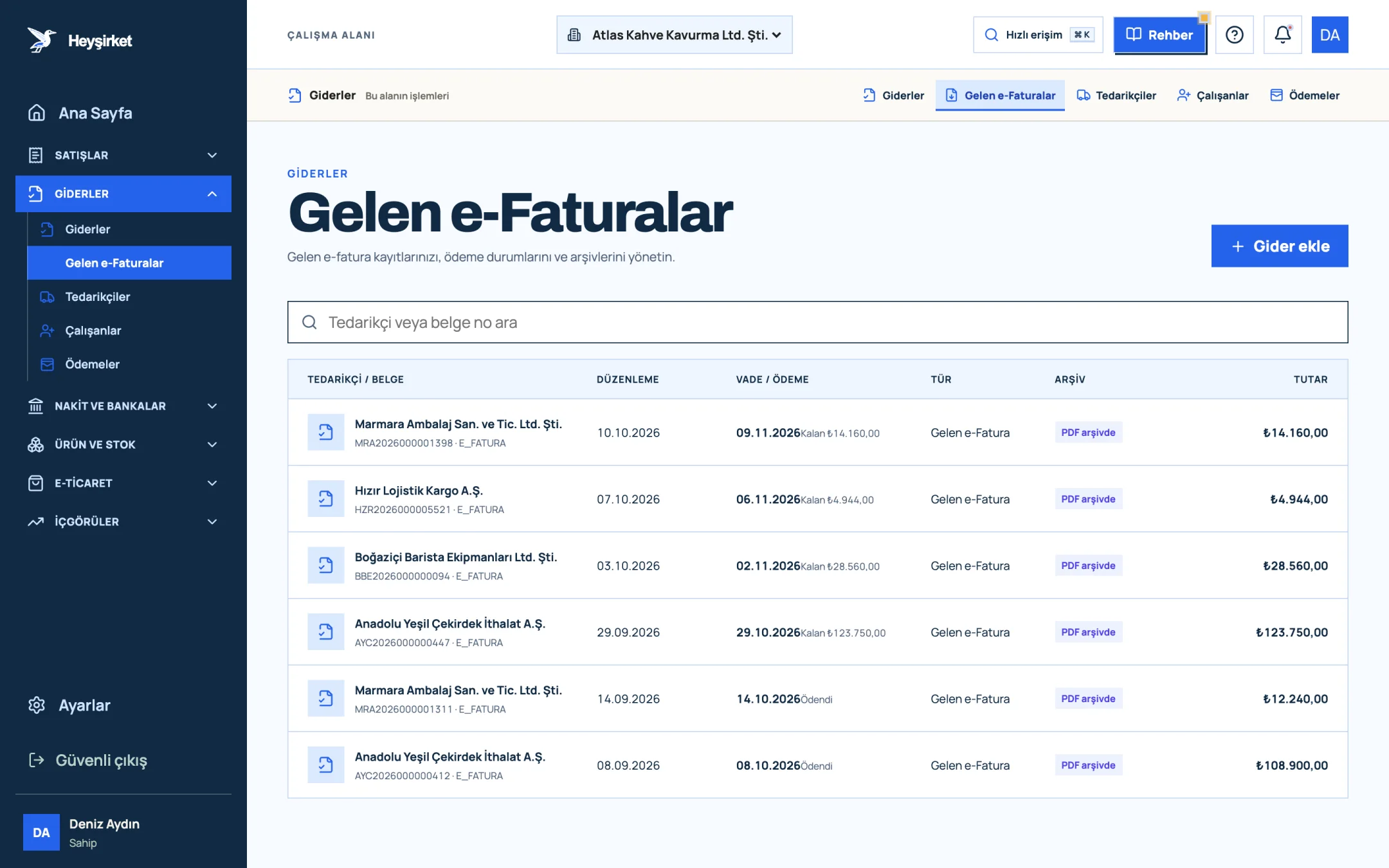
- 1. Incoming e-Faturas tab
- 2. Supplier and document number
- 3. Remaining payment amount
- 4. PDF archive status
The steps for checking incoming invoices and recording them as expenses are explained in the incoming e-invoices guide.
Part 9 · In practice A checklist that prevents five mistakes
Here's the list we promised at the start. Going through it once before each invoicing period is enough.
e-Fatura and e-Arşiv checklist
- I've compared last year's gross sales revenue with the 3 million TL threshold and any thresholds specific to my sector.
- I've confirmed with my accountant from which date the e-Arşiv amount rule applies to me, based on my bookkeeping method.
- The VKN/TCKN, tax office and address details on my customer cards are complete.
- I've chosen my e-Fatura scenario (commercial or basic) deliberately.
- I issue invoices within at most 7 days of delivery or service.
- I check the acceptance or rejection status of my commercial-scenario invoices every week.
- I consult my accountant before issuing a new invoice for a wrong document.
- I'm sure the electronic invoices I issue and receive are kept in an accessible archive for the legal period.
The difference between the e-Fatura issued to Karaköy Pera Otel and the e-Arşiv invoice issued to the individual customer is now clear: one went to the buyer's e-Fatura mailbox, the other to their email. Both carry the same weight when it comes to the issuing deadline, the retention obligation and the tax consequences.
Can I issue an e-Arşiv invoice to a company that's an e-Fatura taxpayer?
No. If the buyer is registered in the e-Fatura system, the document you must issue is an e-Fatura. Heyşirket makes this check automatically at the moment of sending and sets the document type accordingly.
How do I find out whether a company is an e-Fatura taxpayer?
You can check by VKN in GİB's list of registered users. Heyşirket makes this check for you when the invoice is sent, so you don't need to look it up separately.
I exceeded the e-Fatura threshold but missed the switch date. What should I do?
Start your application with an e-document provider without delay and talk to your accountant. Not switching on time can lead to consequences such as a special irregularity penalty; review the status of documents from the past period together.
What happens if the buyer doesn't respond within 8 days to a commercial invoice?
If the buyer doesn't send a rejection response within the period or object outside the system, the invoice content is deemed accepted. This is consistent with the eight-day objection principle in Article 21 of the TTK (Turkish Commercial Code).
How do I send an e-Arşiv invoice to my customer?
An e-Arşiv invoice is sent to the buyer by email or, if requested, as a paper printout. In Heyşirket, if automatic sending is turned on in Settings, the official PDF goes to the customer's email address automatically; you can also send it manually with the Send invoice button in the Invoice details window.
Do I need to print and keep electronic invoices on paper?
No. Electronic invoices are kept electronically; a paper printout doesn't replace the original document. What matters is that the document is kept intact and accessible for the legal period.
Let the system pick the right document type Select your customer and enter the items; Heyşirket issues an e-Fatura or e-Arşiv invoice automatically based on the buyer's taxpayer status. Create new invoice
For questions about your e-document connection, email us at info@heysirket.com or reach us on WhatsApp at 0530 681 36 16.
Author: Heyşirket Editorial Team