Expense management · 11 min read · Updated:
Inventory tracking: when and how to move from Excel to inventory software
Most businesses start tracking stock in an Excel file, and for a while it works perfectly well. This article covers setting up a proper stock sheet in Excel, recognising when it no longer copes and moving to software without trouble.
In short
- Two sheets are enough to track stock in Excel, a product list and a movements list; remaining stock is calculated with a formula by subtracting total outgoing from total incoming.
- Excel usually falls short when several people write to the same file, there's more than one warehouse, sales invoices don't reduce stock automatically and the reason for count differences can't be found.
- When moving to inventory software, clean up product codes first, import the products, open the warehouses, enter opening stock in one go and stop writing to Excel after the switch-over day.
- In Heyşirket, stock tracking is part of pre-accounting and is included in the Professional plan (699.99 TL/month, VAT included); the free Starter plan has no pre-accounting or stock.
- In Heyşirket, when a stock item is added to an invoice, stock is reduced automatically from the chosen outgoing warehouse; a warning appears for items that drop below minimum stock.
When a shop opens there are few products and everything stays in your head. Then an Excel file appears: product name, quantity. A year later the file is called "stock_final_LATEST_v3.xlsx", two people write to different copies, and an item showing 12 on the shelf has actually run out. Every business reaches this problem with inventory tracking at some point.
This article does two things. First, it explains what a well-built Excel stock sheet should look like, because for many businesses that's enough for a while. Then it lists the signs that Excel no longer copes and the steps for moving to inventory software in order. We cover basic concepts such as counting, minimum stock and costing methods separately in inventory management basics.
Part 1 · Excel How do you track stock in Excel?
The most common mistake is adding a "remaining" column next to each product on a single sheet and changing the number by hand with every sale. That way, what changed and why gets lost. The right set-up is two sheets: one holds products, the other holds movements. Remaining stock isn't typed in; it's calculated.
| Column | Example | Note |
|---|---|---|
| Product code | KHV-ESP-1000 | Must be unique; movements link by this code |
| Product name | Espresso blend 1 kg | The name shown on invoices |
| Unit | Each | Or kg, litre, pack |
| Minimum stock | 10 | Reorder when it drops below this |
| Remaining | Formula | Calculated from movements, not typed |
| Column | Example | Note |
|---|---|---|
| Date | 14.10.2026 | Day of the movement |
| Product code | KHV-ESP-1000 | Picked from a list, not typed |
| Type | In / Out | Two options in a drop-down |
| Quantity | 24 | Always a positive number |
| Document | Invoice or delivery note no. | To find the reason for differences |
| Description | Supplier delivery, sample, breakage | Required for non-sale outgoing movements |
| Total in | =SUMIFS(Movements!D:D,Movements!B:B,A2,Movements!C:C,"In") |
|---|---|
| Total out | =SUMIFS(Movements!D:D,Movements!B:B,A2,Movements!C:C,"Out") |
| Remaining | Total in − Total out |
| Minimum stock warning | =IF(Remaining<=D2,"Reorder","") |
In the example, on the Products sheet column A is the product code and column D the minimum stock; on the Movements sheet B is the product code, C the type and D the quantity. In Turkish Excel, use ÇOKETOPLA instead of SUMIFS, EĞER instead of IF and semicolons instead of commas.
Part 2 · Signs When is Excel stock tracking no longer enough?
Excel isn't a bad tool; it just wasn't designed for stock. If two or more of the signs below apply to you, the spreadsheet is no longer carrying your business:
Is it time to switch to software?
- Several people write to the file and nobody knows who changed what.
- There's more than one warehouse, shop or vehicle, and it gets confusing how many of which item are where.
- Sales invoices are issued but stock is reduced separately by hand; when someone forgets, the numbers drift.
- The reason for a count difference can't be found; the difference is just "corrected" by hand.
- Goods promised to a customer but not yet sent still look like available stock.
- Items that drop below minimum stock are only noticed when the shelf is empty.
- Preparing the stock list when the accountant (mali müşavir) asks for it at month end takes half a day.
What these signs have in common: the stock figure doesn't live in the same place as sales, purchasing and counts. The real value of inventory software is tying those three jobs to a single record.
Part 3 · Difference What does inventory software do that Excel doesn't?
| Task | Excel | Inventory software |
|---|---|---|
| Reducing stock on sale | A separate row by hand | Automatically from the chosen warehouse when the invoice is issued |
| More than one warehouse | Duplicated columns or sheets | Each warehouse separate, transfers between them recorded |
| Count differences | Number changed by hand | Expected, counted and difference stored separately |
| Goods promised to customers | Not tracked | Reserved and taken out of available stock |
| History | Can be deleted or overwritten | Movements aren't deleted; corrections are made with a reversing entry |
| Users | Copies and conflicts | Everyone on the same record, with permissions |
Part 4 · Switch-over Steps for moving from Excel to inventory software
The hardest part of switching isn't the software but the data. If the mess in Excel moves into the software, it stays messy there too. Follow this order:
Step by step: from Excel to software
Clean up the product list
Merge rows where the same product is written under two names and give each product a unique code. Remove merged cells, subtotals and coloured header blocks; the first row should be column names and everything below it data only.
Import the products
In Heyşirket, upload your file as XLSX or CSV in the Data migration center on the Settings › Data migration screen, choose Products / services as the record type and map the columns. Details in the data import guide.
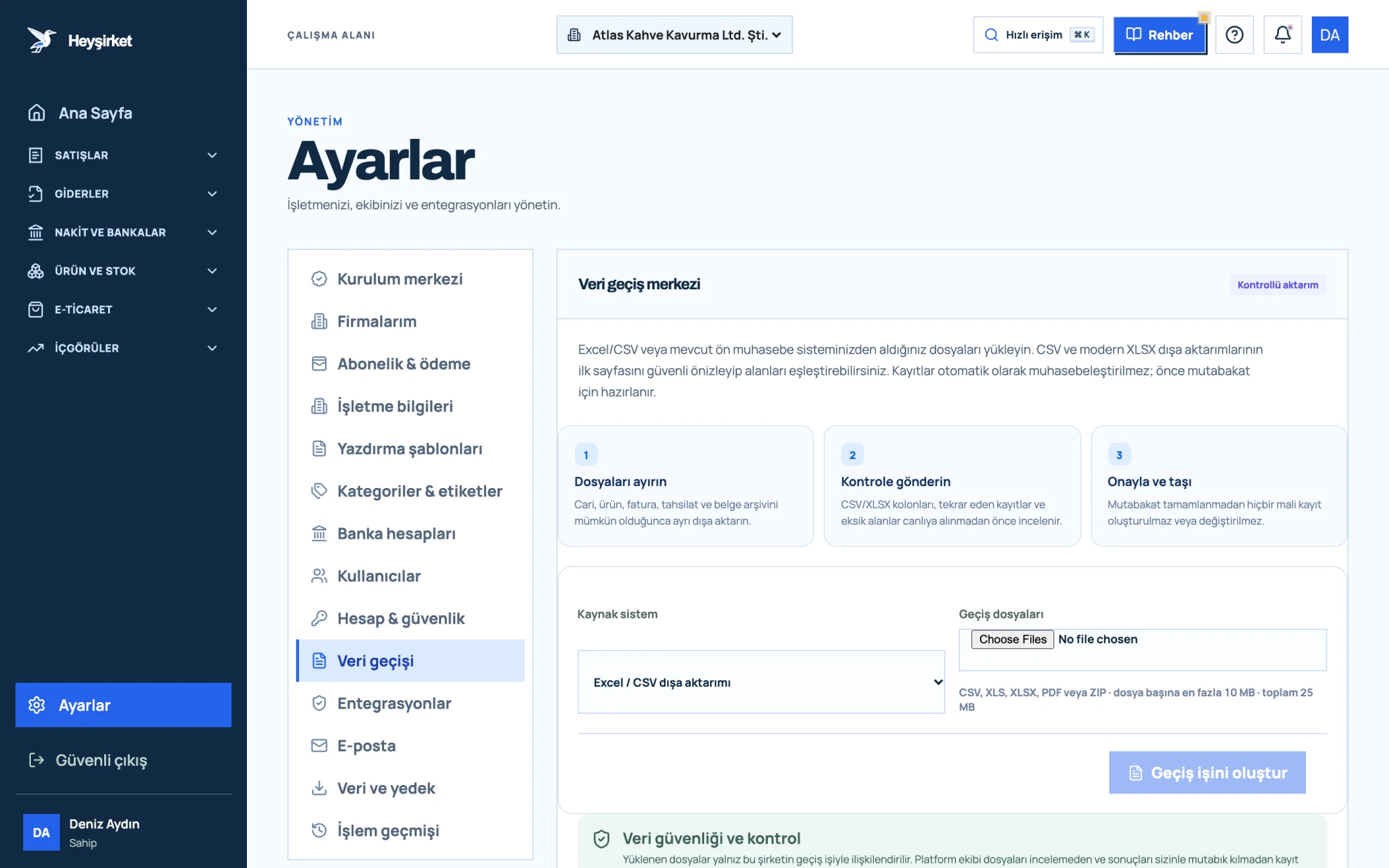
Import the products - 1. Data migration tab
- 2. Three-step migration process
- 3. Source system selection
- 4. Create migration job
Turn on stock tracking
For physical goods, tick Track stock on the product card and enter the Minimum stock value. Don't turn it on for services.
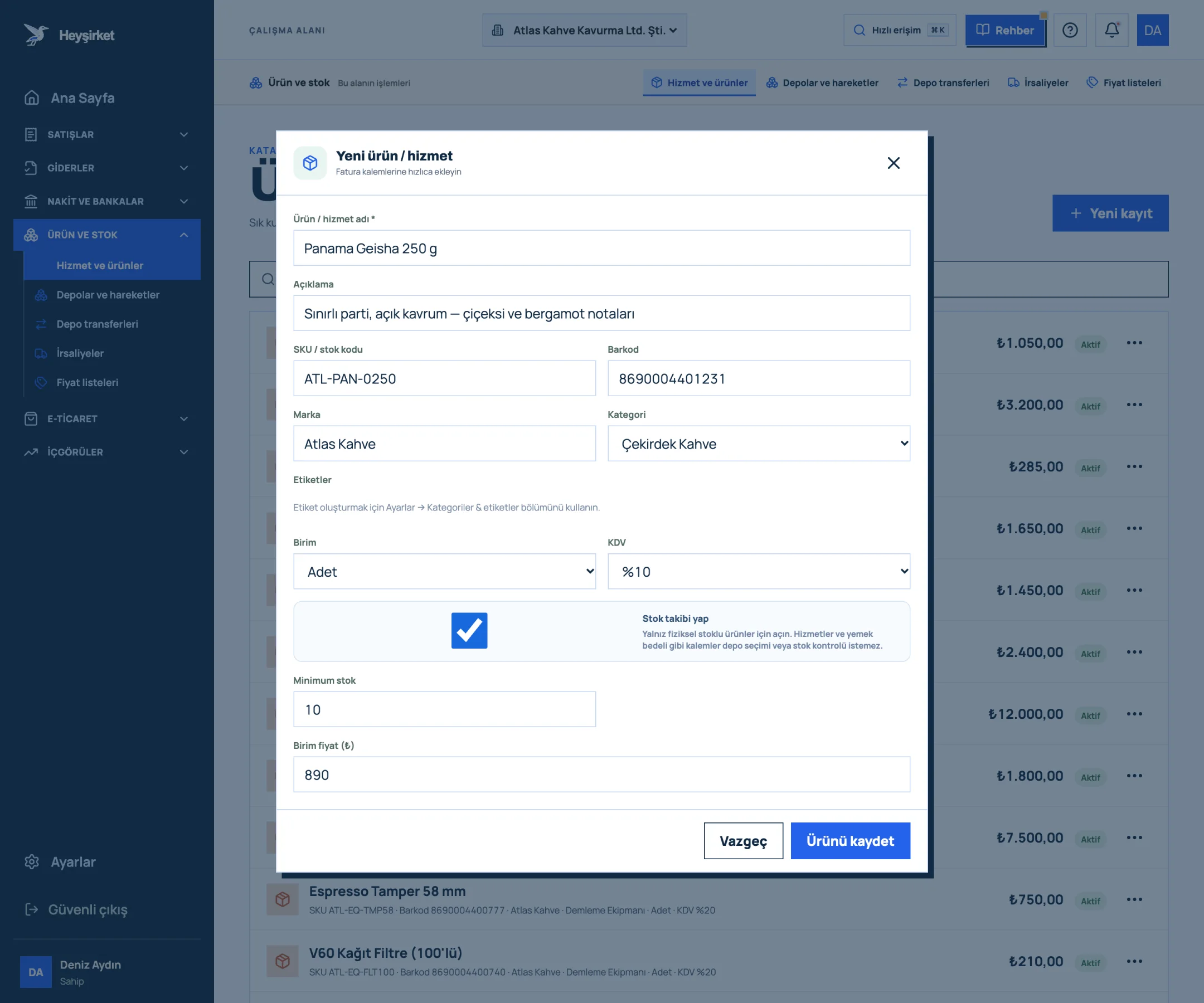
Turn on stock tracking - 1. Product / service name
- 2. SKU and barcode
- 3. Category selection
- 4. Track stock option
- 5. Save product
Open the warehouses
On the Stock and warehouses tab, use Add warehouse to create a record for each warehouse, shop or vehicle.
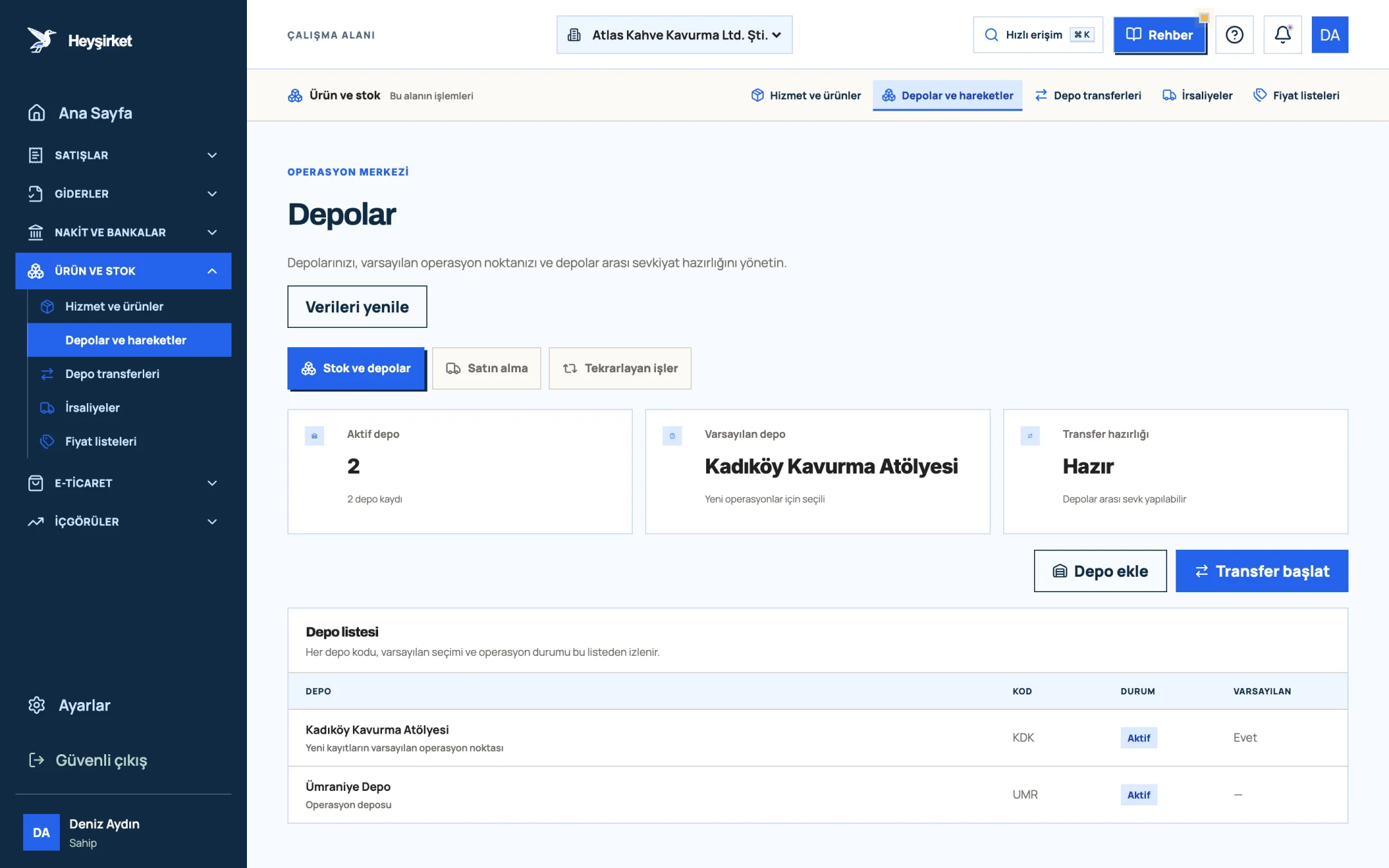
Open the warehouses - 1. Add warehouse
- 2. Start transfer
- 3. Default warehouse
- 4. Warehouse list
Enter opening stock
On switch-over day, count the shelves and record the opening quantity for each item with Add stock movement as a Receive movement. Import brings in products but not stock quantities, so opening stock is entered at this step.
Close Excel
After switch-over day, stop writing movements to Excel and keep the file as a read-only archive. Stock kept in two places is stock kept nowhere.
Part 5 · First month What should you watch in the first month after switching?
The first four weeks after set-up are when habits settle. Sharing a few rules with everyone in this period makes the numbers reliable from the start.
- Record every delivery the same day: Enter incoming goods before they go on the shelf; records left for the evening are often forgotten.
- Give non-sale outgoing movements a reason: No unexplained movements for samples, breakage and internal use.
- Do a small count at the end of the first week: Count your ten best sellers; finding the reason for a difference right away is easier than waiting for month end and combing through hundreds of records.
- Separate permissions: Be clear about who issues invoices, who receives goods and who does counts. In a set-up where everyone can change everything, the problems from Excel carry on in the software.
- Full count at month end: At the end of the first month, count the whole warehouse and close the differences. That clean start carries the months that follow.
Part 6 · In practice How does stock tracking work in Heyşirket?
In Heyşirket, stock tracking is part of the pre-accounting in your company panel. Warehouses and movements are gathered on the Stock and warehouses tab. The counters at the top are for daily checks: Available stock, Active warehouses and Low stock alert. If the alert counter isn't zero, it's time to order the items that have dropped below minimum stock.
- Invoices reduce stock: When you add a stock item to an invoice, the invoice screen asks for the Outgoing warehouse and stock is reduced from that warehouse automatically; you don't enter a separate movement.
- Non-sale outgoing movements: You enter a Dispatch movement for samples, breakage or internal use.
- Reserved: Goods you've promised a customer but not yet sent are taken out of available stock with Reserved, and released if the order falls through.
- Stock count: You enter the counted quantity; differences become a "Count adjustment" movement, and expected and counted quantities are stored separately.
- Warehouse transfers and delivery notes: Transfers between warehouses and dispatch notes are handled in the same panel.
Step-by-step guide to the screen: the warehouse and stock movements guide. To set up the product card correctly, see the adding products and services guide.
Part 7 · Plans Is Heyşirket's inventory software free?
To be straight: no. Heyşirket's free Starter plan includes a website, email on your own domain and basic SEO; pre-accounting and stock tracking aren't part of it. Stock tracking comes with pre-accounting in the Professional, Premium and Custom plans with no separate subscription.
| Plan | Stock tracking | Price |
|---|---|---|
| Starter | No | Free |
| Professional | Product cards, warehouses, movements, counts, transfers, delivery notes, stock reduction on invoicing | 699.99 TL/month or 6,999.90 TL/year |
| Premium | Everything in Professional, with no limits | 14,999 TL/month or 149,990 TL/year |
Alongside pre-accounting, the Professional plan also includes the website, an online store and marketplace connections. If you sell on marketplaces, see the marketplace integration page, and for all the features of the stock module see the inventory management page. All plans are on the pricing page.
Can you track stock in Excel?
Yes. If you open two separate sheets for products and movements and calculate remaining stock with a formula that subtracts total outgoing from total incoming, Excel serves a one-person, single-warehouse business for a long time. It falls short when you need several users, warehouses or a link to invoicing.
Is there free inventory software?
Excel or similar spreadsheet programs are a free method. Most free inventory programs limit the number of products, users or the link to invoicing. Heyşirket's free Starter plan doesn't include stock tracking; stock and pre-accounting are included in the Professional plan.
Can I import my products from Excel?
Yes. In Heyşirket you upload your XLSX or CSV file in the Data migration center and import products and services by mapping columns. Stock quantities aren't imported; you enter opening stock on switch-over day with a Receive movement.
Does stock go down automatically when I issue an invoice?
Yes. When a stock-tracked item is added to an invoice, the invoice screen asks for the outgoing warehouse and stock is reduced from that warehouse automatically. You shouldn't enter a separate outgoing movement for the same sale.
How do I correct a stock count difference?
Do a stock count instead of changing the number by hand. When you enter the counted quantity, the difference is recorded as a Count adjustment movement; because expected, counted and difference are stored separately, the reason can be investigated later.
Set up your warehouses Open your first warehouse, enter your products' opening stock and say goodbye to Excel for the last time. Open stock and warehouses
If you don't have a company panel yet, you can start for free and move to Professional for pre-accounting whenever you like.
Author: Heyşirket Editorial Team