e-Documents · 12 min read · Updated:
Invoice cancellation deadlines in Türkiye: how many days to cancel an e-Fatura or e-Arşiv invoice, and how
Your time to cancel a wrongly issued invoice is limited, and it depends on the document type. We've put together how many days you have for each document and what to do once the time runs out.

In short
- Under article 21/2 of the Turkish Commercial Code (TTK), a person who receives an invoice and doesn't object within 8 days is deemed to accept its content; invoice cancellation and objection periods rest on this rule.
- The buyer can reject an e-Fatura under the commercial scenario through the system within 8 days; under the basic scenario there's no in-system rejection.
- An e-Fatura can't be cancelled unilaterally by the seller; cancellation is done on GİB's e-Fatura Cancellation/Objection Portal with the buyer's approval, or by registered email (KEP) or notary.
- An e-Arşiv invoice is cancelled by its issuer; the window is short and depends on the rule of the portal or provider you use.
- If the deadline has passed or the goods have come back, a return invoice or a correction suggested by your mali müşavir is used instead of cancellation.
You issued the invoice, sent it, and then noticed the amount was wrong. Or you issued it to the wrong customer. The first question is always the same: can I still cancel this invoice, and how many days do I have?
The answer depends on the document type. An e-Arşiv invoice is cancelled by its issuer and the window is short. With an e-Fatura the seller can't cancel alone; the buyer's approval or a formal notice is needed. When the time runs out, the routes don't close, they just change.
Which document goes to which buyer is explained in e-Fatura vs e-Arşiv. In this article we list invoice cancellation periods by document type, show their legal basis and walk through cancelling an e-Fatura. The difference between cancellation and a return, and the VAT effect of returns, are covered in detail in return and cancellation invoices.
Part 1 · The short answer How many days do you have to cancel an invoice?
The general frame is 8 days. Under the Turkish Commercial Code, a person who receives an invoice and doesn't object within 8 days is deemed to accept its content. Cancellation and rejection periods for e-Fatura and e-Arşiv are shaped by this rule, but each document type works differently.
| Document | Who cancels? | Period | How? |
|---|---|---|---|
| e-Arşiv invoice | The issuer (seller) | Short window; depends on the portal or provider rule, about a week in practice | From the GİB e-Arşiv Portal or through the e-document provider |
| Commercial e-Fatura | The buyer rejects | 8 days from the invoice date | The buyer sends a rejection response through the system |
| Basic e-Fatura | Both parties | The TTK's 8-day objection period applies | A request on GİB's e-Fatura Cancellation/Objection Portal and the other party's approval, or KEP or notary |
| Paper invoice | The parties | 8 days from receipt | Objection by notary, registered letter, telegram or KEP |
The most important rows are the first two. With e-Arşiv the ball is in your court; you cancel it yourself within the window. With a commercial e-Fatura the ball is with the buyer; your job is to call your customer straight away and ask them to reject the invoice.
Part 2 · Legal basis Where do invoice cancellation periods come from?
Cancellation periods don't come from a single article. Three sources are read together: the objection period in commercial law, the issuing deadline in tax law and GİB's communiqués and guides on electronic documents.
- TTK art. 21/2: A person who receives an invoice and doesn't object within 8 days of receipt is deemed to accept its content.
- VUK art. 231/5: An invoice must be issued within at most 7 days of delivery or service. This period also matters for an invoice you cancel and reissue.
- VUK General Communiqué No. 509: Regulates e-Fatura scenarios, the accept and reject response on commercial invoices, and the e-Arşiv system.
- GİB Cancellation, Notice/Objection Guides: Explain how cancellation and objection requests for e-Fatura and e-Arşiv are opened and approved. The guides were updated on 3 January 2025, changing the periods within which an objection request must be accepted.
Part 3 · e-Arşiv How do you cancel an e-Arşiv invoice?
Because an e-Arşiv invoice goes to a buyer who isn't registered in the e-Fatura system, the buyer has no mailbox in the system. So the issuer cancels it. If you issued the invoice on the GİB e-Arşiv Portal, you cancel it there; if you issued it through an e-document provider, you cancel it in the provider's panel or your connected software.
Cancelling an e-Arşiv invoice within the window
Find the document
Open the invoice to cancel from the list of issued documents on the portal, or the invoices list in your software. Note its number and amount.
Undo linked entries first
If a payment is recorded against the invoice, reverse it first. That keeps your cash, bank and the customer's account balance correct.
Enter the reason and confirm
Start the cancellation, write a short reason and confirm. The cancellation is reported to GİB and the document drops out of your records.
Tell the customer
Let your customer know in writing that the invoice has been cancelled and the correct one is on its way. The PDF they have is no longer valid.
Issue the correct invoice
Issue a new invoice with the correct details. The cancelled invoice's number isn't reused; the new document gets a new number. Make sure the new invoice is also within 7 days of the delivery date.
The e-Arşiv cancellation window is short and is interpreted differently across sources. Some providers count from the day the invoice was created, others from the issue date. Know your provider's rule; once the window has passed, the document can no longer be cancelled through the provider and you move to the routes described below.
| Day the invoice was created | 3 November |
|---|---|
| Window | Until the end of the 7th day after the creation day |
| Last moment to cancel | 10 November 23:59 |
| From 11 November | No cancellation through the provider |
Dates are an example. Another provider or the GİB portal may count from a different start day; check your own provider's rule.
Part 4 · e-Fatura How do you cancel an e-Fatura?
The moment an e-Fatura reaches the buyer's system, it's in both parties' records. That's why the seller can't cancel it unilaterally. The route depends on the invoice's scenario.
Commercial scenario: ask the buyer to reject it
With a commercial invoice, the buyer can send a rejection response through the system within 8 days of the invoice date. A rejected invoice becomes invalid and you issue the correct one. This is the quickest route, so call your customer the day you spot the mistake.
Basic scenario, or the rejection period has passed: GİB portal, KEP or notary
A basic invoice has no in-system rejection. Cancellation or objection is done through a request opened on GİB's e-Fatura Cancellation/Objection Portal, or by KEP, notary or registered letter.
A cancellation request on GİB's e-Fatura Cancellation/Objection Portal
Log in to the portal
Open the e-Fatura Cancellation/Objection Portal from GİB's e-document pages and log in with your financial seal or e-signature.
Create the request
Create the request by entering the number and amount of the invoice to be cancelled, and sign it.
Wait for the other party's approval
The request lands on the buyer's portal screen. Once the buyer approves, the invoice is cancelled. If they don't, the document stays disputed for both parties and the matter moves to routes outside the system.
Close your records
Once cancellation is complete, record in your e-document provider and accounting software that the invoice was cancelled externally; otherwise it keeps showing in reports and the customer account.
Part 5 · After the deadline What happens if the cancellation period has passed?
When the period runs out, the easy routes close. What you do depends on why the invoice is wrong.
| Situation | Suitable route |
|---|---|
| The goods or service came back | A return invoice (issued by the buyer if they're a merchant; for an end consumer, a gider pusulası (expense voucher) or the return section of the e-Arşiv invoice) |
| The price changed later and nothing came back | A price difference document; decide the details with your mali müşavir |
| The invoice is wrong altogether (wrong buyer, duplicate) | Objection and cancellation notice by KEP or notary, then an external cancellation in your records |
| The VAT return for the invoice's period has been filed | Talk to your mali müşavir first; often a return or a corrective return is used instead of cancellation |
Part 6 · On screen Invoice cancellation and deadline tracking in Heyşirket
In Heyşirket, cancellation starts with the Faturayı iptal et (Cancel invoice) button on the invoice detail. The window looks at the document type and the time left and shows you the right route.
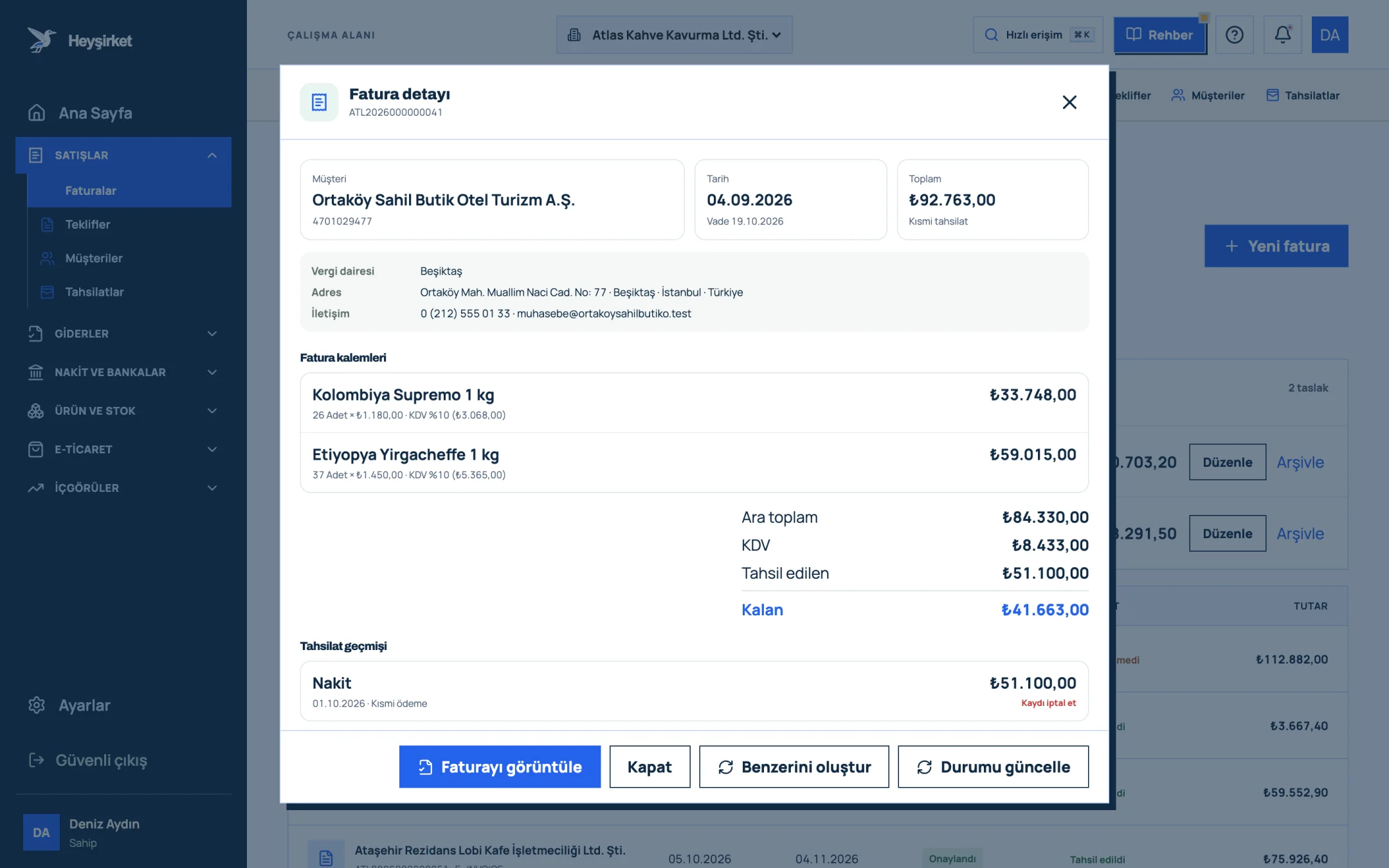
- 1. Invoice details window
- 2. View invoice / PDF
- 3. Collected and remaining amount
- 4. Collection history
- 5. Update status
- e-Arşiv invoice within the window: The window shows the Son iptal günü (Last cancellation day), and a Bugün son gün (Today is the last day) warning on the final day. When you enter the reason and confirm, the cancellation goes to GİB through your e-document provider.
- e-Arşiv invoice after the window: Cancellation through the provider is closed. If the invoice was cancelled by KEP, notary or the GİB portal, you close the record with İptal edildi olarak işaretle (Mark as cancelled).
- e-Fatura: The window shows the steps to follow on GİB's e-Fatura Cancellation/Objection Portal and the invoice details. Once cancellation is complete, you choose how it was cancelled (GİB portal, KEP, notary) and close the record.
- Rejected commercial invoice: Pull the rejection with Durumu güncelle (Update status); the rejected invoice is closed in one step.
- Payment recorded: The window asks you to reverse the payment first so cash, bank and the customer balance stay correct.
A cancelled invoice drops out of the sales, income-expense and VAT reports and the customer's account balance; sold products go back into stock. If the goods came back, a return is used instead of cancellation; the steps are in return and cancellation invoices. To filter the invoice list see the managing invoices guide, for a feature summary the e-Fatura page, and for the issuing steps how to issue an e-Arşiv invoice.
Part 7 · In practice A five-minute check before cancelling
Invoice cancellation checklist
- Is the document e-Arşiv or e-Fatura? If e-Fatura, is it commercial or basic?
- Has my time run out? I checked my provider's last day for e-Arşiv, or the 8 days for a commercial invoice.
- If the goods came back, I know a return is needed, not a cancellation.
- I reversed the payment linked to the invoice.
- If the VAT return for the invoice's period has been filed, I spoke to my mali müşavir.
- I told the customer in writing about the cancellation and the new invoice.
- I reissued the correct invoice within the 7-day issuing period.
How many days do you have to cancel an invoice?
The general frame is the 8-day objection period in the Turkish Commercial Code. With a commercial e-Fatura the buyer can reject it through the system within 8 days. With an e-Arşiv invoice the cancellation window is shorter and depends on the portal or provider you use; in practice it's about a week.
How do you cancel an e-Fatura?
An e-Fatura can't be cancelled by the seller alone. Under the commercial scenario the buyer rejects it through the system within 8 days. Under the basic scenario, or once the rejection period has passed, a request is opened on GİB's e-Fatura Cancellation/Objection Portal and the other party's approval is awaited; KEP or notary can also be used.
Who cancels an e-Arşiv invoice?
The seller who issued the e-Arşiv invoice cancels it. Cancellation is done from the GİB e-Arşiv Portal where it was issued, or through the e-document provider, and is reported to GİB.
Is a cancelled invoice's number reused?
No. The cancelled document's number isn't passed on to a new invoice. The correct invoice gets a new number; it's good practice to link the two documents in your records.
Can I cancel an invoice that's already in a VAT return?
After the return is filed, cancellation may require a correction to the return. At this stage a return invoice or another correction suggested by your mali müşavir is often more appropriate. Talk to your mali müşavir before deciding.
Does Heyşirket track the cancellation deadline?
Yes. For e-Arşiv invoices the cancellation window shows the last cancellation day and warns you on the final day. If the window has passed or the document is an e-Fatura, it shows the GİB portal, KEP or notary steps and lets you close the record once cancellation is complete.
Open the invoice to cancel Open the document from the invoices list; Faturayı iptal et shows the right route for the document type and the time left. Open invoices
Author: Heyşirket Editorial Team