Collections · 12 min read · Updated:
What is a payment link and how do you create one? Card payment for invoices
Your customer can pay the invoice by card in one click from the email or WhatsApp message they received, and you stop waiting for transfers. Here's how a payment link works and how to set it up, step by step.
In short
- A payment link is a link that lets a customer pay a set amount by entering their card details on a secure payment page; behind it there's always a virtual POS or a payment institution account.
- In Heyşirket you connect your own iyzico account from Settings › Collections (card payment); the connection is tested when the keys are saved and the keys are stored encrypted.
- Once connected, a Pay by card button is added to the invoice email and payment reminder sent to the customer; the payment link can also be copied from the invoice details and shared by WhatsApp or SMS, and is valid for 60 days.
- The customer pays the invoice's remaining amount with 3-D Secure, in instalments if you've enabled them; the money goes straight to your iyzico account, the collection is posted to the invoice automatically and you're notified.
- For invoice collection only iyzico is supported today, and only for TL invoices; PayTR and Param are on the roadmap.
You issued the invoice and emailed it. The customer said, “Fine, we'll pay.” Then you wait for the transfer to arrive and, when it does, to work out which invoice it belongs to. As the payment date slips, so does your cash plan.
A payment link shortens that wait. The moment the customer receives the invoice, they press the button in the same email and pay by card. The money reaches your account, the collection is posted to the invoice, and you hear about it without calling anyone.
In this article we explain what a payment link is, how it relates to a virtual POS, and how card payment for invoices is set up in Heyşirket. We've also written plainly what isn't available today.
Part 1 · Definition What is a payment link?
A payment link is a link that lets a customer pay a set amount by entering their card details on a secure payment page. It's sent by email, WhatsApp or SMS; the customer doesn't need to download an app or sign up.
Behind the link there's always a payment infrastructure: a bank's virtual POS or a licensed payment institution. The link is only the door; the infrastructure is what verifies the card, takes the money and passes it on to you.
- Invoice — sent by email
- Pay by card — button or link
- 3-D Secure — bank verifies
- Collection — posted to invoice
- Notification — you're told
Part 2 · Infrastructure What is a virtual POS, and how is it different from a payment link?
A virtual POS is a service that lets you accept card payments online, without a physical terminal. Banks and payment institutions provide it. The checkout on your website, an order taken by phone or a payment link can all use the same virtual POS.
| Virtual POS | Payment link | |
|---|---|---|
| What is it? | The service and account for accepting card payments | A link with a set amount, opened on that service |
| Who provides it? | A bank or payment institution | You or your software creates it through the virtual POS |
| Do you need a website? | Depends on the integration method | No; sharing the link is enough |
| Typical use | Online store, subscriptions, apps | Invoices, deposits, remote sales |
Part 3 · Setup How do you create a payment link?
In Heyşirket, payment links work through your own iyzico account. The money doesn't go to Heyşirket; it goes straight to your iyzico account. Setup is done once.
Connect your iyzico account
Get the keys from iyzico
In your iyzico panel, copy the API key and secret key from Settings › Company Settings › API keys.
Open the collections setting
In Heyşirket, go to the Settings › Collections (card payment) screen. iyzico is selected as the payment institution.
Choose the environment
You can start with Test (sandbox) and try it with test cards; no money is taken from real cards in this environment. When you're ready, enter the live keys and choose Live.
Set instalments and the account
If you like, use Offer instalments to allow up to 2, 3, 6, 9 or 12 instalments. In the Which account should collections be posted to? field, choose the cash or bank account where card collections should land.
Test the connection and save
Press Test connection and save. If the test succeeds, the screen shows “Connected”. The keys are stored encrypted and never shown on screen again.
Part 4 · Sharing How does the payment link reach the customer?
Once the connection is set up, you don't need to do anything else. The invoice email sent to the customer contains a Pay by card button, with a View invoice link next to it. The same button is added to the payment reminder email you send for invoices that are due or overdue.
If your customer doesn't check email, you share the link yourself. In the Collect by card box in the invoice details, press Create payment link; the link is generated and copied to the clipboard, and you send it by WhatsApp, SMS or any channel you like. Each link is valid for 60 days; the box also shows how many active links there are and when one was last opened.
When the customer opens the link, they see your company name, the invoice number, the invoice and due dates and the amount to pay; they can view the invoice and download its PDF. They enter their card details in iyzico's secure form; the card number never reaches you or Heyşirket.
- The full remaining amount is paid. If part of the invoice was collected earlier, the link asks only for the rest.
- TL invoices only. Card payment can't yet be used for invoices in foreign currency.
- It doesn't work on a closed invoice. A link for a cancelled, draft or fully paid invoice won't accept payment; the customer sees a screen explaining why.
Part 5 · Posting What happens when the payment arrives?
The payment result is never taken from the browser; it's always verified server to server with the payment institution. Once the payment is confirmed, the collection is posted to the invoice once and the invoice becomes “paid”; the same payment is never recorded twice. The collection note says it was paid by card and shows the number of instalments.
If you chose an account in the settings, the collection is also written as an inflow to that cash or bank account. Company owners receive a “card payment received” notification. If the invoice was cancelled in the meantime or the amount changed, the collection isn't written automatically; it's left for you as “Needs review”.
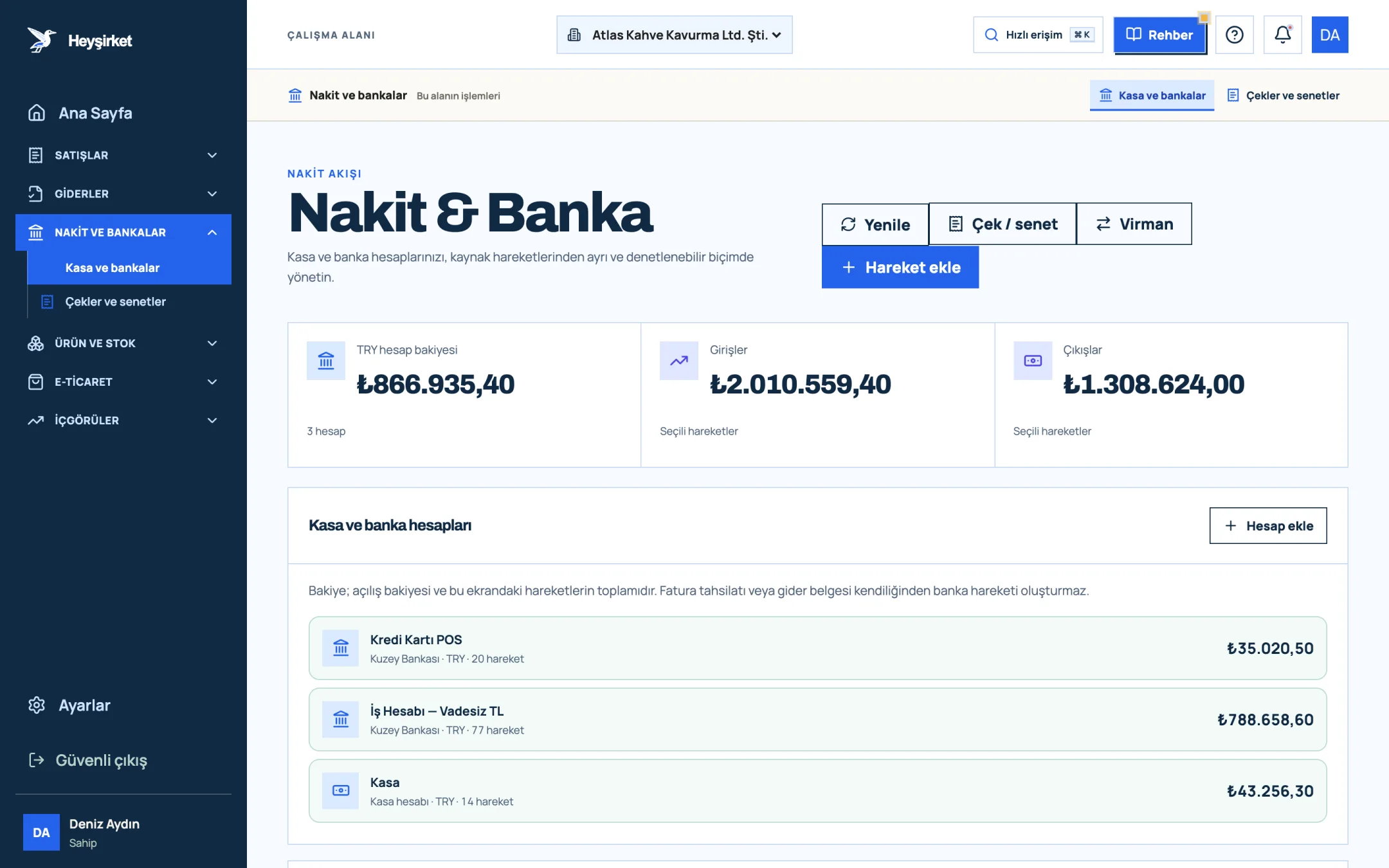
- 1. Add transaction button
- 2. Transfer between accounts
- 3. Total TRY balance
- 4. Cash and bank account list
The transaction commission, instalment interest and how long the money takes to reach your account are set by your agreement with iyzico. If you enable instalments, the instalment interest is passed to the customer according to your instalment settings in iyzico. Don't forget to record iyzico's commission invoice as an expense.
Part 6 · Impact Does card payment really speed up receivables?
A payment link isn't a magic fix on its own, but it removes friction from paying. Instead of opening a banking app, copying an IBAN and typing the invoice number into the description, the customer presses one button. The difference is clearest in work with small amounts and individual customers.
To use card collections well
- Issue the invoice on the day of delivery or service and email it; make sure the button is in the first email.
- Send a polite reminder before the due date; the reminder has the button too.
- If a corporate customer's accounts team doesn't pay by card, don't push it; match their transfers with the bank statement.
- Enable instalments only for larger amounts with individual customers.
- At month-end, compare card collections with iyzico's account statement.
For reminder rhythm, payment terms and credit limits, see speeding up receivables collection; for recording a collection by hand, see the how to record a customer payment guide. The feature summary is on the virtual POS integration page.
Part 7 · Trust Is a payment link safe? How do you explain it to customers?
Because of scams using fake payment links, some customers hesitate to click. That caution is reasonable, and rather than dismissing it you should give them reasons to trust the link. A good payment page shows the customer clearly whom they're paying, what they're paying for and how much.
On Heyşirket's payment page, before paying the customer sees your company name, the invoice number, the dates and the remaining amount, and can open the invoice itself. Card details are entered in iyzico's form and the transaction is approved by the cardholder's bank with 3-D Secure. The link is made of a long, unguessable code and stops accepting payment when it expires.
- Give notice the first time: If you're sending a link to a new customer for the first time, tell them by phone or message: “We're sending a link so you can pay your invoice by card.”
- Send the link with the invoice: The button in the invoice email looks more trustworthy than a separate message with no explanation.
- Write the amount in your message too: Let the customer compare the amount on the page with the amount in your message.
- Never ask for card details by phone: Make the secure form the only way to pay, and tell your team so clearly.
Part 8 · Scope Store payments and what isn't available yet
The payment link described in this article is for collecting invoices issued in pre-accounting. If you've opened a store on your website, its checkout is a separate flow: in the store on the Profesyonel plan, customers complete their basket by card (3-D Secure), by bank transfer or with cash on delivery; you switch these options on in the store payment settings in your company panel. We covered store setup in starting e-commerce.
For invoice collection, only iyzico is supported today. PayTR and Param, and a live bank connection (open banking), are on the roadmap. Until then you can match transfers with invoices by uploading the bank statement.
What is a payment link?
A payment link is a link that lets a customer pay a set amount by entering their card details on a secure payment page. It's sent by email, WhatsApp or SMS, and behind it there's a virtual POS or a payment institution account.
What do I need to create a payment link in Heyşirket?
You need an iyzico merchant account and a plan with pre-accounting enabled. When you enter your iyzico API keys on the Settings › Collections (card payment) screen and test the connection, a Pay by card button is added to your invoice emails.
Who sees the customer's card details?
Card details are processed only in iyzico's secure payment form. Neither your company nor Heyşirket sees the card number; the payment is verified with 3-D Secure by the cardholder's bank.
Can the customer pay part of the invoice by card?
No. The payment link asks for the full remaining amount of the invoice at that moment. If part of the invoice was already paid by transfer, the link shows only the remaining amount.
How long is a payment link valid?
Each payment link created in Heyşirket is valid for 60 days. An expired link doesn't accept payment; your customer can ask you for a new one, and you create it from the invoice details.
Can I collect invoices through PayTR or Param?
Not yet. For invoice collection, iyzico is supported today; PayTR and Param are on the roadmap.
Let your invoices be paid by card Connect your iyzico account and test the connection; from then on every invoice email includes a Pay by card button. Connect virtual POS
Author: Heyşirket Editorial Team