Accountant · 16 min read · Updated:
Working efficiently with your accountant in Türkiye: division of work, delivery calendar and the right access
A good mali müşavir (certified financial advisor) is like a partner who knows your business. But if they have to chase you for documents every month, you're losing half the value you get from them. Here's how businesses in Türkiye can fix that.
In short
- Working efficiently with your mali müşavir rests on a written division of work, a fixed monthly document delivery date and direct access to your documents.
- As a general rule, the KDV (VAT) return is filed on the 28th of the following month, and the withholding tax and social security premium return (muhtasar ve prim hizmet beyannamesi) on the 26th; these dates can shift because of public holidays and deadline extensions.
- Delivering documents at least a week before the filing date, ideally within the first five working days of the month, reduces the risk of corrections.
- In Heyşirket the Accountant role has access to invoices, expenses, collections and reports; it can't change users, settings or integrations.
- A missing expense invoice costs you not only the expense but also the input VAT on that invoice.
It's the 24th of the month, nine in the evening. The lights are on at your mali müşavir's office, because seven of their twelve clients sent their documents "this week". Yours is one of them.
Most mali müşavirs say the bulk of their work isn't accounting but chasing documents. That time could have gone into advising you, tax planning and incentives instead.
In this article we explain how to put the division of work with your mali müşavir in writing, how to set up a monthly delivery calendar, and how to end the email back-and-forth with the right software access. At the end you'll also find three questions to ask every January.
Part 1 · Boundaries Where does your accountant's job start, and where does yours end?
A mali müşavir (SMMM, certified public accountant) is the professional who posts a business's documents to the statutory books, prepares and files its tax returns and advises on legislation. Producing, collecting and recording documents on time, on the other hand, is the business's job, in other words pre-accounting.
| Task | Business | Mali müşavir |
|---|---|---|
| Issuing sales invoices | Yes | No |
| Collecting expense documents | Yes | Checks |
| Recording collections and payments | Yes | Reconciles |
| Journal and general ledger | No | Yes |
| VAT, withholding and provisional tax returns | Provides information | Yes |
| Year-end balance sheet and income statement | Provides information | Yes |
| Tracking changes in legislation | Asks | Yes |
Go through this table together with your mali müşavir. The grey areas differ for every business: some accountants also take on recording collections, others manage the e-Belge (e-document) provider themselves. What matters is that you're both looking at the same table.
We've drawn the line. So on what calendar does the work on either side of it flow?
Part 2 · Calendar How do you set up a monthly document delivery calendar?
A monthly document delivery calendar is a fixed plan showing the date by which all of the previous month's documents will reach your mali müşavir, and how much margin is left before the filing dates. The healthiest practice is to deliver documents within the first five working days of the month.
| Date | Who? | What? |
|---|---|---|
| 1-5 November | Business | Completes October's sales, expense, bank and cash records. |
| 6 November | Business | Tells the mali müşavir "October is closed". |
| 7-20 November | Mali müşavir | Checks the records and asks about any missing documents. |
| 26 November | Mali müşavir | Withholding tax and social security premium return (general rule). |
| 28 November | Mali müşavir | VAT return (general rule). |
| After filing | Both | Discuss the amounts payable and add them to the cash plan. |
The first five days of the calendar are your closing window. We've listed what to check in those five days, item by item, in our month-end closing checklist article.
Once you've set up the calendar, add a recurring reminder to your phone's calendar for the 1st and 6th of every month. Let the first say "start closing" and the second "tell the accountant". It looks simple, but it's exactly what turns it into a habit within the first three months. Once the calendar is fixed, your mali müşavir also plans their work around your delivery day, and questions don't pile up in the last week of the month.
Part 3 · Cost What does a missing expense invoice cost you?
A missing expense invoice means that the expense can't be deducted from the tax base and the VAT on it can't be deducted either. Together, they turn a small document into a big cost.
| Packaging supplier's invoice (excl. VAT) | 25.000 TL |
|---|---|
| VAT on the invoice (20%) | 5.000 TL |
| VAT not deducted in the first month if the invoice misses the return | 5.000 TL |
| Extra VAT paid that month | 5.000 TL |
The example only shows the VAT impact. Ask your mali müşavir whether the document can be deducted in later periods and about the income/corporate tax impact.
Atlas Kahve's owner went through this calculation twice in the first year. The fix was simple: e-invoices from suppliers no longer wait in the inbox; they land in the software automatically and are reviewed once a week.
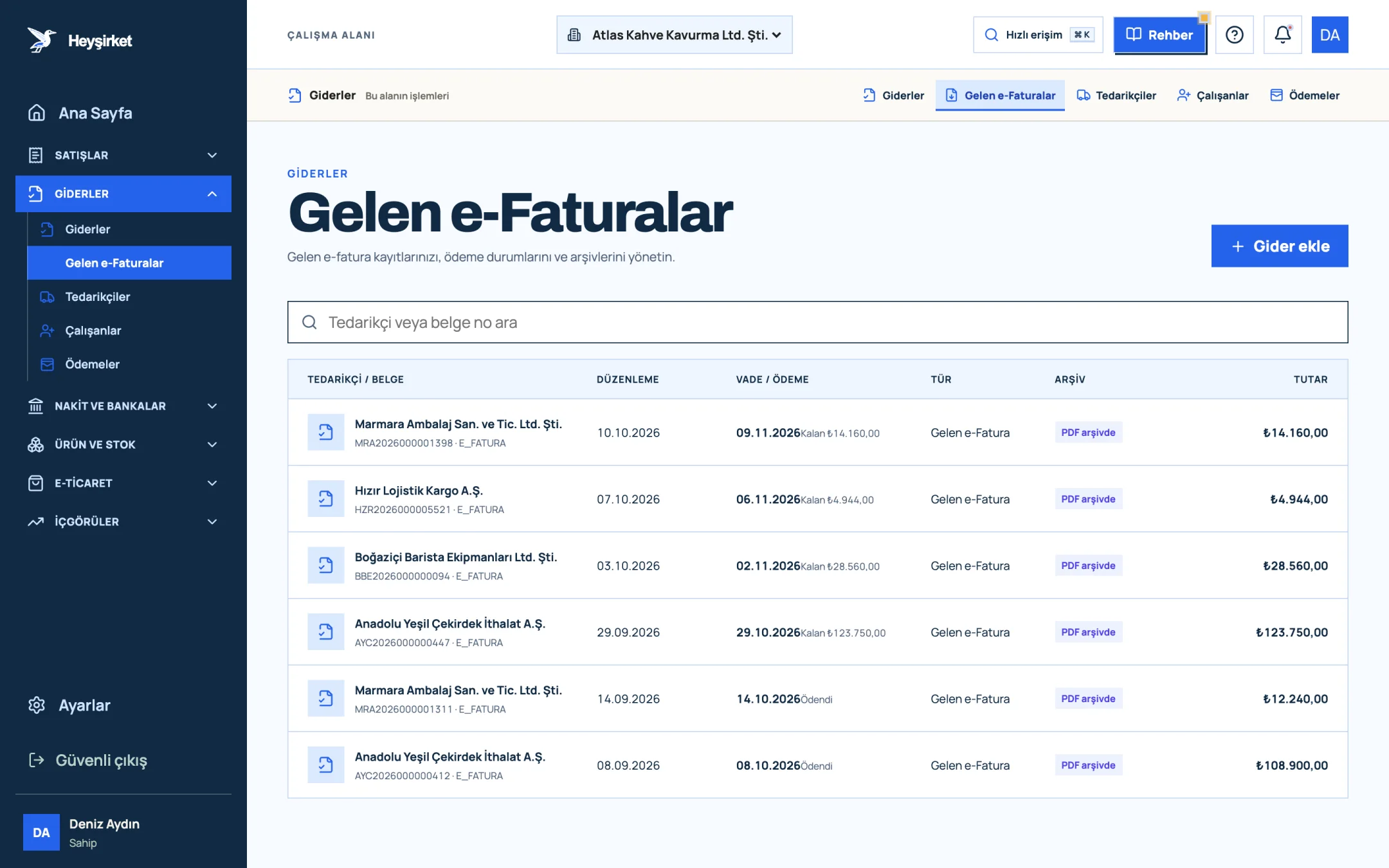
- 1. Incoming e-Faturas tab
- 2. Supplier and document number
- 3. Remaining payment amount
- 4. PDF archive status
Part 4 · Access Why is giving your accountant access better than sending documents?
Giving your mali müşavir access to the software means documents are seen from a single source, always in their latest version. PDFs sent by email are copies; it becomes unclear which one is final and which was cancelled.
But access shouldn't mean access to everything. Your mali müşavir needs to see invoices, expenses and reports; they don't need to change the company's bank account settings, the e-Belge provider password or the user list.
| Area | Accountant role |
|---|---|
| Customers (cari accounts) | Views and edits |
| Sales invoices and expense documents | Views and records; can cancel invoices |
| Collection and payment records | Views and records |
| Reports | Views and downloads as CSV |
| Products, inventory and purchasing | View only |
| Users, settings, integrations, bank account settings | No access |
| Activity history and data backup | No access (available to Owner and Admin) |
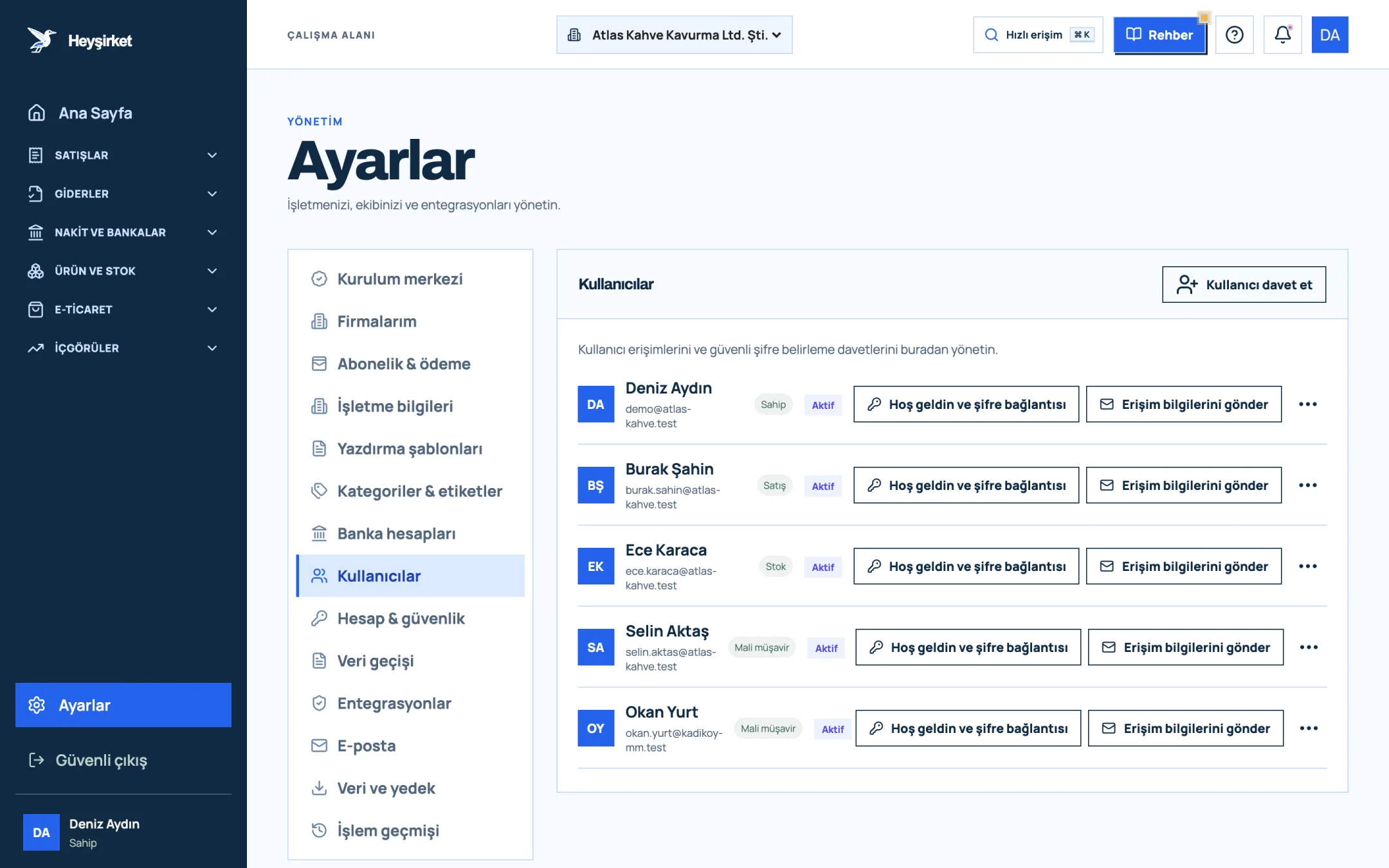
- 1. Invite user
- 2. User role (Owner, Sales, Stock, Accountant)
- 3. Send access details
All the steps for invitations and role changes are in the team and roles guide. We explain the security principle behind the role logic in our team permissions and data security article.
Many mali müşavirs, however, prefer to have the documents come to them rather than opening a separate account. To do that, just save your accountant's email on the My accountant screen in Settings and turn on the monthly document package: on the day of the month you choose, the previous month's sales invoices, incoming invoices and expenses go to them automatically, as Excel-compatible lists, PDFs and an estimated VAT summary. Your accountant does their job without ever signing in to your company.
Send documents to your accountant automatically every month Save your accountant's email and choose the package day; no more chasing documents at month end. Open My accountant
Are you a mali müşavir? To recommend Heyşirket to your clients, receive their documents in your inbox every month and earn from the companies you refer, take a look at the accountant partner programme.
Part 5 · Reports Which reports should you discuss with your accountant?
There are three core reports for your monthly conversation with your mali müşavir: the VAT report, the income and expense report and the open receivables list. Together, these bring surprises to light before the return is filed.
You don't have to send these reports to your mali müşavir; a user with the Accountant role sees them on their own screen and, when needed, exports them to their own software with Download CSV. Your job is to make sure the records the reports are based on are complete.
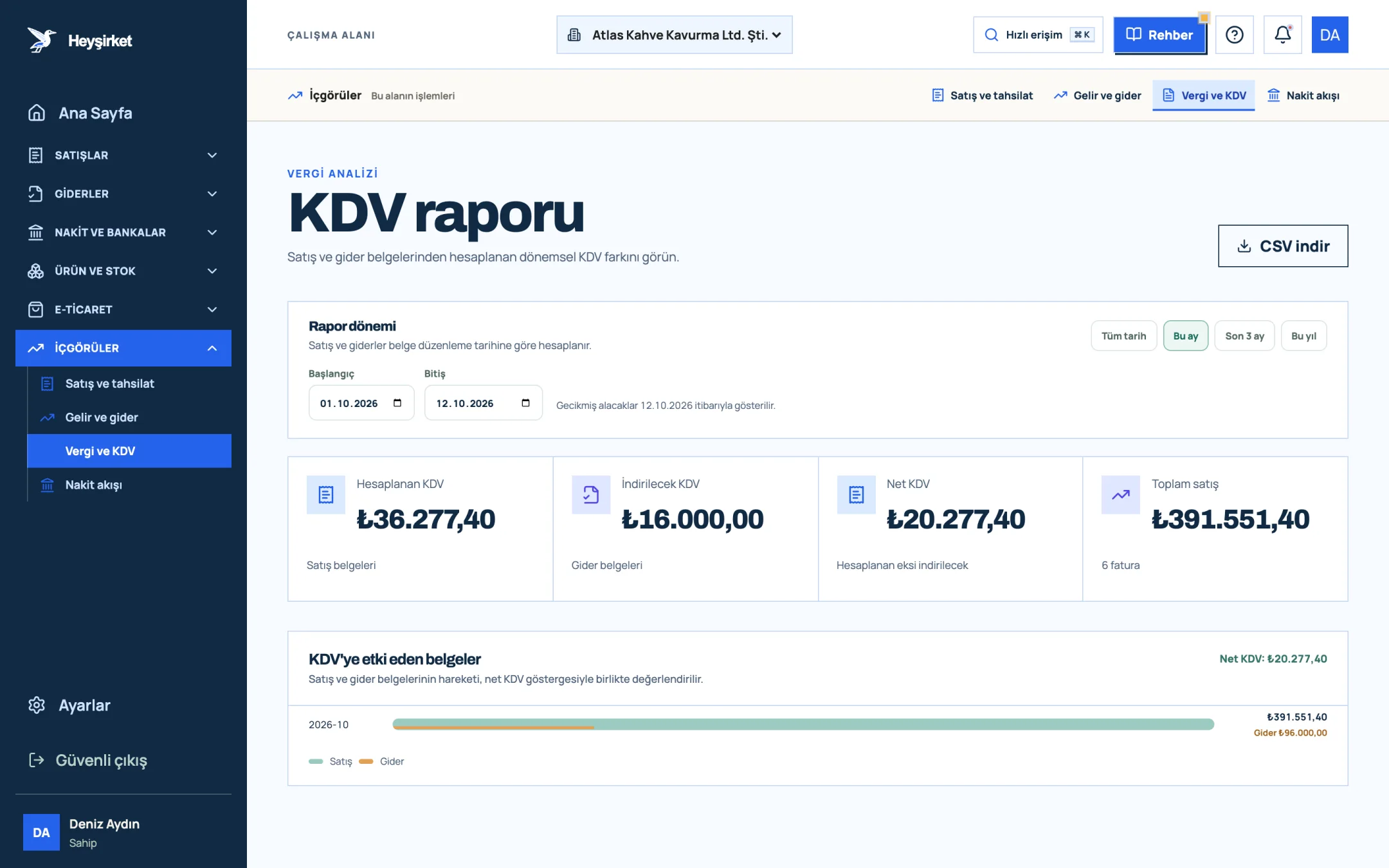
- 1. Output VAT
- 2. Deductible VAT
- 3. Net VAT
- VAT report: Compare output and input VAT before filing. If there's a big gap, start looking for missing expense documents. Details: VAT report.
- Income and expense report: See the net result for the period; discuss the estimated tax burden in provisional tax periods. Details: income and expense report.
- Open receivables: Ask how receivables that have gone uncollected for a long time should be handled for accounting and tax purposes.
Part 6 · Communication Which rules work when communicating with your accountant?
Efficient communication with your mali müşavir is built on a single channel, batched questions and decisions put on record. Messages scattered throughout the day eat up both sides' time.
Rules for working with your mali müşavir
- Documents in one place: in the software, not scattered across email, WhatsApp and paper.
- A fixed delivery date: say "the month is closed" on the same day every month.
- Batched questions: ask the questions that pile up during the week in a single message.
- Unusual transactions in advance: give notice before a big purchase, a loan, a new partner or exports.
- Decisions in writing: confirm important tax decisions with a short email.
- Payments in the calendar: add the amounts payable after filing to your cash plan on the same day.
- Annual review: hold a one-hour meeting in January.
Part 7 · Checklist Which documents do you deliver to your accountant every month?
The documents delivered to your mali müşavir every month are the period's sales and purchase invoices, bank statements, cash movements, cheque and promissory note movements, and changes in employee details. If you agree from the start which document comes through which route, the list stays the same every month.
| Document | Where does it come from? | How is it delivered? |
|---|---|---|
| Sales invoices issued | Pre-accounting software | Software access |
| Incoming e-invoices | e-Belge provider | Software access (Incoming e-Invoices) |
| Paper expense invoices and receipts | Suppliers, supermarkets, fuel stations | Recorded in the software + paper originals in the monthly folder |
| Bank statements | Bank | Statement downloaded on the first day of the month |
| Cash movements | Pre-accounting software | Software access |
| Cheques and promissory notes | Customers and suppliers | Records in the software and photocopies |
| Employee changes | Business | Advance notice of hires, departures and pay changes |
The most critical row in the table is the last one. Because the SGK (Social Security Institution) employment start notification must, as a rule, be submitted before the employee starts work, you should tell your mali müşavir about a new employee before they start, not at the end of the month.
Part 8 · Choosing What should you look for when choosing an accountant?
A good mali müşavir is a professional who knows your sector, offers you an accessible way of communicating and is well versed in electronic document processes. The fee matters, but it shouldn't be the only criterion.
- Sector experience: Do they work with businesses like yours (e.g. manufacturing, e-commerce, services)? Do they know the sector-specific VAT and inventory issues?
- Electronic processes: How do they handle e-Fatura (Turkish e-invoice), e-Arşiv (e-archive invoice), e-Defter (e-ledger) and e-Tebligat (electronic notification) processes?
- Availability: Through which channel and how quickly do they answer your questions? Who on their team will look after you?
- Scope: Which work is included in the monthly fee, and which is charged separately?
- Openness to your software: Are they willing to view your documents in the software you use?
Changing your mali müşavir is a migration project, just like changing software. To hand over previous periods' returns, books and open issues to the new accountant in full, agree a handover date with your old accountant, and move software access to the new accountant on the same day.
Part 9 · Advisory When should you ask your accountant for support beyond the routine?
The moments to ask your mali müşavir for support beyond the routine are just before decisions that have tax consequences and are hard to reverse. A half-hour conversation at these moments is far cheaper than corrections at year end.
| Situation | Why in advance? |
|---|---|
| Buying high-value fixed assets or a vehicle | Depreciation, VAT deduction and the financing method change the tax burden. |
| First export or buying services from abroad | The document type, VAT exemption and foreign currency records are different. |
| New partner, capital increase or share transfer | The trade registry, tax and partners' current account are all affected. |
| Taking out a loan or leasing | Interest, fees and collateral are recorded differently. |
| An uncollectable receivable from a large customer | The conditions for doubtful receivables and documentation matter. |
Before buying its second roasting machine, Atlas Kahve met with its mali müşavir. Whether to buy the machine outright or through leasing, in which month to deduct the VAT and the depreciation period were all put on the table. The decision was made together with the cash plan, and there were no surprises at year end.
How often to meet: For routine work, a short monthly exchange is enough. On top of that, it's a good idea to hold a short review every quarter and an annual meeting every January, and to consult separately before big decisions.
Part 10 · Annual Three questions to ask your accountant every January
The annual review meeting is a short conversation in which you go through last year's closing and the new year's tax calendar together. Three questions form the backbone of this meeting.
- Which obligation thresholds did we cross this year, or will we cross? (Such as e-Belge, e-Defter and independent audit.)
- Which documents did we deliver late or incomplete last year? A recurring gap is a process problem.
- Is there an incentive or exemption we can benefit from this year? Ask about investment, employment and export incentives.
Downloading the annual income and expense and VAT reports from Heyşirket and bringing them to this meeting moves the conversation from guesswork to data.
My mali müşavir uses their own software; is Heyşirket access still useful?
Yes. Even if your mali müşavir keeps the statutory books in their own software, they can see your invoices, expense documents and reports in one place, and download reports as CSV to import into their own system. That removes the back-and-forth of sending documents.
By when should I deliver documents to my mali müşavir?
By the date in your contract. The general recommendation is to deliver the previous month's documents within the first five working days of the month, which leaves enough margin before the filing dates.
Can my mali müşavir issue invoices in Heyşirket?
A user with the Accountant role can record and cancel invoices. It's a good idea to agree within the business who issues invoices and put the division of work in writing.
Can my mali müşavir see the business's bank account settings?
Bank account settings, user management and integrations are only available to the Owner and Admin roles. Your mali müşavir follows cash and bank movements through the records.
If I change my mali müşavir, how do I remove their access?
On the Users tab, press the three-dot button on their row, set the Access status field to Access disabled and choose Save access. Their open sessions are closed immediately.
When is the VAT return filed?
As a general rule, on the 28th of the month following the tax period. Because the date can change due to holidays and deadline extensions, confirm the current calendar with Revenue Administration announcements and your mali müşavir.
Invite your accountant Invite them with the Accountant role so they can see invoices, expenses and reports directly. Open Users
Author: Heyşirket Editorial Team