Reports · 8 min read · Updated:
Income and expense report: reading the period's net movement correctly
Did you make money this month, or did you just issue a lot of invoices? The income and expense report makes that distinction visible by putting sales, collections and expenses side by side for the same period.

In short
- The income and expense report compares the sales invoices and expense documents issued in the selected period on the same screen.
- Net movement is the amount collected from the period's invoices minus the total of the period's expense documents.
- Net movement is neither profit nor a bank balance; it's a cash trend indicator showing the gap between collections and expense documents.
- Sales and expense amounts include VAT; for a profitability analysis, VAT has to be deducted separately.
- The monthly chart shows sales, collection and expense bars together for each month.
Atlas Kahve's accounting file had two figures for September: 312.000 TL in sales and 241.000 TL in expenses. The founder said, "We made a 71 thousand profit." Yet the bank balance had gone down by 13.000 TL in the same month.
Both were right; they were just measuring different things. The income and expense report shows that difference on one screen. By the end of this guide you'll know when and how to use the Net movement figure.
Part 1 · Tour What's on this screen?
The income and expense report is the screen that shows the net movement made up of the sales invoices and expense documents issued in the selected period. Open it from the Income and expenses link under Insights in the sidebar; the Open analysis link on the sales and expenses summary on the Home page brings you here too.
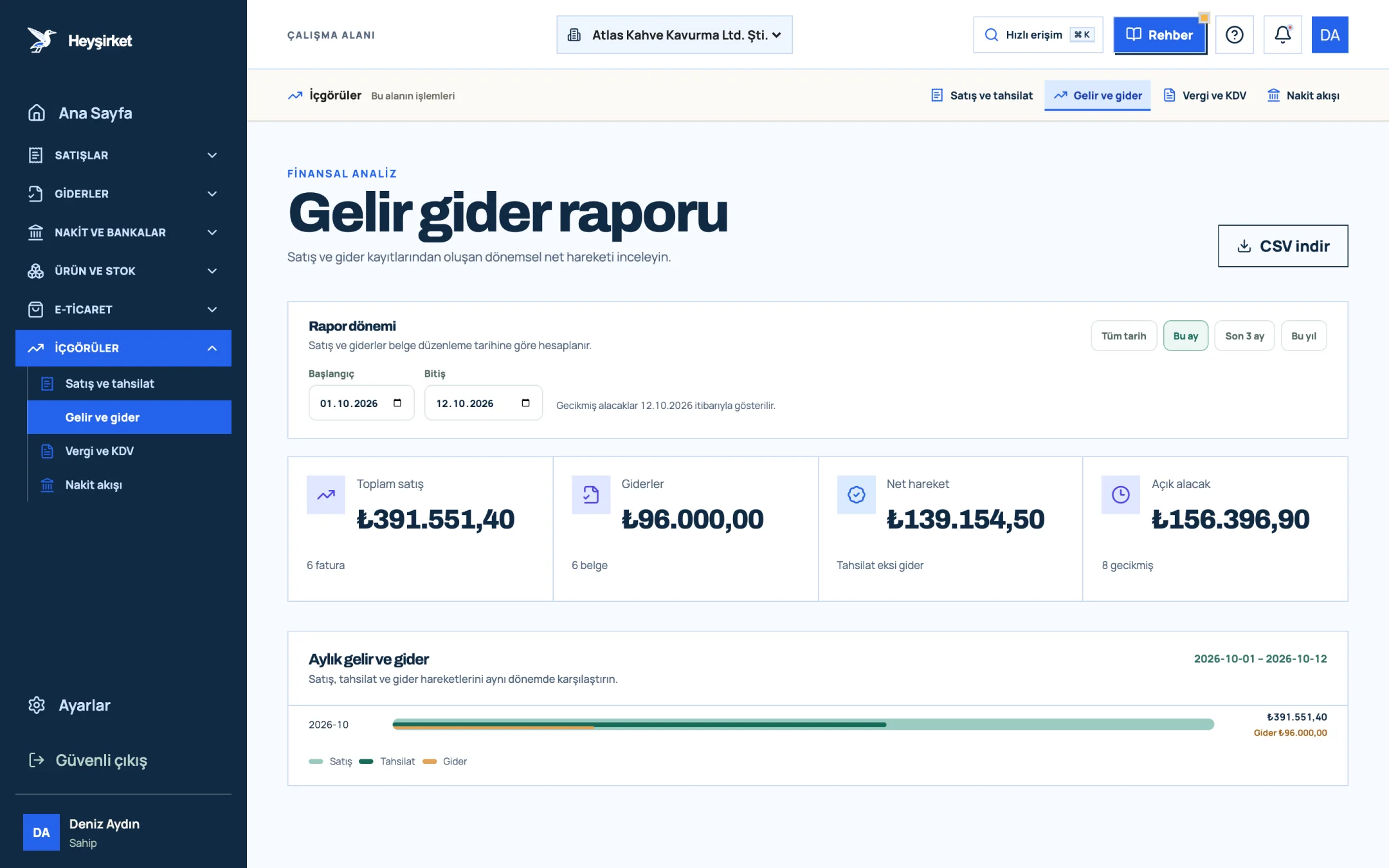
- 1. Total sales and expenses
- 2. Monthly income and expense chart
| Indicator | Calculation | Subline |
|---|---|---|
| Total sales | VAT-inclusive total of non-cancelled invoices issued in the period | Number of invoices |
| Expenses | VAT-inclusive total of expense documents issued in the period | Number of documents |
| Net movement | Collected minus Expenses | Collections minus expenses |
| Open receivables | Amount not yet collected on the period's invoices | Number of overdue invoices |
The chart has three bars for each month: Sales, Collections and Expenses. The large figure on the right shows total sales, and the small line below it shows that month's total expenses. Months are listed from newest to oldest.
The screen looks familiar. So why isn't Net movement called "profit"? The answer is hidden in the formula.
Part 2 · Concept What is net movement, and how does it differ from profit?
Net movement is the figure you get by subtracting the total of the period's expense documents from the amount collected on invoices issued in the period. Because collections rather than sales are used on the income side, it shows not profit but how well collections cover expenses.
| Total sales (incl. VAT) | 312.000 TL |
|---|---|
| Collected (from September invoices) | 228.000 TL |
| Expenses (incl. VAT) | 241.000 TL |
| Sales minus expenses (the Difference logic on the Home page) | +71.000 TL |
| Net movement (228.000 − 241.000) | −13.000 TL |
Sales and expense amounts include VAT. For profitability, you need to remove the VAT on both sides and separate cost of sales from expenses; the income statement prepared by your accountant (mali müşavir) gives you that.
Two different questions for the same month, two different answers. Sales minus expenses comes close to answering "Was it a commercially profitable month?" Net movement answers "Did my collections cover my expenses?"
Part 3 · Steps How do you use the income and expense report step by step?
A monthly income and expense check step by step
Open the report
Open the Insights group in the sidebar and click the Income and expenses link.
Open the report - 1. Total sales and expenses
- 2. Monthly income and expense chart
Choose the period
To review a closed month, enter the first and last day of the month in the Start and End fields. To see a trend, use the Last 3 months or This year buttons.
Make sure your expense documents are complete
If the number of documents on the Expenses card is lower than you expect, some receipts or invoices are missing. Enter them with Add expense on the expense documents screen, and check incoming e-invoices on the Incoming e-Invoices screen too.
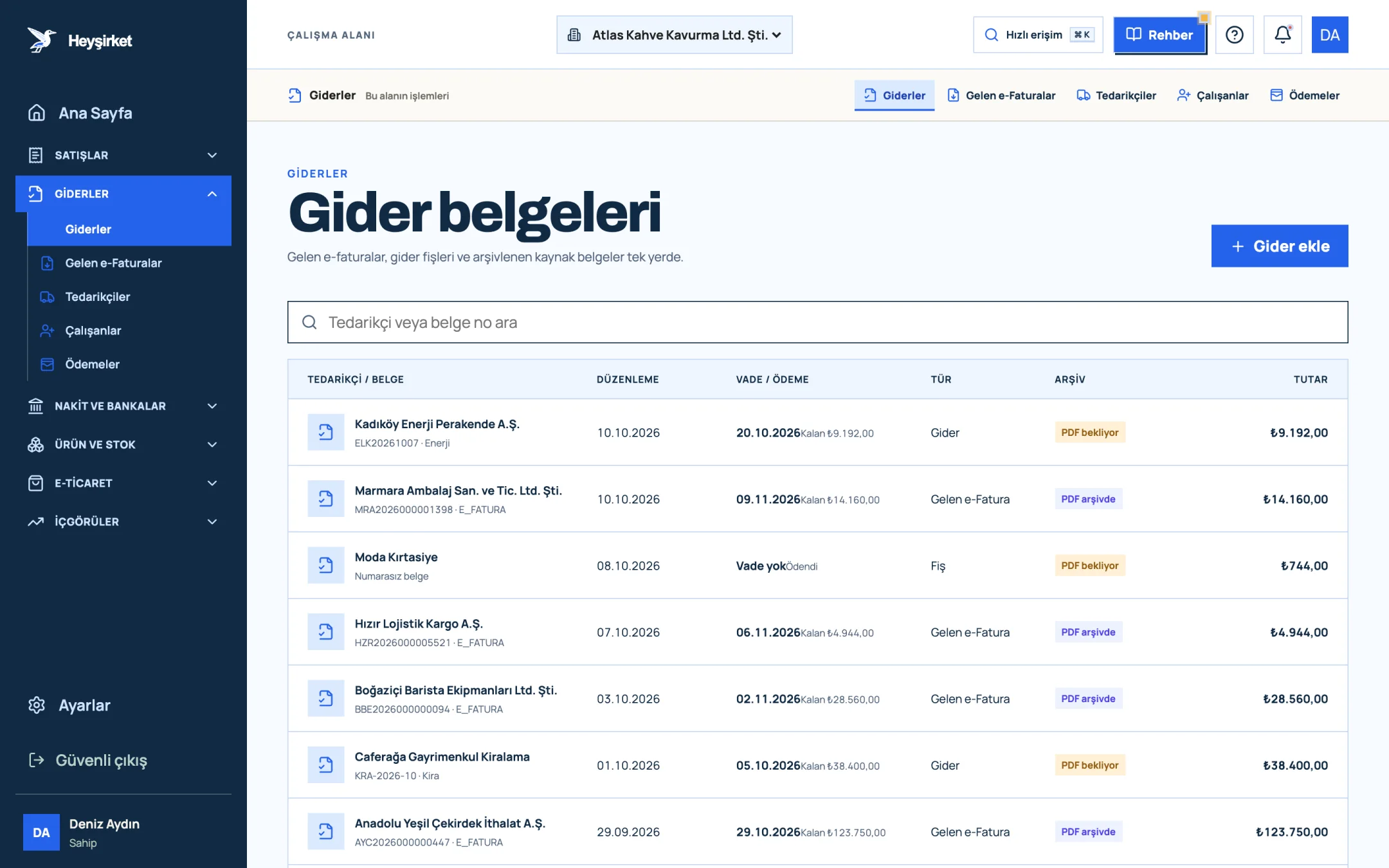
Make sure your expense documents are complete - 1. Add expense button
- 2. Due date and remaining payment
- 3. Document type (Expense, Incoming e-Fatura, Receipt)
- 4. Expense document row
Compare the sales and expense bars
Months where the expense bar gets close to the sales bar need attention. Is it a one-off purchase (a new roasting machine, for example), or an expense item that keeps growing?
Interpret the net movement
If net movement is negative, look at the Open receivables card. If open receivables are high, the problem is collections; if they're low, expenses are exceeding sales.
Share the file
Use Download CSV to download the monthly breakdown of Sales, Collections and Expenses and send it to your accountant or business partner.
Part 4 · Why The reasoning: keep three questions apart
The most common mistake in small businesses is trying to answer questions about profit, cash and revenue with a single number. Revenue is read in the Sales report, cash movement in the Cash flow report, and profitability in the income statement prepared by your accountant.
The income and expense report sits where these three meet: it's a document-based period comparison. We explain with examples how to derive indicators such as gross profit, expense ratio and collection rate from these figures in our reading financial reports article.
Which period should you look at: a month or a quarter?
A single month's Net movement is noisy: a large supplier payment or an annual insurance policy can turn the month negative on its own. So complement the monthly reading with Last 3 months; a picture that's still negative over three months is a structural problem, not a one-off.
- Monthly view: to check that expense documents are entered in full and that collections are keeping to due dates.
- Quarterly view: to see the trend while smoothing out seasonality and one-off expenses.
- Annual view (This year): to compare actuals with the budget and assess new investment decisions.
At Atlas Kahve, the summer months are slow and autumn is strong. That's why the founder doesn't panic over July's negative Net movement; but if the July–September total is negative too, the cost structure goes on the table.
Does the income and expense report replace a profit and loss statement?
No. The report is a document-based period comparison; amounts include VAT and it doesn't include adjustments such as depreciation or changes in inventory. Your accountant prepares the official income statement.
Are employee salaries included in the report?
The Expenses card in the report is the total of expense documents. If a cost doesn't appear on this screen, it hasn't been recorded as an expense document.
Why does net movement change as the months go by?
The collected amount increases with payments that arrive later on the period's invoices. That's why a past month's Net movement goes up as collections come in.
Are cancelled sales invoices included?
No. Invoices with cancelled status aren't included in the sales and receivables totals; return invoices are deducted from the total. On the expense side, all recorded expense documents are counted.
Open the income and expense report Choose last month and look at the difference between Net movement and sales minus expenses. Open the report
Author: Heyşirket Editorial Team