Financial management · 16 min read · Updated:
Reading financial reports: 6 metrics every business owner should know
Reports are full of numbers, but each number answers a different question. Once you learn to ask the right report the right question, month-end meetings shrink to ten minutes.

In short
- Revenue, profit and cash are three separate questions; each is answered in a different report with a different calculation.
- Gross profit is net sales excluding VAT minus the direct cost of goods sold, and it shows how healthy your pricing is.
- The collection rate shows how much of the invoices issued in a period has been collected; reading the same month on different dates reveals how fast your customers pay.
- Receivables aging groups open receivables by the time elapsed since their due date; receivables older than 90 days are the part whose chance of being collected drops the most.
- An expense ratio tracks each expense item as a percentage of sales; if the ratio, not the amount, is growing, you have an efficiency problem.
Picture a coffee roasting workshop. September was its best month since it opened: 312.000 TL in invoices issued. Yet in the first week of October, the founder is checking the credit card limit to pay a supplier.
This contradiction is the most common financial surprise for small businesses, and the cause is almost always the same: asking one number three different questions. "How much did we sell?", "How much did we earn?" and "How much is in the till?" are not the same question.
In this article we unpack, one by one and with realistic TL figures, the six metrics an accountant (mali müşavir) explains in a first meeting. At the end you'll find a mapping table showing which report to check with which question each month, plus a checklist.
Part 1 · Three questions Why aren't revenue, profit and cash the same thing?
Revenue is the total of the sales invoices issued in a period; profit is what remains of those sales after costs and expenses are deducted; cash is the money actually sitting in the bank and the till. All three change at different times and for different reasons.
Invoices grow revenue. Profit is determined by the balance of price, cost and expenses. Cash is determined by payment terms: if your customer pays in 60 days while you pay your supplier in 30, even a profitable month can empty your till.
- Quote — Not in any report yet
- Invoice — Counts toward revenue and VAT
- Due date — Waits as an open receivable
- Payment — Becomes collected
- Bank — Shows up in cash flow
Each stop in this flow is tracked on a separate screen in Heyşirket. An invoice enters the Sales report on the day it's issued; when a payment is recorded, the Collected amount goes up; and the bank transaction is kept as a separate record on the Cash and banks screen.
We've separated the three questions. Now let's start with the first metric, and the one most often confused: gross profit.
Part 2 · Metric 1 What is gross profit and how is it calculated?
Gross profit is net sales excluding VAT minus the direct cost of the goods or services sold. The gross profit margin is that amount as a share of net sales.
A direct cost is one you wouldn't incur if there were no sale: for a coffee roaster, green beans, packaging and roasting energy. Rent, accounting fees or software subscriptions are paid whether you sell or not; these are operating expenses and don't count toward gross profit.
| Total sales (incl. VAT, 42 invoices) | 312.000 TL |
|---|---|
| VAT on sales (Output VAT) | −26.000 TL |
| Net sales (excl. VAT) | 286.000 TL |
| Cost of goods sold (green beans, packaging, energy, excl. VAT) | −171.600 TL |
| Gross profit | 114.400 TL |
| Gross profit margin (114.400 / 286.000) | %40 |
| Operating expenses (rent, salaries, marketing, excl. VAT) | −82.000 TL |
| Operating profit (before tax and depreciation, approx.) | 32.400 TL |
| Operating profit margin (32.400 / 286.000) | ≈ %11 |
Figures are illustrative. An official income statement also includes inventory changes, depreciation and accrual adjustments; your accountant prepares these.
The gross profit margin shows how healthy your pricing is. If the price of green coffee rises 15 percent while your selling price stays put, the margin quietly erodes even as revenue stays the same. That's why you should track the margin before the amount. We cover tying pricing decisions to margin in detail in our pricing strategy article.
Heyşirket reports don't show gross profit as a separate card, because the cost of goods sold depends on inventory valuation and your accountant's records. But both ends of the calculation are ready: Total sales and Output VAT are in the Sales report, and cost documents are in your expense documents.
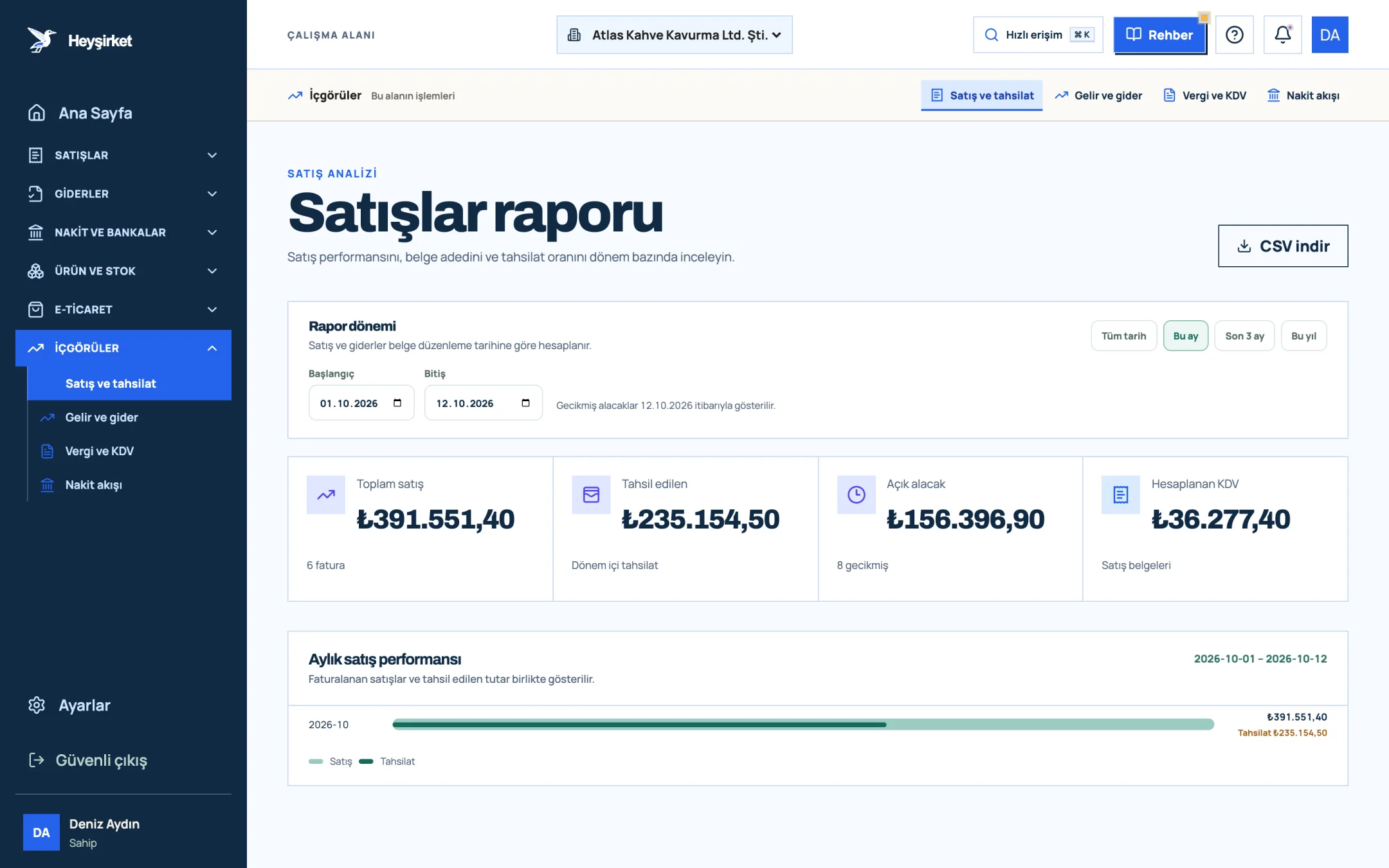
- 1. Report period selection
- 2. Total sales
- 3. Collected
- 4. Monthly sales performance chart
- 5. Download CSV
Part 3 · Metric 2 Is net movement the same as profit?
Net movement is the amount collected from invoices issued in a period minus the total of that period's expense documents. It isn't profit; it's a trend indicator showing whether collections are covering expenses.
In the Atlas Kahve example, 228.000 TL had been collected from September invoices as of 15 October, while September's expense documents total 241.000 TL. Net movement is −13.000 TL. A negative net movement alongside 114.400 TL of gross profit isn't a contradiction: the gap is largely the 84.000 TL receivable still waiting with customers.
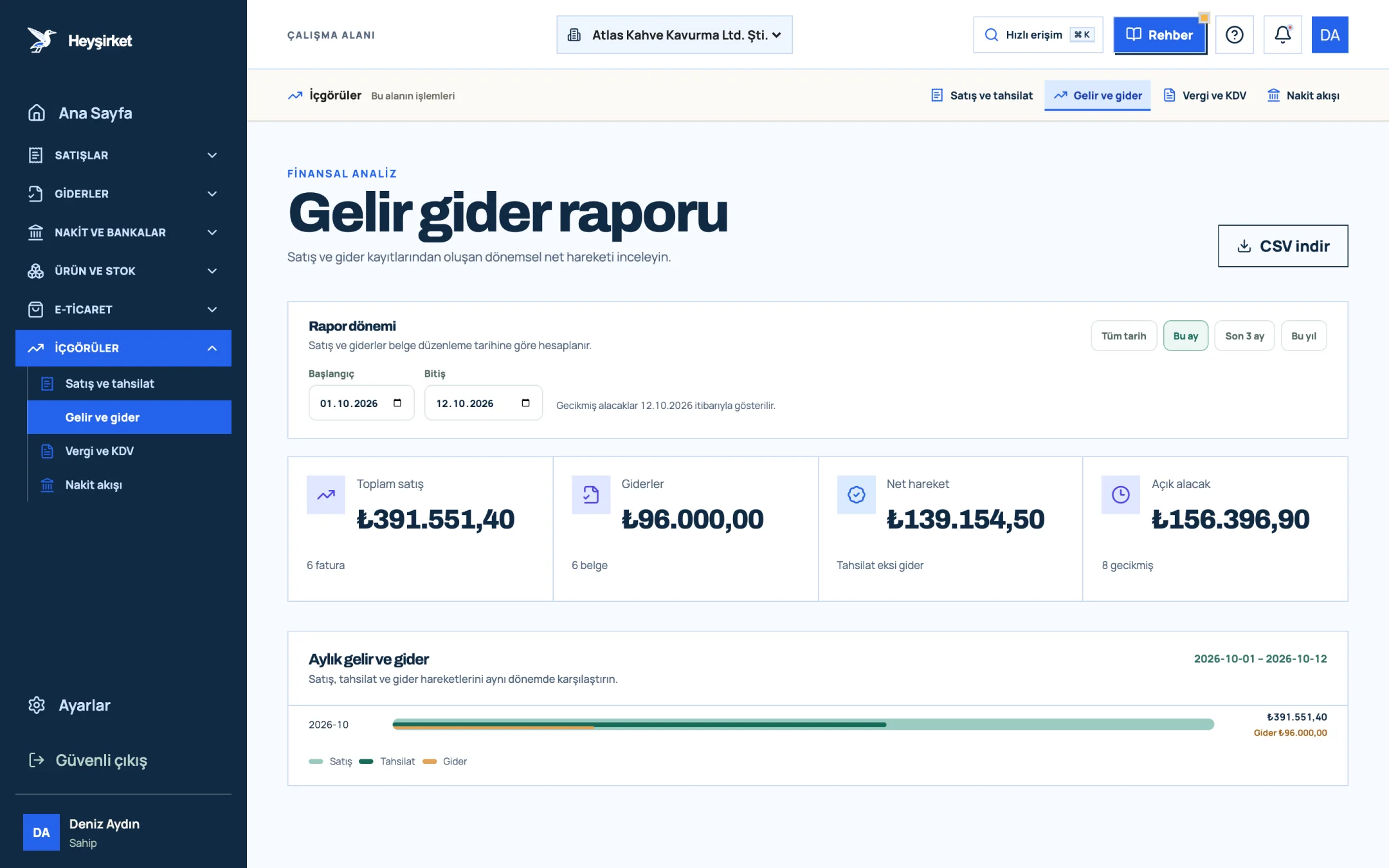
- 1. Total sales and expenses
- 2. Monthly income and expense chart
Read net movement like a warning light. If gross profit is healthy but net movement is negative two months in a row, the problem isn't price, it's collections. If both gross profit and net movement are falling, the problem runs deeper.
So how do you measure a collections problem? The next metric exists for exactly that.
Part 4 · Metric 3 What does the collection rate show?
The collection rate is the collected portion of the invoices issued in a period divided by the total of those invoices. Atlas Kahve's September rate is 228.000 / 312.000, or 73 percent.
The value of this rate shows when you read the same month on different dates. If September invoices are 41 percent collected on 1 October, 73 percent on 15 October and 92 percent on 31 October, your customers pay within 30-45 days on average. If your payment terms are 30 days, that picture is acceptable.
| Reading date | Collected | Collection rate | Interpretation |
|---|---|---|---|
| 1 October | 128.000 TL | %41 | Upfront and short-term payments have arrived |
| 15 October | 228.000 TL | %73 | 30-day terms are closing |
| 31 October | 287.000 TL | %92 | The remaining 8% goes into late-payment follow-up |
The Collection health panel on the Home page shows this rate for the current month as a ring chart: 80 percent and above is "Balanced outlook", 50-79 percent is "Follow-up recommended", and below that is "Prioritize". A low rate in the first days of the month is normal when you sell on credit; what matters is comparing the same day with the same day last month.
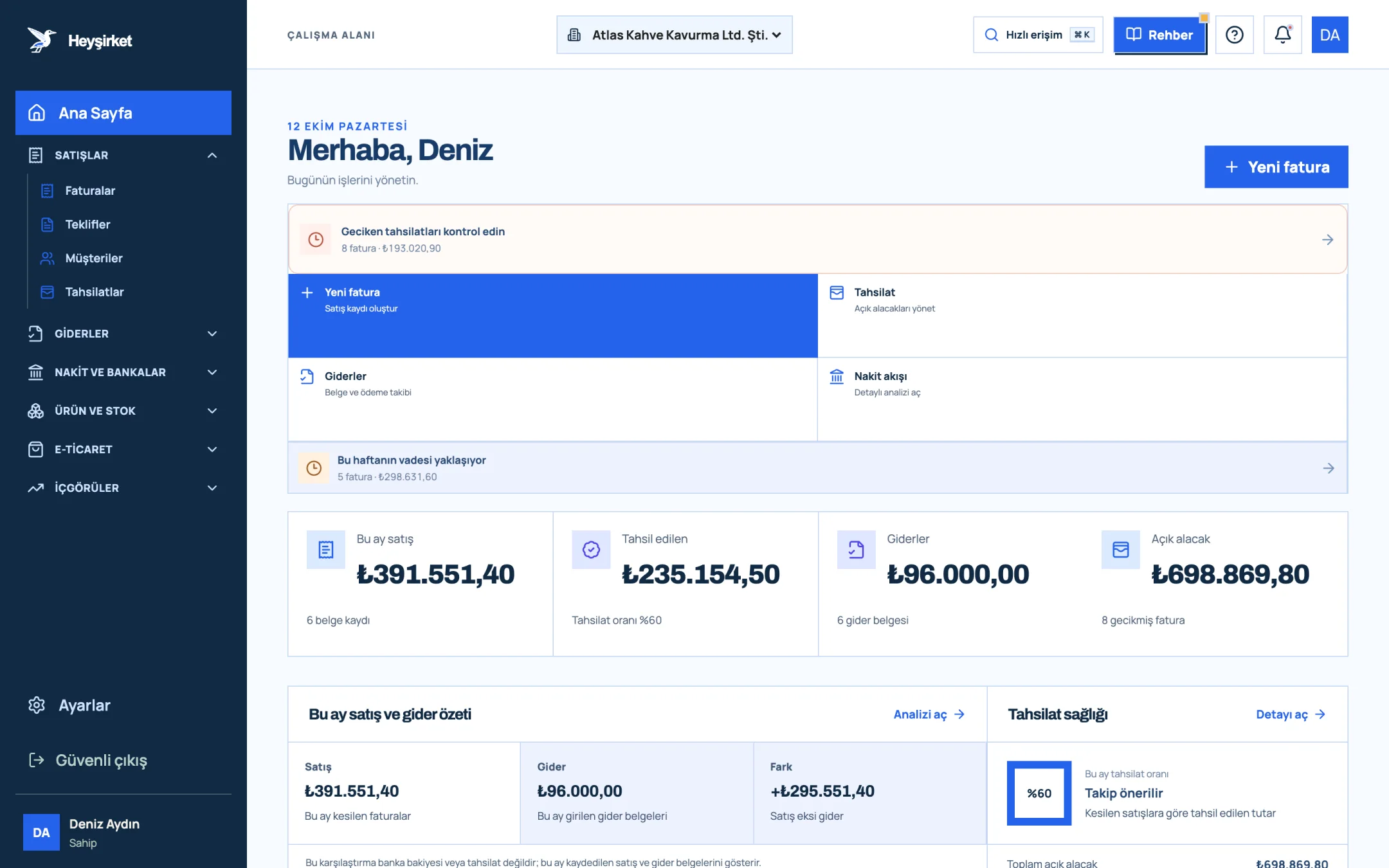
- 1. Create new invoice button
- 2. Overdue collections alert
- 3. Sales invoiced this month
- 4. Total open receivables
Part 5 · Metric 4 How do you do receivables aging?
Receivables aging means grouping open receivables by the time elapsed since their due date. The classic groups are not yet due, 1-30 days, 31-60 days, 61-90 days and over 90 days.
Why does it matter? If 500.000 TL of open receivables consists entirely of invoices not yet due, that's healthy growth; if half of the same amount is over 90 days, there's a serious collection risk. Same total, completely different meaning.
| Since due date | Amount | Share | What to do |
|---|---|---|---|
| Not yet due | 96.000 TL | %52 | A friendly reminder 3 days before the due date |
| 1-30 days | 52.000 TL | %28 | Call by phone and get a payment date |
| 31-60 days | 21.000 TL | %11 | Make new shipments conditional on payment |
| 61-90 days | 9.000 TL | %5 | Written notice, account reconciliation |
| Over 90 days | 7.000 TL | %4 | Review with your accountant and legal advisor |
| Total open receivables | 185.000 TL | %100 |
Heyşirket doesn't have a ready-made aging table, but it has everything you need to build one. The Overdue filter in the invoice list filters out late invoices, and the Download CSV button exports the list including the Due date and Payment status columns. In Excel, a single column subtracting the due date from today's date builds the table in five minutes. The amount in the file is the invoice total; for partially paid invoices, take the remaining amount from the Collections screen and correct it.
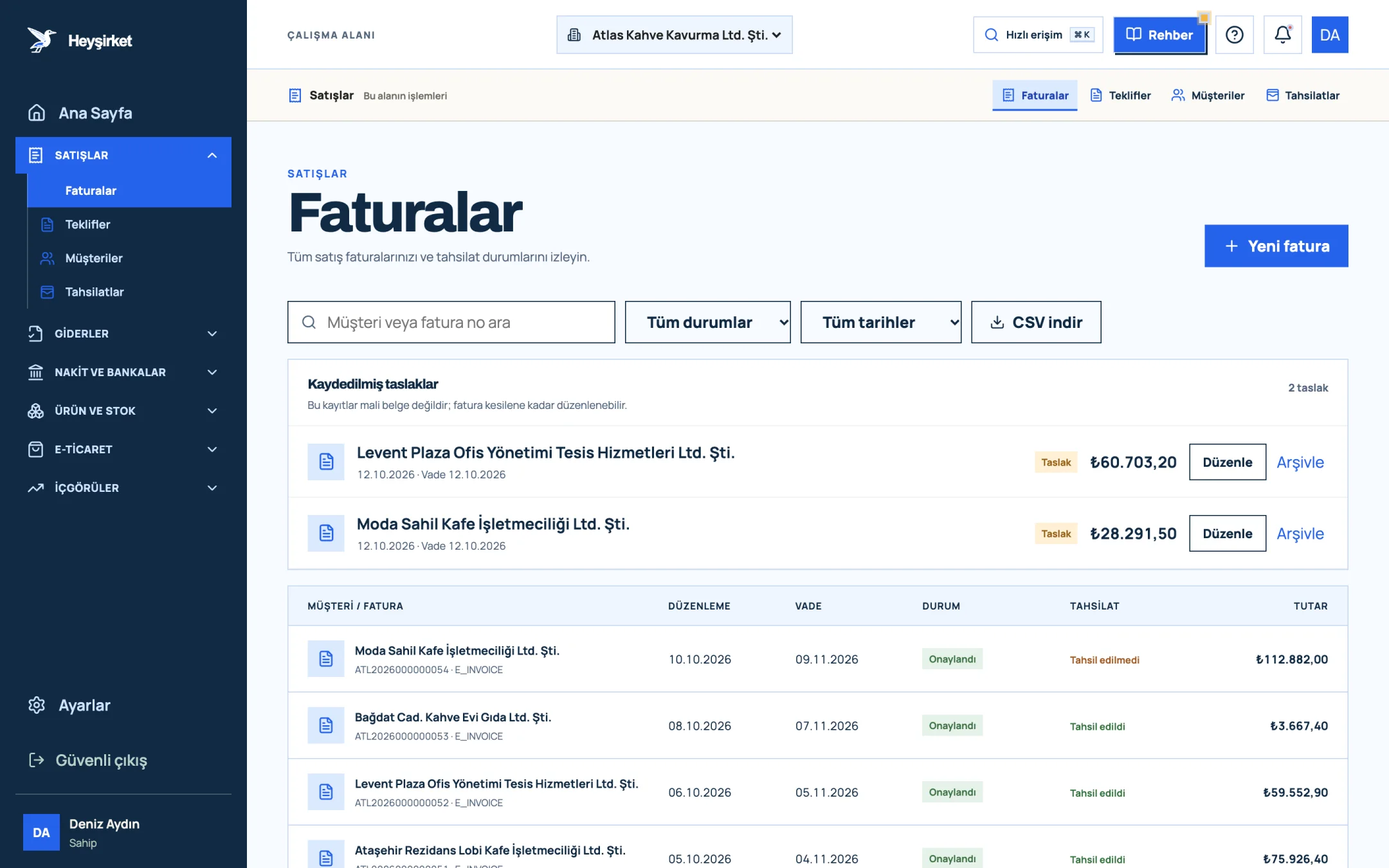
- 1. New invoice button
- 2. Search and filters
- 3. Collection status column
- 4. Saved invoice draft
The Open balance concentration panel on the Home page complements aging: it ranks the four customers with the highest open balances. If a customer is both at the top of this list and in the over-60-days group, they should get the first phone call. You'll find the practical side of receivables follow-up in our speeding up receivables collection article.
Part 6 · Metric 5 Why do expense ratios tell you more than amounts?
An expense ratio is an expense item divided by net sales for the same period. If rent is 18.000 TL and net sales are 286.000 TL, the rent ratio is 6,3 percent.
The amount of an expense can grow; in a growing business that's natural. The real question is whether the ratio is growing. If marketing spend doubles while sales also double, the ratio is flat and there's no problem. If sales stand still while marketing spend rises, the spending isn't paying off.
| Expense item | July | August | September | Signal |
|---|---|---|---|---|
| Rent | %7,1 | %6,8 | %6,3 | Ratio falls as sales grow, good |
| Staff | %14,0 | %14,5 | %14,2 | Stable |
| Shipping and delivery | %2,8 | %3,6 | %4,4 | Rising fast, needs review |
| Marketing | %3,0 | %3,1 | %2,9 | Stable |
In this table the shipping line stands out. As Atlas Kahve's marketplace sales grew, so did the number of small parcels, but shipping fees weren't reflected in the selling price. A single ratio revealed an item that needed fixing in the price list.
To track expense ratios, expenses need to be entered regularly by category. We explain how to set up a document routine in our expense management and document organization article.
Part 7 · Map Which report should you check for which question?
Choose the report based on the type of question you're asking: volume questions go to the Sales report, period balance to the Income and expenses report, tax questions to the VAT report, and cash questions to the Cash flow report. That's the sixth metric: asking the right question on the right screen.
| Your question | Where to look | Metrics |
|---|---|---|
| How much did we sell this month? | Insights › Sales and collections | Total sales, number of invoices |
| How much of what we sold has been collected? | Sales and collections; Home | Collected, Collection health |
| Did collections cover expenses? | Insights › Income and expenses | Net movement |
| How much VAT will we pay on the 28th? | Insights › Tax and VAT | Net VAT |
| Where did the money go? | Insights › Cash flow; Cash and banks | Collected, Expenses, account balances |
| Who owes us the most? | Home | Open balance concentration |
| Who should we call today? | Home; Collections | Overdue receivables, Due this week |
| Did we make a profit? | Your accountant's income statement | Gross profit, operating profit |
All reports use the same Report period panel: the preset ranges This month, Last 3 months, This year and All time, or start and end dates entered by hand. Sales and expenses are filtered by document issue date. We've prepared a separate screen guide for each report: Sales and collections report, Income and expenses report and VAT report.
Part 8 · Routine How do you set up a one-hour monthly reporting routine?
A monthly reporting routine means reading the same reports in the same order in the first week of every month and writing three or four numbers into a table. The magic isn't in the report but in the repetition: when you read the same number from the same place every month, deviations jump out on their own.
Six metrics, one table
| Metric | Formula | September 2026 |
|---|---|---|
| Net sales | Total sales − Output VAT | 286.000 TL |
| Gross profit margin | (Net sales − cost of goods sold) / Net sales | %40 |
| Net movement | Collected − Expenses | −13.000 TL |
| Collection rate | Collected / Total sales | %73 (as of 15 October) |
| Share of receivables over 90 days | Receivables over 90 days / Total open receivables | %4 |
| Shipping expense ratio | Shipping expense / Net sales | %4,4 |
Add this table to a spreadsheet every month with the same columns. After three months you'll have something no software can give you on its own: a line showing your own business's normal. Deviations gain meaning against that line.
Monthly financial report checklist
- In the Sales report, note last month's Total sales and Output VAT; the difference between them is net sales.
- In the same report, divide the Collected amount by Total sales and compare the collection rate with the same day of the previous month.
- Apply the Overdue filter in the Invoices list, download the CSV and update the aging groups.
- Read Net movement in the Income and expenses report; if it's negative, check the Open receivables card.
- Calculate the ratio of your three largest expense items to net sales and note the three-month trend.
- Add Net VAT from the VAT report to your payment calendar.
- Compare the gross profit margin in the income statement from your accountant with your own estimate.
- Decide the next step (a call, a reconciliation, a condition on new orders) for the top customer in the Open balance concentration panel.
You can make this list the last step of your month-end close. We've gathered the whole close step by step, from bank reconciliation to handing over to your accountant, in our month-end close checklist article.
Reading reports isn't a skill, it's a habit. An owner who reads the same number from the same place every month spots the deviation before the accountant does.
Heyşirket editorial team
What's the difference between gross profit and net profit?
Gross profit is found by deducting only the direct cost of goods sold from net sales excluding VAT. Net profit is what remains after operating expenses such as rent, staff and marketing, plus financing costs, depreciation and taxes, are also deducted.
What's a good collection rate?
There's no single right rate; it depends on your payment terms. What matters is reading the same month on the same day and comparing it with previous months. The Heyşirket Home page marks 80 percent and above for the current month as "Balanced outlook".
How often should I update the receivables aging table?
Once a month is enough; businesses with high receivables or many customers catch delays earlier by updating it every two weeks.
If net movement is negative, does that mean we made a loss?
No. Net movement is the amount collected from the period's invoices minus expenses. It can be negative because of uncollected receivables; for profit or loss, look at the income statement prepared by your accountant.
Are report figures VAT-inclusive?
In Heyşirket reports, Total sales and Expenses are VAT-inclusive amounts. VAT amounts are shown separately on the Output VAT and Input VAT cards.
Open your reports Open last month's Income and expenses report and read Net movement and the Open receivables card side by side. Go to Income and expenses report
Author: Heyşirket Editorial Team