Collections · 11 min read · Updated:
Bank statement matching: match bank transfers to invoices in minutes
The customer made the transfer, but it's unclear what they wrote in the description. Searching the statement to find which invoice it settled is the dullest part of collections. With the right method, it takes a few minutes.
In short
- Bank statement matching means linking every money movement at the bank to the related invoice, expense or cash-bank entry, so open receivables and payables are clear.
- The strongest clues for linking a transfer to the right invoice are the tax number and invoice number in the description, followed by company name, amount and closeness to the due date.
- A bulk transfer that settles several invoices is allocated starting from the oldest invoice; any overpayment stays on the customer account as an advance.
- In Heyşirket you upload the bank's Excel or CSV statement; columns are recognised automatically for Ziraat, İş Bankası, Garanti BBVA, Akbank, Yapı Kredi, QNB, Halkbank, VakıfBank and Enpara statements.
- Every confirmed match is written both to the invoice as a collection and to the bank account's ledger; the same statement line is never processed twice.
It's month end and the bank statement is in front of you: forty incoming transfers, thirty outgoing payments. Some show a company name, others only say "EFT". One customer paid three invoices with a single transfer, another paid half. Bank statement matching is the job of linking each of these lines to the right invoice, and in many businesses it takes days.
In this article we explain the logic of matching, the clues that tell you which invoice a transfer belongs to, and how to handle bulk, partial and overpayments. Then we show step by step how to do the same job in Heyşirket by uploading an Excel statement.
Part 1 · Definition What is bank statement matching and why is it needed?
Bank statement matching means linking every money movement your bank recorded to its counterpart in your own records. An incoming transfer is linked to a sales invoice, an outgoing payment to a supplier invoice, and other movements to their own types such as fees, tax or transfers between accounts.
If it isn't done, three problems appear at once. You remind a customer about an invoice they already paid. You think an unpaid invoice is paid. And after a while your bank balance and the balance in your records stop matching, and finding where the difference came from gets harder every month.
- Invoice issued — An open receivable
- Transfer arrives — A line on the statement
- Matching — Line linked to the invoice
- Invoice closed — Account and bank up to date
Part 2 · Clues How do you tell which invoice a transfer belongs to?
Transfer descriptions aren't standard; whatever your customer types is what you see. So several clues are weighed together. They don't all carry the same weight.
| Clue | How strong? | Note |
|---|---|---|
| Tax number (VKN/TCKN) in the description | Very strong | Identifies the sending company for certain |
| Invoice number in the description | Very strong | Shows which invoice was settled |
| Company name | Strong or medium | Abbreviations and spelling may differ |
| Amount exactly equal to an open invoice | Medium | Misleading if several invoices have the same amount |
| Payment date close to the due date | Weak | Not enough on its own |
Part 3 · Tricky cases How are bulk, partial and overpayments matched?
What makes matching hard is that one transfer doesn't always equal one invoice. Three cases are very common:
- Bulk payment: the customer pays several invoices with one transfer. As a rule, the payment is allocated starting from the oldest invoice.
- Partial payment: the customer pays part of an invoice. The invoice stays open as partially collected, and the rest stays tracked.
- Overpayment or prepayment: the customer pays more than their open balance, or pays before there's an invoice. The excess stays on the customer account as an advance and is deducted from the next invoice.
| Incoming transfer | 50.000,00 TL |
|---|---|
| Invoice 1 (oldest due), remaining | 18.000,00 TL |
| Invoice 2, remaining | 24.000,00 TL |
| Invoice 3, remaining | 15.000,00 TL |
| Invoices 1 and 2 close; collected on Invoice 3 | 8.000,00 TL |
The figures are illustrative. 7.000 TL stays open on Invoice 3. If your customer wanted a different allocation, for example they deliberately didn't pay a disputed invoice, change the allocation manually.
Part 4 · Other movements How are bank movements other than invoices tracked?
Not every statement line belongs to an invoice. Bank fees, tax and social security payments, salaries, loan instalments and transfers between your own accounts are on the statement too. If you don't link these to a type as well, the list of unmatched lines grows every month and hides the lines that really need attention.
No unmatched lines at month end
- Incoming transfers are linked to customer invoices or recorded as customer advances.
- Outgoing payments are linked to supplier expenses or recorded as supplier advances.
- Items such as bank fees, tax and interest are recorded as other expense or other income.
- Transfers between your own accounts are recorded as transfers.
- Movements already in the ledger weren't entered a second time.
- The statement's closing balance equals the bank balance in your records.
The last item is the simplest proof that matching was done correctly. If the balance doesn't match, either a line was skipped or a movement was entered twice. Comparing balances with the other company on the customer side is a separate job; we covered it in current account reconciliation.
Part 5 · Preparation What should be ready before you start matching?
Matching finishes as fast as your records are tidy. Before opening the statement, make sure these four things are in place:
- Invoices must be issued: every sale whose payment appears on the statement should have its invoice in the system. A transfer without an invoice can only wait as an advance.
- Customer cards need tax numbers: a VKN/TCKN in the description can only be linked to a company if it's also on the customer card.
- Expenses must be entered: if the expense documents behind supplier payments aren't recorded, outgoing payments won't match.
- The opening balance must be right: the bank account's opening balance should equal the statement balance on the day you started tracking; otherwise the balance never matches at month end.
This preparation is done once. In the following months, the job is just issuing new invoices on time and entering new customers' tax numbers in full.
Part 6 · Heyşirket How do you match a bank statement in Heyşirket?
In Heyşirket's pre-accounting, open a bank account on the Nakit & Banka (Cash & Bank) screen and click Ekstre yükle (upload statement) to open the matching screen. You upload the Excel (.xlsx), CSV or the bank's .xls export you downloaded from your bank. The file is read on your device; only the movement lines are saved to the server.
| Bank | Bank | Bank |
|---|---|---|
| Ziraat Bankası | İş Bankası | Garanti BBVA |
| Akbank | Yapı Kredi | QNB |
| Halkbank | VakıfBank | Enpara.com |
You can upload a statement from a bank that isn't on the list too. If the columns aren't recognised, the screen opens a Kolon eşleştirmesi (column mapping) step; you only have to choose the transaction date, description and amount (+/−) columns, or separate debit and credit columns, once. A live connection to the bank, i.e. open banking, isn't available yet; for now statements are uploaded as files.
Step by step: from statement to closed invoices
Download and upload the statement
Download the period's account movements from online banking as Excel or CSV. In Heyşirket, open the bank account, click Ekstre yükle and drag in the file. Files can be up to 8 MB; split long periods into several parts.
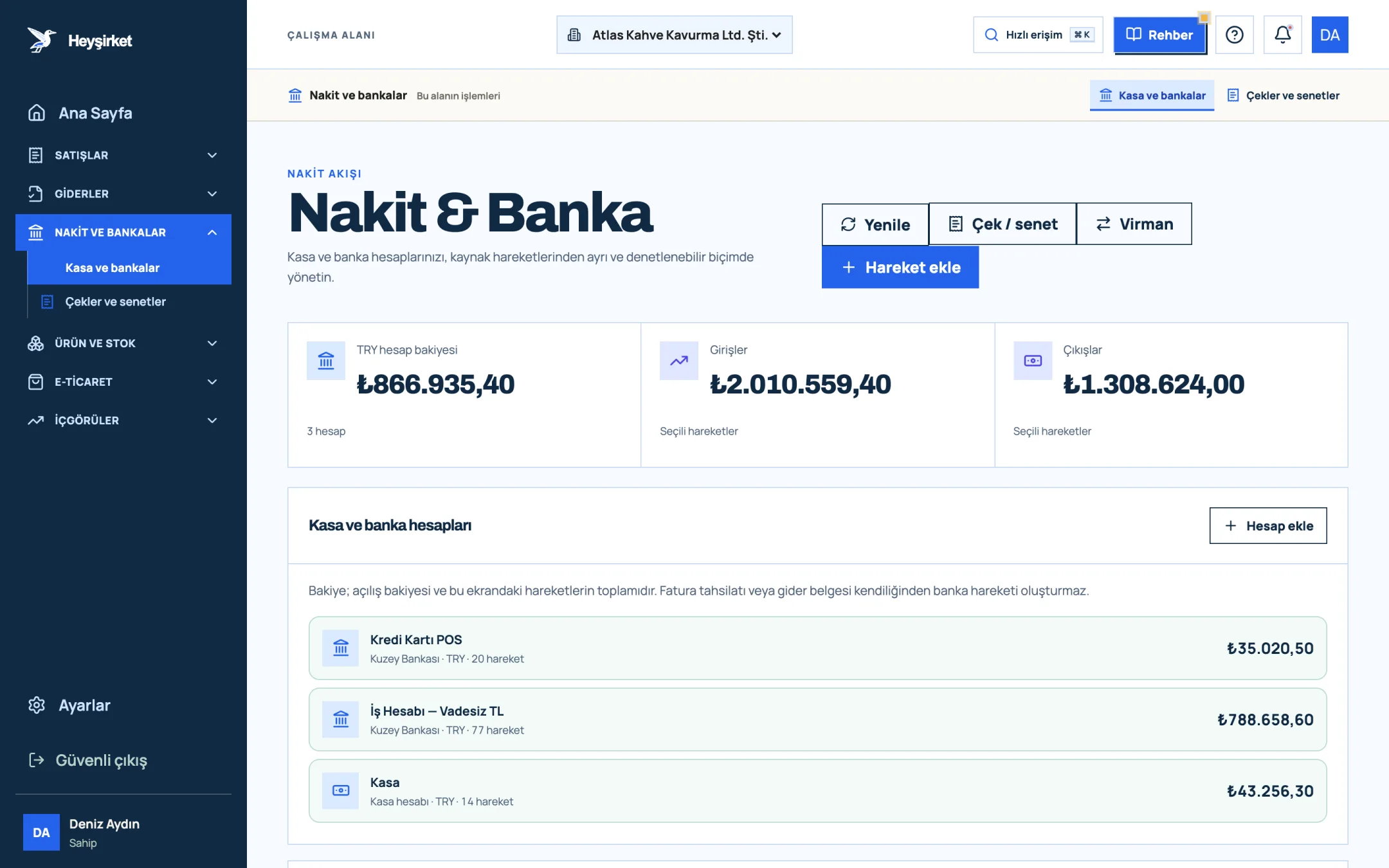
Download and upload the statement - 1. Add transaction button
- 2. Transfer between accounts
- 3. Total TRY balance
- 4. Cash and bank account list
Review the suggestions
Next to each bank line you see a suggested invoice or expense and a confidence badge: high, medium or low. Money in is matched to the customer's open invoices, money out to the supplier's open expenses. The reason for the suggestion is shown too, for example the tax number appears in the description, or the amount is exactly the same as the invoice.
Confirm high-confidence matches in one click
The Yüksek güvenlileri onayla (confirm high-confidence) button links all strong matches to the ledger at once. Bulk transfers are allocated starting from the oldest invoice; the same invoice is never allocated to two lines at once.
Link the rest manually
For lines on the Eşleşmeyen (unmatched) tab, use Faturaları seç (select invoices) or Giderleri seç (select expenses) and search by customer name, tax number or invoice number to choose the document yourself. Overpayments stay as Cariden avans / ön ödeme (customer advance) or Tedarikçiye avans (supplier advance).
Link non-invoice lines to their type
For lines such as bank fees and tax choose Diğer gider (masraf, vergi…) (other expense), for inflows such as interest choose Diğer gelir (other income). Skip unimportant lines, or ones you'll look at later, with Atla (skip).
Every match you confirm is written in two places: the invoice is updated as collected, and an entry is added to the bank account's ledger. If a bank movement with the same date and amount is already recorded, the screen says Defterde zaten kayıtlı (already in the ledger) and links to that line without creating a new entry. If you upload the same statement, or two overlapping periods, lines uploaded before aren't processed again.
Pre-accounting is included in the Profesyonel and Premium packages. The steps for recording a collection manually are in the how to record a collection guide, the cash side in how to keep a cash book, and all cash features on the cash and bank page. If you want to accept card payments, a payment link records the collection on the invoice automatically.
What is bank statement matching?
Bank statement matching means linking every money movement at the bank to its counterpart in your records. Incoming transfers are linked to sales invoices, outgoing payments to supplier expenses, and other movements to their types such as fees, tax or transfers between accounts. The goal is to keep open receivables, payables and the bank balance correct.
How do I match a transfer if the description has no invoice number?
First check whether the description has a tax number or company name, then whether the amount equals one of the customer's open invoices and how close the payment date is to the due date. Matching by amount alone can close the wrong invoice when several have the same amount.
What if one transfer settles several invoices?
As a rule, a bulk payment is allocated starting from the oldest invoice. If the transfer exceeds all open invoices, the excess stays on the customer account as an advance and is deducted from the next invoice. If the customer deliberately didn't pay a particular invoice, the allocation is changed manually.
Which banks' statements does Heyşirket recognise?
Columns are recognised automatically for Ziraat Bankası, İş Bankası, Garanti BBVA, Akbank, Yapı Kredi, QNB, Halkbank, VakıfBank and Enpara.com statements. For other banks' Excel or CSV statements, you map the columns manually once.
Does Heyşirket connect to the bank directly?
Not yet. A live connection to the bank, i.e. open banking, is among the features coming soon. For now you match by uploading the Excel or CSV statement downloaded from your bank; the file is read on your device and only movement lines are saved.
If I upload the same statement twice, are movements recorded twice?
No. Lines uploaded before aren't processed again, and the upload summary shows how many lines were new and how many were repeats. Also, if a bank movement with the same date and amount is already recorded, the match links to that movement without creating a new entry.
Upload your statement, close your invoices Open your bank account, upload the Excel statement and confirm high-confidence matches in one click. Open Cash & Bank
Author: Heyşirket Editorial Team