e-Documents · 15 min read · Updated:
e-SMM guide for Türkiye: withholding, VAT and net-to-gross on self-employment receipts
Your lawyer issues a receipt for 20.000 TL, but do you transfer 16.000 TL or 20.000 TL? Understanding the e-SMM from both the issuing and the receiving side under Turkish rules prevents both cash and tax mistakes.
In short
- An e-SMM (e-self-employment receipt) is the electronic version of the self-employment receipt issued by self-employed professionals, and it's mandatory for self-employed professionals who aren't tax-exempt.
- Under Article 94 of the Income Tax Law, the company or merchant receiving the service withholds 20% income tax on the gross fee and declares it in the withholding and social security premium return (muhtasar ve prim hizmet beyannamesi).
- Self-employment services are generally subject to 20% KDV (VAT); VAT is calculated on the gross fee and isn't affected by withholding.
- No withholding applies to self-employment services provided to end consumers, because an individual consumer isn't a withholding agent.
- An e-SMM can be issued free of charge through GİB's e-Arşiv Portal or through a private integrator; Heyşirket does not issue e-SMMs.
Atlas Kahve worked with a lawyer on a new dealership agreement. At the end of the month the lawyer's e-SMM arrived: gross fee 20.000 TL, VAT 4.000 TL, withholding 4.000 TL. Deniz looked at the receipt for a while and asked: “So who do I pay now, and how much?”
Thousands of companies ask this question every month. The answer is simple but counterintuitive: the lawyer receives 20.000 TL, and Atlas Kahve pays the other 4.000 TL to the state. By the end of this article you'll also see how to find the gross fee in a single line for a self-employed professional who says “I want this much in hand.”
Part 1 · Definition What is an e-SMM, and who has to issue one?
An e-SMM (elektronik serbest meslek makbuzu, or e-self-employment receipt) is the electronic version of the receipt that self-employed professionals such as lawyers, accountants, doctors, architects, engineers, designers or consultants issue for their services. Legally, it has the same standing as a paper receipt.
The e-SMM is mandatory for self-employed professionals who aren't tax-exempt. It was introduced in 2020: those already in business moved to the system by 1 June 2020, and those who start later switch to e-SMM within a short period after starting, regardless of revenue.
| Topic | Rule |
|---|---|
| Who issues it? | Self-employed professionals who aren't tax-exempt (activities under Article 65 of the Income Tax Law, GVK) |
| Revenue threshold | None; carrying out a self-employed activity is enough |
| Where is it issued? | GİB e-Arşiv Portal (free) or a private integrator |
| Delivery to the recipient | Electronically (e.g. by email), or as a printed copy if the recipient asks |
| Signature | e-signature or financial seal (mali mühür) |
| Retention | 5 years under VUK (Tax Procedure Law); 10 years under TTK (Turkish Commercial Code) |
| Legal basis | VUK General Communiqué No. 509 |
The definition is clear. The real confusion comes from two different taxes appearing on the receipt at the same time.
Part 2 · Withholding Who withholds tax on a self-employment receipt?
Self-employment withholding (stopaj) is the amount that the company or merchant receiving the service deducts from its payment to the self-employed professional as an income tax prepayment and pays to the tax office on their behalf. Under Article 94/2-b of the Income Tax Law, the rate is 20% of the gross fee.
- The service recipient withholds. Since Atlas Kahve is a limited company, it is a withholding agent; it withholds 20% from its payment to the lawyer.
- Withholding is calculated on the gross fee. VAT is not included in the withholding base.
- Withheld tax is declared in the withholding and premium return. As a rule, filing and payment are due by the 26th of the month following the month of payment.
- The self-employed professional offsets the withholding in their annual return. The withheld amount is deducted from their annual income tax; it isn't lost.
- No withholding for end consumers. When an individual hires a lawyer for themselves, they aren't a withholding agent, so no tax is withheld and the receipt is issued without withholding.
Withholding lowers the amount you pay. But the receipt also has VAT, which adds the same amount back.
Part 3 · VAT How is VAT calculated on an e-SMM?
Self-employment services are generally subject to the 20% general rate, and VAT is calculated on the gross fee. Withholding doesn't affect VAT; VAT is applied to the gross amount before withholding.
| Gross fee | 20.000 TL |
|---|---|
| Income tax withholding (20%) · withheld by Atlas | −4.000 TL |
| Net fee | 16.000 TL |
| VAT (20%, on the gross fee) | +4.000 TL |
| Withholding Atlas pays to the state via the withholding return | 4.000 TL |
| Amount transferred to the lawyer (16.000 + 4.000) | 20.000 TL |
Because withholding and VAT have the same rate, the payment happens to equal the gross fee. Atlas can treat the 4.000 TL VAT as deductible input VAT under the general rules. The figures change where VAT withholding (KDV tevkifatı) applies.
So here's the answer to Deniz's question: the lawyer receives 20.000 TL, and Atlas also pays the 4.000 TL withholding to the tax office by the 26th of the following month. Atlas's total cash outflow for this service is 24.000 TL; it recovers the 4.000 TL VAT through deduction.
When does VAT withholding come into play?
Some self-employment services may also be subject to VAT withholding when provided to certain buyers. For example, the VAT General Implementation Communiqué requires part of the VAT on services such as studies, planning and design, consulting and auditing provided to designated buyers to be declared by the buyer. In that case, part of the VAT shown on the receipt goes not to the self-employed professional but into the buyer's VAT Return No. 2.
Part 4 · Net-to-gross How do you find the gross fee for someone who says “I want this much net”?
To get from the net fee to the gross fee, divide the net amount by 1 minus the withholding rate. With 20% withholding, that means dividing the net amount by 0,80: Gross = Net ÷ 0,80.
| Net fee the trainer asks for | 12.000 TL |
|---|---|
| Gross fee (12.000 ÷ 0,80) | 15.000 TL |
| Withholding (20%) · withheld by Atlas | 3.000 TL |
| VAT (20%, on the gross) | 3.000 TL |
| Paid to the trainer (12.000 + 3.000) | 15.000 TL |
| Atlas's total cash outflow (15.000 + 3.000 withholding) | 18.000 TL |
Atlas can deduct the 3.000 TL VAT, in which case the net cost of the service is 15.000 TL. The figures assume no VAT withholding applies.
The math is done. Now let's look at where and how to record the receipt when it reaches your company.
Part 5 · The service recipient How do you record an incoming e-SMM?
For a company receiving the service, an e-SMM is an expense document with deductible VAT. In pre-accounting, the goal is to keep both the liability (the amount owed to the self-employed professional) and the document (for VAT deduction and the withholding return) complete.
Recording an e-SMM as an expense in Heyşirket
Open the expense screen
In the Expenses section, press the Add expense button at the top right. The window that opens lets you track the expense liability, its due date and payment status; it doesn't create a financial e-document.
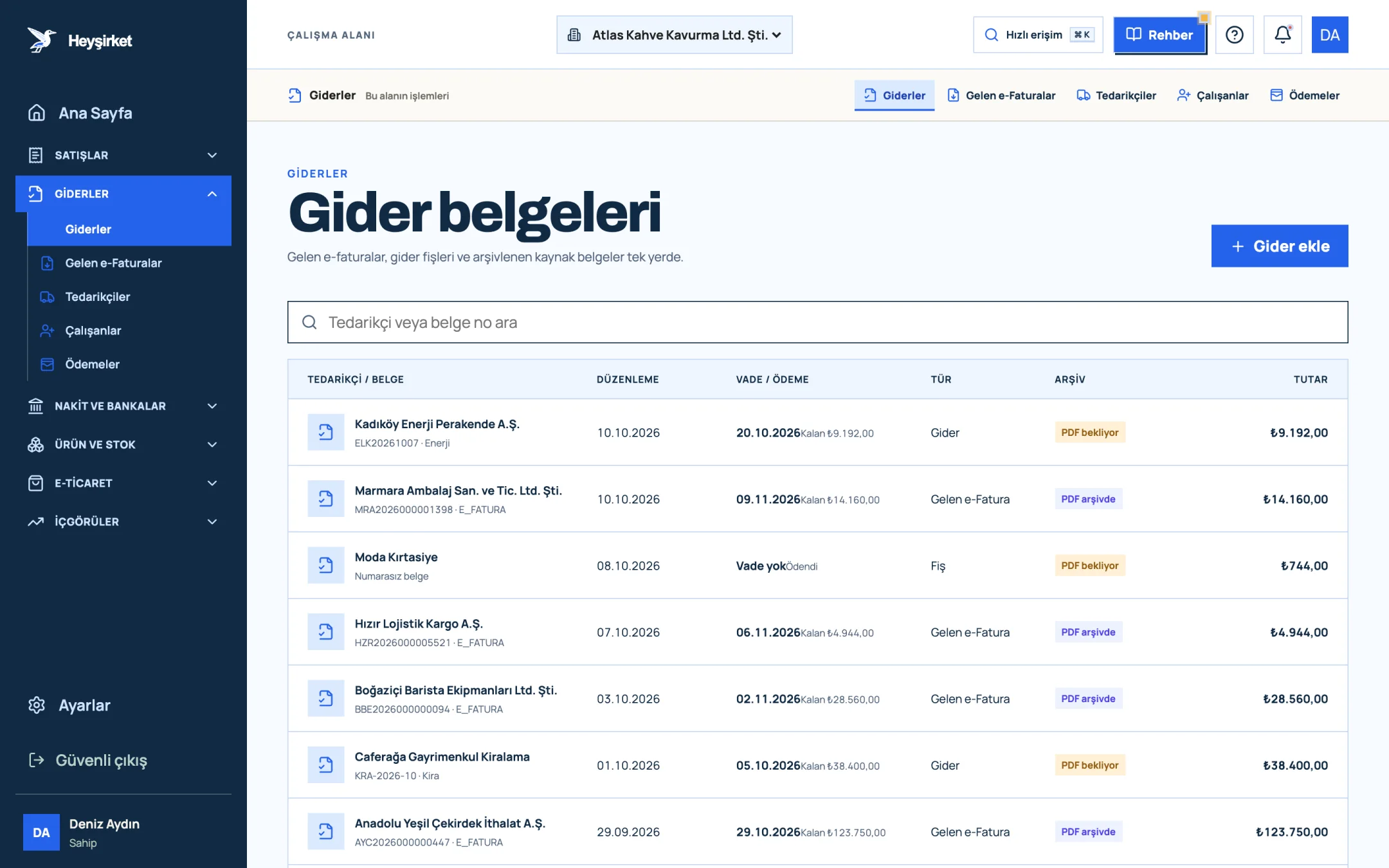
Open the expense screen - 1. Add expense button
- 2. Due date and remaining payment
- 3. Document type (Expense, Incoming e-Fatura, Receipt)
- 4. Expense document row
Enter the provider and the document
Choose the self-employed professional from the Saved supplier list; select the Expense document option in the Document type field and enter the receipt number in the Document number field. Choose a suitable Expense category.
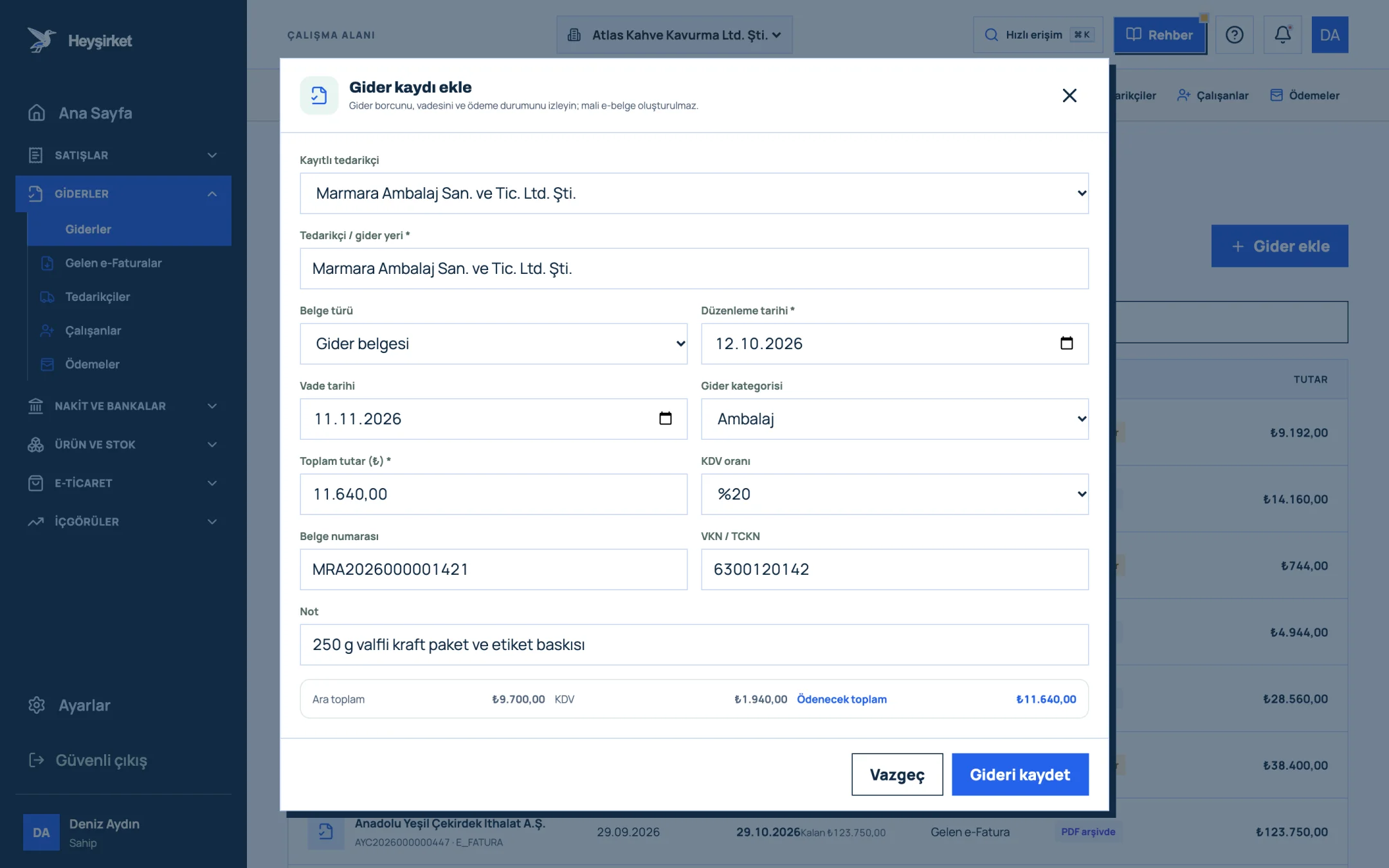
Enter the provider and the document - 1. Supplier selection
- 2. Expense category
- 3. Amount and VAT rate
- 4. Subtotal, VAT and total payable
- 5. Save expense
Enter the amount and VAT rate
Fill in the Total amount (₺) and VAT rate (20%) fields; the Subtotal, VAT and Total payable appear at the bottom of the window. Withholding isn't a separate field in this form; write the withheld amount in the Note field and let your accountant know separately. Finish with Save expense.
Enter the amount and VAT rate - 1. Supplier selection
- 2. Expense category
- 3. Amount and VAT rate
- 4. Subtotal, VAT and total payable
- 5. Save expense
Record the payment
When you make the payment, open the expense document's details and enter the payment amount, date and cash / bank account with Add payment. The due date column in the list updates to Paid; don't forget to pass the receipt itself on to your accountant.
Record the payment - 1. Add expense button
- 2. Due date and remaining payment
- 3. Document type (Expense, Incoming e-Fatura, Receipt)
- 4. Expense document row
You'll find the general rules of document management in our article on expense management and document organization, and the details of the expense screen in the how to record an expense guide.
Part 6 · The receipt issuer If you're self-employed, how should you organize your work?
For a self-employed professional, the e-SMM is the only official document that records earnings, but it isn't the whole job. Quotes, contracts, payment tracking and customer balances revolve around the receipt, and that's often the part that takes the most time.
| Stage | What happens? | Where? |
|---|---|---|
| Quote | Scope of service, gross fee and validity period are written down | Quote document |
| Service | The work is done and payment comes due | - |
| e-SMM | The receipt is issued at the time of payment | GİB e-Arşiv Portal or integrator |
| Payment | The net fee and VAT arrive in your account; the customer pays the withholding | Bank account |
| Records and returns | Receipts go into the earnings ledger; VAT and annual income tax are declared | Ledger-Return System (Defter-Beyan Sistemi) and accountant |
There's an important detail here: for self-employment income, the receipt is generally issued at the time of payment. That's why tracking payments is a precondition for issuing receipts on time.
Earnings are recorded in a separate system. As a rule, self-employed professionals keep their earnings ledger through GİB's Ledger-Return System (Defter-Beyan Sistemi); the e-Defter (e-ledger) is specific to companies keeping balance-sheet-basis books. You'll find which ledger suits you and where you stand in e-transformation in our e-Defter and e-Dönüşüm article.
Heyşirket doesn't issue e-SMMs; you need to issue the receipt through the GİB e-Arşiv Portal or a private integrator. Sales invoices issued from Heyşirket don't replace an e-SMM either. But you can keep the customer, quote and payment workflow around the receipt in Heyşirket.
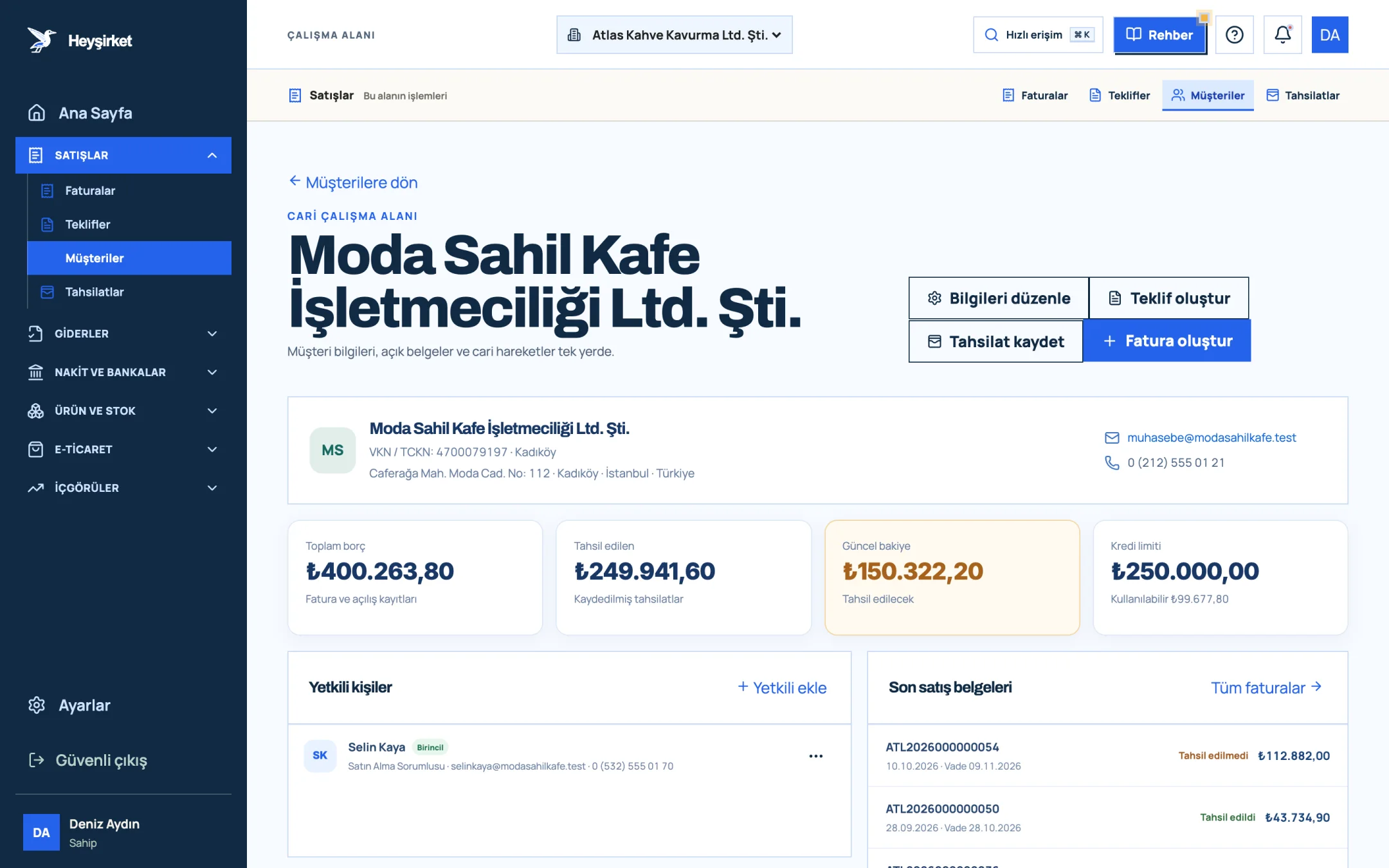
- 1. Quick actions (Create invoice, Record collection)
- 2. Current balance
- 3. Credit limit
- 4. Recent sales documents
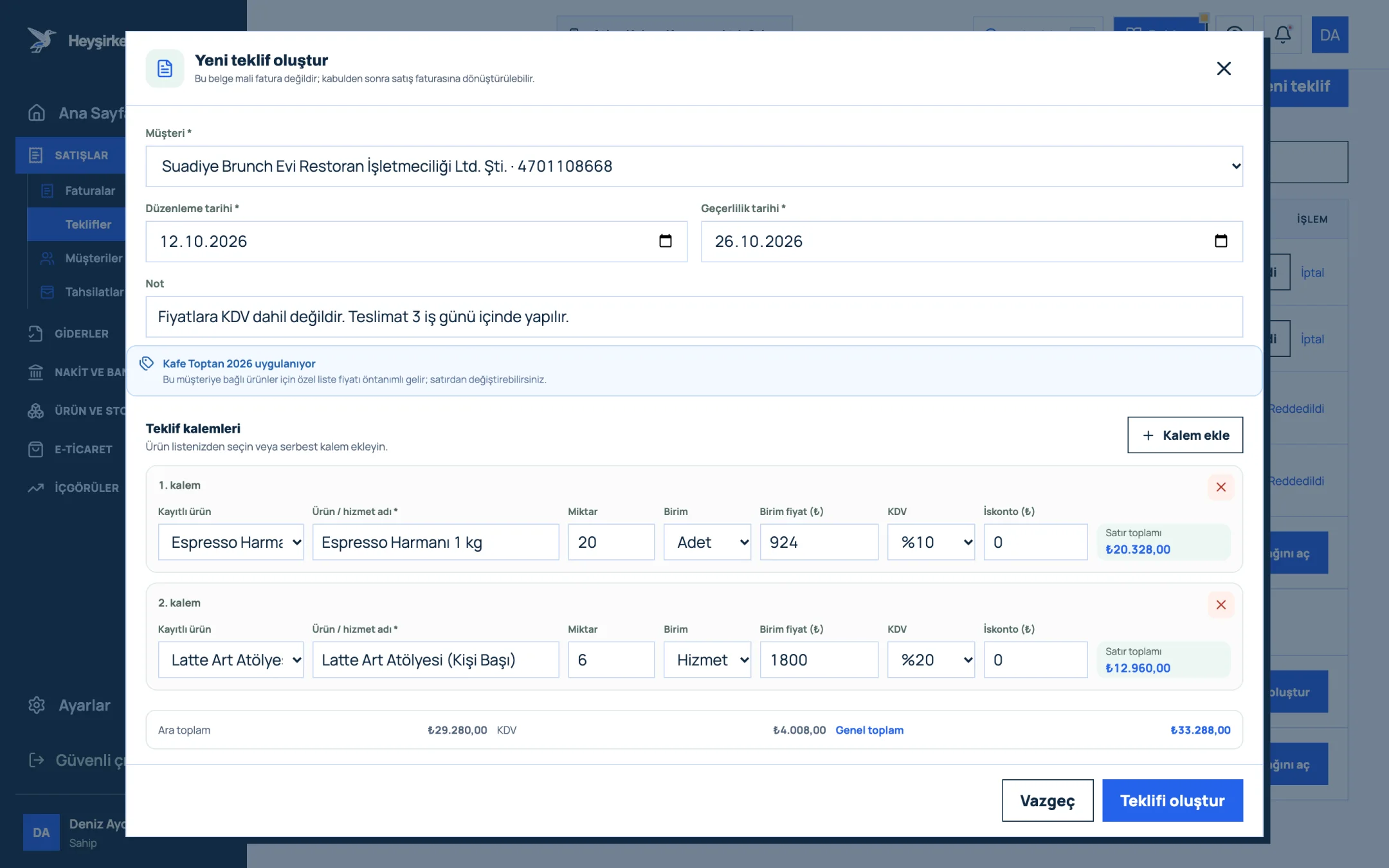
- 1. Customer and date fields
- 2. Quote line items
- 3. Add line item
- 4. Quote total
- 5. Create quote button
Part 7 · Check How do you do a month-end check on e-SMMs?
A month-end check on e-SMMs means confirming that the receipts you received and issued are consistent in terms of withholding, VAT and payment. The list below is a short check both sides can use.
e-SMM month-end checklist
- Have I received an e-SMM from every self-employed professional whose services I used this month?
- Are withholding and VAT on each receipt calculated at the correct rate on the gross fee?
- Did I pay the self-employed professional the net fee plus VAT, and set the withholding aside separately?
- Have the withheld amounts been reported to the accountant for the withholding return?
- If I received a service subject to VAT withholding, has this been flagged separately?
- Have the receipts been recorded as expenses in Heyşirket, with their PDFs in the archive?
- If I'm self-employed, have I issued an e-SMM for every payment received this month?
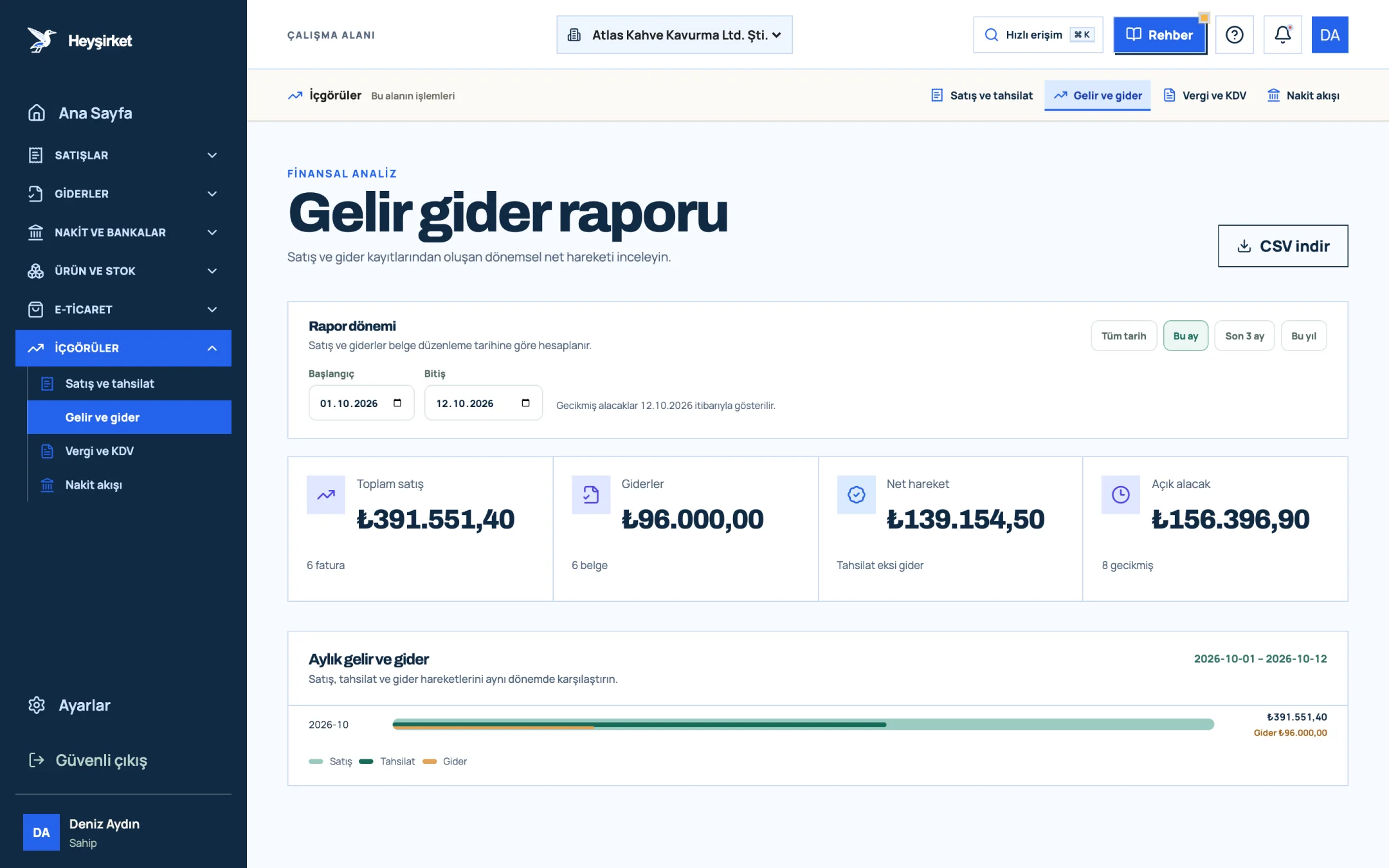
- 1. Total sales and expenses
- 2. Monthly income and expense chart
Who has to issue an e-SMM?
All self-employed professionals who aren't tax-exempt, such as lawyers, accountants, doctors, architects, engineers, consultants and similar professions. There's no revenue threshold for the e-SMM. New businesses also join the system within a short transition period; confirm your own date with your accountant.
Can I issue an e-SMM for free?
Yes. An e-SMM can be issued free of charge through GİB's e-Arşiv Portal; you need an e-signature or financial seal. The portal only keeps documents for a limited time, so you should maintain a permanent archive yourself. Private integrators offer automation and archiving for a fee.
Is there withholding when I provide a service to an individual customer?
No. An individual consumer isn't a withholding agent, so they don't withhold tax. In this case the receipt is issued without withholding; VAT is calculated on the service fee and collected.
When is self-employment withholding paid?
The company or merchant receiving the service declares and pays the withheld tax with the withholding and premium return. As a rule, filing and payment are due by the 26th of the month following the month of payment; check current announcements for holidays and extensions.
Does Heyşirket issue e-SMMs?
No. Heyşirket doesn't issue e-SMMs, and its sales invoices don't replace an e-SMM. You can record the e-SMMs of self-employed professionals you work with as expenses in the Expenses section and track their payments and document archive; the withholding calculation stays with your accountant.
Can an e-SMM be cancelled?
An incorrectly issued e-SMM can be cancelled through the portal or integrator it was issued from; however, cancelling a receipt that has already been included in withholding and VAT returns may require amending those returns. Talk to your customer and your accountant before cancelling. For similar rules on the invoice side, see our article on return and cancellation invoices.
Get your self-employment expenses in order Record incoming receipts as expenses and track payment status and the PDF archive in a single list. Open expenses
Once you've read a self-employment receipt line by line, the two taxes on it stop getting mixed up: one is the income tax you pay on someone else's behalf, the other is VAT you can deduct.
Author: Heyşirket Editorial Team