Pre-accounting · 11 min read · Updated:
Preparing a quote: three price quote examples for products, services and projects
Writing a quote on a blank page is much harder than adapting a ready example. This article gives filled-in price quote examples for three different businesses, short texts to use when sending them and a quote form you can put on your site.

In short
- A price quote should include at least a quote number and date, a validity date, customer details, line items, unit prices, VAT, a grand total, and payment and delivery terms.
- In a product quote, quantity and unit come first; in a service quote, scope and exclusions; in a project quote, stages and a staged payment plan.
- A quote is not a financial document and doesn't replace an invoice; the sale becomes official when the accepted quote is turned into an invoice and issued.
- "Quote form" means two things: the site form where a customer asks you for a quote and the quote document you prepare; in Heyşirket the first is on the free Starter plan and the second is in pre-accounting on the Professional plan.
- A quote prepared in Heyşirket is sent by email with a PDF attached; the customer opens the quote page without logging in, via the QR code in the PDF or the button in the email, and approves it.
The customer said "put a price together and send it over". Now there's a blank page in front of you: where do you start, what goes in, how do you show VAT, where do payment terms go? Once preparing a quote is set up properly, the next quotes take minutes.
This article is practical: a filled-in price quote example for three different kinds of work, short texts for sending and following up, and a form for collecting quote requests on your site. For where quotes fit in the sales process and decisions on discounts and payment terms, read from quote to invoice; for screen-by-screen use, see the how to prepare a quote guide.
Part 1 · Skeleton What information should a price quote contain?
Whatever the sector, every quote has the same skeleton. Put the list below into your own template once; all the examples use this skeleton.
Price quote template: the essentials
- Your company details: legal name, address, tax office and number, phone, email.
- Customer details: legal name or full name, contact person.
- Quote number, issue date and validity date.
- Line items: name, description, quantity, unit, unit price and any discount.
- VAT rate and amount, subtotal, grand total.
- Payment terms: upfront, on credit or in stages.
- Delivery or start time.
- Whether prices include VAT, and the exchange rate rule if a foreign currency is involved.
Number your quotes consistently, e.g. TKL-2026-041. When a customer calls months later about "the quote you gave us last spring", the number lets you find the right document in seconds. When you revise a quote, add a new number or "Rev. 2" so two different prices don't get mixed up.
Part 2 · Product Example 1: a price quote for selling products
Example: a stationery wholesaler quotes an accounting office for monthly office supplies. In product quotes, the customer looks mostly at quantity, unit price and delivery time; descriptions are kept short.
| Item | Quantity | Unit price | Amount |
|---|---|---|---|
| A4 copy paper, 80 g, box of 5 reams | 40 boxes | 650.00 TL | 26,000.00 TL |
| Laser printer toner, compatible model | 6 units | 2,400.00 TL | 14,400.00 TL |
| Line discount (toner) | −400.00 TL |
| Subtotal (after discount) | 40,000.00 TL |
|---|---|
| VAT 20% (example rate) | 8,000.00 TL |
| Grand total | 48,000.00 TL |
Terms: Prices exclude VAT. Delivery is 3 working days after order confirmation. Payment is due 30 days from the invoice date. The figures are an example.
In this example the discount is shown on its own line. That way the customer sees how much discount they got, and you protect your list price. If you regularly give certain customers special prices, set up a price list instead of typing it into every quote.
Part 3 · Service Example 2: a service quote example
Example: a cleaning company quotes an office for a monthly cleaning service. Most disputes in service quotes are about scope: "was window cleaning included?" That's why the item description and a list of exclusions matter as much as the price.
| Item | Description | Quantity | Amount |
|---|---|---|---|
| General office cleaning | 3 days a week, 2 staff, 08:00 to 11:00; desks, floors, kitchen and washrooms | 1 month | 18,000.00 TL |
| Window cleaning | Once a month, inside and outside, ground and 1st floor | 1 month | 3,000.00 TL |
| Subtotal | 21,000.00 TL |
|---|---|
| VAT 20% (example rate) | 4,200.00 TL |
| Monthly grand total | 25,200.00 TL |
Exclusions: carpet washing, post-construction cleaning, consumables other than cleaning materials. Contract term 12 months; price reviewed every 6 months. The figures are an example.
Part 4 · Project Example 3: a project quote with staged payments
Example: a design studio quotes a newly opened café for a corporate identity. Project work spreads over weeks, so the stages, each stage's deliverables and the payment plan are written together.
| Stage | Deliverable | Duration | Amount |
|---|---|---|---|
| 1. Logo and colour palette | 3 logo proposals, 2 rounds of revisions | 2 weeks | 30,000.00 TL |
| 2. Printed materials | Business card, menu card, cup label design | 2 weeks | 15,000.00 TL |
| 3. Identity guidelines | Logo use, colours, typefaces; PDF | 1 week | 5,000.00 TL |
| Subtotal | 50,000.00 TL |
|---|---|
| VAT 20% (example rate) | 10,000.00 TL |
| On approval (40%) | 24,000.00 TL |
| On delivery of stage 1 (30%) | 18,000.00 TL |
| At project end (30%) | 18,000.00 TL |
| Grand total | 60,000.00 TL |
Extra revisions are charged by the hour. Printing costs are not included. The figures are an example.
Staged payment protects both sides: you receive part of the fee before starting, and the customer pays after seeing each stage. If you'll issue an invoice per stage, say so clearly in the quote.
Part 5 · Texts Quote email and follow-up text examples
What you write after sending a quote matters as much as sending it. Adapt the short texts below to your own voice; short and clear is enough.
| When | Example text |
|---|---|
| When sending | "Hello Ms Yılmaz, please find attached our quote for the office cleaning we discussed. The quote is valid for 30 days; if you have any questions, just reply to this email." |
| 3 to 4 days later | "Hello, have you had a chance to look at the quote we sent last week? If there's anything in the scope you'd like to change, I can update it and send it again." |
| Before it expires | "Our quote expires on Friday. After that we may need to rework the prices, so we'd be glad to hear your decision." |
| After acceptance | "Thank you for your approval. I'll call you tomorrow to confirm the start date and billing details." |
Part 6 · Form Quote form: collecting quote requests on your site
Some people searching for a "quote form" want the document, others want the site form where a customer asks you for a quote. The second is where the sale begins: the clearer the request, the faster and more accurately you can prepare the quote.
- Keep it short: Name, company, phone, email and a "what do you need" box are enough.
- Add a guiding question: One or two fields such as service type, approximate quantity or square metres and desired start date let you prepare the quote directly.
- Say when you'll respond: A note such as "we'll send your quote within 1 working day" makes customers less likely to look elsewhere.
In Heyşirket, when you choose Quote form in a page's Form on this page field, the form is added at the bottom of the page and requests land on the Requests screen. This is available on the free Starter plan too. We explain how to follow up requests in managing site requests.
Part 7 · In practice Preparing and approving quotes in Heyşirket
The quote document is part of pre-accounting in Heyşirket and is included in Professional and above with no separate subscription. On the Quotes screen, New quote lets you choose the customer and enter the validity date and line items. You can choose your saved products or write a Quote-only item that isn't added to your products. The item description appears full-width under the item in the PDF and on the customer's quote page; use it for scope and exclusions.
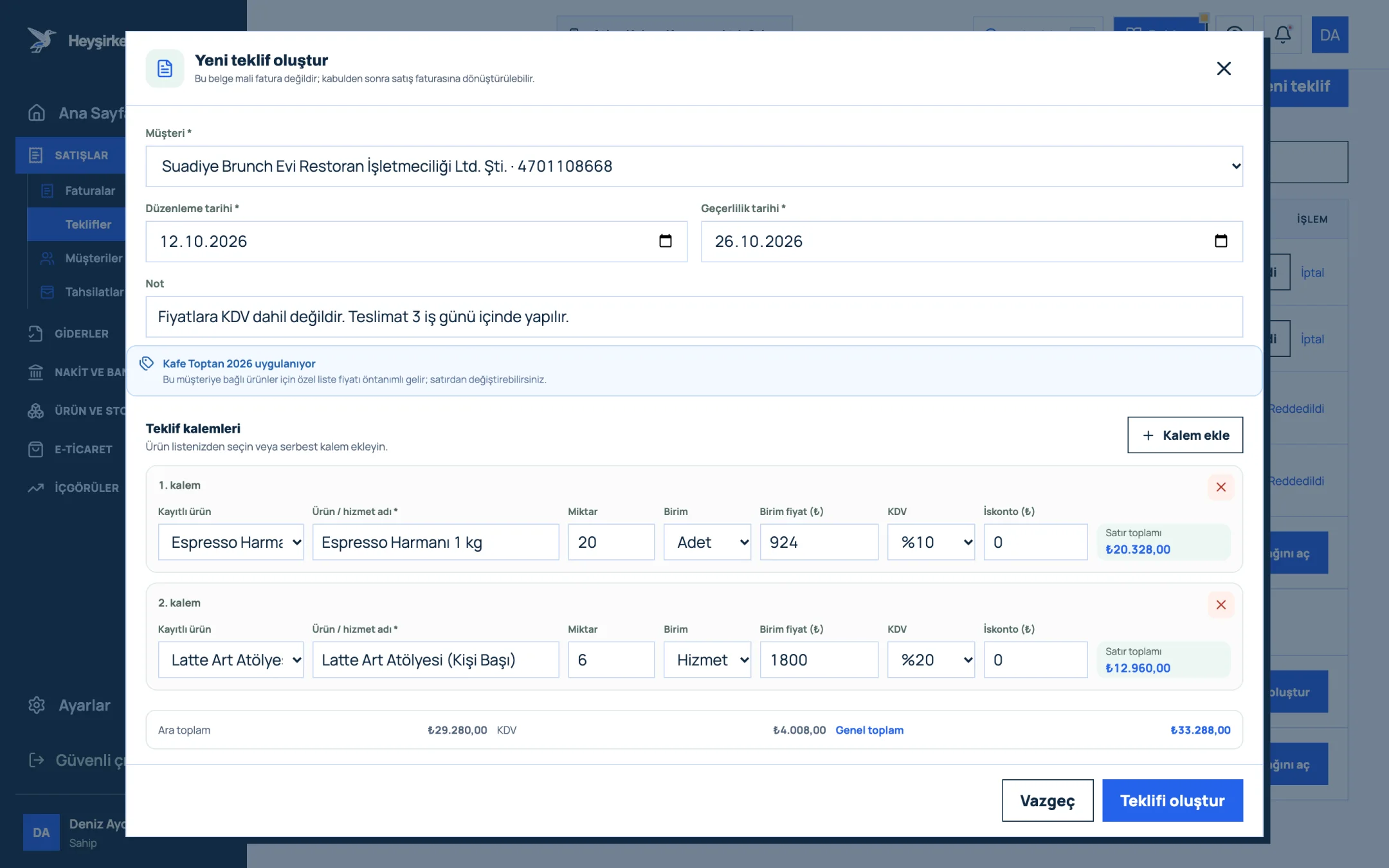
- 1. Customer and date fields
- 2. Quote line items
- 3. Add line item
- 4. Quote total
- 5. Create quote button
- Note / terms: Write payment and delivery terms, and that prices exclude VAT, in this field.
- Sending by email: From the quote's details, Send quote by email sends an email with the PDF attached; when the customer replies, the reply comes to your company email.
- Customer quote page: The QR code in the PDF and the button in the email open a quote page the customer views without logging in. The customer approves the quote there, and the company owners get an email and a notification. Rejections are not on the page; they come by email or phone and you mark the quote rejected yourself. You also see when the customer first opened the page.
- Sharing the link: With Copy link you can send the same page over WhatsApp too.
- Copy quote: For similar jobs, copy an old quote and just change the customer; enter the examples above once and use them like templates.
- Invoice draft: On an accepted quote, Create invoice draft takes you to an invoice with the same items.
Step-by-step guide to the screen: the how to prepare a quote guide. You'll find the whole quote module on the quotes page and plan prices on the pricing page.
How do you write a price quote?
Write your company and customer details, the quote number, and the issue and validity dates. Then list the items with quantity, unit and unit price, and show VAT and the grand total. Finish with payment and delivery terms and whether prices include VAT.
How long should a price quote be valid?
There's no single right period. For products priced against exchange rates or raw materials, 7 to 14 days is common; for service and project quotes, up to 30 days. In Heyşirket a new quote's validity date defaults to 14 days later and can be changed.
Does a quote replace an invoice?
No. A quote isn't a financial document and isn't sent to the Revenue Administration. The sale becomes official when the accepted quote is turned into an invoice and issued.
What is a quote form?
The term is used in two ways: the quote request form a customer fills in on your site, and the quote document you send the customer. In Heyşirket the site form is on the free Starter plan; the quote document and its PDF are in pre-accounting on the Professional plan.
Can a customer approve a quote online?
Yes. In Heyşirket, the QR code in the PDF of the quote you send, or the button in the email, opens a quote page the customer views without logging in. The customer approves the quote there, and you're notified by email and notification.
Prepare your first quote Fill in one of the examples above with your own items, send the PDF by email and follow the customer's approval in the panel. Go to quotes
If you don't have a company panel yet, you can start for free and move to Professional for quotes and invoicing.
Author: Heyşirket Editorial Team