Cash management · 8 min read · Updated:
Cheque and promissory note tracking: portfolio, collection, payment, return and cancellation
The cheques in your drawer and the notes you've issued now sit in one list, with their due dates. This guide shows every step, from a cheque entering your portfolio to it landing in your bank account.
In short
- Every document added with Cheque / note is first saved with In portfolio status and doesn't affect your cash or bank balance.
- When a received cheque is processed with Collect or an issued cheque with Pay, an incoming or outgoing transaction is automatically recorded in the selected cash or bank account.
- The collection or payment date can't be earlier than the due date; only documents in the portfolio can be collected, paid, returned or cancelled.
- Returns and cancellations require a reason of at least three characters; the note appears on the document's row and shows later who did what.
Karaköy Pera Otel pays for its coffee bean order with a cheque due in 90 days. The cheque goes into a drawer, and three months later nobody remembers its due date. Cheque and note tracking exists so you don't pay the price for that kind of forgetfulness.
In this guide you'll learn how to record a cheque or promissory note in your portfolio, collect it when due and post it to your bank account, and return or cancel it when things go wrong. The last part explains why the collection date rule matters.
Part 1 · Tour What's on this screen?
Cheque & note tracking is the part of the Cash & Bank screen that lists the cheques and promissory notes you've received and issued, together with their due dates. In the left menu, the Cheques and notes link under Cash and banks scrolls you straight to this section.
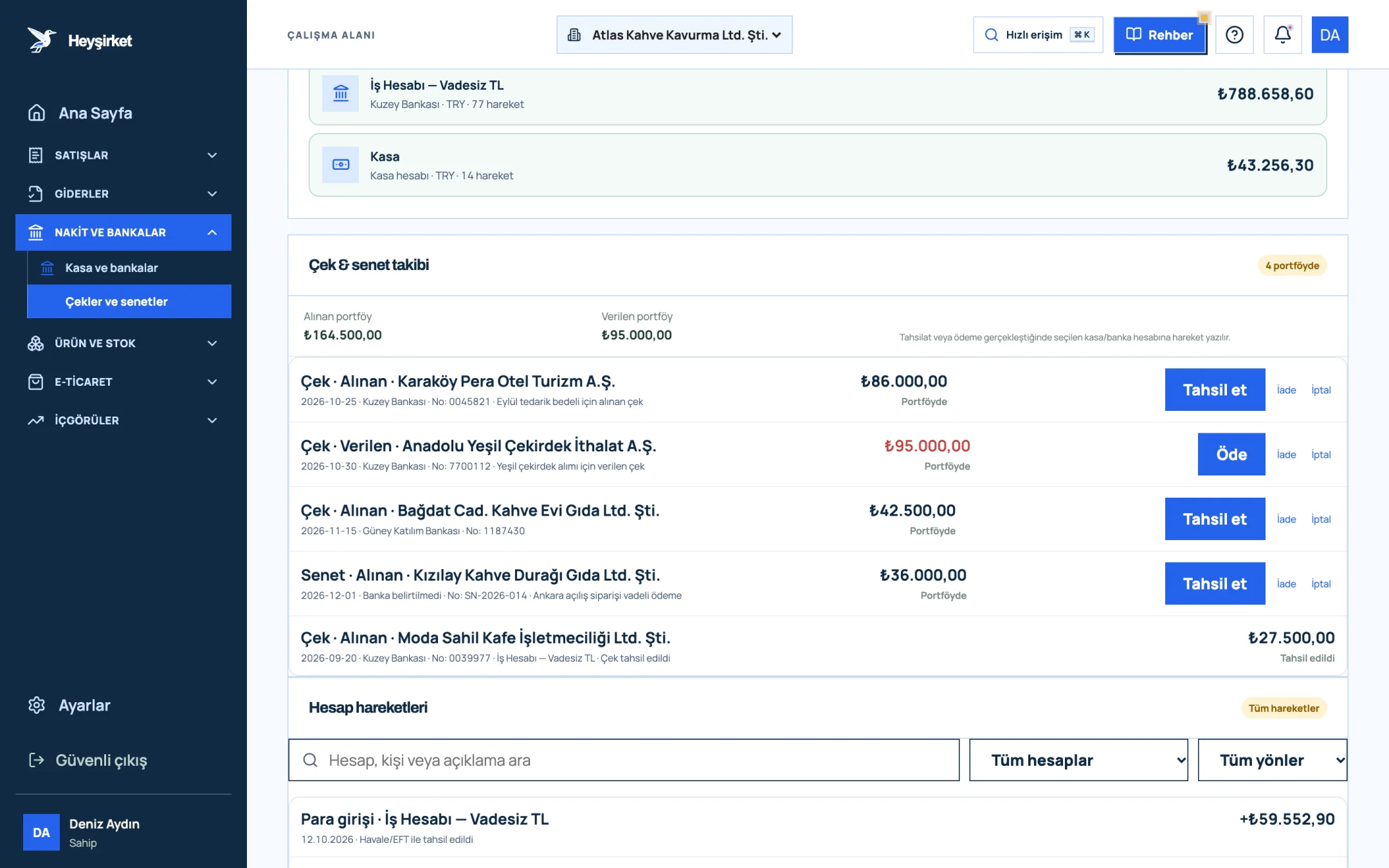
- 1. Received and issued portfolio summary
- 2. Received check in portfolio and Collect
- 3. Issued check and Pay
- 4. Collected check
| Status | Meaning | Effect on cash/bank |
|---|---|---|
| In portfolio | The document is in your hands or has been issued, and its due date is pending | None |
| Collected | The money for a received cheque/note went into the selected account | Money in to the selected account |
| Paid | The money for an issued cheque/note left the selected account | Money out of the selected account |
| Returned | The document was given back to the other party or came back to you | None |
| Cancelled | The document was treated as void | None |
The row heading shows the document type, direction and the name of the drawer or payee: for example, "Cheque · Received · Karaköy Pera Otel". The small line below shows the due date, bank name, serial number and note. Documents in the portfolio are listed first, starting with the nearest due date.
Part 2 · In practice How do you record and collect a cheque or note?
Step by step: from portfolio to bank account
Open the record window
Press the Cheque / note button in the top right of the Cash & Bank screen. The Add cheque / note window opens; this is a portfolio record and doesn't affect your balance yet.
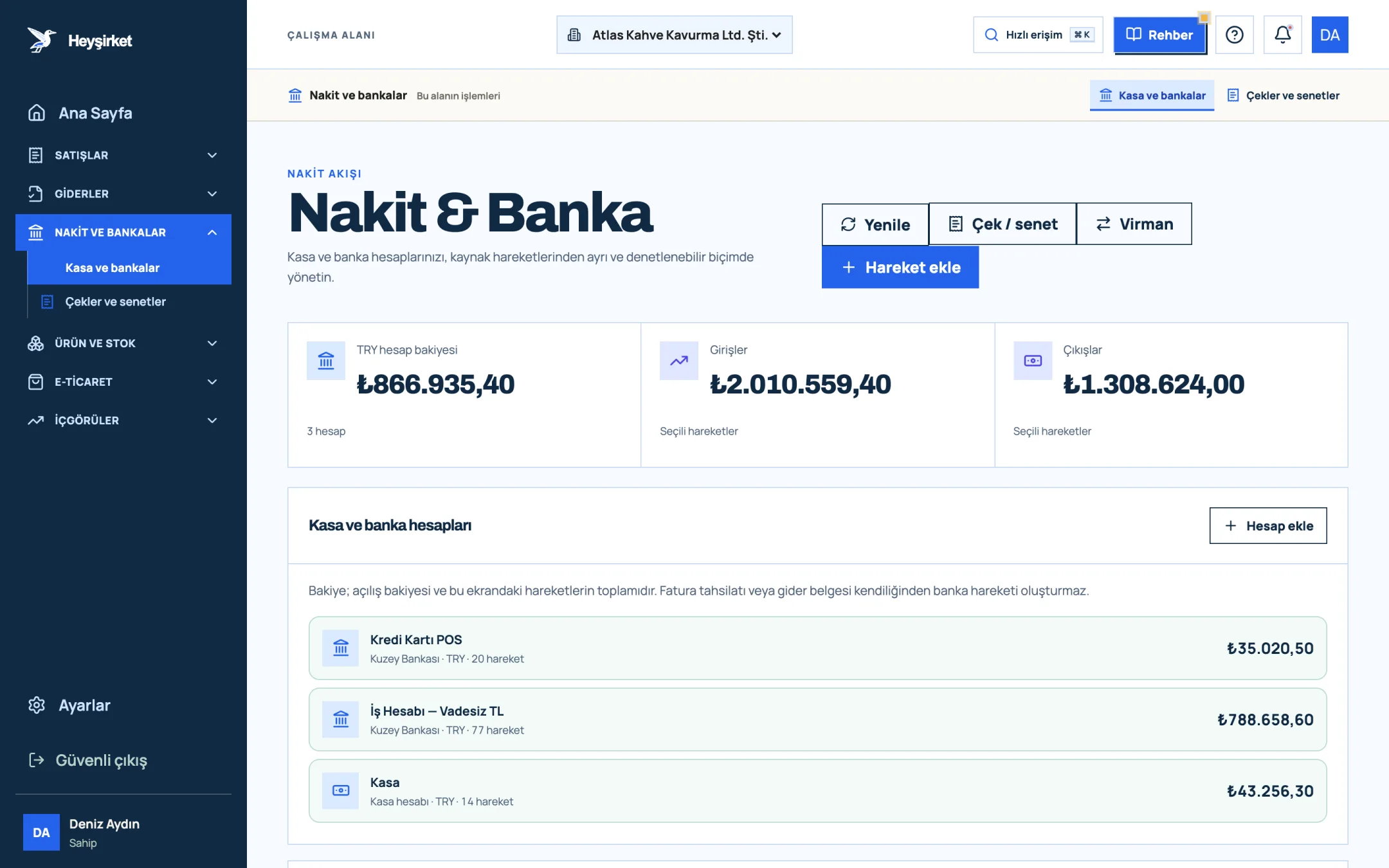
Open the record window - 1. Add transaction button
- 2. Transfer between accounts
- 3. Total TRY balance
- 4. Cash and bank account list
Choose the document type and direction
In the Document type field, choose Cheque or Promissory note. In the Direction field, choose Received / to collect if you got it from a customer, or Issued / to pay if you gave it to a supplier.
Enter the document details
In the Drawer / payee field, enter the name of the company that wrote the cheque or the person you issued the note to, and enter the details from the document in the Due date and Amount fields. Filling in Currency, Bank name, Serial / document no. and Note makes tracking easier. Finish with Save to portfolio.
Enter the document details - 1. Received and issued portfolio summary
- 2. Received check in portfolio and Collect
- 3. Issued check and Pay
- 4. Collected check
Collect or pay on the due date
When the due date arrives, press Collect (for received documents) or Pay (for issued documents) on the row. In the window that opens, choose the Cash / bank account and Transaction date, then press Collect and post to account or Pay and post to account.
Collect or pay on the due date - 1. Received and issued portfolio summary
- 2. Received check in portfolio and Collect
- 3. Issued check and Pay
- 4. Collected check
Check the transaction
The document's status changes to Collected or Paid, and the name of the account you chose appears on the row. At the same time, an incoming or outgoing entry with the cheque or note description is added to the Account transactions list.
Check the transaction - 1. Add transaction button
- 2. Transfer between accounts
- 3. Total TRY balance
- 4. Cash and bank account list
Return or cancel if needed
If a document in the portfolio bounced or was given back, use the Return link on the row; if it should be treated as void, use Cancel. Type the reason in the box that opens (at least three characters); the note is added to the document's row.
Part 3 · Rules Can a cheque be recorded as collected before its due date?
No; in Heyşirket the collection or payment date can't be earlier than the document's due date. When the window opens, the Transaction date field is prefilled with today's date if the due date has passed, or with the due date if it hasn't arrived yet.
- Only documents with In portfolio status can be collected, paid, returned or cancelled.
- A document that has been collected, paid, returned or cancelled can't be moved back into the portfolio.
- The cheque/note and the account must be in the same currency.
- These actions are available to the Owner and Admin roles; other roles can view the list.
Part 4 · Background The reasoning: why track the portfolio separately?
A cheque in your hand isn't money yet; it's a promise to pay. Adding it to your bank balance before the due date makes your cash look higher than it is and leads to poor payment decisions. Totaling the received and issued portfolios separately is the most concrete way to see how much money will come in and go out over the coming weeks.
We cover topics such as bounced cheque risk, ways to check a drawer's cheque history and the endorsement chain in detail in our cheque and note management article. To carry your portfolio figures into your weekly cash plan, take a look at the cash flow management article.
A three-minute portfolio check every Monday
- Make sure you've deposited the received cheques due this week with the bank for collection.
- For issued cheques due this week, check that there are sufficient funds in the relevant bank account.
- Close out, one by one, any documents still showing In portfolio after their due date.
- Check whether your Received portfolio total depends too heavily on a single drawer.
Does a cheque / note record settle the customer's cari (customer account) balance?
No. This screen tracks the portfolio and the cash/bank transaction. To show that the invoice is paid, you also need to enter a collection record.
How do I correct a cheque I entered incorrectly?
There's no edit option on the screen. If the document is in the portfolio, cancel it with Cancel and a note such as "incorrect entry", then record it again with the right details.
How do I mark a cheque that bounced?
While the document is in the portfolio, use the Return link and enter that it bounced as the reason. For the legal process, talk to your lawyer and accountant (mali müşavir).
Can I record a foreign currency cheque?
Yes, you can choose USD or EUR in the Currency field. The received and issued portfolio totals only add up TRY documents.
Set up your cheque and note portfolio Record the cheques in your drawer and the notes you've issued with their due dates, and post the ones that are due to your account in one click. Go to cheques and notes
Author: Heyşirket Editorial Team