Expense management · 11 min read · Updated:
How to track income and expenses: a system for small businesses
To answer “did we make a profit?” at month-end with numbers rather than guesses, you don't need a complicated system. The right columns, two separate views and a weekly routine are enough.
In short
- Income and expense tracking means recording every amount coming into and going out of the business with its date, category, counterparty, VAT and payment status.
- An invoice issued is income, money collected is cash; they're different figures and should be tracked separately.
- In an income and expense sheet, the amount excluding VAT, the VAT and the total should be in separate columns; otherwise profit looks inflated by the VAT.
- Income and expense tracking doesn't replace the official books; your accountant keeps the official records, and the business's own records give them accurate data.
- In Heyşirket, sales invoices create income and expense documents and incoming e-Faturas create expenses; the Income and expense report shows income, expenses and profit margin excluding VAT by month and category.
Month-end. There's less money in the account than last month, but sales were better. Did we make a profit or a loss? Most small business owners answer this by feel, because income is in one place, expenses in another, and there's no regular record bringing the two together.
Income and expense tracking fills that gap. When you record every amount in and out in the same format, at the end of the month you read a table instead of guessing. The good news: you don't need accounting knowledge for this, just a few right columns and a weekly habit.
In this article we explain how to set up an income and expense sheet, how far you can go with Excel, and what happens automatically once you move to software. Which spending can be recorded as an expense, and how to keep documents in order, is covered separately in expense management and document order.
Part 1 · Definition What is income and expense tracking?
Income and expense tracking means recording every amount coming into and going out of the business with its date, category, counterparty, VAT and payment status. The aim is to be able to answer two questions at any time: what did we earn this period, and how much of it has actually reached the bank?
The second question is as important as the first, because the most common mistake in small businesses is confusing sales with cash. Issuing an invoice creates income, but the money may not have arrived yet. Receiving an expense invoice creates an expense, but it may be paid next month.
Part 2 · Logic Sales or collections? Two separate views
There are two views in income and expense tracking. The first looks at invoices: what did you sell, what did you spend? That shows profitability. The second looks at money: what did you collect, what did you pay? That shows cash. The two can give very different figures for the same month.
| Sales invoices issued (excl. VAT) | 100.000 TL |
|---|---|
| Collected this month | 60.000 TL |
| This month's expense invoices (excl. VAT) | 40.000 TL |
| Invoice view result (sales − expenses) | 60.000 TL profit |
| Cash view result (collections − expenses) | 20.000 TL |
Expenses are assumed to have been paid this month. The figures are illustrative; VAT and tax effects are simplified.
On paper the business made 60.000 TL profit, but the net amount that reached the bank was 20.000 TL. The difference is receivables still waiting with customers. A business that doesn't see this gap can get squeezed on payday even while it's profitable. To plan the cash side, see cash flow management.
Part 3 · The sheet How do you build an income and expense sheet?
A good income and expense sheet keeps every transaction on one row with the same columns. Keeping income and expenses in one list with a “Type” column, rather than in separate files, makes totalling easier.
| Column | What goes in it | Why |
|---|---|---|
| Date | Document date | Determines which month it belongs to |
| Type | Income or expense | Lets you total in one list |
| Category | Sales, rent, salaries, packaging… | Shows where the money goes |
| Counterparty | Customer or supplier | Links to the customer account |
| Document no | Invoice or receipt number | Leaves a trail for your accountant and for audits |
| Amount excl. VAT | Net amount | Shows the real profit |
| VAT | Output or input VAT | Separates VAT from profit |
| Total | Amount incl. VAT | Matches the amount paid or collected |
| Payment status and account | Paid, partial, open; cash or bank | Gives you the cash view |
Keep the number of categories between 8 and 12. Too few tells you nothing, too many makes you think every time about where an expense goes. Rent, staff, packaging and raw materials, shipping, marketing, software and subscriptions, travel, and bank and finance costs are a good start for most businesses.
Part 4 · Excel How do you track income and expenses in Excel?
You can set up an Excel sheet with the columns above and produce a summary for each month. Three formulas are enough on the summary sheet: total income excluding VAT by month, total expenses excluding VAT, and the difference between them. Expense totals by category also show where most of the money goes.
- One document per row: Don't split one invoice across two rows or combine two invoices on one row.
- Fix the category list: Choose categories from a drop-down instead of typing them; “Rent” and “rent” become two categories.
- Don't write rows without documents: Mark spending without a document as a note and keep it out of the expense total.
- Close the month: At month-end, lock that month's rows or move them to a separate tab so past months don't change later.
How do you read the monthly summary?
Look at three figures on the summary sheet. First, the profit margin: subtract expenses from income excluding VAT and divide by income. With the example's 100.000 TL of sales and 40.000 TL of expenses, the margin is 60 percent. Second, the three largest expense categories: most spending usually sits in two or three lines, and that's where to look for savings. Third, open receivables: the amount invoiced but not yet collected. If the margin is good but open receivables grow every month, the problem isn't profit, it's collection.
Excel's limit is that income is issued somewhere else. If you issue invoices in an e-Fatura program and retype them into Excel, every row is a chance for error. You also have to carry incoming e-Faturas across by hand. Once you pass a few dozen documents a month, it's time to move to software.
Part 5 · Routine A weekly routine for income and expense order
Leaving income and expense tracking to month-end means losing a day at month-end. Instead, set up a small, regular rhythm.
Daily, weekly, monthly
- Every day: record the invoices you issue and the receipts and invoices you receive on the same day.
- Every week: go through bank movements, link each incoming transfer to an invoice and each outgoing payment to an expense.
- Every week: check the due dates of unpaid expense invoices.
- Every month: compare total income and expenses, the category breakdown and the profit margin with the previous month.
- Every month: send your documents to your accountant complete.
For a broader month-end check, see the month-end close checklist.
Part 6 · Screens How does income and expense tracking work in software?
In software you don't enter the income side separately: the sales invoices you issue create income and the collections you record create cash inflows. You only record the expense side; invoices from suppliers who use e-Fatura arrive on the Incoming e-Faturas screen automatically.
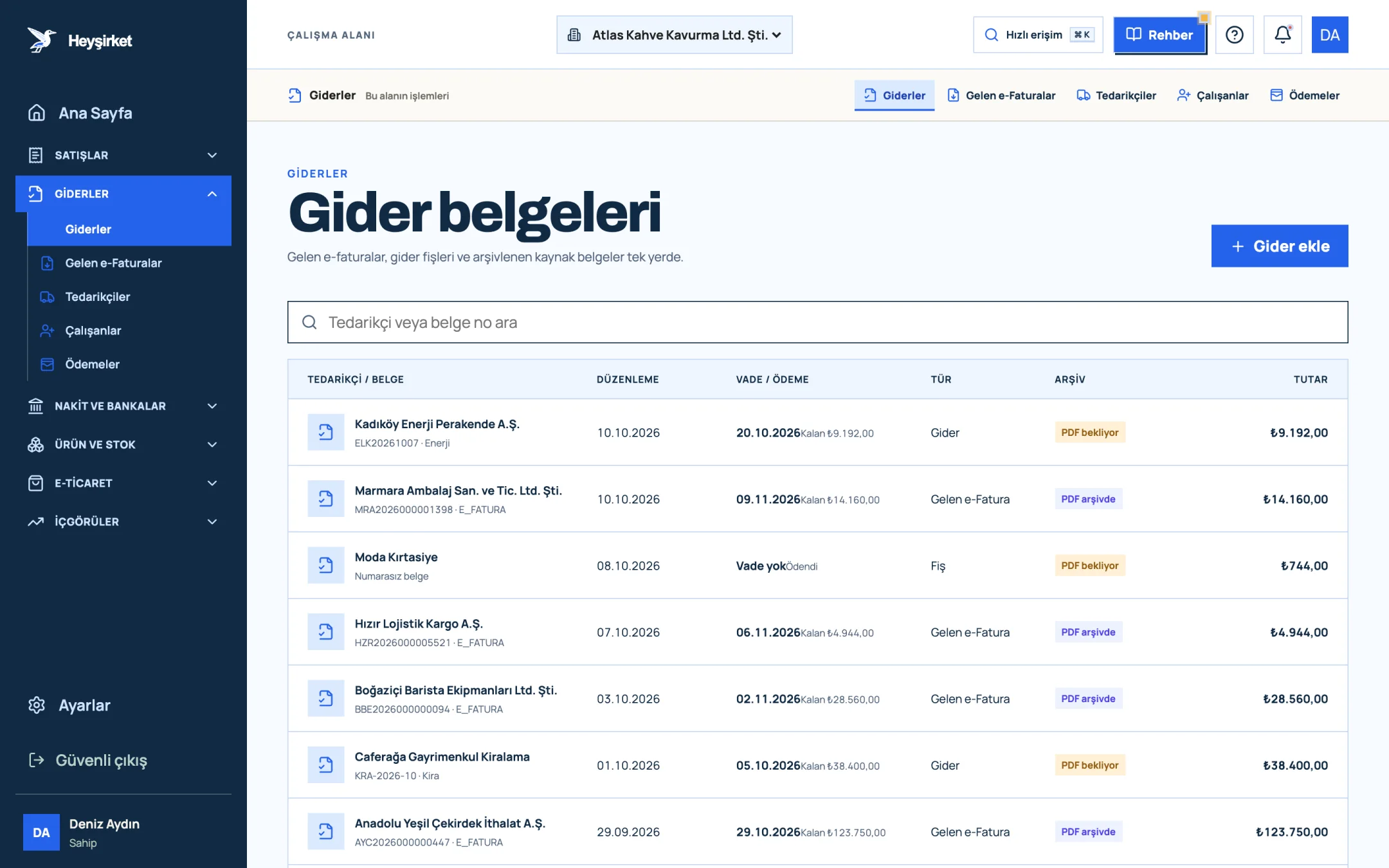
- 1. Add expense button
- 2. Due date and remaining payment
- 3. Document type (Expense, Incoming e-Fatura, Receipt)
- 4. Expense document row
For a receipt or paper invoice, you press the Add expense button. In the window you enter the supplier, document type (Expense document, Receipt, Other), due date, Expense category, total amount and VAT rate; the subtotal and VAT are split out automatically. You edit the categories to suit your business on the Settings › Categories & tags screen.
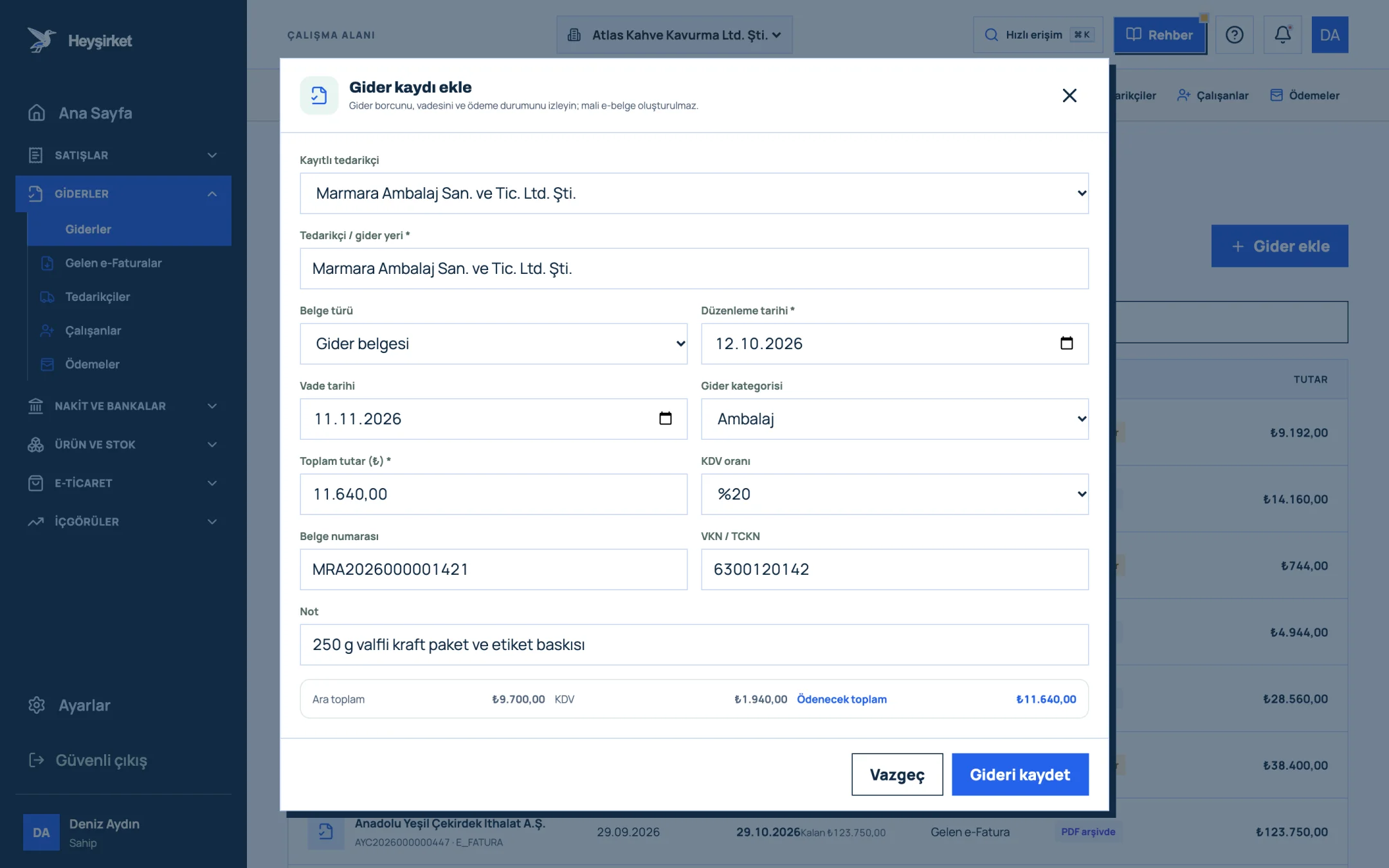
- 1. Supplier selection
- 2. Expense category
- 3. Amount and VAT rate
- 4. Subtotal, VAT and total payable
- 5. Save expense
When you pay the expense, you open the document and use Add payment to enter the amount, date, method and which cash or bank account it came from. That way the same record shows both the expense and the cash outflow. Step-by-step instructions are in the how to record an expense guide.
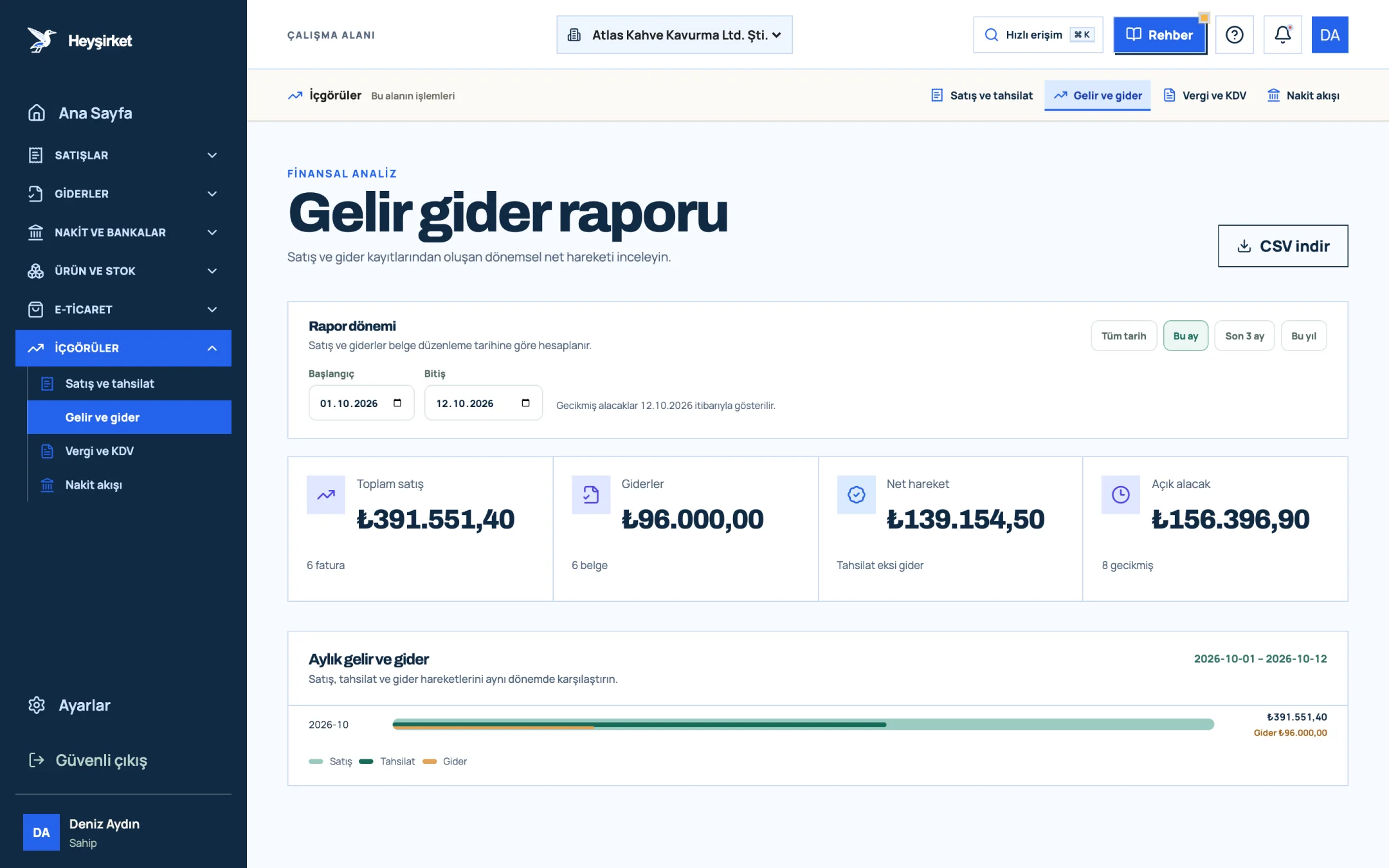
- 1. Total sales and expenses
- 2. Monthly income and expense chart
The Income and expense report gives both views on the same screen: it shows income and expenses excluding VAT, gross profit and profit margin by month and expense category, and in the Net movement card you also see collections minus expenses, in other words the cash view. The details of reading the report are in the income and expense report guide. In the company panel this report sits under Finance as Income and expenses.
Part 7 · Boundary Does income and expense tracking replace the official books?
No. The income and expense record a business keeps itself is a management tool. The official books required under the Tax Procedure Law (the business book on the business account basis, the journal and general ledger on the balance sheet basis, and the self-employment earnings book for self-employed professionals) are kept by your accountant (mali müşavir), and tax returns are based on those books.
The record you keep determines the quality of the data that reaches your accountant. If documents are complete, categories consistent and payments matched, your accountant's work speeds up, and you no longer have to deal with “could you send that invoice?” messages.
How do you track income and expenses?
Record every income and expense in a single list with columns for date, type, category, counterparty, document number, amount excluding VAT, VAT, total and payment status. At month-end compare income and expenses excluding VAT, and also compare collections and payments to see your cash position.
Should an income and expense sheet include VAT?
The amount excluding VAT, the VAT and the total should be written in separate columns. Profit is calculated on amounts excluding VAT; the VAT-inclusive total is used to match against money paid or collected.
Is Excel enough for income and expense tracking?
It can be with a small number of documents. When issuing invoices in another program and retyping them into Excel, carrying incoming e-Faturas across by hand and matching payments take up time, moving to income and expense software means fewer errors and less time.
Does tracking income and expenses replace keeping official books?
No. The official books are kept by your accountant under the Tax Procedure Law. The income and expense record a business keeps is for management and gives the accountant accurate data.
Do I need to enter income separately in Heyşirket?
No. The sales invoices you issue are reflected in the report as income and the collections you record as cash inflows automatically. On the expense side you record receipts and invoices with Add expense; invoices from suppliers who use e-Fatura arrive on the Incoming e-Faturas screen automatically.
Record your first expense today Record the receipt on your desk with the Add expense button and choose its category; have the income and expense report ready at month-end. Open expenses
Author: Heyşirket Editorial Team