Collections · 13 min read · Updated:
Invoice due date tracking: clearing overdue receivables with a weekly routine
Most receivables run late not out of bad faith, but because nobody is following them up. Record the due date with the invoice, set aside half an hour a week, and overdue invoices stop piling up.
In short
- Invoice due date tracking means regularly monitoring each open invoice's due date, remaining balance and how many days it is overdue.
- Grouping overdue receivables into 0-30, 31-60, 61-90 and 90+ days (ageing) shows which customer to contact first.
- A weekly check is enough: a heads-up for invoices coming due, a reminder for overdue ones, a phone call once they pass 30 days.
- A good payment reminder includes the invoice number, the remaining amount, the due date and how to pay; it doesn't accuse, it makes paying easy.
- In Heyşirket the due date comes from the customer's default payment term; the Collections screen shows open and overdue invoices, and the Send reminder button on the invoice detail emails the customer a payment reminder.
It's the end of the month and the bank balance is lower than you expected. The sales were made and the invoices issued, but part of the money is still with your customers. Which invoice was due when, who is late, who got a reminder? If the answers are scattered across a notebook, a few emails and your memory, the problem isn't sales; it's invoice due date tracking.
In this article we turn due date tracking into a simple system: which information to keep, how to group overdue receivables, a half-hour weekly check, and payment reminder messages you can copy and use.
We covered broader collection decisions such as payment term policy, credit limits and late payment interest in speeding up receivables collection. Here we focus on the daily and weekly side of the job.
Part 1 · Definition What is invoice due date tracking?
Invoice due date tracking means regularly monitoring each invoice's due date, the amount paid and still open, and, if it is past due, how many days late it is. The goal is to look at a single list and immediately answer three questions: Who should pay us how much this week? Who is late? When did we last contact whom?
The due date usually comes from the payment terms you agreed with the customer: cash, 15 days, 30 days and so on. Writing that date on the invoice and in your records is the first step. An invoice issued without a due date is the hardest to follow, because the question “when did it become late?” has no answer.
Part 2 · Table Which columns should a due date table have?
If you don't use software yet, you can track due dates in a spreadsheet. What matters is choosing the right columns and updating the table with every invoice. The structure below is enough for a small business.
| Column | What goes in it? | Why it matters |
|---|---|---|
| Invoice no. and date | ATL2026000041 · 04.09.2026 | To find the document at once when talking to the customer |
| Customer | Company name and contact person | To send the reminder to the right person |
| Due date | 19.10.2026 | The day lateness begins |
| Invoice amount | 92.763,00 TL | Total receivable |
| Collected | 51.100,00 TL | To see partial payments |
| Remaining | 41.663,00 TL | The amount you'll write in the reminder |
| Days overdue | Today − due date | Decides the ageing group |
| Last contact | Date, channel and note | So you don't message the same customer twice in a row |
| Promised date | The payment date the customer gave | The date of your next check |
The spreadsheet works for the first months, but its weak spot is obvious: when a payment arrives you have to correct the remaining amount by hand. Forget one correction and a customer who has already paid gets a reminder. We explained when customer account tracking should move from a spreadsheet to software in how to track customer accounts.
Part 3 · Ageing How should overdue receivables be grouped?
Tracking overdue receivables as a single total is misleading. 100.000 TL of late payments made up entirely of invoices that fell due three days ago is very different from one invoice that is more than 90 days late. That's why receivables are grouped by days overdue. This is called accounts receivable ageing.
| Group | Status | What to do |
|---|---|---|
| Not yet due | Normal | A short heads-up a few days before the due date |
| 0-30 days | Slightly late | A polite email or message; usually it's forgetfulness |
| 31-60 days | Clearly late | A phone call and a firm promised payment date |
| 61-90 days | Risky | Hold new shipments, send written notice |
| Over 90 days | Serious risk | Discuss legal steps with your accountant and lawyer |
| 0-30 days overdue (6 invoices) | 84.000 TL |
|---|---|
| 31-60 days overdue (3 invoices) | 52.500 TL |
| 61-90 days overdue (1 invoice) | 18.000 TL |
| Over 90 days (1 invoice) | 11.200 TL |
| Total overdue receivables | 165.700 TL |
Figures are illustrative. Although 0-30 days is the largest group by amount, the two invoices over 61 days are looked at first, because the chance of collection falls as the delay grows.
Producing the ageing table once a month is enough. The real work is done by the weekly check.
Part 4 · Routine How do you run a 30-minute weekly due date check?
In due date tracking, consistency matters more than frequency. You don't need to look every day, but you do need to look on the same day every week. Pick a fixed slot, such as Monday morning or Friday afternoon.
Weekly due date routine
Record payments
First record last week's incoming payments. Skip this and you risk reminding a customer who has already paid.
Look at this week's due dates
List invoices falling due in the next seven days. For large ones, send a short heads-up before the due date.
Sort the overdue ones
Sort late invoices by days overdue and amount. Start with the oldest and largest.
Take one step for each
A message for 0-30 days, a call for 31-60 days, written notice for older ones. Note what you did and what was promised.
Put promised dates in the calendar
If the customer said “we'll pay on Thursday”, check on Friday. A broken promise is the reason for the next step.
Part 5 · Messages How do you write a payment reminder message? Examples
A good payment reminder message carries four things: the invoice number, the remaining amount, the due date and how to pay. If one is missing, the customer has to write back and payment slips another day. The message should be short, shouldn't accuse, and should end with “if you've already paid, please ignore this”.
Before the due date: a heads-up
Hello Selin, the due date for invoice ATL2026000041 for 41.663,00 TL is 19 October. Our bank details are at the bottom of the invoice. If you have any questions, just reply to this message. Have a good day.
Due date + 3 days: a polite reminder
Hello Selin, the remaining balance of 41.663,00 TL on invoice ATL2026000041 was due on 19 October. If you've already paid, please ignore this message, thank you. If not, could you let us know a date that suits you?
Due date + 15 days: a firm reminder
Hello Selin, the 41.663,00 TL balance on invoice ATL2026000041 has been open for 15 days. If something is missing in our records, we'd like to fix it. If not, could you give us a date for payment this week? We're happy to talk by phone if needed.
Due date + 30 days: before written notice
Hello Selin, the 41.663,00 TL balance on invoice ATL2026000041 has been unpaid for 30 days. We'll need to hold your new orders until this balance is cleared. If you'd like to discuss a payment plan, we can call you today or tomorrow.
In instant messages such as WhatsApp, keep the same content shorter and give the payment method as a link. Adding a card payment link to the invoice removes the “which account were we paying into?” question; we explain how in what is a payment link.
Part 6 · In practice How does invoice due date tracking work in Heyşirket?
In Heyşirket, due date tracking starts with the invoice. If you entered 30 in the Varsayılan vade (gün) (default payment term, days) field on the customer card, the due date is set automatically to 30 days after the invoice date when you invoice that customer. For customers who pay upfront, leave the field empty.
On the home screen you'll see two alert strips: Geciken tahsilatları kontrol edin (check late collections) shows the number and amount of invoices that became overdue in the last 60 days, and Bu haftanın vadesi yaklaşıyor (due this week) shows those falling due in the coming days. Both take you to the Tahsilatlar (Collections) screen.
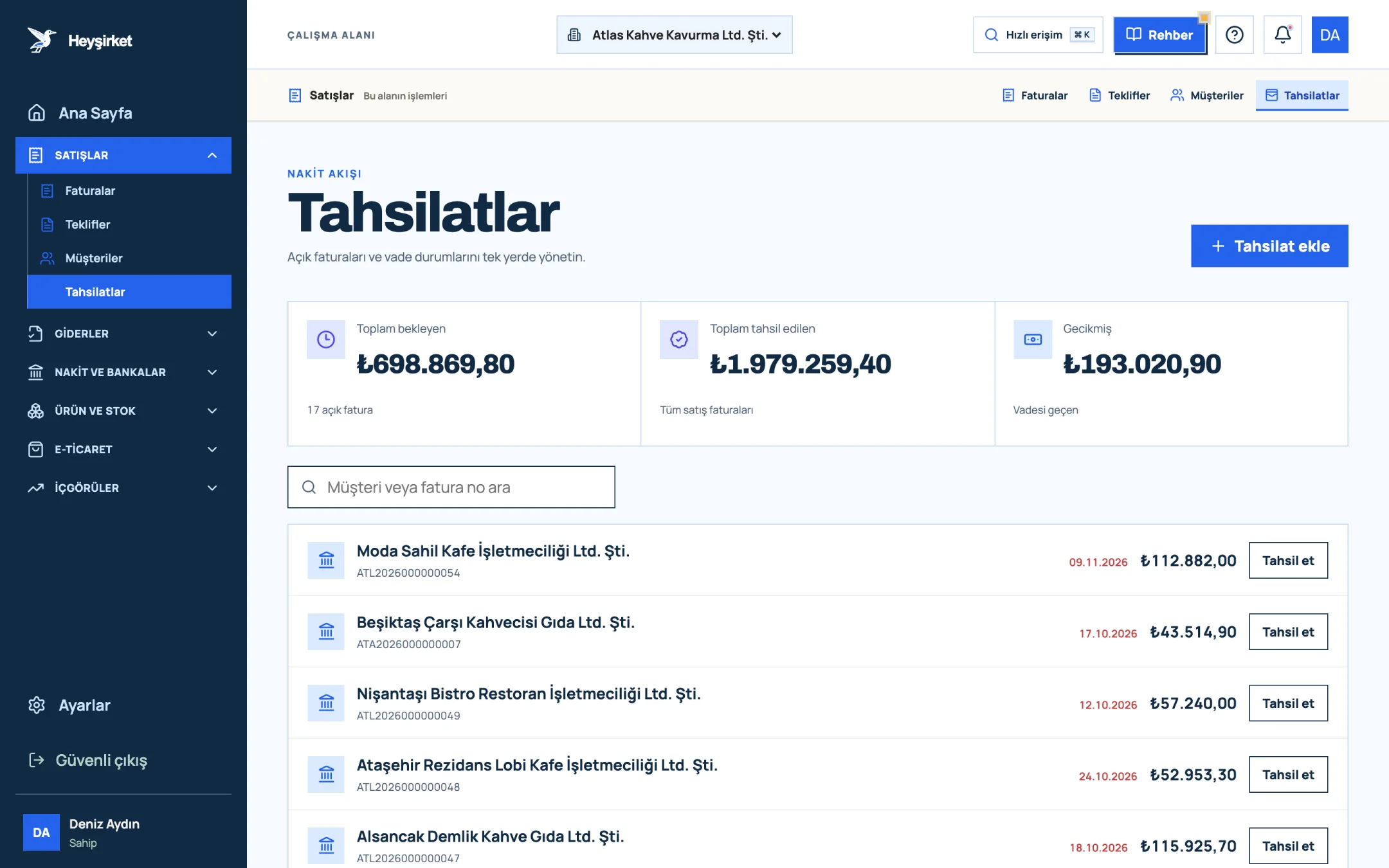
- 1. Add collection button
- 2. Total pending receivables
- 3. Total overdue receivables
- 4. Per-row Collect button
- Reminder to the customer: The Hatırlatma gönder (Send reminder) button on the invoice detail emails a “Payment reminder” to the customer's address. The email shows the remaining amount, the due date and, if overdue, how many days have passed; the customer views the invoice through a link valid for 30 days. You can't remind the same address about the same invoice twice within 24 hours.
- Card payment: If your iyzico account is connected, a Kartla öde (Pay by card) button is added to the reminder email and the customer pays the remaining amount by card.
- WhatsApp copy: If WhatsApp is selected as the contact channel on the customer card and your WhatsApp connection is ready, a short copy of the reminder is also sent by WhatsApp.
- Reminder to you: If an invoice you issued in Heyşirket is still open, the person who issued it gets a “Has this invoice been paid?” email one week and one month after issuing. If the payment arrived, the button in the email marks the invoice as collected in one click. This quick action doesn't add a cash or bank transaction.
- Weekly summary: If enabled in your email preferences, every Monday morning you get an email with the total of overdue invoices and the customers with the highest balances.
The steps for recording a payment are in the how to record a collection guide. To spot customers whose payment behaviour is getting worse, see customer credit limit. How invoices, collections and reminders work together is on the invoicing and collections page.
Part 7 · Check The most common due date tracking mistakes
Due date tracking checklist
- Every invoice has a due date; I don't issue invoices without one.
- I record payments in the week they arrive.
- Once a month I split overdue receivables into ageing groups.
- Every reminder includes the invoice number, remaining amount and payment method.
- I note the customer's payment promise with its date.
- I hold new shipments for receivables over 60 days.
- If there's a dispute about the balance, I reconcile the account first.
The last item is often skipped. If the customer says “we don't have this invoice in our records”, carrying on with reminders won't help. Agree on the balance first; how to do it is in customer account reconciliation.
Do I need separate software for invoice due date tracking?
No; a business with a handful of customers can track due dates in a spreadsheet. As the number of invoices and payments grows, pre-accounting software that updates the remaining balance automatically when a payment is recorded and lists overdue invoices reduces the risk of mistakes.
When should the first reminder for an overdue invoice be sent?
Within the first few days after the due date, for example due date + 3 days. Waiting too long normalises lateness; a harsh message sent too early damages the relationship. The first message should be polite and include the payment method.
What should a payment reminder message include?
The invoice number, the remaining amount, the due date and the payment method (IBAN or payment link). Ending with “if you've already paid, please ignore this” means you don't upset customers who have paid.
What is accounts receivable ageing?
It is grouping overdue receivables by days overdue, such as 0-30, 31-60, 61-90 and over 90 days. Since the chance of collection falls as the delay grows, it shows which receivable to focus on first.
Does Heyşirket send automatic reminders to my customers?
You send the payment reminder that goes to the customer: with the Send reminder button on the invoice detail or from the Riskiest customers card on the home screen. The automatic emails come to you: a collection check one week and one month after issuing for open invoices, and, if enabled, an overdue summary every Monday morning.
If the customer paid part of the invoice, which amount does the reminder show?
The remaining amount. When you record the partial payment against the invoice, Heyşirket updates the remaining balance and the reminder email shows only the unpaid part.
See your open invoices in one list Find overdue invoices on the Collections screen, record payments, or send your customer a payment reminder in one click. Open collections
Author: Heyşirket Editorial Team