Customer accounts · 12 min read · Updated:
How to track customer accounts: moving from Excel to software
Knowing at any moment who owes you and whom you owe is a small business's most valuable information. Here's how to start in Excel and move to software without losing a single balance.
In short
- A customer account (cari hesap) is the record in which all debit and credit movements with a customer or supplier are tracked in one account; an invoice issued debits the customer's account and a payment received credits it.
- To track customer accounts in Excel, keep columns for date, document number, description, debit, credit and running balance; the balance is calculated as previous balance plus debit minus credit.
- Switch to software on the first day of a month and import each account's opening balance as of that day.
- In Heyşirket, each customer's account workspace shows total debit, collected, current balance and credit limit; the statement lists debit, credit and balance columns in date order.
- Under Article 21 of the Turkish Commercial Code, a person who receives an invoice and doesn't object within eight days is deemed to have accepted its content.
A customer calls: “How much do we still owe you?” To answer, you look in three places: the invoice folder, the banking app and an Excel file. All three give a different number. That's the clearest sign that customer account tracking has slipped.
Customer account tracking means keeping debit and credit for every customer and supplier in one account, in date order. Done right, you answer that call in ten seconds; done wrong, you get paid later and end up in pointless arguments with customers.
In this article we explain the logic of the customer account, how to keep it correctly in Excel, when Excel stops being enough, and how not to lose your balances when you switch to software. Agreeing the balance with your customer is covered separately in customer account reconciliation.
Part 1 · Definition What is a customer account?
A customer account (in Turkish, cari hesap) is the record in which all debit and credit movements between you and a customer or supplier are tracked in a single account. The invoice you issue to a customer debits their account, and the payment you receive from them credits it. The difference between the two is that company's balance.
With a supplier the direction is reversed: the invoice a supplier issues to you increases what you owe them, and the payment you make reduces it. So the customer account answers “what am I owed?”, and the supplier account answers “what do I owe?”.
| Date | Transaction | Debit | Credit | Balance |
|---|---|---|---|---|
| 01.09.2026 | Opening balance | 12.000,00 | 12.000,00 | |
| 05.09.2026 | Invoice 041 | 36.000,00 | 48.000,00 | |
| 20.09.2026 | Bank transfer | 30.000,00 | 18.000,00 | |
| 03.10.2026 | Invoice 052 | 24.000,00 | 42.000,00 | |
| 15.10.2026 | Partial transfer | 10.000,00 | 32.000,00 |
This table is called a statement. When the customer asks “how much do we owe?”, you send them the 32.000 TL on the last line; when they ask “why?”, you send the whole table. The figures are illustrative.
Part 2 · Method How do you track customer accounts?
Customer account tracking comes down to five habits. Whatever tool you use, if these five aren't in place the numbers won't add up.
Five basic habits
Open one card per company
Legal name, tax number (VKN/TCKN), tax office, address, payment terms and a credit limit if there is one. Opening the same company twice under two names splits the balance in two.
Post every invoice to the account on the day you issue it
If an invoice is issued but not posted, the customer looks debt-free. Software does this automatically; in Excel it takes a separate line.
Link every collection to an invoice
“10.000 came in from Ali” isn't enough; record which invoice was settled. With a partial payment, the remainder stays open on the invoice.
Check due dates once a week
List invoices falling due this week and those that are overdue, and send reminders where needed. To set up the rhythm, see speeding up receivables collection.
Read the statement at month-end
Open the statement for every company with a balance and look for any line that doesn't make sense; reconcile with large customers at period end.
Part 3 · Excel How do you keep customer accounts in Excel?
Starting with Excel isn't wrong; it works for a few dozen customers and a modest number of invoices a month. What matters is setting the file up correctly from the start.
- One sheet for the customer list: Give each company a fixed code (e.g. M001). Other sheets link to the company by this code, not by name.
- One sheet for movements: Columns for date, customer code, document number, description, debit and credit. Every invoice and every collection is a row.
- Running balance: When you filter by company, the balance column is calculated as the previous balance plus debit minus credit.
- Summary sheet: For each customer code, total debit, total credit and the difference. This sheet shows who owes you how much.
- Due date column: Add a due date to invoice rows; those earlier than today's date are your overdue receivables.
| Previous balance | 18.000,00 TL |
|---|---|
| + New invoice (debit) | 24.000,00 TL |
| − Payment received (credit) | 10.000,00 TL |
| Current balance | 32.000,00 TL |
A positive balance shows what the customer owes you. The figures are illustrative.
Part 4 · Limits When is Excel no longer enough?
Excel's problem isn't that it can't calculate; it's that the records aren't connected. The invoice is in one place, the collection in another, the bank movement in a third, and you make the links between them. If two of the signs below apply, it's time to switch.
Signs it's time to switch
- More than one person edits the file and there are arguments about which version is right.
- You issue more than twenty invoices a month and matching collections to invoices takes hours.
- When a customer asks for a statement, you filter the file, copy it and prepare a separate one.
- With partial payments, you lose track of which invoice is still open.
- You retype into Excel the documents you've already issued as e-Fatura.
Part 5 · Migration How do you move from Excel to customer account software?
The most critical moment of the switch is the opening balance. You don't need to move every old invoice; you only need to carry over each account's balance on the switch date correctly.
Migration steps
Choose the first day of a month as the switch date
Switching mid-month leaves part of that month in Excel and part in the software. Everything before the 1st goes into the opening balance.
Clean up the customer list
Merge duplicate rows for the same company and fill in missing tax numbers and tax offices. If you'll issue e-Faturas, this information is essential.
Prepare opening balances
Write each account's balance on the switch date on a single line: what you're owed as positive, what you owe as negative.
Import the files
In Heyşirket, on the Settings › Data import screen, you upload the customer list and opening balances as CSV, XLS or XLSX and map the columns.
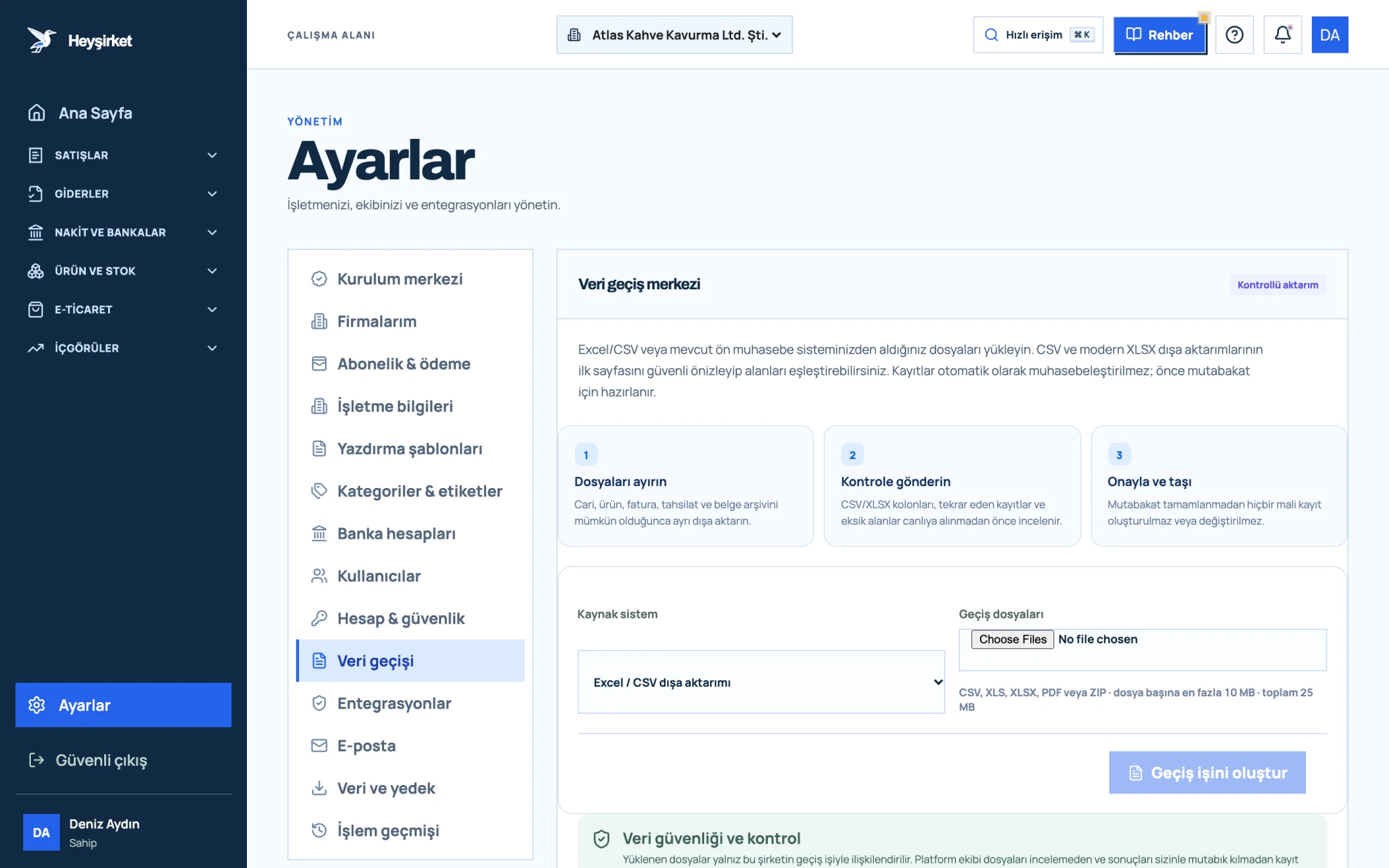
Import the files - 1. Data migration tab
- 2. Three-step migration process
- 3. Source system selection
- 4. Create migration job
Compare the totals
Is the total receivable in Excel the same as the total customer balance in the software? Check large customers' balances one by one.
Detailed steps are in the data import guide, and planning and the parallel running period are in switching accounting software.
Part 6 · Screens What does customer account tracking look like in software?
In Heyşirket, customer account tracking isn't a separate task; the account updates itself when you issue an invoice and record a collection. In the company panel you open it from Finance › Customers and accounts.
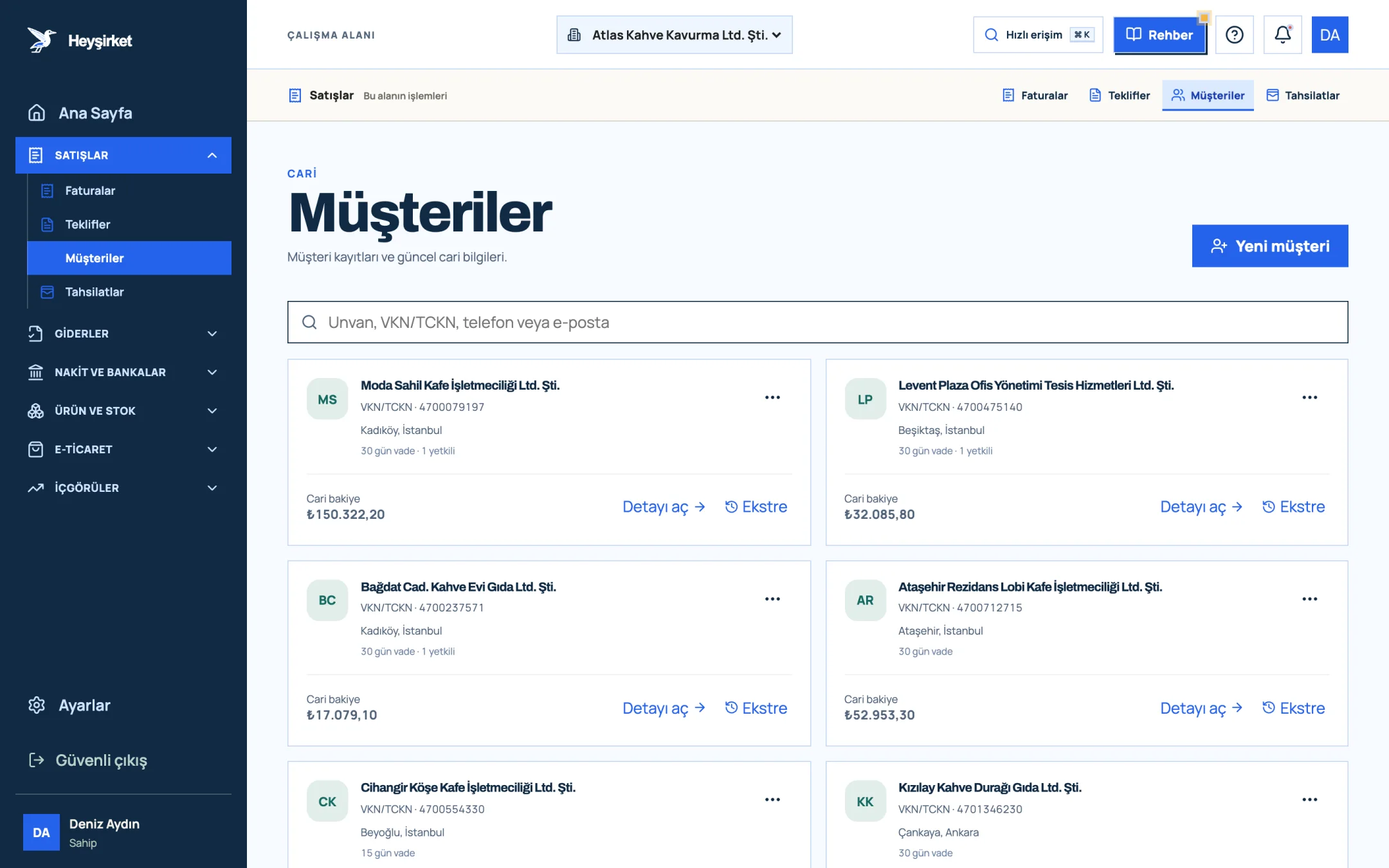
- 1. New customer button
- 2. Customer search
- 3. Customer card: account balance and payment terms
- 4. Statement link
When you open a customer's card you enter the account workspace. Here the Total debit, Collected, Current balance and Credit limit boxes sit side by side, and it also shows how much of the limit is still available. With the Create invoice and Record collection buttons at the top right, you start the action from the same screen.
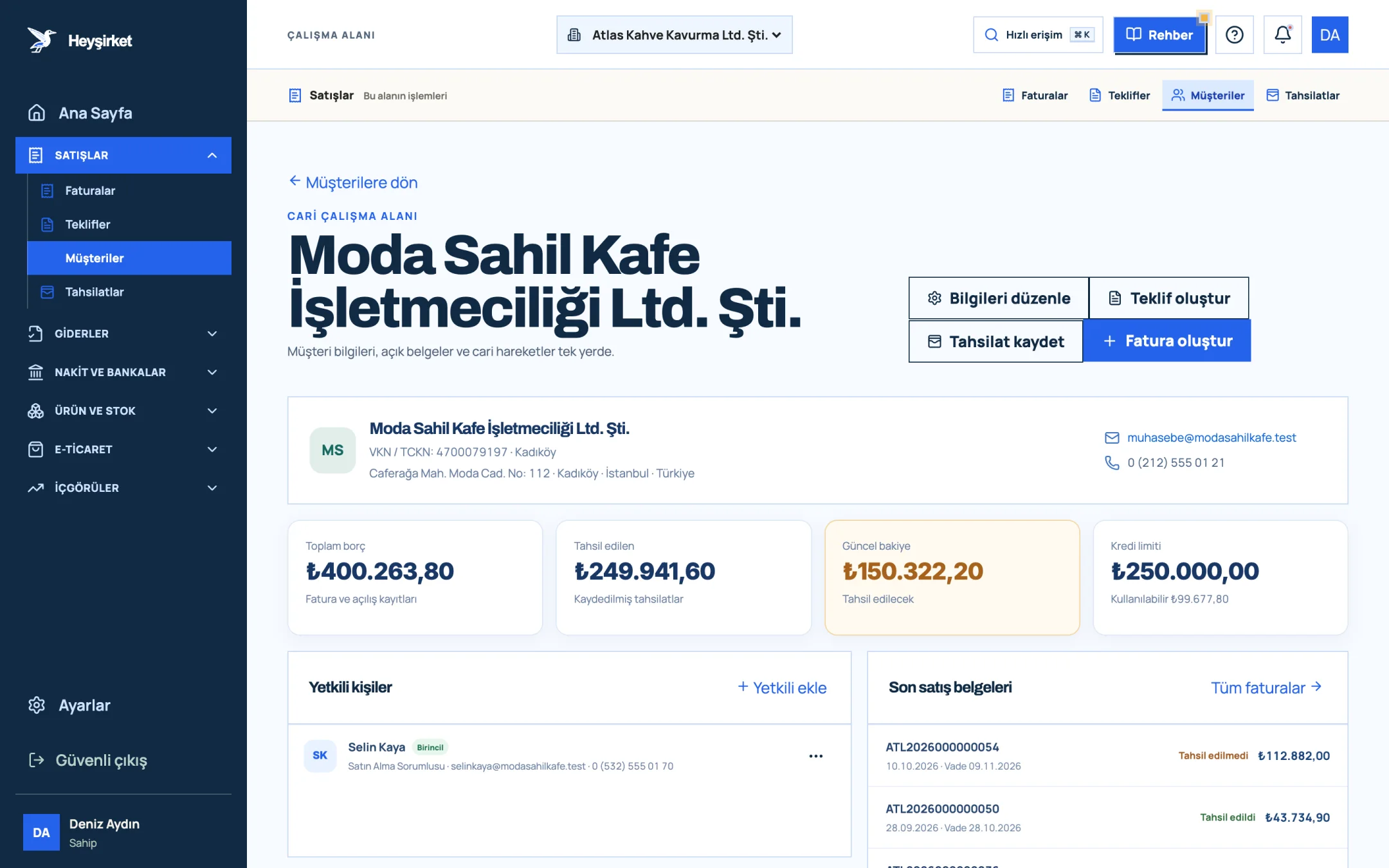
- 1. Quick actions (Create invoice, Record collection)
- 2. Current balance
- 3. Credit limit
- 4. Recent sales documents
The Statement window prepares automatically the same table we built in Excel above: invoices and recorded collections in date order, with Debit, Credit and Balance columns.
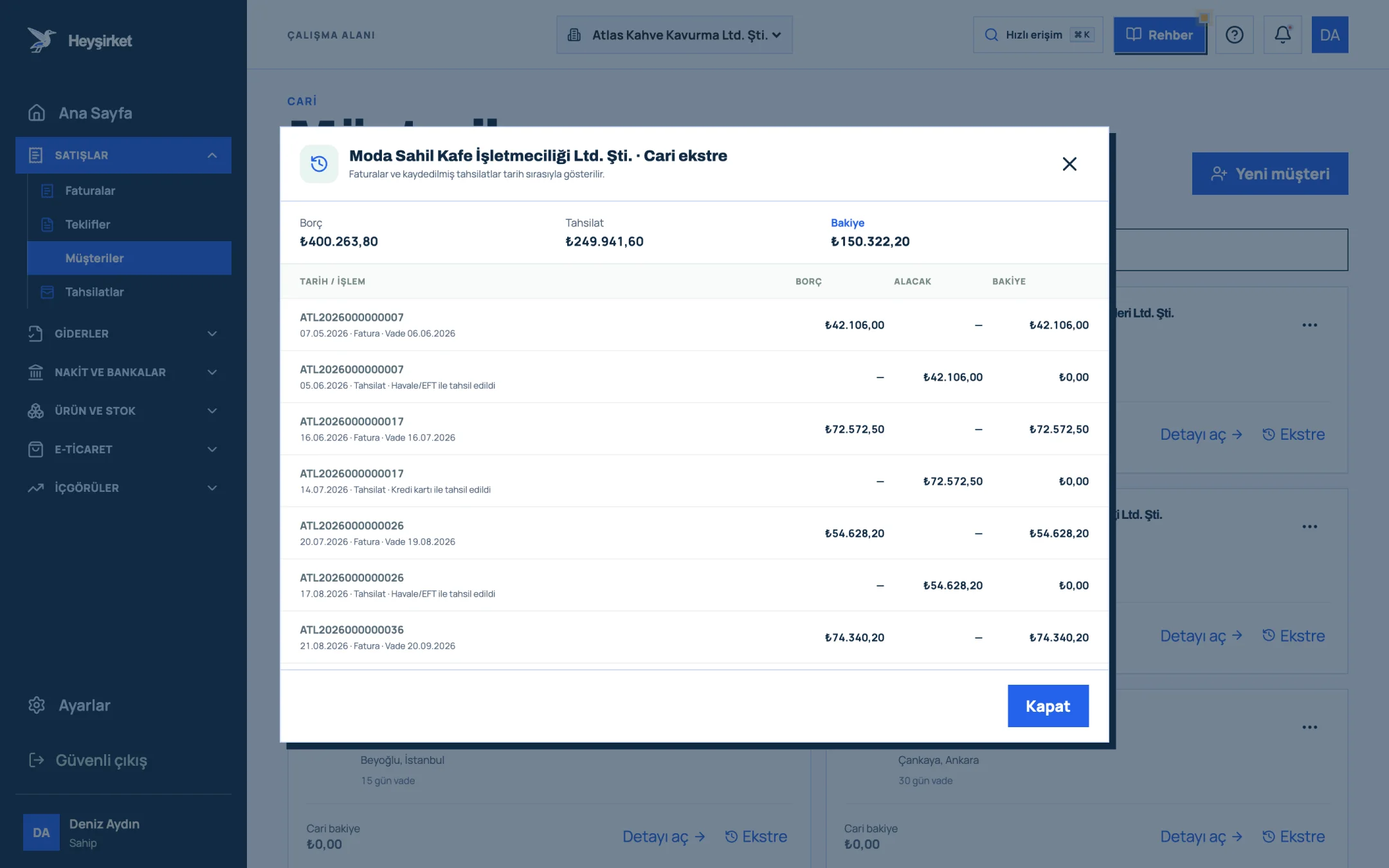
- 1. Account statement window
- 2. Statement transactions and balance
For an overview, the Customer balances report shows customer receivables and supplier payables together with due date ageing. All the screens are in the customer account workspace guide, and the steps for opening a new card are in how to add a customer.
Part 7 · Pitfalls What are the most common mistakes in customer account tracking?
Account balances usually go wrong not through one big mistake but through small missing entries that pile up. The five below waste the most time at month-end.
- Not linking a collection to an invoice: The money is in the bank but the invoice shows as open; a reminder goes to the customer by mistake.
- Opening the same company twice: “ABC Ltd.” and “ABC Limited Company” become two accounts and the balance is split in two. Search by tax number before opening a new card.
- Not posting returns and discounts: The customer issued a return invoice or you agreed a discount, but the account still shows the old amount. The difference surfaces at reconciliation.
- Leaving advances hanging: A payment received before the invoice is noted somewhere and forgotten. Advances should also be posted to the credit side of the account.
- Taking the opening balance without checking: If the balance carried over from the old system is wrong, every number after it is wrong. After switching, confirm large accounts with the customer.
Most of these mistakes surface early when you regularly compare the balance with the other party. We explained how in customer account reconciliation.
Part 8 · Payables Why should supplier accounts be tracked separately?
Account tracking is often thought of only on the customer side. But not knowing what you owe suppliers disrupts your cash plan too: you miss a payment date, or pay the same invoice twice.
In Heyşirket, suppliers are kept as separate cards. Expense documents and incoming e-Faturas increase what you owe the supplier, and the payments you record reduce it; you get the supplier statement with the same logic. The steps are in the suppliers and purchasing guide.
What is a customer account (cari hesap)?
A customer account is the record in which all debit and credit movements with a customer or supplier are tracked in one account. An invoice issued to a customer debits their account and a payment received credits it; the difference is that company's balance.
Can customer accounts be tracked in Excel?
Yes, for a small number of customers and invoices. Columns for customer code, date, document number, description, debit, credit and a formula-based running balance are enough. As the number of records and the number of people using the file grow, so does the margin for error.
Do I need to import all old invoices when switching to software?
No. It's enough to choose the first day of a month as the switch date and import each account's opening balance as of that day. If you want to track open invoices separately, you can import just those as well.
Are a customer statement and reconciliation the same thing?
No. A statement lists an account's movements and balance. Reconciliation is comparing that balance with the other party and confirming it in writing; the statement is the main document for reconciliation.
Does the account balance update automatically in Heyşirket?
Yes. When you issue an invoice the customer's debit is posted, and when you record a collection their credit is posted. Payments from card payment links and transfers you match from the bank statement are also written to the invoice and the account automatically.
See your customer accounts on one screen Open your customers, see who owes how much, and get a statement in one click. Open customers
Author: Heyşirket Editorial Team