Pre-accounting · 11 min read · Updated:
Quote approval process: how to get quotes approved online and track them
Sending the quote is half the job. The other half is knowing whether the customer opened it, getting the approval in writing and turning the approved work into an invoice without retyping anything.

In short
- The quote approval process is the full set of steps from preparing a quote to the customer's written approval and its conversion into an invoice.
- Under the Turkish Code of Obligations, an offer with a deadline binds the person making it until that deadline, so every quote should state its validity date clearly.
- Quote tracking watches five statuses: draft, sent, accepted, rejected and expired; the time the customer first opened the quote is also part of tracking.
- With online quote approval, the customer opens the link or the QR code on the PDF and approves without logging in; the approval is recorded with its date.
- In Heyşirket an approved quote turns into an invoice draft in one click; approval given by phone is also recorded with Approve on behalf of customer.
You sent the quote and a week has passed. Did the customer look at it, is it stuck in a lost email, or are they waiting for a competitor's quote? When you call, you hear “it's not in front of me right now, we'll get back to you”. In the end someone says “OK, go ahead” on the phone and the work starts, but there's no written approval.
This article is about the quote approval process: which statuses a quote goes through, how online quote approval works, when and how to follow up for quote tracking, how to record a verbal approval, and how to move from approval to invoice.
For the content of the quote and filled-in examples see quote examples; for discount and payment term decisions see from quote to invoice.
Part 1 · Definition What is quote approval, and why should it be in writing?
Quote approval is the customer stating that they accept the price, scope and terms you sent. Once approval arrives, the quote becomes a sales commitment: you agree to do the work at the quoted price, and the customer agrees to pay for it.
Verbal approval is still approval, but it's hard to prove. When, three months later, there's an argument that “installation was included at that price” or “we never approved that line”, having a dated written approval makes things easier. Written approval also shows which version of which quote was accepted.
A quote isn't a financial document and doesn't replace an invoice. Approval is the decision to sell; the official record is created when the invoice is issued.
Part 2 · Flow Which steps make up the quote approval process?
- Prepare — Lines, VAT, validity
- Send — PDF and link
- Opened? — First-opened time
- Follow up — Before it expires
- Approval — Dated, written
- Invoice — Lines carry over
Each step should have an owner and a date. In a small business the owner is usually the same person; what matters is that no step is skipped. The step skipped most often is checking whether the quote was opened. Waiting for a price negotiation on a quote nobody has opened is waiting for an answer that won't come.
Part 3 · Online approval How does online quote approval work?
With online quote approval, the customer receives not just a PDF but a link to a page dedicated to that quote. On this page they see your company details, the lines, VAT, grand total, notes and validity date, and approve with a single button. The approval is recorded with its date and you're notified at once.
In Heyşirket this page is created automatically for every quote. Your customer opens it with the button in the email or by scanning the QR code on the PDF with their phone. No login or sign-up is required, and only people with the link can see the page. When the customer presses Teklifi onayla (Approve quote), the quote becomes “Kabul edildi” (accepted) and company owners receive an email and a phone notification. The page also has a PDF indir (Download PDF) button.
- An expired quote can't be approved. If the validity date has passed, the page asks the customer to contact you for an updated quote.
- A cancelled quote won't open. If you cancel a quote sent by mistake, the link stops working too.
- Rejections and questions come to you. The customer page has only an approve button; a customer who doesn't accept or wants changes replies to the email or calls you, and you mark the quote as Reddedildi (rejected).
Part 4 · Tracking Which statuses matter in quote tracking?
Quote tracking means knowing which stage each open quote is at and what the next step is. For that, each quote should have a single status, updated with every change.
| Status | Meaning | Next step |
|---|---|---|
| Draft | Prepared, not yet sent to the customer | Check it and send it |
| Sent | Reached the customer, waiting for an answer | Check whether it was opened, follow up if needed |
| Accepted | The customer approved | Create the invoice draft, plan the work |
| Rejected | The customer didn't accept | Note the reason, revise if needed |
| Expired | The validity date has passed | Send a new quote at current prices |
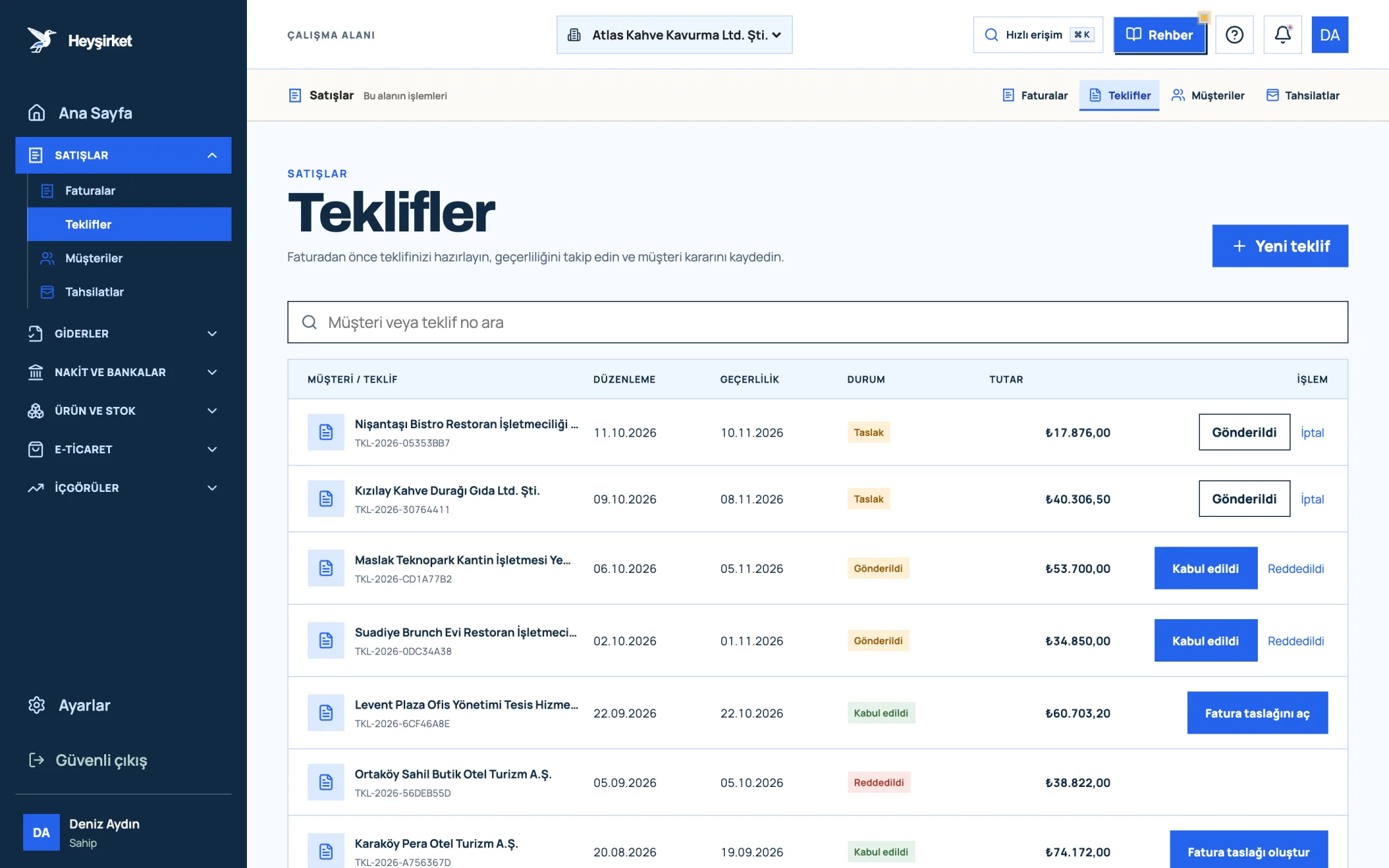
- 1. New quote button
- 2. Quote status (Accepted)
- 3. Create invoice draft
- 4. Decision buttons for a sent quote
In Heyşirket, when you email a quote its status becomes “Sent” automatically; if you handed it over another way, use Gönderildi olarak işaretle (Mark as sent). The quote detail shows the time the customer first opened the quote page, or that it hasn't been opened yet. A quote past its validity date appears in the list as “Süresi doldu” (expired).
Putting quote tracking into numbers
When you update statuses regularly, you get a simple but valuable measure: the quote conversion rate, the share of quotes sent that are accepted. If you send 20 quotes a month and 6 are accepted, the rate is 30 percent. Split by customer type, service and quote amount, it shows where your prices are accepted and where you keep losing.
The second measure is time to approval: the number of days from sending to approval. If approvals usually come in the first few days, a quote unanswered for two weeks is probably lost; either follow up, or accept the loss and ask why. These two numbers base your sales forecasts on data rather than feelings.
Part 5 · Timing When should you follow up on a quote?
Follow-up timing is built around the quote's validity period. For a quote valid for 15 days, a practical rhythm is:
- Day 2: Check whether the quote was opened. If not, send a short message to make sure it arrived.
- Days 5-7: If it was opened but there's no answer, ask whether they have questions. This isn't sales pressure; it's an offer of help.
- 2-3 days before it expires: Remind them of the validity date. Saying prices are valid until that date creates a natural deadline for the decision.
- After it expires: If the customer is still interested, send a new quote at current prices instead of extending the old one.
You'll find ready-made follow-up messages in quote examples. Tying follow-ups to the calendar rather than the person makes every quote get the same care.
Part 6 · Exceptions How do you record verbal approval, revisions and rejections?
Not every approval comes online. A customer may say “fine” in a meeting or approve by phone. That approval needs recording too, otherwise the quote stays “Sent” in the list and tracking breaks down.
- Verbal approval: In Heyşirket, Müşteri adına onayla (Approve on behalf of customer) in the quote detail records a quote approved in a conversation. You can add a note about the call. No email or notification goes to the customer.
- Revision: If the customer wants a line or price changed, use Kopyala (Copy) to move the lines and note to a new quote, make the change and send it as a new quote. Cancelling the old one prevents two different prices being open at once.
- Rejection: Mark the quote as Reddedildi (rejected) and note the reason. Price, timing or scope? A few months later these notes become valuable data for your pricing policy.
After a verbal approval, sending a short summary email is a good habit too: “In today's call we noted that you approved our quote no. 12; we start work on 4 November.” That one sentence leaves a written trail in case of a dispute.
Part 7 · Invoice How does an approved quote become an invoice?
The biggest waste of time after approval is retyping the same lines into an invoice. Every retyped line risks a price or quantity that differs from the quote. In Heyşirket, when you choose Fatura taslağı oluştur (Create invoice draft) on an accepted quote, the customer, lines, prices and discounts carry over to the invoice form as they are. You check the draft and issue it as an e-Fatura or e-Arşiv invoice; the document type is decided automatically by the buyer's taxpayer status.
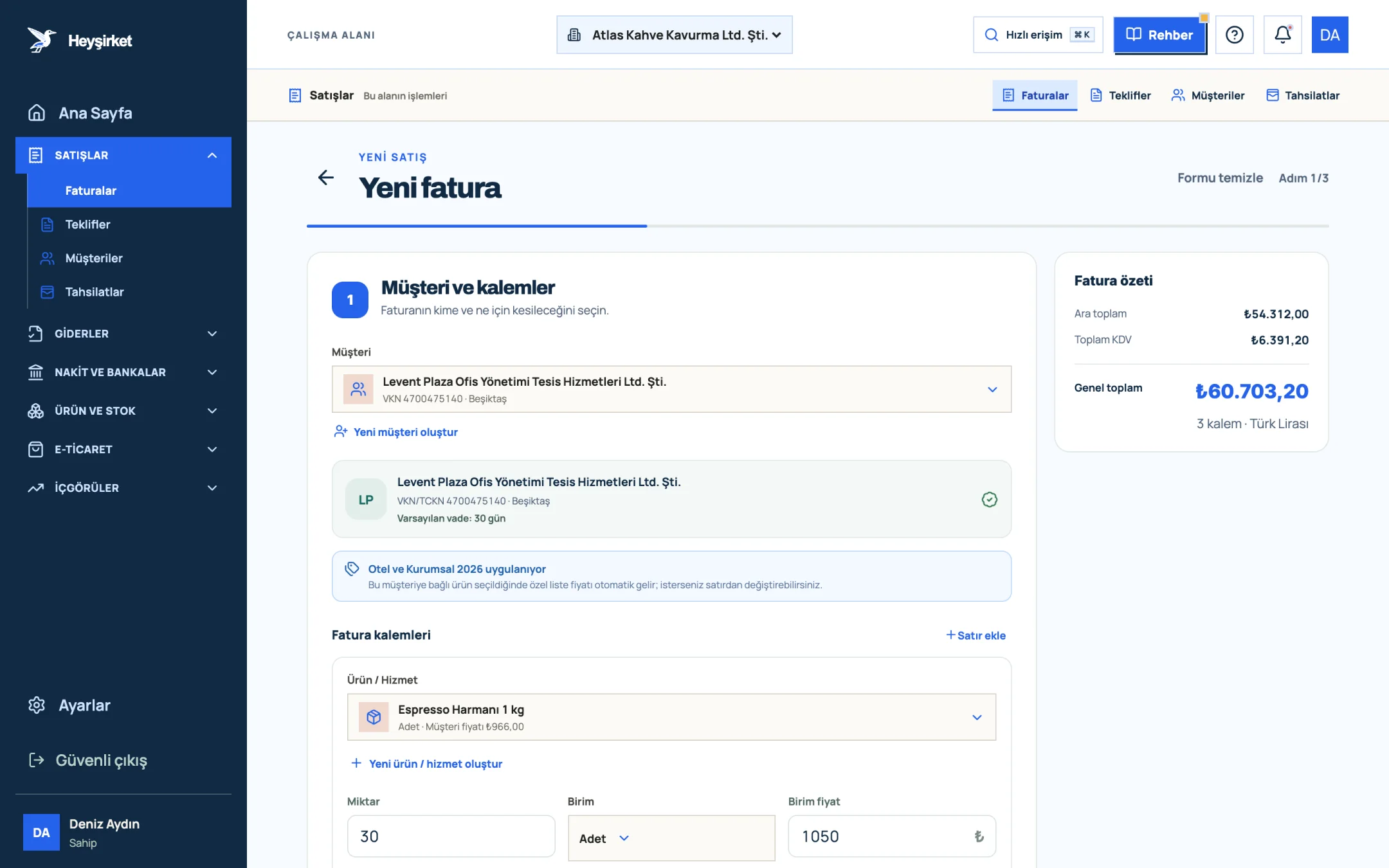
- 1. Customer carried over from the quote
- 2. Line items from the quote
- 3. Customer price list note
- 4. Invoice summary
On the quote and invoice screens, a warning card appears if the customer's payment risk is medium or high. When a large approval arrives, that warning is a good moment to consider asking for a partial advance before starting; details are in customer credit limit. The invoicing steps are in how to issue an e-Fatura, and the whole quotes screen in the how to prepare a quote guide.
Quotes are part of the pre-accounting module and included in the Professional, Premium and Custom plans with no separate subscription. You'll find all the features on the quotes page and plan prices on the pricing page.
Is online quote approval legally valid?
Under the Turkish Code of Obligations, a contract is formed by the parties' mutual and matching declarations of intent; unless the law requires a special form, approval can be given electronically. A dated online approval is much stronger evidence than a verbal one. For high-value or form-restricted transactions, consult your lawyer.
Does the customer need an account to approve the quote?
Not in Heyşirket. The customer opens the quote page with the button in the email or the QR code on the PDF and presses Approve quote. No login or sign-up is required, and only people with the link can see the page.
How do I know if the customer opened the quote?
In Heyşirket, the quote detail shows when the customer first opened the quote page, or that it hasn't been opened yet. Your own preview doesn't count as a view.
How long should a quote be valid?
It depends on how long your prices can stay fixed; most businesses use between 7 and 30 days. When costs change quickly, keeping the period short and stating it clearly on the quote protects you.
How do I record a customer who approved by phone?
Record it with Approve on behalf of customer in the quote detail and add a note about the call if you like. The quote becomes accepted and no email or notification goes to the customer. Sending a short summary email afterwards leaves a written trail.
Can I invoice a quote that hasn't been approved?
Yes. Since approval may have come another way, an invoice draft can be opened from any quote that isn't cancelled. You check the draft and issue it as an e-Fatura or e-Arşiv invoice.
Track your quotes in one list Send the quote, see whether the customer opened it, and turn it into an invoice draft in one click once it's approved. Open quotes
Author: Heyşirket Editorial Team