Data migration · 15 min read · Updated:
Switching accounting software: planning, cutover date and reconciliation
The hard part of switching software isn't learning the new tool. The hard part is making sure the figures from the old system start in the new one exactly the same, down to the last kuruş.

In short
- A successful software migration consists of an inventory, a cutover date, data transfer, reconciliation and a short parallel-run period.
- The cutover date should be the first day of a month; if possible, the start of a quarter or year removes mid-period splits altogether.
- You don't need to migrate everything: cari accounts (customer and supplier accounts), products, open invoices and opening balances are migrated; the detail of closed past periods stays in the old system or the archive.
- Reconciliation means comparing the number of records and the totals transferred with the old system; you don't go live until the difference is zero.
- If your e-Belge (e-document) provider is also changing, download the archive of documents from the old provider; the retention obligation stays with the business.
A café owner sends you a message: "The system shows I owe 18.400 TL, but I paid all of it last month." The payment was recorded in the old software. During the move to the new software only the invoices were migrated; the collections were forgotten.
This is the most common problem after a software switch: the figures the new system starts with don't match the old one. And it usually surfaces through a customer's objection, in other words at the worst possible moment.
In this article we explain how to plan a migration from start to finish: what to move, which day to switch, and how to verify the figures. At the end you'll also see how to tell, with a single number, whether the migration succeeded.
Part 1 · The decision When should you switch accounting software?
The right time to switch accounting software is when your current system slows your business down, no longer meets your team's needs, or costs more than the value it delivers. Switching software is a one-week project; staying on the wrong software is a hidden cost you pay every month.
- You enter the same data in two places (e.g. you issue an invoice in one place and type it into Excel separately).
- You can't access it from your phone or outside the office.
- The team has grown, but everyone signs in with the same user; you can't see who did what.
- e-Fatura (Turkish e-invoice), incoming e-invoices and collection tracking live in different places.
- You have to wrestle with Excel separately every month to get reports.
You've made the decision. The first job now is knowing what you'll move.
Part 2 · Inventory What should move to the new software, and what should stay in the old system?
A data inventory means listing the information in the old system and deciding "migrate, summarise or archive" for each item. Migrating everything takes time and invites old mistakes into the new system.
| Data | Decision | Why? |
|---|---|---|
| Cari accounts (customers, suppliers) | Migrate | Used every day; tax details are needed on invoices. |
| Product and service list | Migrate | Speeds up invoicing, together with prices and VAT rates. |
| Open (unpaid) invoices | Migrate | Collection tracking will continue in the new system. |
| Partial collections on open invoices | Migrate | Otherwise balances will look wrong. |
| Cash and bank opening balances | Migrate | Your cash view must start out correct. |
| Closed past invoices | Archive or summarise | May be needed for reporting, but not used in daily work. |
| Past-period expense detail | Archive | It's already in your mali müşavir's books. |
Part 3 · The date How do you choose a cutover date?
The cutover date is the day the old system stops taking entries and the new system takes its first one. All balances on that date become the new system's opening balances.
| Option | Pros | Cons |
|---|---|---|
| Start of the year (1 January) | New accounting period; the cleanest start | Clashes with the year-end rush |
| Start of a quarter (1 April, 1 July, 1 October) | Aligned with provisional tax periods | You may need to wait for the next quarter |
| Start of a month | Fast; aligned with the VAT period | Quarterly reports are combined from two systems |
| Mid-month | None | The same month's records are split across two systems; not recommended |
Set the cutover date together with your mali müşavir (certified financial advisor). Knowing which day you'll close the old system makes their job easier when preparing that month's return. We cover the division of work in our working with your accountant article.
Once you've chosen the cutover date, announce it to the whole team and your key suppliers. Telling your large customers who are expecting invoices in advance that the first document from the new system may look a little different heads off unnecessary questions. Take care not to schedule other workloads in the migration week, such as a big campaign, a year-end stock count or the filing rush.
Part 4 · Flow In what order do the migration steps run?
An accounting software migration has four main phases: preparation, transfer, verification and go-live. The flow below shows the order of these phases.
- Inventory — What will move?
- Cutover date — First day of the month
- Export — Separate files
- Mapping — Column → field
- Reconciliation — Count and total
- Parallel run — 2-4 weeks
- Live — Old system closes
Heyşirket's migration guide page suggests four steps with the same logic: prepare your files, map the fields, reconcile the results and go live.
Part 5 · Files How do you export data from the old system?
Exporting means downloading the data in the old system in an open file format such as Excel or CSV. Most pre-accounting tools offer an export option on their list screens; if you use Excel, your files are already ready.
Export checklist
- Export cari accounts, products, invoices, collections and expenses to separate files.
- Make sure the first row of each file has column names, with no merged cells or subtotal rows.
- Re-save old .xls files as XLSX or CSV.
- Check that date columns use a single format (e.g. DD.MM.YYYY).
- Make sure amount columns contain no currency symbols or text.
- Also download the open receivables, open payables and bank balance reports as of the cutover date from the old system as PDFs; you'll need them for reconciliation.
The last item is the one most often skipped. Once the old system is closed, it's often impossible to run that report again, yet it's the reference figure for reconciliation.
Part 6 · Mapping What is field mapping, and why does it matter?
Field mapping means deciding which field in the new system each column in the old system corresponds to. "Ünvan", "Firma Adı" and "Müşteri" columns can all go to the same field, the cari account's company name.
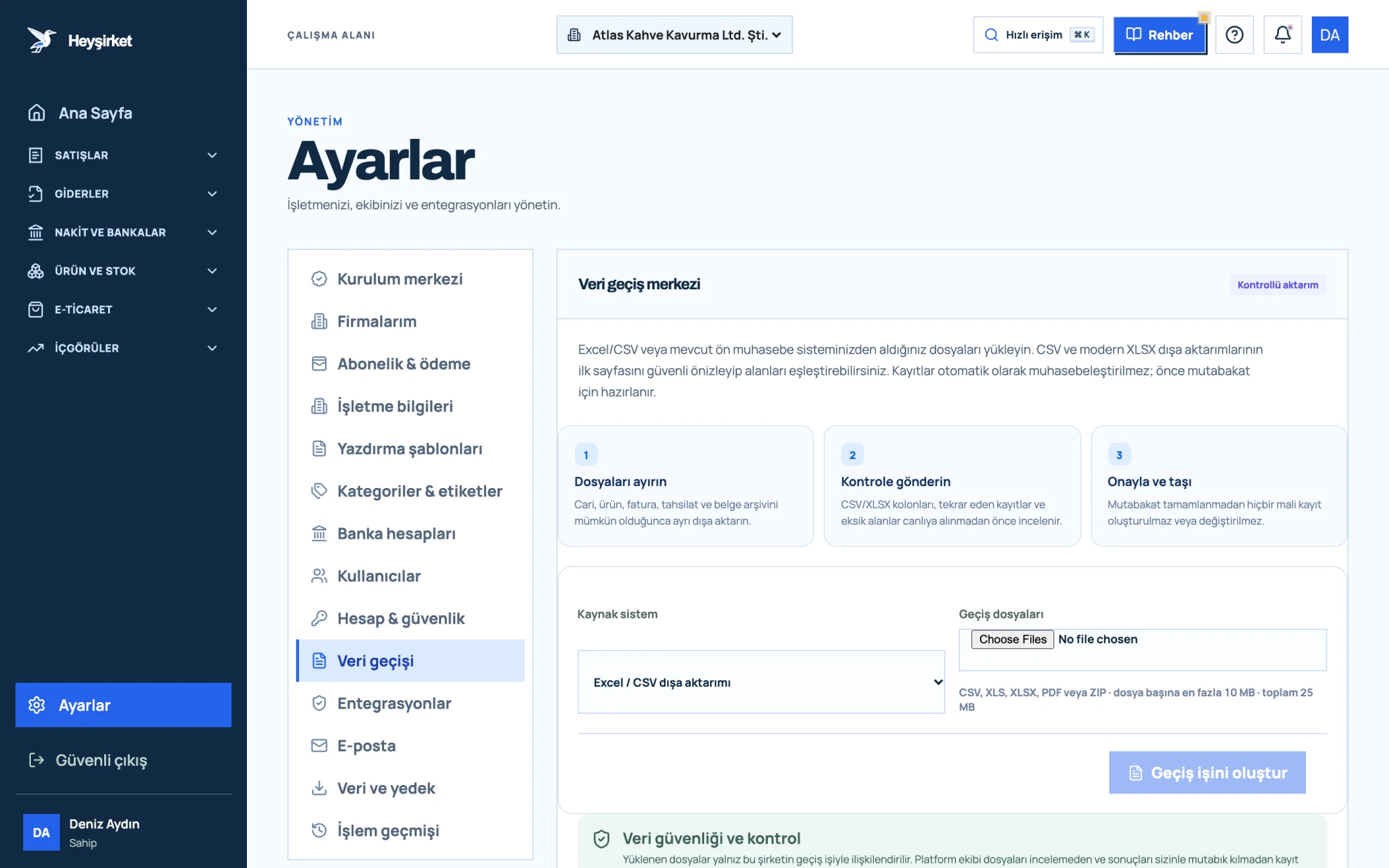
- 1. Data migration tab
- 2. Three-step migration process
- 3. Source system selection
- 4. Create migration job
In the mapping window you first choose the file's record type: Cari accounts, Products / services, Sales invoices, Collections or Expenses. Then you set the Heyşirket field opposite each source column. The system makes the first suggestions itself, based on the column names.
An important safeguard: no financial records are created automatically from the files you upload. Records are first prepared for reconciliation, and the transfer happens only after your approval. All the steps are in the data import guide.
Part 7 · Reconciliation How do you reconcile a migration?
Migration reconciliation means comparing the records transferred to the new system with the old system by count and amount, and explaining every difference. Going live before reconciliation is finished means working all year with a wrong opening balance.
| Total open receivables in the old system as of 30 September | 412.350 TL |
|---|---|
| Total of open invoices transferred to Heyşirket | 430.750 TL |
| Partial collections transferred | 18.400 TL |
| Calculation | 430.750 TL − 18.400 TL |
| Open receivables after transfer (difference 0 TL) | 412.350 TL |
This is where the café example at the start of the article comes from: if the collections file had been forgotten, open receivables would have shown 18.400 TL too much.
| Check | Old system | New system | If there's a difference |
|---|---|---|---|
| Number of cari accounts | List count | Customers screen | Duplicate or skipped accounts |
| Number of products | List count | Products and services screen | Inactive products may not have been migrated |
| Total open receivables | Receivables report | Overview · Total open receivables | Missing collection or invoice |
| Bank balance | Bank statement | Cash and banks screen | Wrong opening balance |
| Balances of the 10 largest customers | Account statement | Account statement | Review one by one |
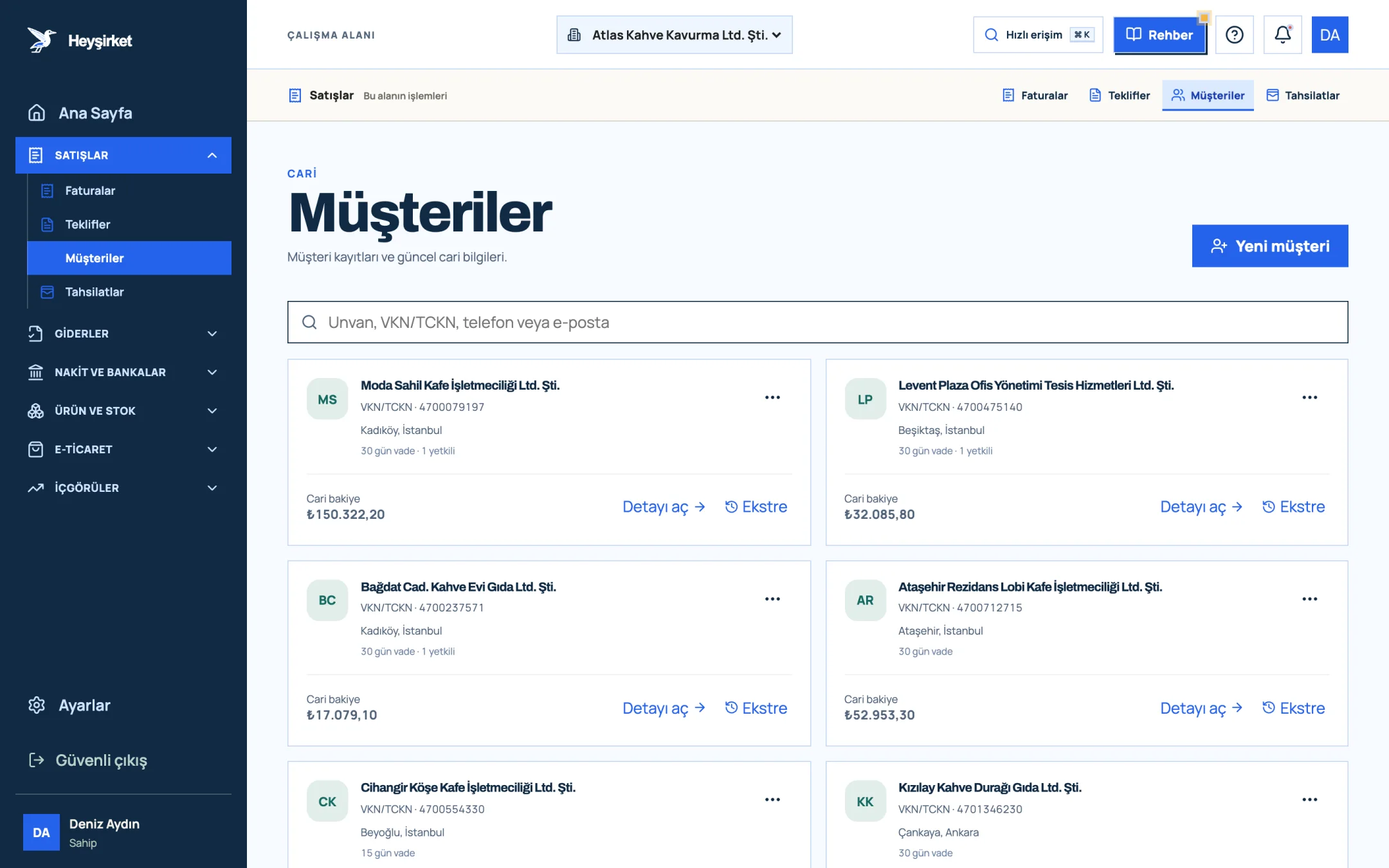
- 1. New customer button
- 2. Customer search
- 3. Customer card: account balance and payment terms
- 4. Statement link
It's a good idea to confirm your largest customers' balances with them after the transfer, too. We explain how in our account reconciliation article.
Part 8 · Parallel run How long should the parallel run last?
A parallel run means keeping the old system open in read-only mode for a short period after the cutover date while the new system is used live. The goal isn't to do the same transaction in both systems, but to be able to look back at the old one when a question comes up.
For a small business, a parallel period of two to four weeks is usually enough. During this period new records are entered only in the new system; the old system is for reference only. Entering the same invoice in two places wipes out all the benefits of the migration.
Part 9 · e-Belge What should you watch out for if your e-Belge provider is changing too?
Changing your e-Belge provider means changing the private integrator that transmits your e-Fatura and e-Arşiv (e-archive) documents to GİB (Turkish Revenue Administration). It's not the same as changing your pre-accounting software; you can change one and keep the other.
- Download the archive of all sent and received documents from the old provider.
- Plan the invoice series you'll use with the new provider and the continuity of numbering together with the provider.
- Stop issuing documents from the old provider on cutover day; don't issue documents from two providers on the same day.
- Test the new connection in trial mode first, then take it live.
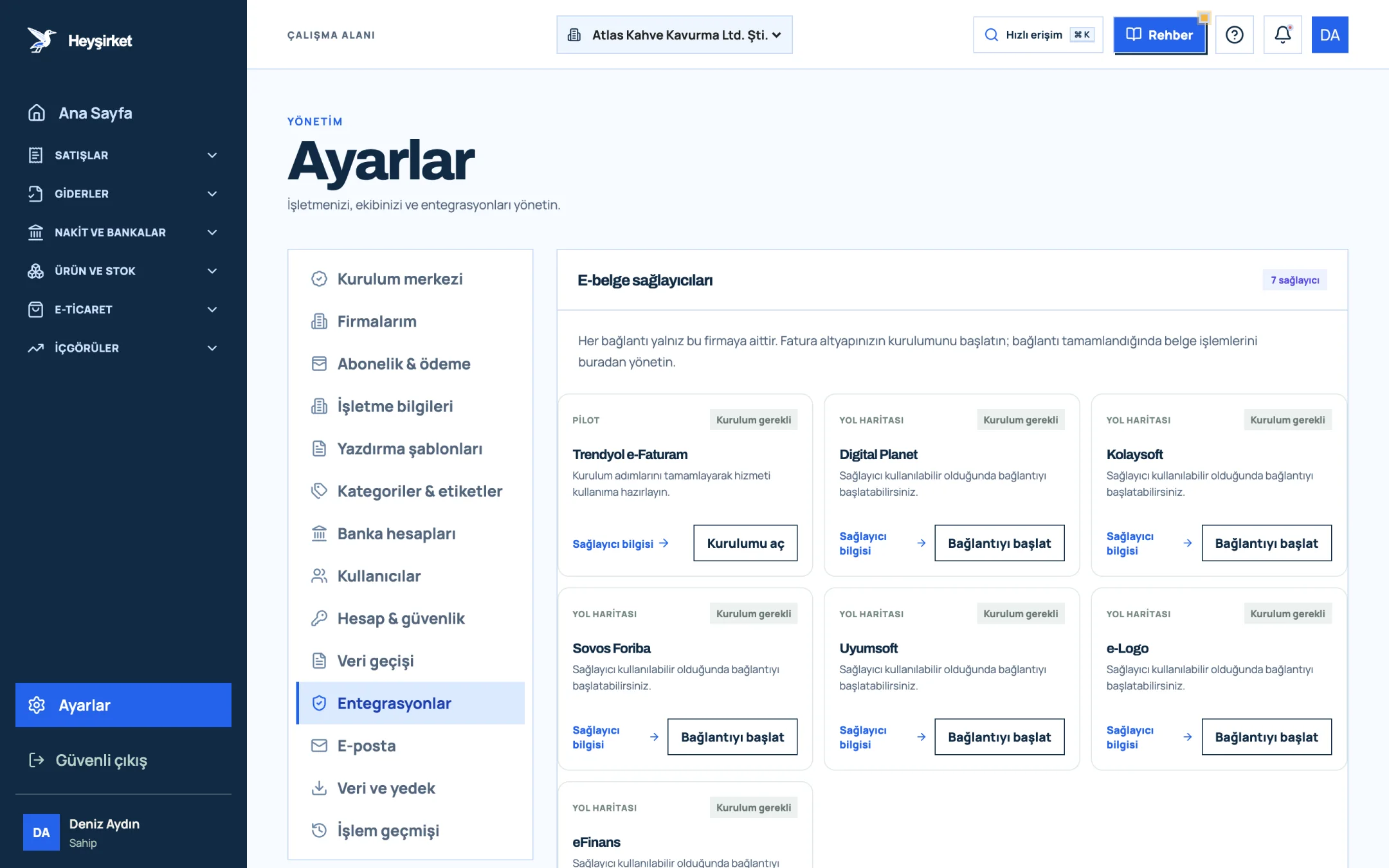
- 1. Integrations tab
- 2. Trendyol e-Faturam card
- 3. Open setup button
- 4. Other e-document providers
All setup steps and the note on credits (kontör) are in the e-document connection guide.
Part 10 · Balances Where should opening balances come from?
An opening balance is the value entered in the new system as the starting amount for each cari account, cash register and bank account as of the cutover date. The right source isn't the old system's report on its own, but that report verified against your mali müşavir's records and bank statements.
| Balance | Primary source | Verification |
|---|---|---|
| Bank accounts | Bank statement (end of day before the cutover date) | Bank balance in the old system |
| Cash | Physical cash count | Cash balance in the old system |
| Customer balances | Old system's open receivables report | Reconciliation with large customers |
| Supplier balances | Old system's open payables report | Supplier statements |
| Stock quantities | Physical count on the cutover date | Stock report in the old system |
Atlas Kahve made its switch on 1 October. On the evening of 30 September the cash was counted, the bean and packaging stock in the warehouse was weighed and the bank statement was downloaded. The next morning, the first job in the new system was to enter these three figures as opening balances.
Part 11 · Team How do you get the team used to the new software?
The most effective way to get the team used to new software is to show each person only the screens they use for their own work and to run short daily checks in the first week. Explaining the whole software to everyone means nothing sticks in the first week.
- Sales team: adding customers, and the quote and invoice screens.
- Finance: collections, cash and bank movements, reports.
- Warehouse: products, stock movements and dispatch notes.
- Mali müşavir: invoices, expenses and reports; a short joint review at the end of the first month.
In the first week, do a five-minute check at the end of every day: invoices issued today, collections entered, any screen someone got stuck on? When questions are resolved in the first week, the urge to go back to the old system fades on its own from the second week. Short guides for each screen are in the Guides section.
Part 12 · Pitfalls What are the three most expensive mistakes in a software migration?
The most expensive mistakes in software migrations are incomplete collection transfers, duplicate cari accounts and continuing to enter records in the old system after cutover day. All three look small at first glance, but lead to corrections that drag on for months.
- Incomplete collection transfer: Invoices are migrated, partial collections are forgotten. The result is payment reminders going to customers who've already paid.
- Duplicate cari accounts: "Moda Sahil Kafe" and "Moda Sahil Kafe Ltd." are migrated as two separate accounts; balances are split and statements come out wrong.
- Entries continuing in the old system: After cutover day, someone issues an invoice in the old software out of habit; that document never appears in the new system.
The safeguards for all three are in the steps in this article: transferring the collections file separately, cleaning up the cari list beforehand and switching off new entries in the old system on cutover day. But the real insurance is the single-number check in the next part.
Part 13 · The measure How do you know the migration succeeded?
The success of a migration is measured by a single number: total open receivables on the cutover date being the same in the old and new systems. If this number matches, invoices, collections and cari accounts have most likely been migrated correctly.
The bank balance is the second checkpoint. When these two numbers match, you can leave the old system read-only and do your first month-end close in the new system. For the close, take a look at our month-end closing checklist article.
Should I tell my mali müşavir about the migration?
Yes, definitely. Choose the cutover date together and give them access in the new system with the Accountant role. Knowing which system the migration month's documents will come from makes their job easier when preparing that month's return.
How long does switching accounting software take?
For a small business, preparation and transfer usually take one to two weeks, followed by a parallel run of two to four weeks. How clean the data is matters most for the timeline.
Do I need to migrate all invoices from past years?
No. Open invoices, cari accounts, products and opening balances are migrated. The detail of closed past periods is kept in the old system or the archive.
Which file types can I upload to Heyşirket?
CSV, XLS, XLSX, PDF and ZIP. Field mapping works on CSV and XLSX files; there's a limit of 10 MB per file and 25 MB in total.
Is my data turned into records automatically during the transfer?
No. No financial records are created automatically from uploaded files. Records are first prepared for reconciliation, and the transfer happens after your approval.
Who can I contact if I get stuck during the migration?
You can write to info@heysirket.com or to our WhatsApp line at 0530 681 36 16.
Start your migration Upload your files and map the fields; records are transferred with reconciliation and your approval. Open data migration
Author: Heyşirket Editorial Team