Pre-accounting · 11 min read · Updated:
How to choose pre-accounting software: a checklist
The right program isn't the one with the most features; it's the one that fits how your business works and won't become a burden when you grow. Decide with a ten-point checklist.
In short
- When choosing pre-accounting software, weigh e-document support, customer account and collection tracking, bank matching, stock, accountant access, data migration, mobile access, security and the pricing model together.
- e-Fatura and e-Arşiv documents are issued through a private integrator licensed by GİB; ask which providers the program works with and how credits are charged before you choose.
- With free pre-accounting software, check the limits on documents, users, export and support; being able to export your data at any time is essential.
- In Heyşirket, pre-accounting isn't a separate subscription; it's included in Profesyonel (699,99 TL/month or 6.999,90 TL/year), Premium and Özel, and e-document credits are paid to the provider.
- Heyşirket doesn't yet issue e-SMM or export invoices, and has no live bank connection (open banking); these are on the roadmap.
Choosing pre-accounting software is a decision most business owners make once and then live with for years. The demo looks great, and the first month goes fine. The problems come later: the e-invoice provider doesn't fit, bank movements are entered by hand, the accountant can't log in, and when you want to take your data out the program won't give you a file.
This article is a neutral buyer's guide. First we explain how to work out what you need, then the ten criteria to look at in any pre-accounting program, and the traps in pricing models. At the end there's a checklist you can print and keep on your desk.
In the last section we've written plainly how Heyşirket meets this list, including what isn't available today. That way you can compare it against your own list and decide.
Part 1 · Preparation How do you work out what you need before choosing?
Pre-accounting software is where a business records its sales, purchases, collections, payments, and cash and bank movements together with their documents. If you'd like the detail, see what is pre-accounting. Before choosing, answer three questions: what do you sell, who do you sell to, and how do you get paid?
| Type of business | Must have | Comes later |
|---|---|---|
| Service business (agency, consultancy, clinic) | e-Fatura/e-Arşiv, customer accounts, collections, due date tracking | Quotes, payment links, reports |
| Product business (wholesale, retail) | Stock, warehouses, delivery notes, price lists | Suppliers and purchasing, bank matching |
| Online store and marketplace seller | Order import, bulk invoicing, stock matching | Payout and commission tracking |
| Self-employed professional | e-SMM, collections, expenses | Tax calendar, accountant access |
Part 2 · e-Documents What should you look for in e-Fatura and e-Arşiv support?
e-Fatura and e-Arşiv invoices are issued through a private integrator licensed by GİB (the Turkish Revenue Administration) or through GİB's own panel. The pre-accounting program connects to that integrator and sends the invoice on your behalf. So you're not only choosing a program, but also the provider it connects to.
- Which providers does it work with? Can it connect to the provider you use today, or would you have to switch?
- Who chooses the document type? Does the program itself decide between e-Fatura and e-Arşiv based on the buyer's taxpayer status?
- How are credits charged? Are credits included in the program's price, or paid to the provider separately?
- Do incoming e-Faturas arrive? Do the e-Faturas your suppliers issue to you show up as expenses automatically?
- Who holds the archive? Do the official PDFs remain accessible if you change provider?
You'll find which document goes to which customer in table form in the difference between e-Fatura and e-Arşiv.
Part 3 · Money What matters in customer accounts, collections and bank matching?
A program's real value isn't issuing the invoice but following what happens after it. Who owes you how much, which invoice is late, which invoice did an incoming transfer settle?
- Customer card: Can it hold the tax number, payment terms, credit limit and contact person? Can you get a statement in one click? Details: how to track customer accounts.
- Partial collection: When part of an invoice is paid, does the remaining amount show correctly?
- Bank matching: When you upload a bank statement, are transfers matched with open invoices, or do you enter each line by hand?
- Card payment: Can your customer pay the invoice by card from a payment link, and does the invoice close automatically when the payment arrives?
- Reminders: Can you send customers a reminder for overdue invoices?
Part 4 · Operations Stock, accountant access and data migration
If you sell products, stock shouldn't be a separate program but part of the same record as the invoice. Stock should go down when an invoice is issued, delivery notes should convert into invoices, and if you have more than one warehouse you should be able to transfer between them.
Accountant access is an often-overlooked criterion. Will you email documents to your accountant every month, or will they log in with a limited role and see invoices, expenses and reports themselves? The second option shortens month-end considerably. We covered the division of work in working well with your accountant.
Data migration is the switch itself. Can you import customers, suppliers, products and opening balances from your old program or from Excel? More importantly, if you want to leave tomorrow, can you take your data out? For a migration plan, see switching accounting software.
Part 5 · Security Is cloud pre-accounting safe? Mobile access and security
Cloud pre-accounting is the model where the program isn't installed on your computer but used from the browser and the phone. The advantage is access from anywhere and no installation hassle; in return, you need to pay attention to the security settings.
Security questions to ask
- Is there two-step verification?
- Can users be given role-based permissions (so the sales team doesn't see expenses, for example)?
- Does an activity history show who changed what and when?
- Are bank and payment keys stored encrypted?
- Can you export all of your data?
- Is there a phone app or mobile-friendly screens?
We explained how to split access within a team in detail in team permissions and data security.
Part 6 · Price What do pre-accounting software prices depend on?
Pre-accounting software prices follow one of four models or a mix of them. The list price on its own tells you little; you need to look at the total annual cost.
| Model | How it works | Watch out for |
|---|---|---|
| Per user | A separate fee for each extra user | The price rises as you add your accountant and team |
| Per module | Stock, e-commerce and reports as separate packages | As you grow you end up buying several modules |
| Per document or credit | A fee per e-document issued | Are credits paid to the program or to the provider? |
| Fixed annual plan | One price, a defined scope | Ask about plan limits and the renewal price |
If you're looking for free pre-accounting software, check these limits: monthly document count, user count, e-document support, export and support. If the free version won't let you take your data out, you pay the real price on the day you switch.
| Monthly payment | 699,99 TL × 12 = 8.399,88 TL |
|---|---|
| Annual payment | 6.999,90 TL |
| e-Document credits | Paid to the provider separately |
| Difference with annual payment | 1.399,98 TL |
Prices include VAT and also cover the plan's website, store and SEO modules. The credit fee depends on your e-document provider's tariff.
Part 7 · Checklist Pre-accounting software checklist
Go into the demo with this list. Write “yes”, “no” or “coming soon” next to each item; for the “coming soon” items, decide separately how urgent they are for you.
Ten criteria
- e-Fatura and e-Arşiv: which providers, is the document type automatic, how are credits paid?
- Do incoming e-Faturas show up as expenses automatically?
- Is there a customer card, statement, payment terms and credit limit tracking?
- Are there partial collections, payment reminders and a card payment link?
- Can I upload a bank statement and match transfers with invoices?
- Are stock, warehouses, delivery notes and price lists in the same record as invoices?
- Can my accountant log in with a limited role?
- Can I import data with opening balances from Excel and my old program, and can I export my data?
- Are there two-step verification, roles and an activity history, and can I use it from my phone?
- What is the total annual cost, and which features cost extra?
Part 8 · Product How does Heyşirket meet this list?
In Heyşirket, pre-accounting is a module of your company panel, used with the same login as your website, store and SEO. The table below shows where things stand today. Items marked “on the roadmap” aren't available today.
| Criterion | Status |
|---|---|
| e-Fatura and e-Arşiv | Yes. The document type is chosen automatically based on the buyer's taxpayer status. The provider connection today is with Trendyol E-Faturam; other providers are on the roadmap. Credits are paid to the provider. |
| Incoming e-Faturas | Yes. Listed with payment status on the Incoming e-Faturas screen. |
| Customer accounts, statement, payment terms, credit limit | Yes. Customer workspace, the Statement window and the Customer balances report. |
| Collections and card payment link | Yes. Partial collections, payment reminders; card payment link with iyzico. PayTR and Param are on the roadmap. |
| Bank matching | Yes, by uploading the statement (Excel/CSV). A live bank connection (open banking) is on the roadmap. |
| Stock, warehouses, delivery notes, price lists | Yes. |
| Accountant access | Yes. Accountant role and monthly document package. |
| Import and export | Yes. Data import for CSV, XLS and XLSX files and opening balances; Data and backup for JSON export. |
| Security and mobile | Two-step verification, 7 roles, Activity history; iOS and Android app. |
| e-SMM and export invoices | No, on the roadmap. Today you need to use the GİB e-Arşiv Portal or your e-document provider's panel for e-SMM. |
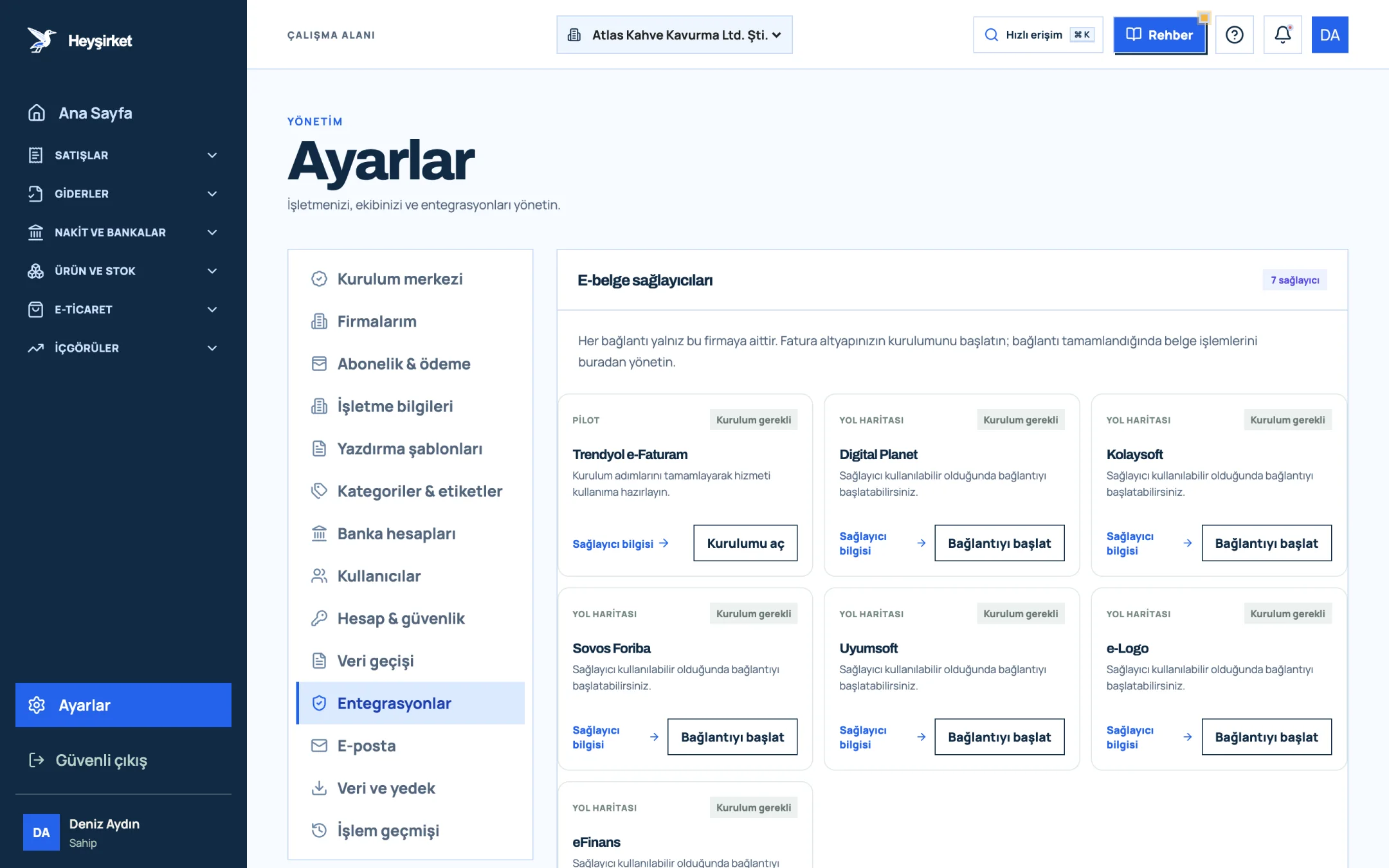
- 1. Integrations tab
- 2. Trendyol e-Faturam card
- 3. Open setup button
- 4. Other e-document providers
On price, pre-accounting isn't a separate subscription. It's included in Profesyonel (699,99 TL/month or 6.999,90 TL/year), Premium (14.999 TL/month or 149.990 TL/year) and Özel; prices include VAT. The free Başlangıç plan doesn't include pre-accounting. For the provider connection see connecting your e-document provider, and for data migration see the data import guide.
What is the most important criterion when choosing pre-accounting software?
It depends on your business, but three criteria apply to everyone: e-Fatura and e-Arşiv support that works with your provider, customer account and collection tracking in the same record as the invoice, and the ability to export your data whenever you want.
Does it make sense to use free pre-accounting software?
It can, to get started. But check the document and user limits, e-document support, export and the level of support. With a free program that won't let you take your data out, you pay the price on the day you switch.
Are e-Fatura credits included in the program's price?
It varies by program, so always ask. In Heyşirket, credits aren't included in the plan; they're paid to your e-document provider at its own tariff. Pre-accounting itself is included in Profesyonel, Premium and Özel at no extra charge.
Can my accountant log in to the program?
In a good program, yes. In Heyşirket you invite your accountant with the Accountant role; and if you switch on the monthly document package in the My accountant setting, the previous month's sales invoices, incoming invoices and expenses go to them automatically on the day you choose.
Can I issue e-SMM in Heyşirket?
Not yet. Issuing e-SMM (the electronic self-employment receipt) is on the roadmap. Today you can issue receipts through the GİB e-Arşiv Portal or your e-document provider and track customers, collections and expenses in Heyşirket.
Try the list on your own screen Choose a customer, enter the lines and look at the invoice preview; you can save it as a draft even before the e-document connection is complete. Create new invoice
Author: Heyşirket Editorial Team