Basics · 15 min read · Updated:
What is ön muhasebe (pre-accounting)? Who does it, what it covers and where to start
Ön muhasebe (pre-accounting) means recording where your business's money comes from and goes, on the day it happens. For businesses in Türkiye, the accountant's job starts after that; yours happens every day.

In short
- Ön muhasebe (pre-accounting) is keeping invoice, collection, expense, cash and bank, and cari (customer and supplier account) records inside the business, on the day and backed by documents.
- Keeping the official books and filing tax returns is the mali müşavir's (accountant's) job; pre-accounting supplies them with complete, timely data.
- An invoice must be issued within at most seven days of the delivery of goods or performance of a service; books and documents are kept for five years under the Tax Procedure Law.
- A good pre-accounting routine consists of a five-minute daily entry, a weekly due date check and a monthly close.
- Excel should give way to pre-accounting software once the number of records grows, more than one person edits the same file and due dates start slipping through the cracks.
It's the 20th of the month. A short message arrives from your accountant: “I'm waiting for last month's expense invoices, the VAT return is coming up.” You open the drawer: a pile of receipts, a few PDFs and two invoices lost somewhere in WhatsApp.
This scene is called “missing pre-accounting”, and most small businesses go through it at least once a month. The good news: the solution isn't working harder, it's working in the right order and on the day.
In this article we'll explain exactly what pre-accounting is, where the line with your accountant falls and how to stay in control with a five-minute daily routine. At the end you'll also find four signs that tell you it's the right time to leave Excel behind.
Part 1 · Definition What is ön muhasebe (pre-accounting)?
Ön muhasebe (pre-accounting) is recording and tracking a business's daily commercial transactions (sales, purchases, collections, payments, cash and bank movements) inside the business, together with their documents. The “pre” in the name comes from its being the stage before entries are posted to the official books.
Put simply: what did you sell to whom, what did you buy from whom, who owes you, whom do you owe and what's in your till today? If you can answer these five questions at any moment, your pre-accounting is in good shape.
| Pre-accounting | General (official) accounting | |
|---|---|---|
| Who does it? | The business owner or an employee | The mali müşavir (SMMM, certified public accountant) |
| When? | Every day, as transactions happen | Periodically; usually monthly |
| What's the output? | Invoices, cari balances, cash position, due date list | Journal, general ledger, tax returns, balance sheet |
| What's the purpose? | Running the business: cash, receivables, payables | Meeting legal obligations |
| What if there's a mistake? | Collections slip and cash gets tight | Penalties and amended returns may be needed |
As you can see, one job continues the other. When pre-accounting is done poorly, even the best accountant has to work with incomplete data. So what does this division of labour look like in practice?
Part 2 · Roles Who does pre-accounting, and what does the accountant do?
The business does its own pre-accounting; in small businesses this is usually the owner's job or an office employee's. The accountant takes the documents and records you produce, posts them to the official books, and prepares and files the tax returns.
- Your job: issuing invoices, gathering incoming invoices and receipts, recording collections and payments, entering cash and bank movements, tracking customer balances.
- The accountant's job: booking documents according to the chart of accounts, filing returns such as KDV (VAT) and muhtasar (withholding tax), handling provisional and annual tax calculations, warning you about changes in legislation.
- Shared ground: the document handover calendar, account reconciliations and the month-end close.
You can come back later to our article on working efficiently with your accountant, which covers this division of labour in more detail. Now let's look at the raw material of pre-accounting: documents.
Part 3 · Documents What are the key documents in pre-accounting?
The key documents in pre-accounting are sales and purchase invoices, irsaliye (dispatch notes), collection and payment receipts, bank slips, cheques and promissory notes, and expense receipts. At least one of these documents should sit behind every commercial transaction.
| Document | When is it issued? | What's it for in pre-accounting? |
|---|---|---|
| Sales invoice (e-Fatura / e-Arşiv) | After delivering goods or a service | It's the source of income and the receivable. |
| Purchase (expense) invoice | Comes from the supplier | Documents the expense and the deductible VAT. |
| İrsaliye (dispatch note) | With the shipment of goods | Proves who the goods went to and when. |
| Collection receipt / bank slip | When money is received | Closes the receivable and records money into cash or bank. |
| Cheque / promissory note | In a deferred payment agreement | Shows a future-dated receivable or payable. |
| Expense receipt / cash register receipt | For small purchases | Documents small expenses. |
Of all the document types, the most confusing is the distinction between e-Fatura (Turkish e-invoice) and e-Arşiv (e-archive invoice). You'll find which one to issue to whom in a table in our article on the difference between e-Fatura and e-Arşiv.
Now we know the documents. The real question: in what order, and when, should we record them?
Part 4 · The flow What path does a sale follow in pre-accounting?
In pre-accounting, a sale passes through five links: quote, invoice, collection, cash or bank movement, and report. Each link uses the previous one's data; if one is missing, the chain breaks.
- Quote — Price and terms
- Invoice — Income and receivable arise
- Collection — Receivable is closed
- Cash / Bank — Cash becomes visible
- Report — Profit and VAT are calculated
Let's take an example from Atlas Kahve. The roastery in Kadıköy prepares a quote for a monthly bean supply to Moda Sahil Kafe. The café approves, the delivery is made and the invoice is issued. Fifteen days later a bank transfer arrives, and the collection record closes the invoice.
When every link in this chain is recorded in the software, Atlas Kahve's owner can answer “What did I sell to whom this month, and who still hasn't paid?” on a single screen without waiting for month-end. We cover the finer points of moving from quote to invoice in our article on the quote-to-invoice sales process.
Part 5 · Routine How do you set up a daily, weekly and monthly pre-accounting routine?
A solid pre-accounting routine has three rhythms: daily entries, a weekly due date check and a monthly close. Altogether it takes less than an hour a week, but it wipes out the panic hours at month-end.
Pre-accounting routine
- Every day: check the invoices issued, record incoming collections and enter the expense receipts collected during the day.
- Every day: look at your cash and bank balances; if there's an unexpected movement, explain it the same day.
- Every week: list the receivables falling due this week and send reminders.
- Every week: check incoming e-invoices so that no document is left unrecorded as an expense.
- Every month: compare your bank statement with the bank balance in the software.
- Every month: look at the VAT report and confirm the document handover date with your accountant.
- Every month: check the balances of your five largest customers and request a reconciliation if needed.
Our month-end closing checklist article, which covers the monthly part with a more detailed list, is the natural continuation of this routine.
| VAT calculated on your October sales | 48.000 TL |
|---|---|
| Deductible VAT on your October purchases and expenses | 31.500 TL |
| Calculation | 48.000 TL − 31.500 TL |
| VAT payable (estimated) | 16.500 TL |
The example shows the estimated picture you can see before the month ends when pre-accounting records are kept on the day. Your accountant calculates the exact amount on the return; if expense documents are missing, deductible VAT comes out lower and VAT payable higher.
This simple calculation shows why collecting expense documents on time matters: every forgotten expense invoice means extra VAT coming out of your pocket. We explain how VAT works in our VAT guide.
Part 6 · Screens What does pre-accounting look like in software?
Pre-accounting software brings the five links above and the routine together in one place. In Heyşirket the work runs through five main screens: Home, Invoices, Expenses, Cash and banks, and the reports under Insights.
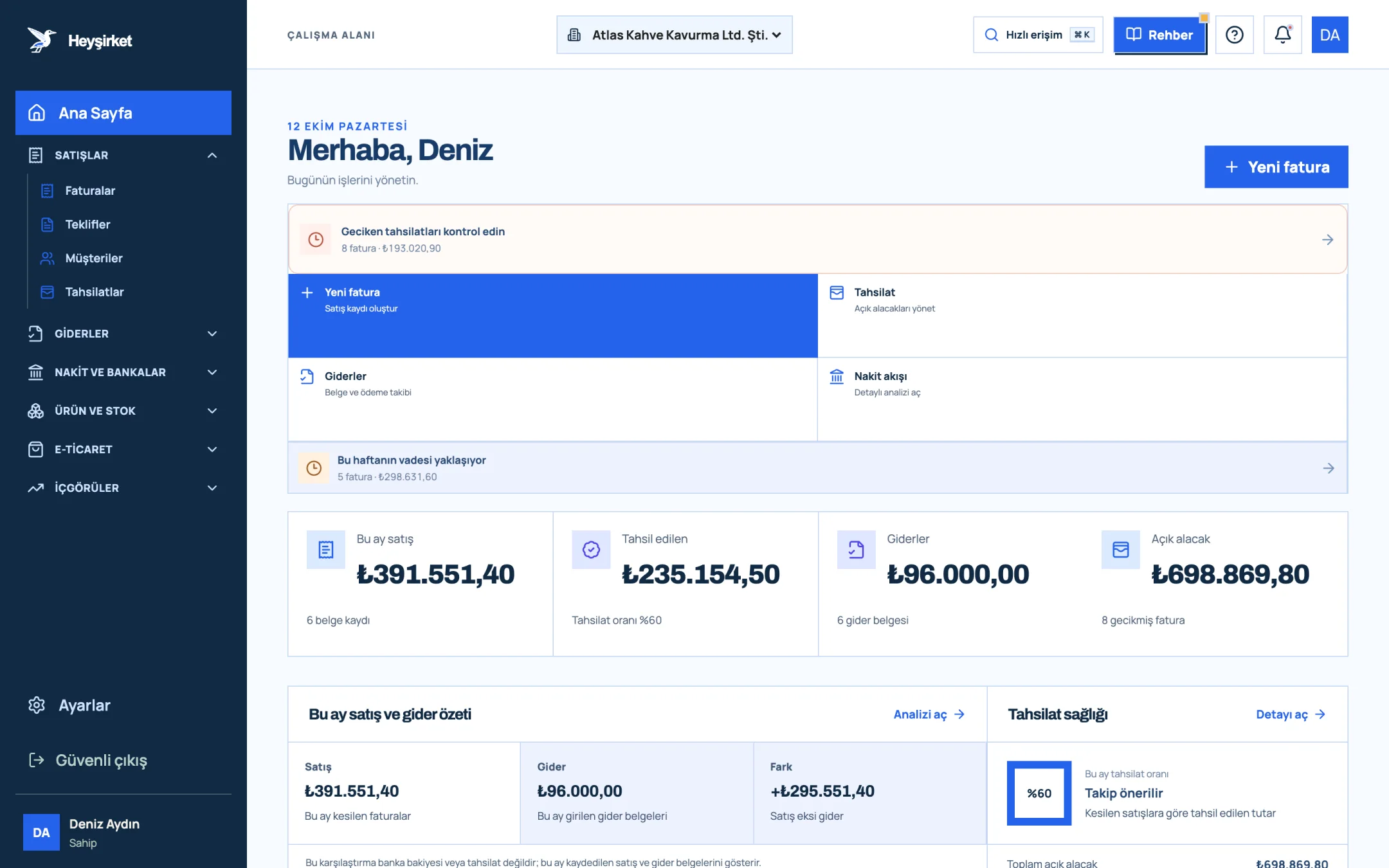
- 1. Create new invoice button
- 2. Overdue collections alert
- 3. Sales invoiced this month
- 4. Total open receivables
On Home you also see this month's sales, expenses and difference summary, along with your collection rate. Take a look at the portal home page guide, where we introduce the screen in detail.
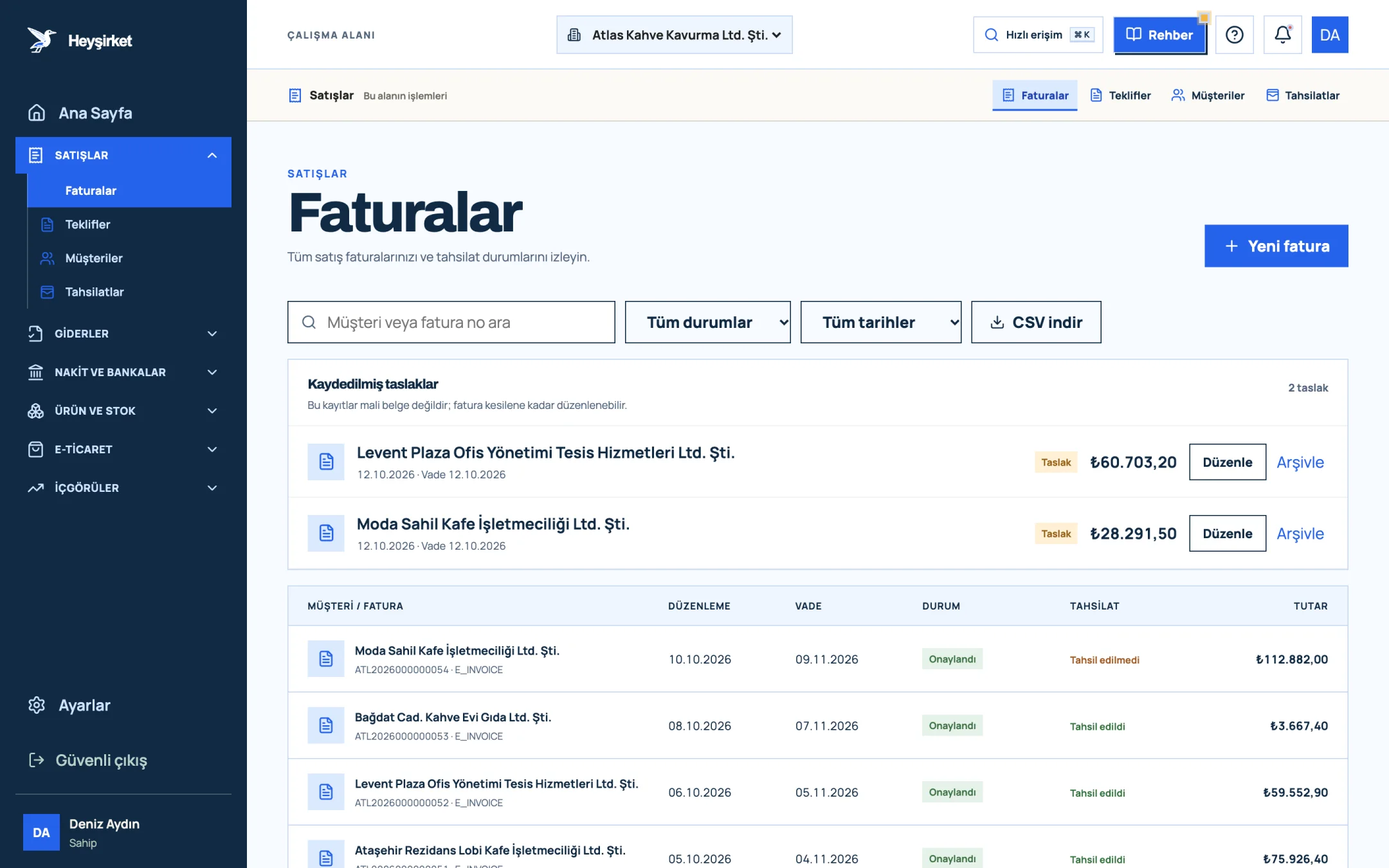
- 1. New invoice button
- 2. Search and filters
- 3. Collection status column
- 4. Saved invoice draft
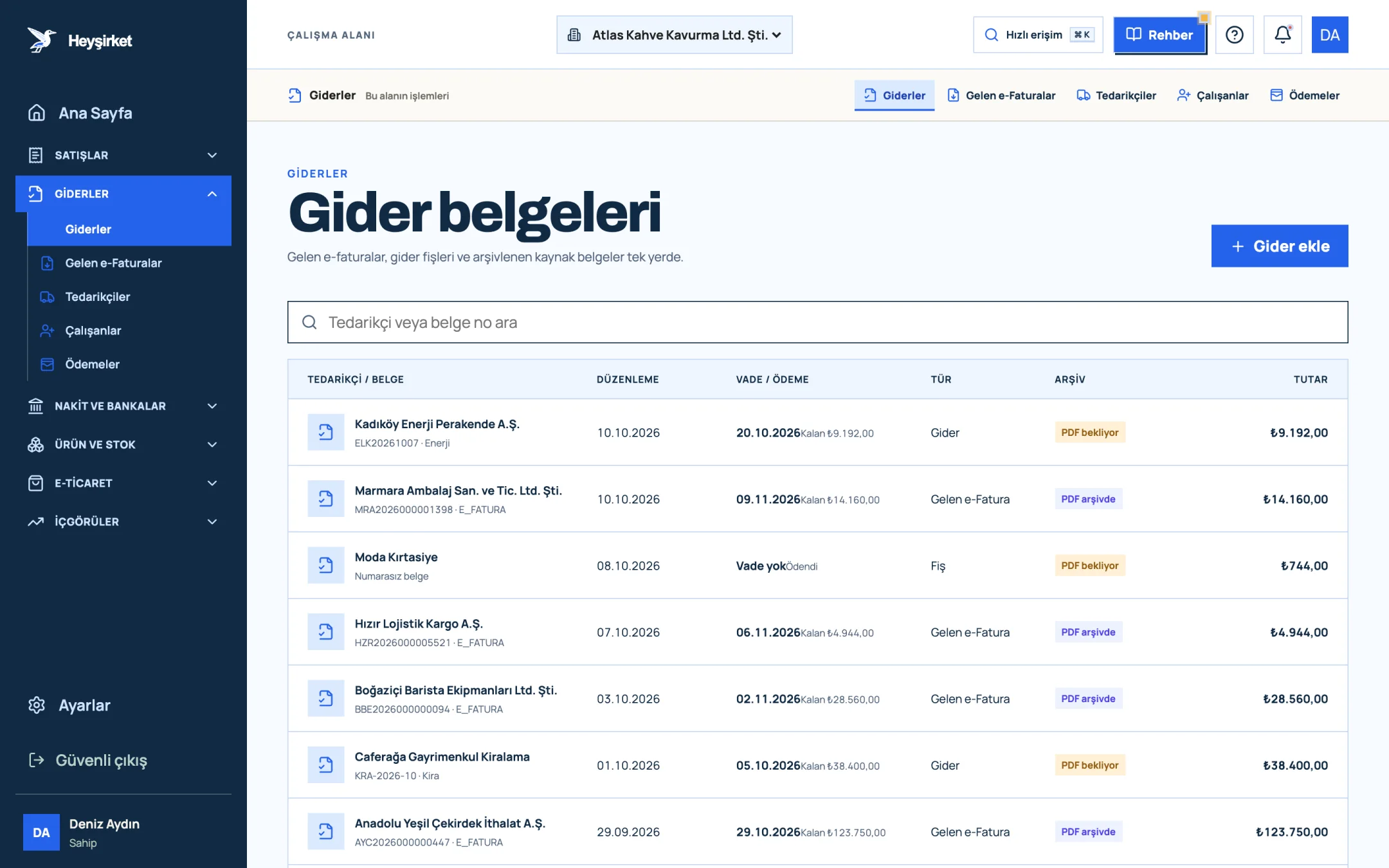
- 1. Add expense button
- 2. Due date and remaining payment
- 3. Document type (Expense, Incoming e-Fatura, Receipt)
- 4. Expense document row
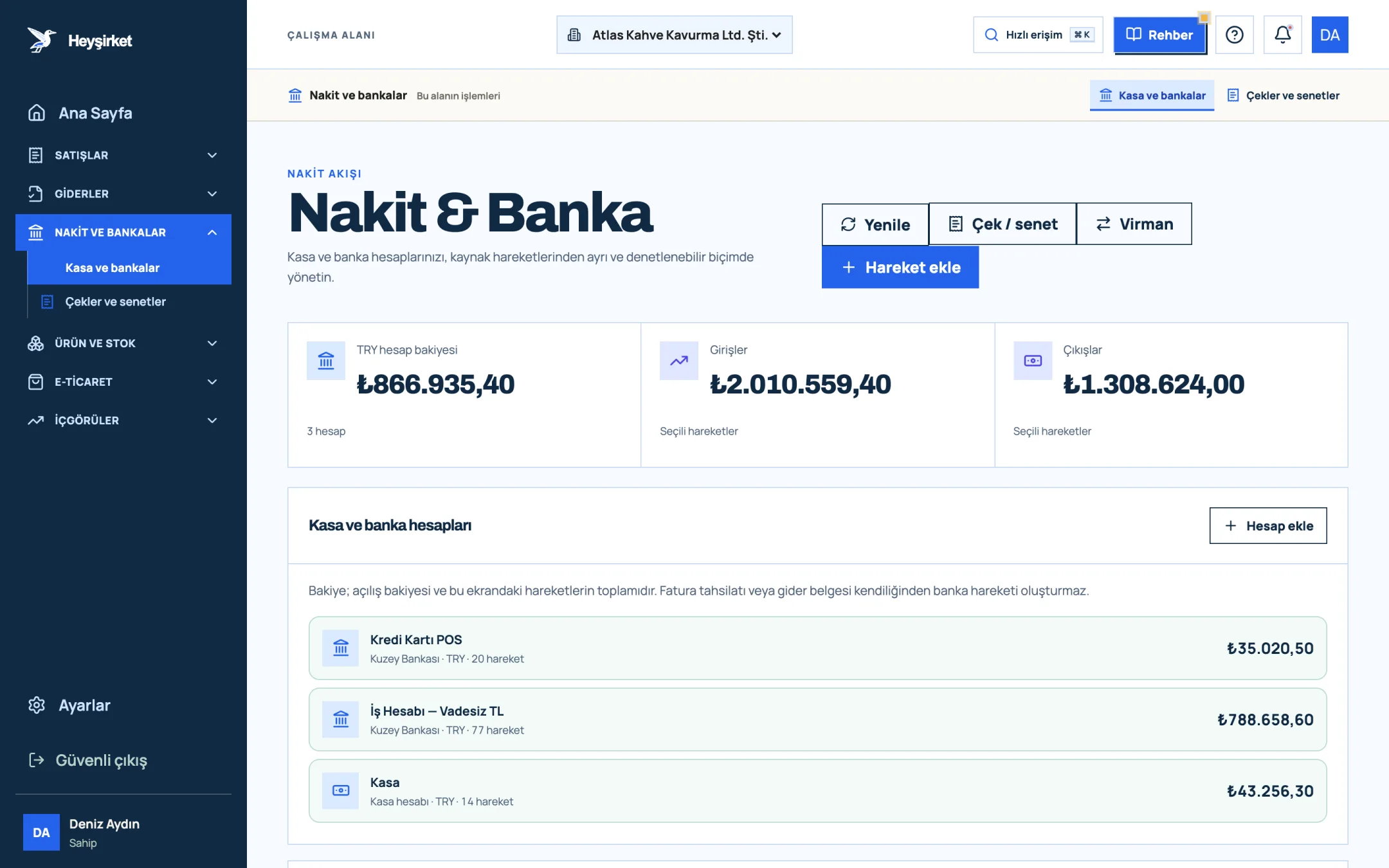
- 1. Add transaction button
- 2. Transfer between accounts
- 3. Total TRY balance
- 4. Cash and bank account list
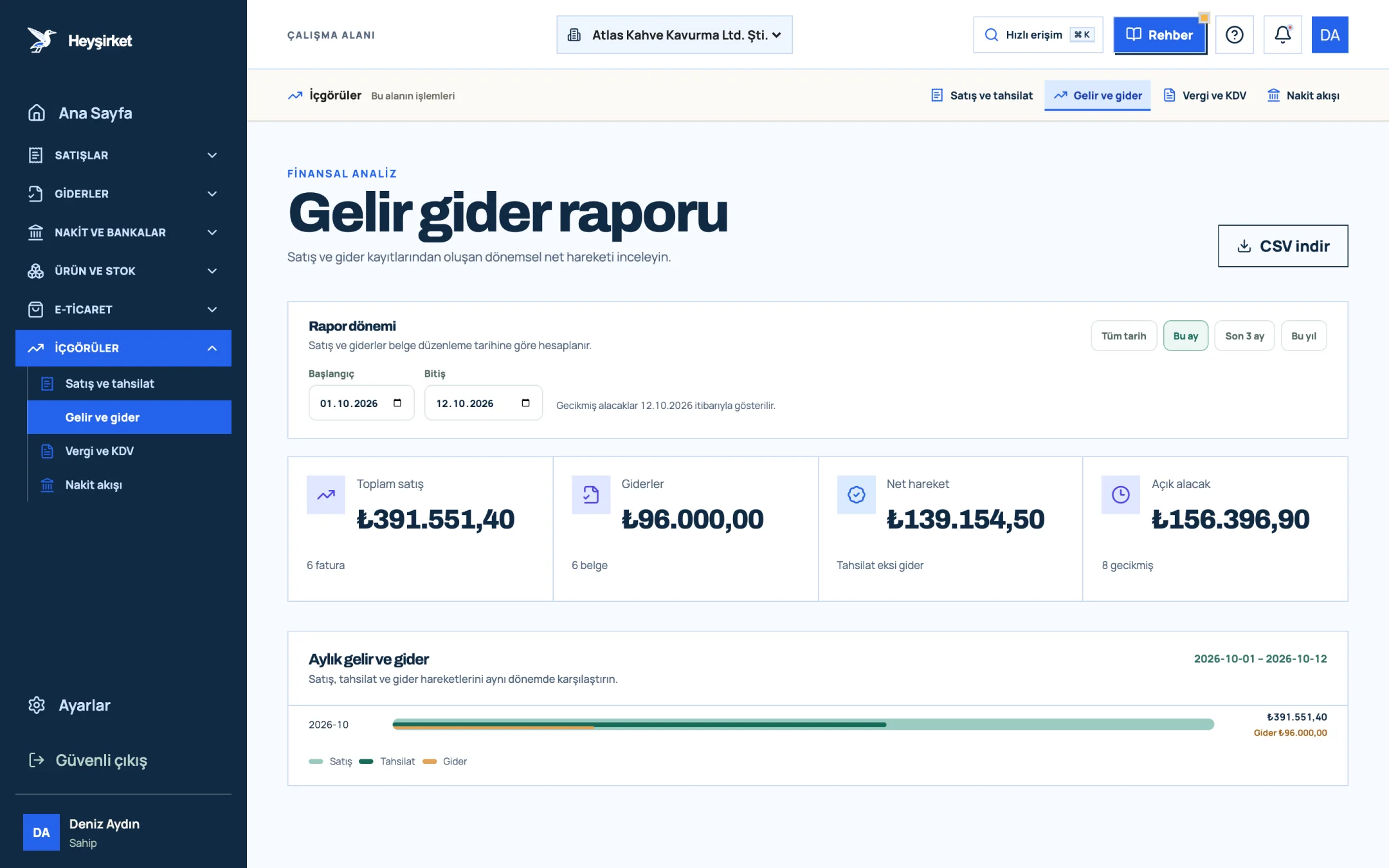
- 1. Total sales and expenses
- 2. Monthly income and expense chart
A business owner who opens these five screens every day will most likely never again get the “I'm waiting for the documents” message from their accountant.
Part 7 · Pitfalls What are the most common pre-accounting mistakes?
Most pre-accounting mistakes don't come from a lack of knowledge but from putting off records. The five mistakes below are where small businesses lose the most time at month-end.
- Not matching collections to invoices. The money arrived in the account, but which invoice it closed wasn't recorded; the customer balance looks wrong.
- Leaving expense receipts in a drawer. Every receipt that can't be found at month-end means VAT you can't deduct and an expense you can't take off your tax base.
- Mixing business and personal spending. Business expenses paid with a personal card create extra entries, extra explanations and extra questions.
- Opening incomplete customer cards. An invoice issued from a cari card with a missing tax number or tax office can cause problems on the other side.
- Never counting the till. The longer it takes to notice a gap between recorded cash and actual cash, the harder it is to explain.
The common fix for all these mistakes is the same: record the transaction on the day it happens, together with its document. Once recording becomes a habit, month-end turns into a check, and the panic into a memory.
The first two in particular hit your cash directly. Sending a second reminder to a customer whose payment wasn't matched damages the relationship; a lost expense receipt costs you extra tax. We cover the collections side in detail in speeding up collections and the expense side in expense management and document organisation.
Part 8 · Cari What is a cari account, and why is it the heart of pre-accounting?
A cari account (customer or supplier current account) is the record in which all debit and credit movements between you and a customer or supplier are tracked in a single account. An invoice you issue debits the cari account, a collection you receive credits it; the difference is that company's balance.
For Atlas Kahve, Karaköy Pera Otel's cari account reads like this: 96.000 TL invoiced over three months, 72.000 TL collected and an open balance of 24.000 TL. When this balance is right, the year-end reconciliation with the hotel's accounts department takes ten minutes. We explain how in our article on cari account reconciliation.
Part 9 · Switching When should you move from Excel to pre-accounting software?
Excel is a good tool for getting started with pre-accounting, but as the number of records, employees and due dates grows, so does the margin for error. If you're experiencing two of the four signs below, it's time to switch.
- More than one person works in the same file, and the question “which is the latest version?” has started coming up.
- You noticed an overdue receivable by chance, meaning there's no reminder system.
- You issue the invoice in one place and type it into Excel separately; the same data is entered twice.
- Gathering documents for your accountant at month-end takes more than a day.
You don't need to retype your customer, product and invoice lists from Excel by hand. On Heyşirket's Data migration screen you can upload your files and map the columns; the steps are in the data import guide, and the planning in our article on switching accounting software.
Part 10 · Getting started Where should you start with pre-accounting in the first week?
The best way to start pre-accounting is to set up the fixed information (company, bank, customers, products) first, then start recording movements (invoices, collections, expenses). When the fixed information is right, every movement is set up correctly on its own.
- Enter your company details and bank accounts: company settings.
- Add the ten customers you work with most: how to add a customer.
- Define the products and services you sell most often.
- Issue your first invoice: how to issue an invoice.
- For one week, set aside five minutes every evening to enter the day's collections and expenses.
At the end of one week you'll notice two things: the numbers on the Home screen start to genuinely describe your business, and your conversations with your accountant shift from “where's the document?” to “how did this month go?”
What's the biggest difference between pre-accounting software and Excel?
Excel keeps every piece of information in a separate table; in pre-accounting software, invoices, collections, cari balances and reports are linked. When you record a collection, the customer's balance, the cash position and the reports update at the same time.
Do I need accounting training to do pre-accounting?
No. Pre-accounting is simply issuing documents correctly and recording them on the day. The technical part, such as the chart of accounts and journal entries, is handled by your accountant.
Does a sole proprietorship need pre-accounting too?
Yes. Whatever the company type, you need to issue invoices, track receivables and payables and keep documents. The type of books (business account basis or balance sheet basis) only changes the recording method on the accountant's side.
Does pre-accounting software replace an accountant?
No. The software keeps your daily records organised and accessible. Keeping the official books and filing tax returns is the accountant's responsibility.
How long should I keep expense receipts?
At least five years under the Tax Procedure Law, and ten years for merchants under the Turkish Commercial Code. In practice, the safest approach is to go by the longest period and confirm it with your accountant.
How much time should I spend on pre-accounting each month?
When you enter records on the day, five to ten minutes a day and a one-hour check at month-end is usually enough for a small business.
Track your pre-accounting from one screen See your open receivables, this week's due dates and the month's sales and expense summary on the Home screen. Open Home
Author: Heyşirket Editorial Team