Going digital · 11 min read · Updated:
Small business budget template: how to build a one-page monthly budget plan
Budgets aren't just for big companies. For a café, a workshop or a three-person office, a one-page monthly table ends the “where did the money go?” question at month end.

In short
- A small business budget table plans a month's expected income, costs and cash position on one page and compares them with what actually happened.
- The table works with four columns: plan, actual, variance and variance percentage; rows are grouped as income, fixed costs, variable costs and tax and social security payments.
- The first month's plan starts from the average of the last three months' actuals; it rests on past data, not guesses.
- Profit and cash are different: an invoice is booked as income when issued but doesn't reach the bank until it's collected, so the table needs a separate cash line.
- Heyşirket has no separate budget module; actual sales, expense and cash figures are downloaded from the reports as CSV and moved into your budget table.
Most small businesses keep their budget in their head: “rent is this much, wages are that much, the rest will work out.” Then one month tax and social security payments land in the same week, a customer pays late and the numbers don't add up. The problem isn't low income; it's that the month wasn't seen in advance.
In this article we build a one-page small business budget template: which rows it has, where the first month's figures come from, how to compare the monthly budget plan with actuals, and why the table needs a separate cash line.
For a revenue forecast covering the whole year, scenarios and a 12-month plan, see annual budgeting for SMEs. Here the subject is the short table you keep at hand every month.
Part 1 · Definition What is a small business budget table and what is it for?
A monthly budget table is a one-page plan where you write next month's expected income and costs, then put the actual figures beside them once the month is over. It does three jobs: it lets you see payments in advance, it shows which cost is getting out of control, and it lets you base price or campaign decisions on numbers.
The annual budget sets the direction; the monthly table tells you every month whether you're staying on course. If a small business has to pick one, starting with the monthly table is easier, because the data arrives every month and the habit forms quickly.
Part 2 · Template Which rows and columns should a monthly budget table have?
Four columns are enough: Plan, Actual, Variance (actual − plan) and Variance %. Group the rows into five blocks. Keep each block to five or six rows at most; more than that makes the table hard to read.
| Group | Rows | Where the figure comes from |
|---|---|---|
| Income | Product sales, service sales, other income | Invoices issued and till sales |
| Fixed costs | Rent, wages, accounting, software subscriptions, insurance | Contracts and payroll |
| Variable costs | Raw materials and goods, shipping, packaging, commissions, advertising | Purchases that grow with sales |
| Tax and social security | VAT, withholding return, social security premiums, provisional tax | Tax calendar and previous months' returns |
| Cash | Opening cash, collections, payments, closing cash | Bank and till movements |
Separating fixed and variable costs is the most valuable part of the table. Fixed costs are paid even if sales drop; variable costs rise and fall with sales. When sales fall by 20 percent, this split shows which costs will shrink on their own and which stay the same. You can use the items in business expenses list to create your cost rows.
Part 3 · Getting started Where do the first figures of a monthly budget plan come from?
Fill the first table from the past, not from guesses. Take the average of the last three months' actual income and costs and add known changes: a rent increase, a new employee, a seasonal difference in sales. If your past data is scattered, filling only the fixed cost and tax-social security rows in the first month is also a start.
| Planned sales (last 3 months' average × 0,95 seasonal effect) | 380.000 TL |
|---|---|
| Fixed costs (rent, 3 wages, accounting, subscriptions) | −182.000 TL |
| Variable costs (38% of sales: coffee, milk, packaging, commission) | −144.400 TL |
| Tax and social security payments (26th of the month onwards) | −38.500 TL |
| Planned monthly difference | 15.100 TL |
Figures are illustrative. Because the margin is small, the café owner postpones a one-off equipment purchase to December.
Planning variable costs as a share of sales rather than as amounts makes life easier. When the sales plan changes, the table updates itself and you can see “what if sales fall?” in a single cell.
Part 4 · Cash The budget shows a profit, so why is the till empty?
This is where budgets most often mislead. A sale you've invoiced goes into the income row, but if the customer pays on 45-day terms the money arrives two months later. Likewise, you might pay for stock in cash today and sell it next month. That's why the bottom of the table needs a separate cash section.
- Opening cash — Bank + till
- + Collections — Money actually received
- − Payments — Money actually paid out
- = Closing cash — Next month's opening
If closing cash looks set to fall below at least one month of fixed costs, there's still time to act: speed up collections, postpone a purchase, or talk to a supplier about terms. We described the weekly cash plan in cash flow management; for clearing overdue receivables, invoice due date tracking will help.
Part 5 · Buffers Which buffers should a budget include?
The weakest point of a small business budget is assuming everything will go to plan. A customer pays a month late, a machine breaks, a supplier raises prices. To absorb such surprises, add two buffer rows to the table.
- Unexpected cost allowance: Each month, write an amount between 3 and 5 percent of total costs on a separate row. Any unused part rolls over to the next month.
- Cash cushion: Set your closing cash target at least one, ideally three months of fixed costs. This isn't income; it's the guarantee that you can pay rent and wages in a crisis.
- Late collection allowance: If you sell on credit, assume part of your planned collections will slip into the next month. Use the share of collections that arrived on time in the past as your ratio.
Buffers make the budget look worse at first, because they shrink the profit line. But a realistic budget is worth more than an optimistic one: the way to avoid surprises at month end is to write the surprise into the table from the start.
Part 6 · Tracking How do you compare budget and actuals each month?
In the first week after the month closes, set aside 20-30 minutes for the table. Fill in the actual column, calculate the variances and focus only on large ones. Trying to explain every small variance makes people drop the habit quickly.
Monthly comparison routine
Fill in actuals
Take sales, cost and collection figures from your accounting records. Downloading them from reports instead of adding them up by hand reduces errors.
Set a threshold
Mark rows that deviate from plan by more than 10 percent and by more than a set amount (for example 5.000 TL).
Write the reason in one sentence
Such as “milk prices rose” or “two big customers postponed payment”. If the reason isn't known, check the records.
Adjust next month
Reflect permanent changes (a price rise, a new employee) in next month's plan; don't reflect one-offs.
Making this comparison a step of the month-end close makes the habit stick; the other steps of the close are in month-end close checklist.
Part 7 · Going digital How do you connect a budget table to digital data?
The hard part of budgeting isn't writing the plan but collecting the actual figures every month. If invoices are in one place, expenses in a box and bank movements somewhere else, it takes hours and is eventually abandoned. When records are kept in one place, the actual column fills in a few minutes.
Heyşirket has no separate budget module; you keep the budget itself in Excel or a similar spreadsheet. The actual side comes from your pre-accounting records: the Gelir gider raporu (income and expense report) shows the sales, costs and net movement for the period you choose, and the Nakit akışı raporu (cash flow report) shows collections, costs and open receivables. In both, choose the period and use CSV indir (download CSV) to move the data into your table.
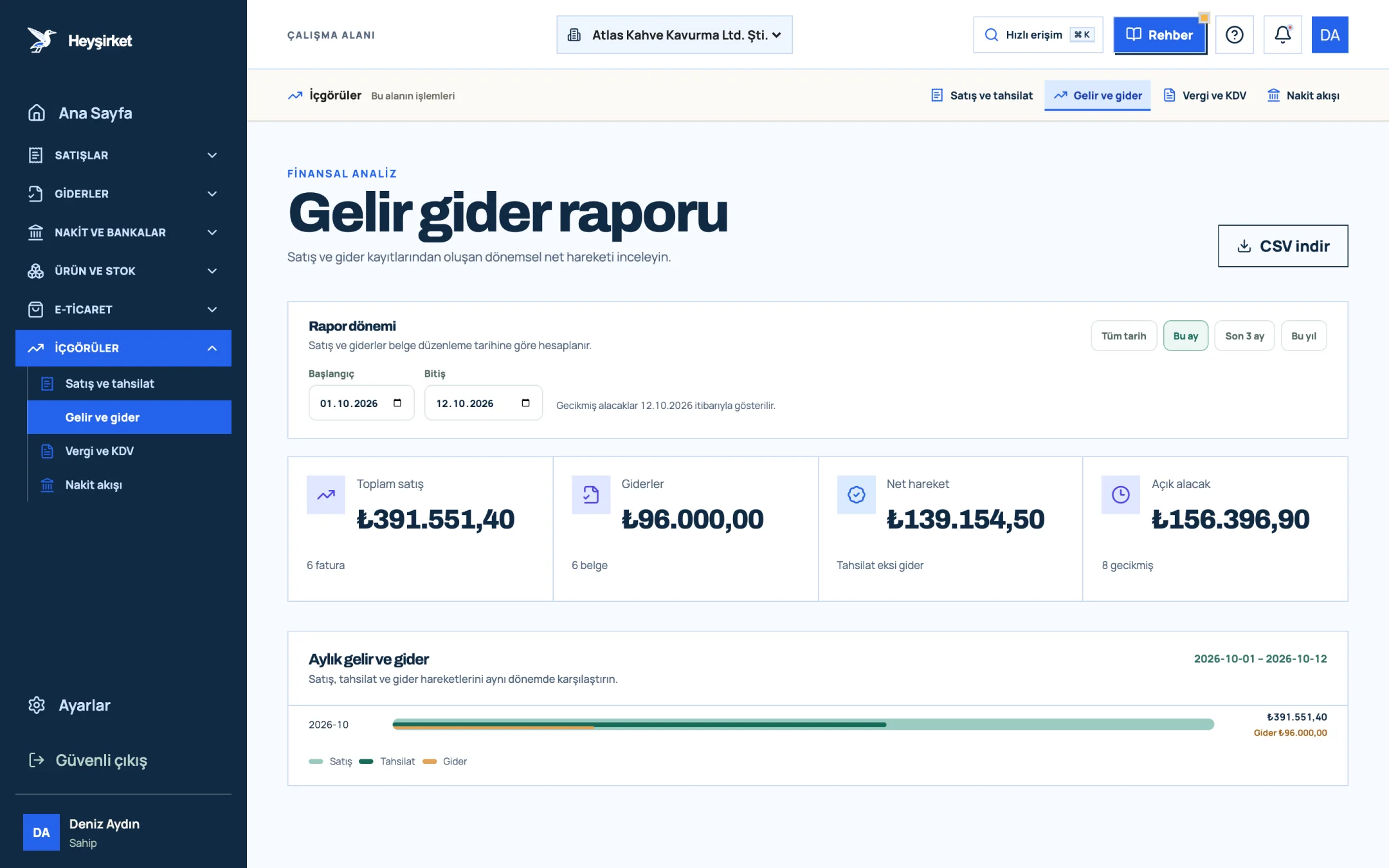
- 1. Total sales and expenses
- 2. Monthly income and expense chart
- Expense categories: If you record expenses with the same categories as your budget rows, the comparison works directly row by row.
- Tax and social security row: The tax calendar shows your own deadlines and estimated amounts; you can fill the budget's tax row from there.
- Open receivables: For expected collections in the cash line, use the total outstanding and overdue amounts on the Collections screen.
We've gathered what each report shows on the reports page. For the overall picture of bringing accounting, website and customer work into one panel, see company digitalisation.
How do you prepare a small business budget table?
Open a one-page table with plan, actual, variance and variance percentage columns. Group rows into income, fixed costs, variable costs, tax and social security, and cash. Fill the first month's plan with the average of the last three months' actuals, then write the actuals beside it when the month ends.
What's the difference between a monthly and an annual budget?
The annual budget plans the revenue target and big decisions for twelve months. The monthly budget table is a short control tool showing whether that plan holds each month. For small businesses, starting with the monthly table is easier.
Why should the cash line be separate in a budget table?
Because an issued invoice is booked as income but doesn't reach the bank until it's collected, and purchases paid upfront create cash outflows before the sale. A separate cash line shows in advance the risk of being unable to pay in a month that looks profitable.
When does a budget variance matter?
A practical rule is to look at rows that deviate from plan by more than 10 percent and by more than an amount you set. Explaining small variances one by one wastes time; large and repeated variances call for a change in the plan.
Does Heyşirket create a budget table?
No, Heyşirket has no separate budget module. You keep the budget in your own spreadsheet and compare it by downloading actual sales, costs, collections and cash data from the income and expense and cash flow reports with Download CSV.
See your actual figures on one screen Choose the month in the income and expense report, download sales and costs as CSV and move them into the actual column of your budget table. Open the income and expense report
Author: Heyşirket Editorial Team