Reports · 8 min read · Updated:
Cash flow report: read collections, expenses and open receivables on one screen
If sales are going well but money isn't building up in the account, the answer is in this report. With four indicators and a monthly chart, you see whether collections cover your expenses.
In short
- The cash flow report shows the amount collected, expenses, net movement (the difference between the two) and open receivables for the selected period.
- Sales and expenses are calculated by document issue date; so the collected amount reflects the portion collected from invoices issued in the period.
- The report doesn't include manually entered transactions on the Cash & Bank screen or the cheque/promissory note portfolio; for bank balances, see the Cash and bank accounts screen.
- Download CSV gives you the indicator summary and a monthly sales, collections and expenses table as a file that opens in Excel.
Atlas Kahve had record sales in September, but when they checked the till on the 25th to pay the rent, the picture was different. Part of the sales was still sitting in the cafés' accounts. The cash flow report lets you see this gap before the month is over.
In this guide you'll open the report, choose the period, interpret the four indicators and export the data. One part also explains what the report doesn't show, because a misread cash report is more dangerous than one never read at all.
Part 1 · Tour What's on this screen?
The cash flow report compares the amount collected in the selected period with expenses, and shows the difference and the receivables not yet collected. You open it with the Cash flow link in the Insights group of the left menu.
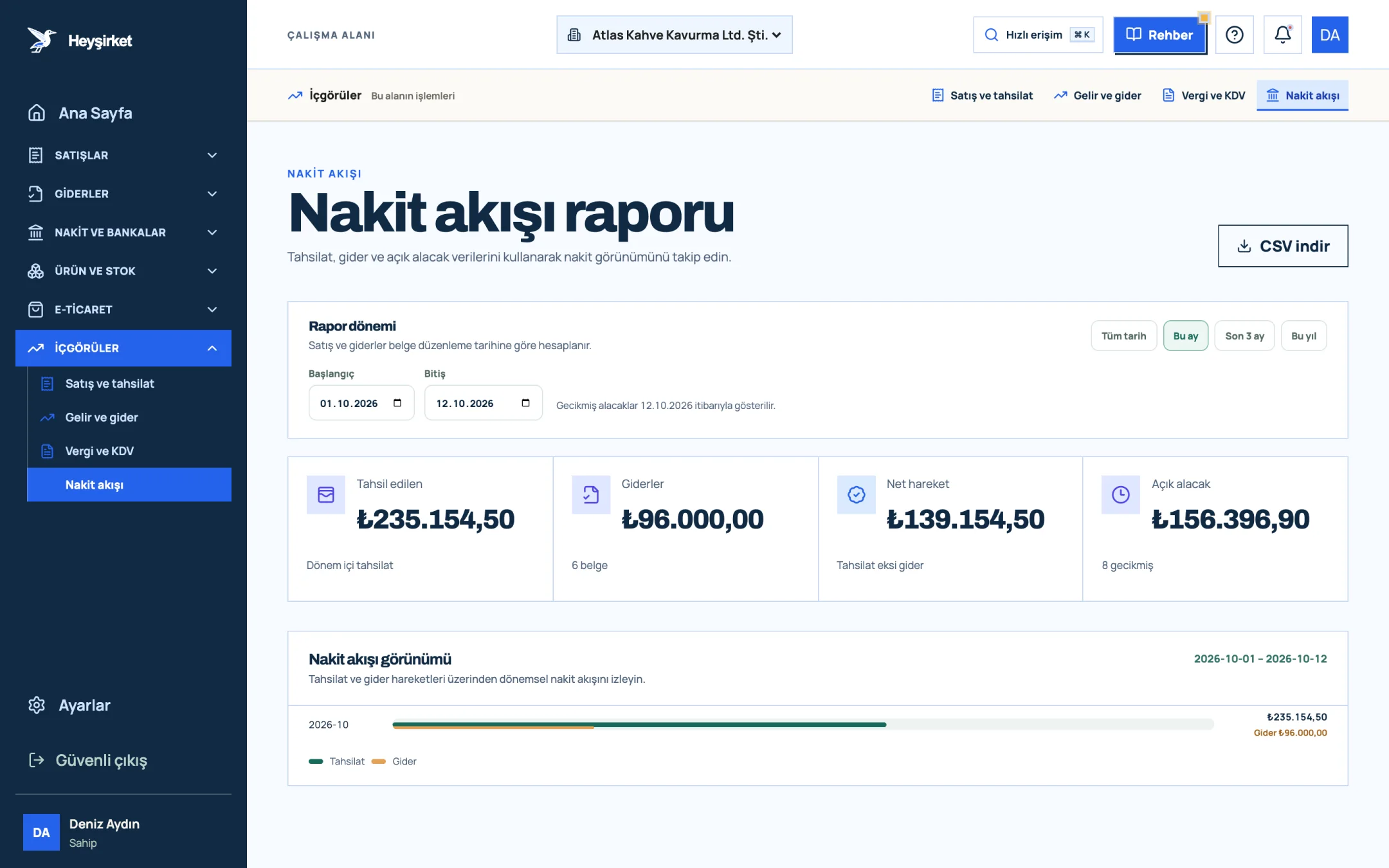
- 1. Collected and expenses
- 2. Cash flow view
| Indicator | How is it calculated? | What does it tell you? |
|---|---|---|
| Collected | Amount collected from invoices issued in the period (return invoices are deducted) | How much of your sales turned into cash? |
| Expenses | Total and count of expense documents issued in the period | The size of the period's obligations |
| Net movement | Collected minus expenses | Is the period positive or negative in cash terms? |
| Open receivables | Amount not yet collected from the period's invoices; overdue document count below | Money waiting to come in, and the risky part of it |
Each row in the chart represents a month; the newest month is at the top. The large figure is that month's collections, and the small line below gives that month's expenses. In the bars, collections and expenses sit side by side on the same scale, so you can see at a glance which month ran a deficit.
Part 2 · In practice How to use the cash flow report, step by step
Step by step: from period to file
Open the report
Click the Cash flow link under Insights in the left menu. By default, the report opens with the period from the start of this month to today.
Open the report - 1. Collected and expenses
- 2. Cash flow view
Choose the period
Press one of the preset ranges in the Report period section: This month, Last 3 months, This year or All time. For a custom range, enter the Start and End dates manually.
Choose the period - 1. Collected and expenses
- 2. Cash flow view
Read the net movement
If the Net movement indicator is negative, more expense documents were created in the period than you collected. Look at the overdue document count under the Open receivables indicator; the money to close the gap is most likely there.
Compare the months
In the Cash flow view chart, note the months where the expense bar exceeds the collections bar. If this happens two months in a row, it's time to review your payment terms and payment plan.
Compare the months - 1. Collected and expenses
- 2. Cash flow view
Go to overdue receivables
If there are overdue documents, go to the collections screen to see overdue invoices by customer and plan reminders.
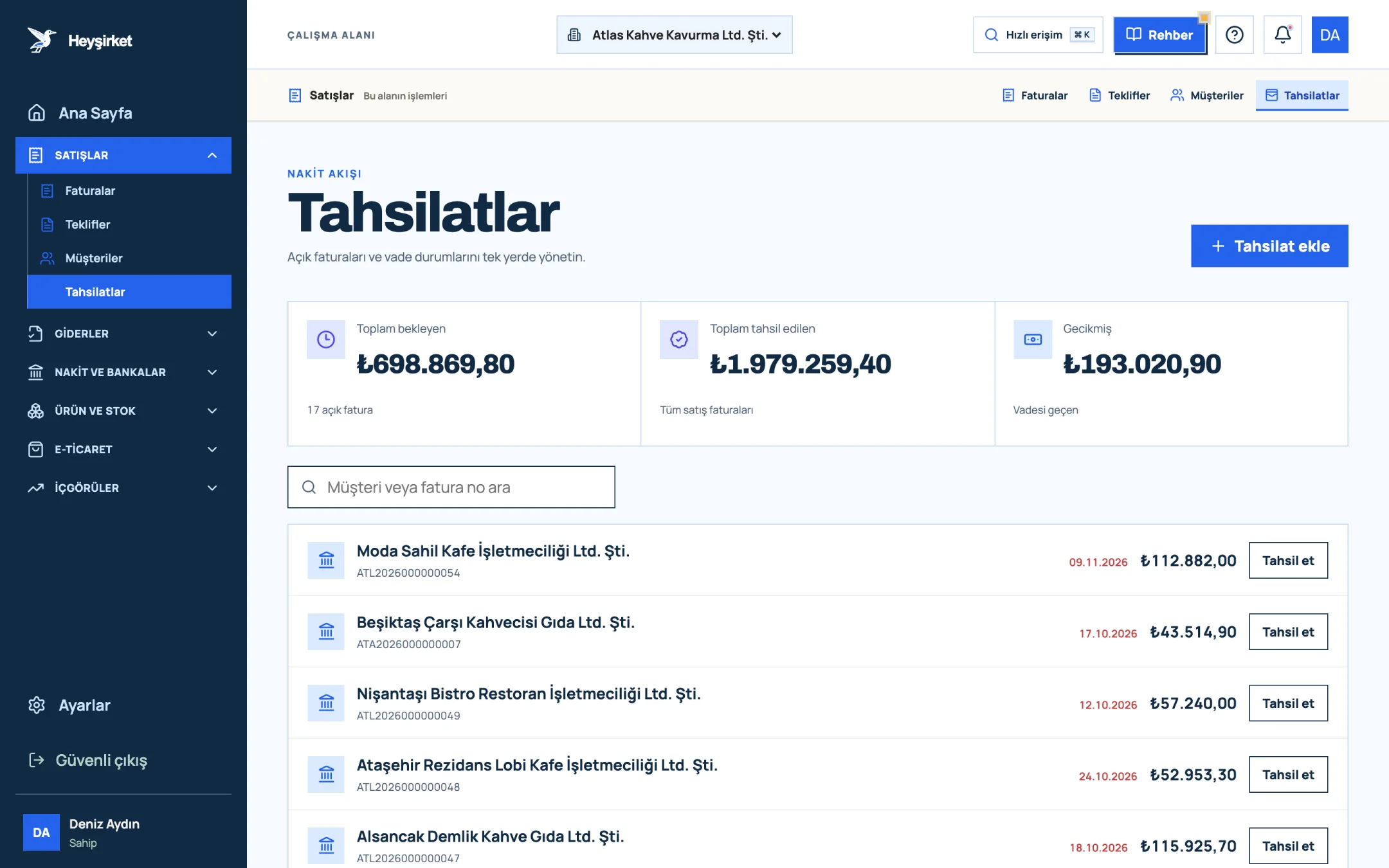
Go to overdue receivables - 1. Add collection button
- 2. Total pending receivables
- 3. Total overdue receivables
- 4. Per-row Collect button
Export it as a file
Press the Download CSV button. The file contains the period details, total sales, collections, expenses, net movement, open receivables and net VAT rows, along with a monthly sales, collections and expenses table; it opens in Excel with Turkish characters intact.
Part 3 · Reading it right What doesn't the cash flow report show?
This report is a period view generated from invoices and expense documents; it's not a bank statement or a forecast. The note on screen reminds you of this: sales and expenses are calculated by document issue date.
- Records entered with Add transaction on the Cash & Bank screen aren't included in this report.
- Cheques and promissory notes in the portfolio aren't reflected in the report; track them in the cheque and promissory note tracking section.
- Cancelled invoices aren't counted, and return invoices reduce the totals.
- This report doesn't appear in the menu for users with the Sales role.
| Collected | 412.600 TL |
|---|---|
| Expenses (38 documents) | − 455.900 TL |
| Open receivables (6 overdue) | 168.300 TL |
| Net movement | − 43.300 TL |
Net movement is negative, but open receivables are about four times the gap. This picture points not to a profitability problem but to a collections problem: collecting roughly a quarter of the open receivables is enough to close the gap.
Part 4 · Background The reasoning: why read profit and cash separately?
Profit arises the moment you issue the invoice; cash arrives when the customer pays. Every business that sells on credit has a gap between these two moments, and as that gap widens, even a profitable company gets squeezed on payment day.
This report shows the past. We explained step by step how to turn this data into a 13-week forecast for planning the weeks ahead in our cash flow management article; for how income and expenses break down in terms of profitability, see the income and expense report guide.
| Your question | Where to look |
|---|---|
| How much of the invoices I issued this month has been collected? | Cash flow report or sales and collections report |
| How much money do I have in the bank and the till right now? | Cash and bank accounts screen |
| Which cheques will be collected in the coming weeks? | Cheques and promissory notes section |
| How much VAT will I pay this period? | VAT report |
Why don't the collections in the report match the deposits in my bank account?
The report counts collections by the invoice's issue date and doesn't include transactions on the Cash & Bank screen. Track bank deposits on the Cash and bank accounts screen.
Which date are open receivables calculated by?
Open receivables are the amount not yet collected from invoices issued in the selected period. The overdue document count includes invoices past their due date as of the end date (today, if you didn't choose one); the note at the bottom of the screen shows this date.
Does the CSV file open in Excel with garbled characters?
No. The file is prepared to preserve Turkish characters and is semicolon-separated; you can open it in Excel by double-clicking.
Why can't my teammate see this report?
The cash flow report isn't shown in the menu for users with the Sales role. To change roles, see the team and roles guide.
Open your cash flow report Choose the last three months and look at the direction of net movement and the overdue document count; your first action is most likely there. Go to cash flow report
Author: Heyşirket Editorial Team