E-commerce · 17 min read · Updated:
Accounting for marketplace sellers in Türkiye: commission, shipping, 1% withholding and your real profit
The money paid into your marketplace account isn't the price of the product you sold. Once you learn to read the difference line by line, you'll see which products actually make you money under Turkish rules.
In short
- A hakediş (marketplace payout) is what remains after commission, shipping, service fees and the 1% e-commerce withholding are deducted from the sale price, so the bank transaction alone can't stand in for a sales record.
- Since 1 January 2025, marketplaces withhold 1% income or corporate tax from their payments to sellers, calculated on the VAT-exclusive sale price; for the seller this isn't an expense but tax paid in advance, offset on the tax return.
- Commission and shipping deductions are documented by the invoices the marketplace issues to you; the VAT on these invoices can be treated as deductible VAT.
- For businesses selling online, the threshold for moving to e-Fatura and e-Arşiv is 500.000 TL in gross sales revenue.
- Profit per product should be calculated by deducting product cost, commission, shipping, service fees and packaging from the VAT-exclusive sale price.
Last month Atlas Kahve Kavurma sold 40 ceramic burr hand grinders on Trendyol at 2.400 TL each. Total revenue: 96.000 TL. The amount paid into the bank account, however, was a little under 70 thousand TL.
The co-founder first assumed there had been a mistake. There wasn't; there was just an unread payout report. Commission, shipping, a service fee and a 1% deduction that most sellers still haven't noticed.
In this article we'll open up that gap line by line. By the end you'll have a table that calculates how many lira a single product really earns you, plus a checklist to go through at month-end.
Part 1 · Payout What is a marketplace payout, and why is it lower than the sale amount?
A hakediş (marketplace payout) is the net amount the marketplace pays the seller after deducting its own charges from the sale price collected from the customer. The sale price is the money the customer pays; the payout is the money that reaches your bank.
The most common accounting mistake is recording the bank transaction as a sale. In fact, your sale is the invoice you issue to the customer; the difference consists of separately documented expenses and a tax paid in advance.
- Customer pays — VAT-inclusive sale price
- Seller invoices — e-Arşiv or e-Fatura to the customer
- Marketplace deducts — Commission, shipping, service, withholding
- Payout arrives — In the bank on the due date
- Reconciliation — Report, invoices and bank are matched
Every arrow in this flow corresponds to a document. When you match the documents correctly, both your VAT and your profit come out right. Let's start with the deductions themselves.
Part 2 · Deductions How are commission and shipping deductions documented?
Commission and shipping deductions are the price of the services the marketplace provides to you, and the marketplace issues you invoices for them. These invoices are expenses for you, and the VAT on them can be treated as deductible VAT.
| Item | What does it mean? | Document | Where it goes in the books |
|---|---|---|---|
| Sale price | The VAT-inclusive amount the customer pays | The sales invoice you issue | Sales revenue + output VAT |
| Commission | Intermediary fee that varies by category | The marketplace's commission invoice | Expense + deductible VAT |
| Shipping deduction | Cost of shipping with the marketplace's contracted carrier | Invoice from the marketplace or the carrier | Expense + deductible VAT |
| Service / platform fee | Fixed fee charged per order (if any) | The marketplace's invoice | Expense + deductible VAT |
| E-commerce withholding (1%) | Income/corporate tax withholding | Payout report and the marketplace's muhtasar (withholding tax) return | Tax paid in advance, offset later |
| Return deduction | The amount of the returned order | Return document | Sales return + VAT adjustment |
Marketplaces usually issue commission invoices in bulk, once a month or per period. If you're an e-Fatura (Turkish e-invoice) user, these invoices reach you electronically; if not, they arrive as e-Arşiv (e-archive) invoices by email or through the seller panel.
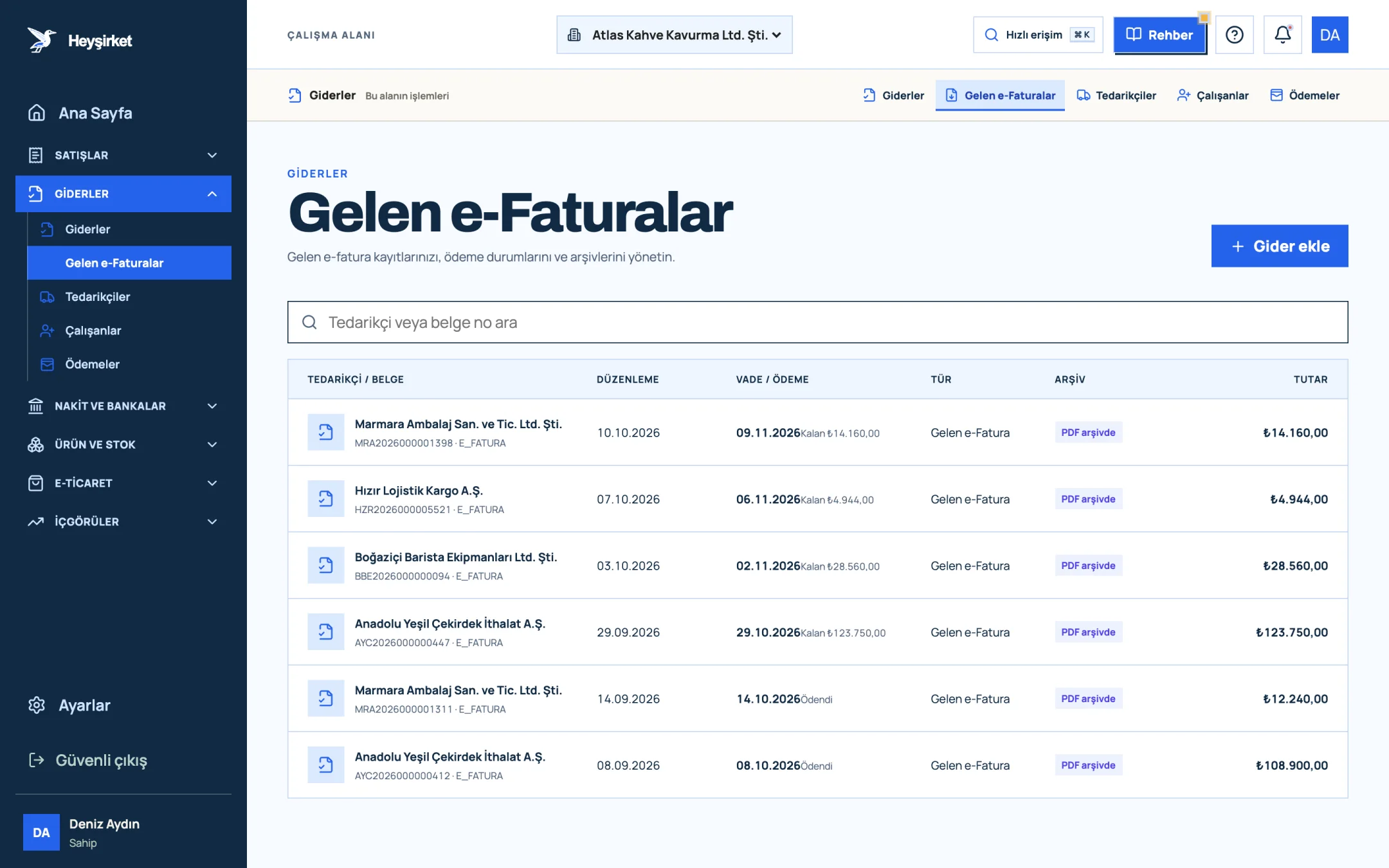
- 1. Incoming e-Faturas tab
- 2. Supplier and document number
- 3. Remaining payment amount
- 4. PDF archive status
In Heyşirket you'll find commission invoices received as e-Fatura on the Incoming e-Invoices screen. Record shipping invoices that come on paper or as PDF with Add expense on the Expenses screen, and use separate categories such as "Marketplace commission" and "Shipping" in the Expense category field.
The quietest deduction of all, though, is the one with no invoice: withholding.
Part 3 · Withholding Who does the 1% e-commerce withholding apply to, and how is it calculated?
E-commerce withholding (stopaj) is a 1% income or corporate tax deduction that intermediary service providers (marketplaces) withhold from their payments to sellers and pay to the tax office on the seller's behalf. It came into force on 1 January 2025, and as of October 2026 the rate is still 1%.
- Who withholds it? Intermediary service providers under E-Commerce Law No. 6563, in other words marketplaces.
- On what amount? The VAT-exclusive price of the goods or services. The base is the amount before commission, shipping and service fees are deducted.
- Your own website? For sales made on your own website through your own payment infrastructure, no marketplace sits in between, so this withholding doesn't apply.
- What does it mean for you? The withheld amount isn't an expense. It's offset against the tax calculated on your provisional tax and annual income or corporate tax returns; a refund can be requested for any part that can't be offset.
- Exceptions: No withholding is made on payments to certain sellers, such as tradespeople with a tax exemption certificate. Confirm your situation with your mali müşavir (accountant).
On Atlas Kahve's sale of 40 grinders, the VAT-exclusive amount is 80.000 TL. The withholding is 800 TL. It looks small, but for a seller with 1 million TL in VAT-exclusive marketplace sales a year, it means 10.000 TL of tax paid in advance, and it's lost if it isn't offset on the return at year-end.
Part 4 · Reconciliation How do you reconcile marketplace payouts?
Payout reconciliation means comparing every order in the marketplace's payment report with your own sales invoice, the marketplace's deduction invoices and your bank transaction. The goal is to make sure every kuruş that should have been paid has been paid.
First, let's work out the payout for one order in numbers. The commission rate and fees in the example are illustrative; check your own category's rate in your seller panel.
| Amount paid by the customer (VAT included) | 2.400,00 TL |
|---|---|
| Commission 18% (432 TL + 20% VAT) | − 518,40 TL |
| Shipping deduction (90 TL + 20% VAT) | − 108,00 TL |
| Service fee (10 TL + 20% VAT) | − 12,00 TL |
| E-commerce withholding (1% × 2.000 TL excl. VAT) | − 20,00 TL |
| Payout paid into the bank | 1.741,60 TL |
In this example, commission is calculated on the VAT-inclusive sale price; the calculation may differ by marketplace and category.
Now look at how this 1.741,60 TL breaks down in the books: 2.000 TL of sales revenue and 400 TL of output VAT; 532 TL of expenses and 106,40 TL of deductible VAT; 20 TL of tax paid in advance. The amount paid into the bank is the net result of these items.
Monthly payout reconciliation checklist
- I downloaded the marketplace payment report as of month-end.
- I checked that a sales invoice was issued for every order in the report.
- Invoices for cancelled and returned orders were cancelled, or a return document was issued.
- I found the commission, shipping and service fee invoices among incoming invoices and compared their amounts with the deductions in the report.
- I noted the withholding total separately and passed it to my accountant.
- I matched the total payment in the report with the amounts paid into the bank account, by due date.
- I raised any remaining differences with a marketplace seller support ticket.
In Heyşirket, the order side of this check starts in the E-commerce hub. On the Orders tab, each order's channel, date, delivery status and invoice status appear side by side.
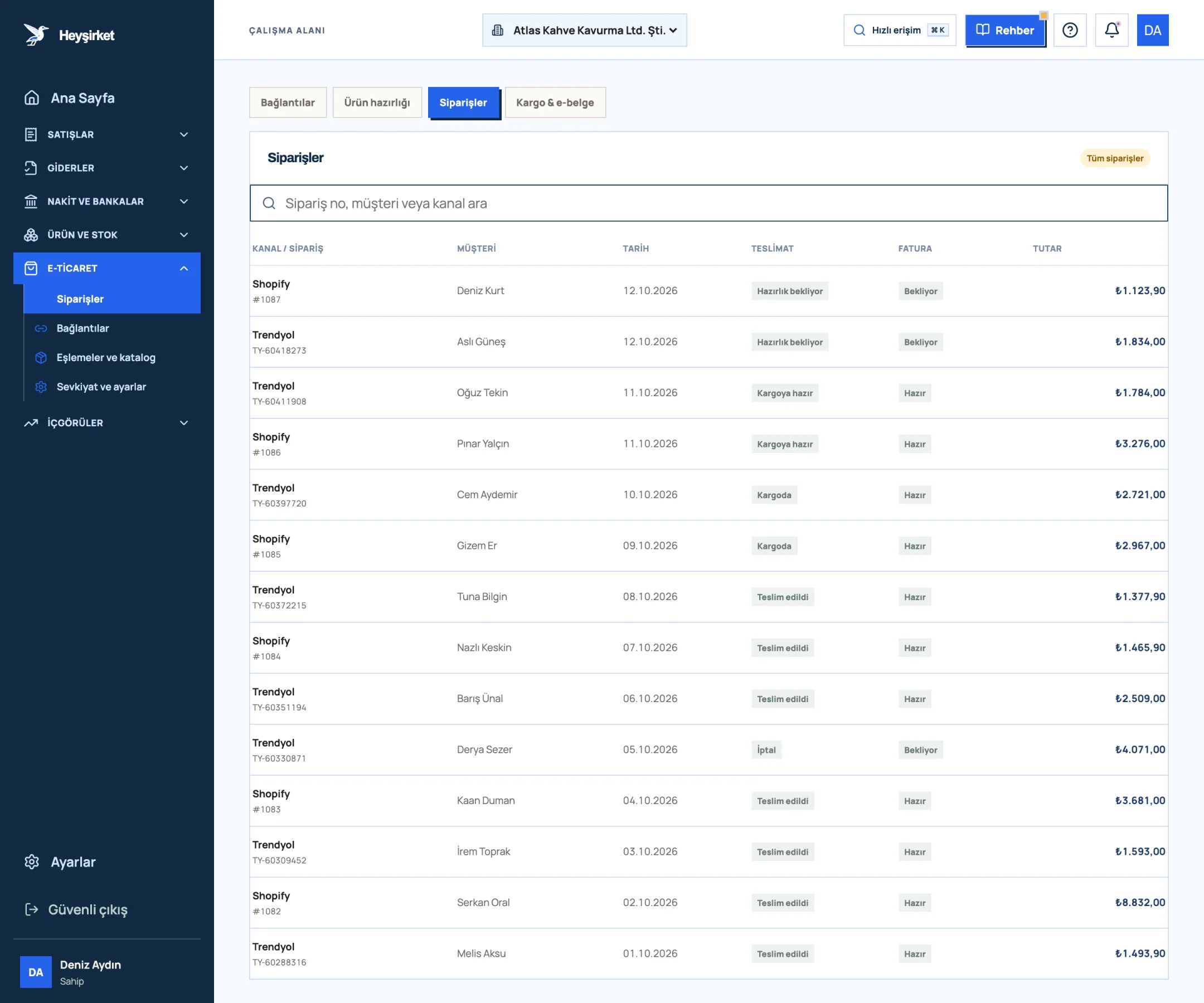
- 1. E-commerce tabs
- 2. Order search
- 3. New incoming Shopify order
- 4. Trendyol order ready to ship
An order with the invoice status Ready is eligible for invoicing but hasn't been invoiced yet; the financial document isn't issued automatically. We walk through the order flow step by step in the E-commerce orders guide.
The place where reconciliation breaks down most, though, is returns.
Part 5 · Returns How do you correct invoices and VAT for marketplace returns?
A marketplace return is a sale being partly or fully reversed when the customer sends back goods they received. How it's documented depends on who the buyer is.
- If the buyer is an end consumer: Consumers don't issue invoices. The return is documented with the return section included on e-Arşiv invoices for online sales, or with documents such as a return report; the seller receives the goods and the return document.
- If the buyer is a taxpayer business: The business sending the goods back issues a return invoice to you. You record this invoice as an incoming invoice.
- The VAT side: The VAT you previously declared on the returned goods is adjusted in the period the return takes place (VAT Law Article 35).
- If the invoice hasn't been issued yet: If the order was cancelled on the channel, don't issue an invoice; in Heyşirket the order is updated to Cancelled at the next import.
What happens to deductions on returns varies from marketplace to marketplace and contract to contract. Check your seller agreement and payout report to see whether commission is refunded and who is charged for outbound and return shipping. Return shipping is often an extra cost for the seller and should be included in your profitability calculation.
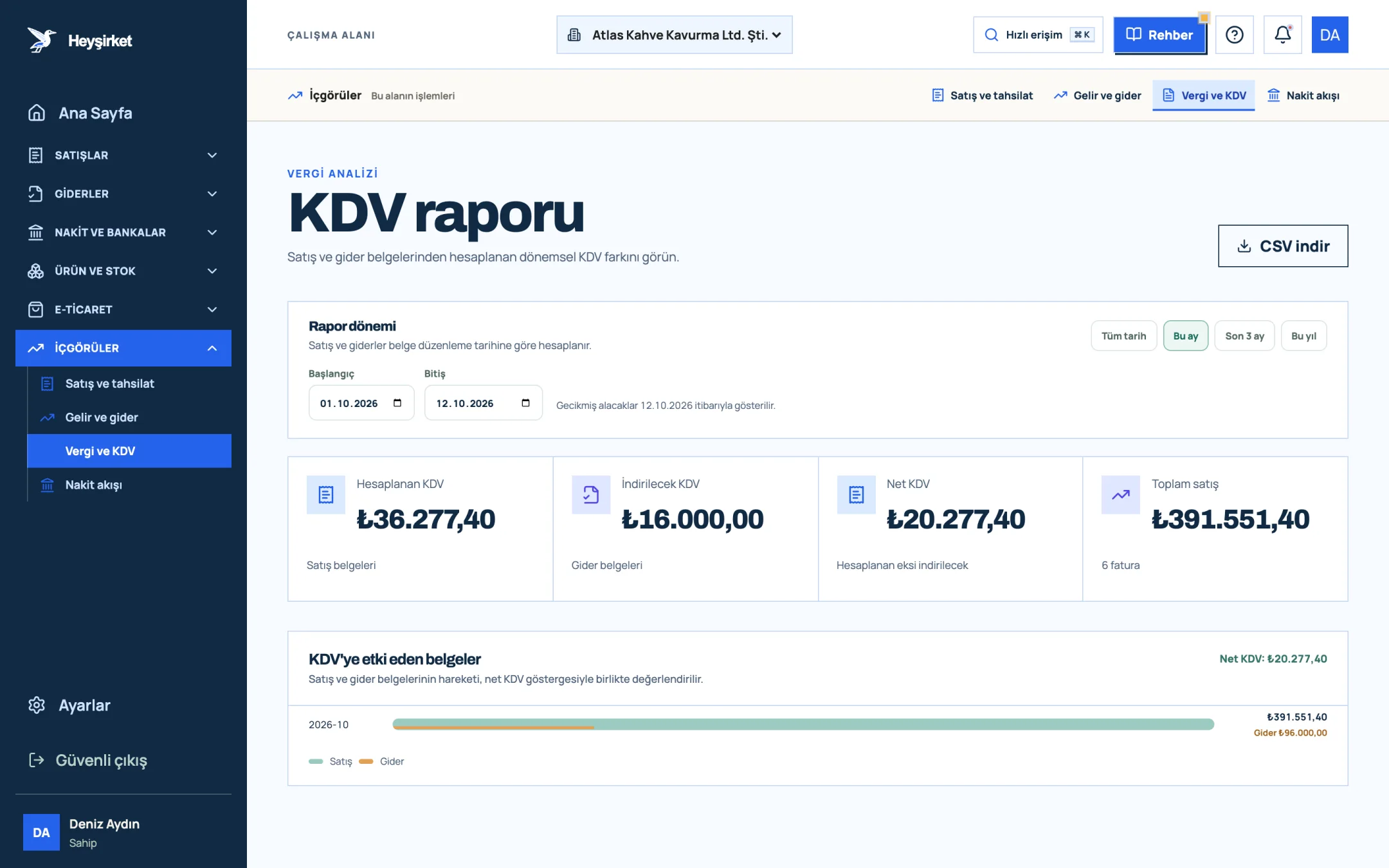
- 1. Output VAT
- 2. Deductible VAT
- 3. Net VAT
On the VAT report screen you can compare the period's output and input VAT. If the VAT on commission invoices doesn't show up here, an invoice most likely hasn't been recorded. For the full logic of VAT, see our VAT guide.
Part 6 · e-Documents Which invoice should online sellers issue?
For taxpayers selling goods or services online, the threshold for moving to e-Fatura and e-Arşiv invoices is set much lower than the general threshold: 500.000 TL in gross sales revenue. This threshold covers all online sales, whether you sell through your own website or a marketplace.
| Topic | Rule |
|---|---|
| e-Fatura / e-Arşiv threshold (online sales) | 500.000 TL gross sales revenue |
| General e-Fatura threshold | 3.000.000 TL gross sales revenue |
| When to switch | From the start of July in the year following the year the threshold is exceeded |
| If the buyer is an e-Fatura user | An e-Fatura is issued |
| If the buyer isn't an e-Fatura user | An e-Arşiv invoice is issued |
| Issuing deadline | 7 days from delivery of goods or performance of the service (VUK Article 231) |
What sets an e-Arşiv invoice for an online sale apart from an ordinary invoice is the extra information it must carry. The web address where the sale was made, the payment method and date, the date the goods were shipped and the details of the carrier delivering them must appear on the invoice.
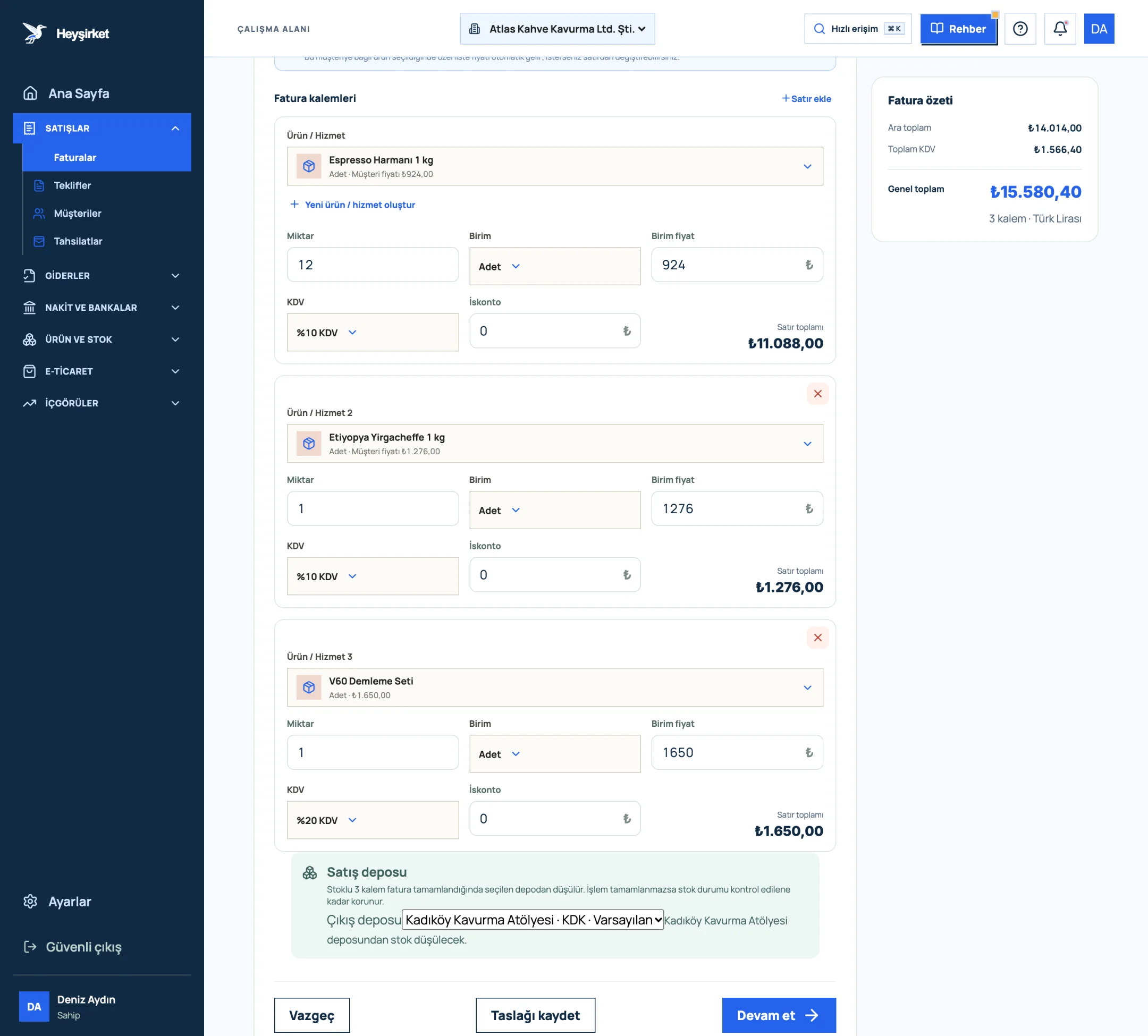
- 1. First invoice line item
- 2. VAT rate selection
- 3. Add row
- 4. Invoice summary and VAT total
In Heyşirket, a sales invoice is issued following the steps in the How to issue an invoice guide. For choosing the right document type depending on whether the buyer is an e-Fatura user, and for setting up e-documents, take a look at our article on the difference between e-Fatura and e-Arşiv.
The documents are in order. Now for the most important question: is this product making you money?
Part 7 · Profitability How do you calculate a product's real profit on a marketplace?
Unit profitability is what remains of a product's VAT-exclusive sale price after deducting all costs directly tied to that sale. Leave VAT out of the calculation; VAT isn't your money, it's held in trust and passed on to the state.
| Sale price (excl. VAT) | 2.000,00 TL |
|---|---|
| Product cost (purchase, excl. VAT) | − 1.100,00 TL |
| Commission (excl. VAT) | − 432,00 TL |
| Shipping (excl. VAT) | − 90,00 TL |
| Service fee (excl. VAT) | − 10,00 TL |
| Packaging and filler material | − 25,00 TL |
| Unit contribution margin | 343,00 TL (%17,2) |
Withholding isn't a cost; it's offset on the tax return. Still, the 20 TL of withholding ties up your cash until it's offset.
343 TL looks good. Now add a return. If return shipping comes out of your pocket when the product comes back, and the product can't be resold, a single return can wipe out the contribution from five or six sales.
That's why you should track profitability per product, taking the return rate into account. For example, for a product with a 10% return rate, if you pay 90 TL of return shipping on one in every 10 sales, deduct another 9 TL from the unit contribution. Build this margin in from the start when setting your price; we explain the method in our Pricing strategy article.
On a marketplace, revenue makes you look big; contribution margin keeps you standing.
Part 8 · In practice How do you set this up in Heyşirket?
Good marketplace accounting means every step, from the order coming in to the payout landing, leaves a trace in one place. In Heyşirket, that trace is kept on these screens.
- Connection: Connect your Trendyol, WooCommerce or Shopify store as described in the Marketplace connection guide; orders come in with Import orders on the channel card.
- Product matching: Link channel products to your company product cards; profitability can only be calculated when sales land on the right card.
- Orders and shipping: Approve the order, enter the tracking number and complete delivery.
- Sales invoice: Issue invoices for orders whose invoice status is Ready.
- Deduction invoices: Record commission and shipping invoices via Incoming e-Invoices or with Add expense.
- Check: At month-end, compare output and input VAT in the VAT report, and your payout report against your own checklist.
For the full month-end close, our Month-end closing checklist article is the general version of this list.
Is the e-commerce withholding also deducted from sales on my own website?
No withholding applies to sales you make on your own website, through your own payment infrastructure, with no intermediary service provider in between. The withholding is made by the marketplace that pays you as an intermediary.
Is withholding calculated on the VAT-inclusive amount?
No. The base is the VAT-exclusive price of the goods or services. Commission, shipping and service fees aren't deducted from the base.
How do I get back the 1% withholding?
Withholding isn't an expense, it's tax paid in advance. It's offset against the tax calculated on your provisional tax and annual returns; a refund can be requested for any part that can't be offset. Pass the withholding amounts from your payout reports to your accountant regularly.
Can I deduct the VAT on a marketplace commission invoice?
Because a commission invoice documents a service purchased for your business, the VAT on it can be treated as deductible VAT under the general rules. Always record the invoice; an unrecorded invoice doesn't appear in the VAT report.
I sell online; do I need to switch to e-Fatura?
For online sellers, the threshold is 500.000 TL in gross sales revenue. If you exceed this amount, you must switch to e-Fatura and e-Arşiv from the start of July in the following year. Confirm your situation with your accountant.
Does Heyşirket automatically issue an invoice for a marketplace order?
No. When an order is approved, its invoice status becomes Ready, but the financial document isn't created automatically. You check and issue the invoice yourself; this prevents invoices from being issued by mistake for cancelled orders.
Bring your marketplace orders together in one place Connect your channels, approve orders and see which ones are waiting for an invoice before month-end. Open the E-commerce hub
Author: Heyşirket Editorial Team