New company · 16 min read · Updated:
The first 30 days after starting a company in Türkiye: setting up your finances right from day one
The real work begins once the registration certificate is in your hands. The routine you set up in the first month shapes every month-end for the next five years.

In short
- The first month after setting up a company is when you put in place the bank account, e-Tebligat, the e-document setup, cash and document routines, and the first employee notifications.
- Electronic notification is mandatory for corporate taxpayers, and an e-Tebligat is deemed served at the end of the fifth day after it reaches your address.
- The e-Fatura obligation arises based on revenue and sector; even if it isn't mandatory for you, switching voluntarily makes exchanging documents with your buyers easier.
- With SGK (Social Security Institution), the workplace registration must be filed no later than the date the first insured employee starts work, and the employment start notice is, as a rule, filed one day before work begins.
- Separating company money from personal money from day one is the easiest rule of the first month, and the one most often skipped.
You've walked out of the trade registry office with your registration certificate in hand and a smile on your face. The next morning your first customer calls: “Who do we make the invoice out to, and what's your IBAN?” And you realise that you have a company, but not yet a system.
Most of the trouble new companies run into in their first year comes from small steps skipped in the first month: company expenses paid from a personal account, an unread official notice, a first invoice issued under the wrong company name.
In this article we split the first 30 days into four weeks and explain what you need to finish each week. At the end, we'll also share a habit that many new companies only discover in their sixth month.
Part 1 · The map What does the roadmap for the first 30 days look like?
The first 30 days after setting up a company consist of four stages: completing your legal identity, separating the money, setting up your document infrastructure, and preparing for your first employee and first invoice. The flow below shows the natural order of these steps.
- Registration — Trade registry
- Tax registration — Tax office
- Bank account — In the company's name
- e-Tebligat — Official mailbox
- e-Document — Invoicing setup
- First invoice — Revenue begins
| Week | Focus | What you need to finish |
|---|---|---|
| Week 1 | Legal identity and bank | Confirming the tax certificate details, the company bank account, a written division of work with your accountant |
| Week 2 | Official communication | Checking the e-Tebligat address, deciding who receives notifications |
| Week 3 | Document infrastructure | e-Fatura / e-Arşiv decision, e-document provider, pre-accounting software |
| Week 4 | Employees and closing | SGK notices, cash routine, the first month-end close |
Now let's open up these weeks one by one. The first stop is the one most founders put off with “I'll get to it”: the bank.
Part 2 · Week 1 Why should the company bank account be opened on day one?
A company bank account is the business account through which all of the company's income and expenses pass, kept separate from the partners' personal accounts. In a capital company, the company is a separate legal entity, and its money is separate from the partner's money too.
A company expense paid from a personal account creates extra entries in the books, such as “debt to partner”. And a payment that should have come into the company account but lands in a personal account creates both messy records and unnecessary questions.
Once the account is open, add the IBAN to your pre-accounting software. In Heyşirket, active accounts you add on the Bank accounts tab are added automatically to the note on new invoices; so your first customer never has to ask “what's your IBAN?”.
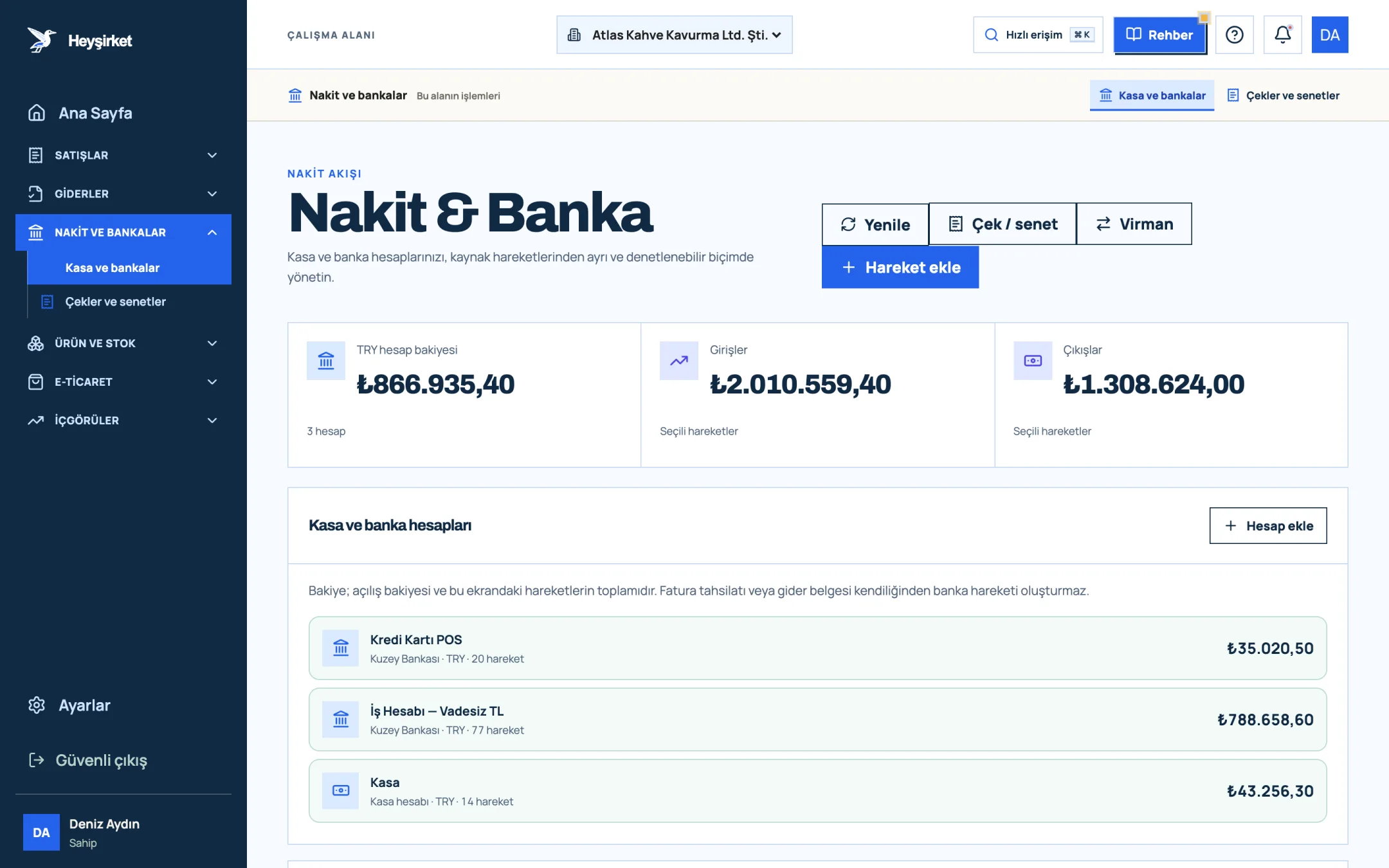
- 1. Add transaction button
- 2. Transfer between accounts
- 3. Total TRY balance
- 4. Cash and bank account list
Part 3 · Week 1 What should you agree on with your accountant in the first week?
There are three things to settle with your mali müşavir (accountant) in the first week: who delivers which documents and by when; which tax returns are filed on which schedule; and who keeps track of electronic obligations such as e-documents and e-Tebligat.
Have this conversation in writing; a short email is enough. Six months later it prevents the sentence “I thought you were going to do that”. We set out the framework in detail in working with your accountant.
Part 4 · Week 2 What is e-Tebligat, and why shouldn't you ignore it?
e-Tebligat (electronic official notification) is the method by which the tax administration and other authorities deliver official notices electronically to the taxpayer's electronic address instead of on paper. It's mandatory for corporate taxpayers.
In practice there are two things to do. First, confirm with your accountant that an e-Tebligat address has been opened for your company; the application is made through the tax office and e-Devlet (e-Government) channels. Second, decide which email address and phone number receive the notifications, and make one person responsible for them.
The objection period for a penalty notice can start running before you even notice. Checking the e-Tebligat inbox once a week is the cheapest insurance you can take out in the first month.
Part 5 · Week 3 Does a new company have to switch to e-Fatura?
The e-Fatura (Turkish e-invoice) obligation doesn't arise from simply having set up a company; it arises from gross sales revenue, line of business and some special circumstances. Under VUK General Communiqué Serial No. 509, taxpayers whose gross sales revenue in an accounting period is 3 million TL or more must switch to e-Fatura and e-Arşiv (e-archive invoice) by 1 July of the following year.
Even if it isn't mandatory, switching voluntarily usually makes sense. If your customers are registered for e-Fatura, your documents land directly in their systems, there's no printing and couriering paper invoices, and the invoices you receive are collected electronically too.
To tell who gets an e-Fatura and who gets an e-Arşiv invoice, see our article on the difference between e-Fatura and e-Arşiv. Setting up your document infrastructure in Heyşirket comes down to filling in a few fields.
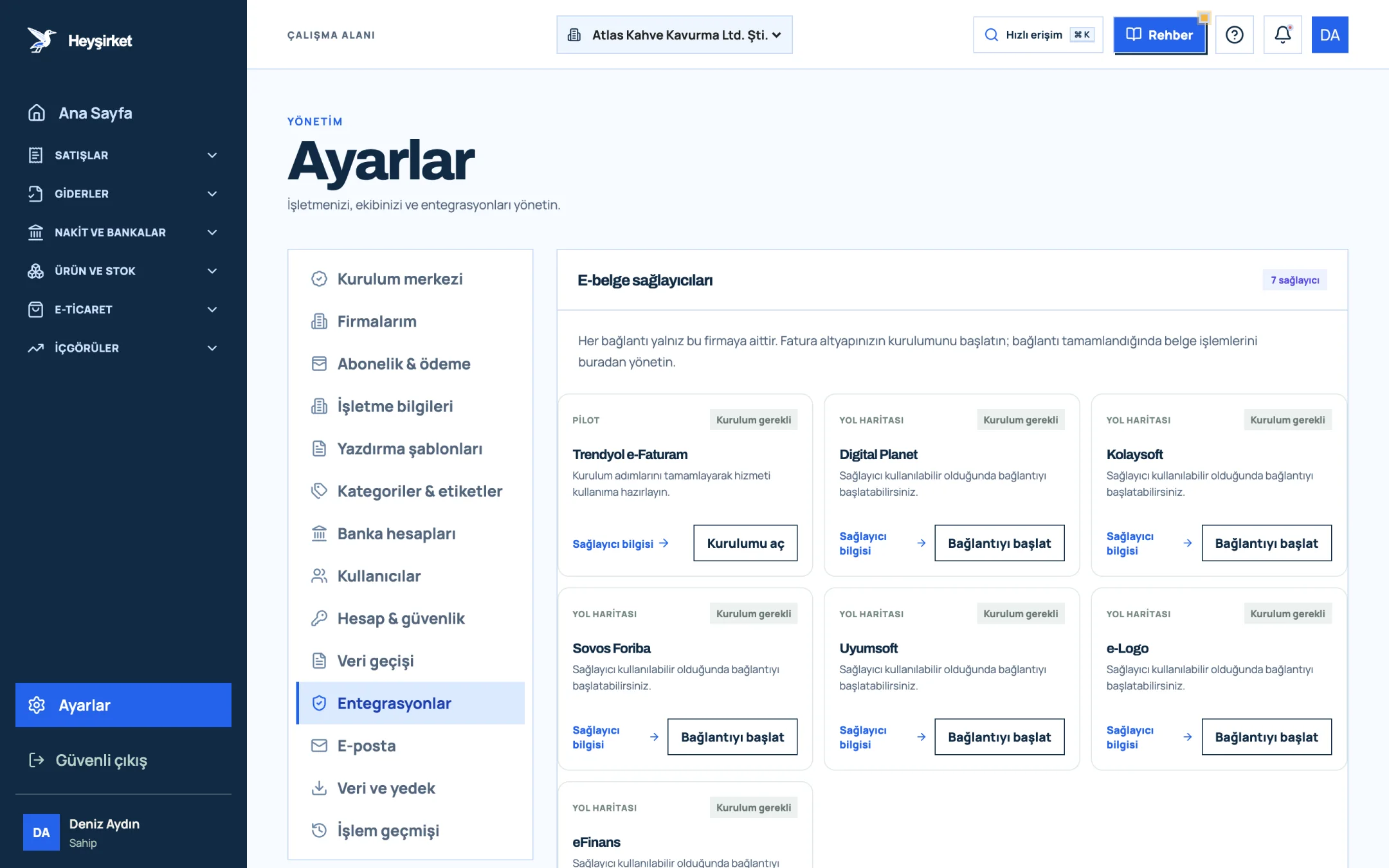
- 1. Integrations tab
- 2. Trendyol e-Faturam card
- 3. Open setup button
- 4. Other e-document providers
Part 6 · Week 3 How do you set up a document filing routine from day one?
A document filing routine means putting every document coming into and going out of the business in one place on the same day, and naming it so it can be found later. A routine set up in the first month makes your life easier throughout the five-year retention period.
Document filing rules
- Photograph or record every expense receipt in the software on the same day; put the paper original in that month's folder.
- Don't leave incoming e-invoices in your inbox; enter them as expenses in your pre-accounting software.
- Don't store separate PDFs of the invoices you issue; they're already archived in the software.
- Use the same naming rule for recurring expenses such as rent, electricity and internet.
- Keep contracts and official letters in a separate “company documents” folder.
- Close the folder at the end of the month and give your accountant access.
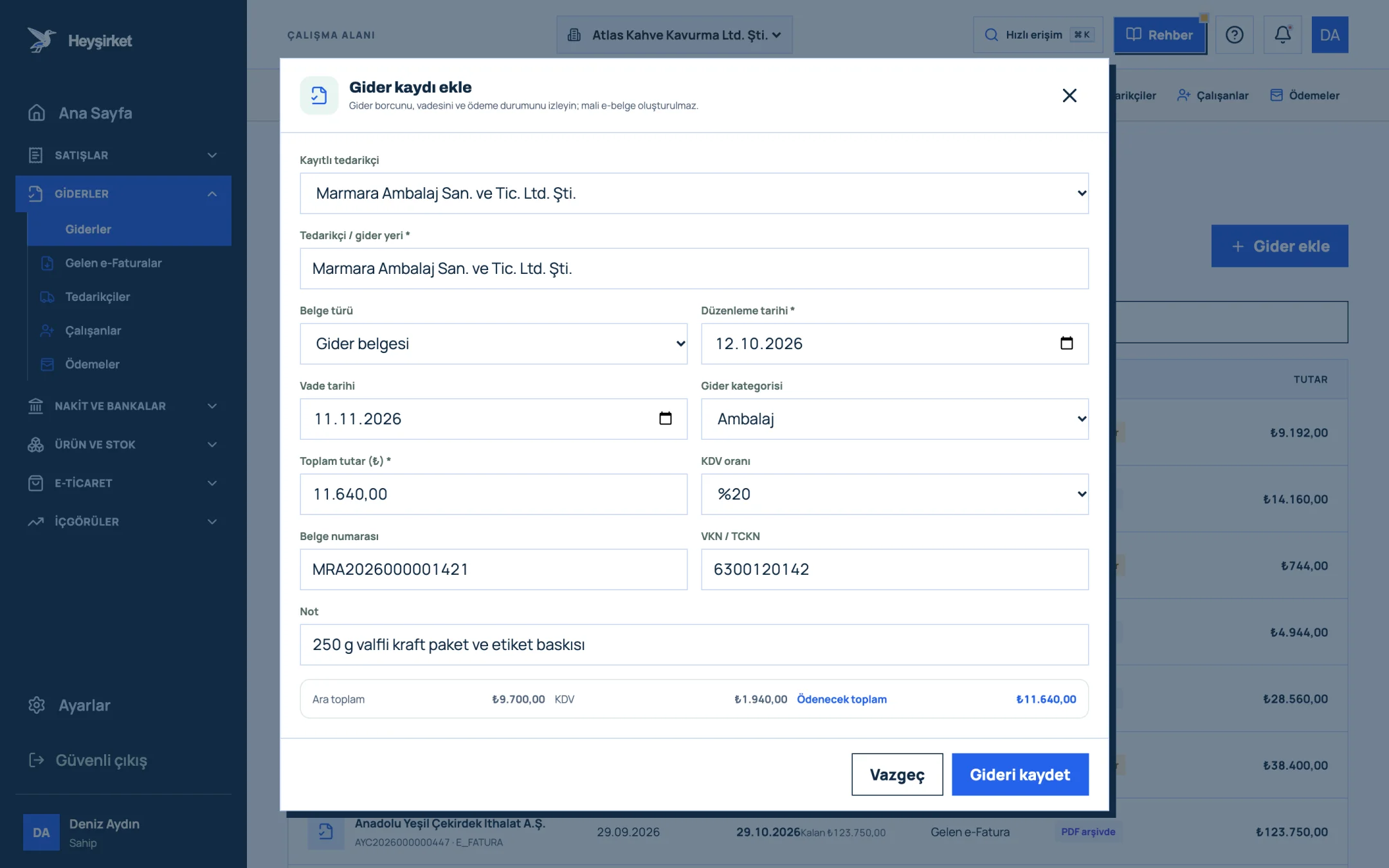
- 1. Supplier selection
- 2. Expense category
- 3. Amount and VAT rate
- 4. Subtotal, VAT and total payable
- 5. Save expense
We cover document retention periods and expense classification in more detail in expense management and document filing.
Part 7 · Week 4 How do you put together a cash budget for the first month?
The first month's cash budget is the total of fixed costs that will definitely have to be paid before any revenue comes in. The most common problem for new companies isn't a lack of profit; it's being unable to pay fixed costs because revenue arrives late.
| Expense item | Monthly amount | Note |
|---|---|---|
| Workshop rent | 45.000 TL | Per the lease agreement |
| Accountant's fee | 7.500 TL | Per the contract |
| Electricity, gas, water | 12.000 TL | High because of the roasting machine |
| Internet and phone | 1.500 TL | |
| Pre-accounting software | 199,99 TL | Heyşirket monthly plan |
| Employer cost of one employee | To be obtained from your accountant | Including wages, SGK and taxes |
| Total excluding employee | 66.199,99 TL |
Looking at this table, Atlas Kahve's owner might ask: if I sell to cafés on 30-day terms, for how many months do I need to finance this amount until the first payment arrives? The answer is cash planning itself; the details are in cash flow management.
On the cash side, one simple rule is enough: open a cash register only if you actually hold cash, and record every movement in and out on the same day. The earlier you spot a difference between what should be in the till and what's actually there, the easier it is to explain.
Part 8 · Week 4 What are the SGK deadlines when hiring your first employee?
When you hire your first employee, two separate notifications are made: the workplace registration, which introduces the workplace itself to SGK, and the employment start notice, which starts the employee's insurance coverage. These two notices have different deadlines and are often confused.
| Notice | When is it filed? | Legal basis |
|---|---|---|
| Workplace registration | No later than the date the first insured employee starts work | Law No. 5510, Art. 11 |
| Employment start notice | As a rule, at least one day before work begins | Law No. 5510, Art. 8 |
The insurance status of partners and the company manager is assessed separately and varies by company type. Be sure to ask your accountant about this in the first week.
If you'd also like to track employee details and payments in your pre-accounting, the Employees screen under Expenses in Heyşirket is designed for exactly that; details are in the employee management guide.
Part 9 · Week 4 How should you set up your pre-accounting software in the first month?
Setting up your pre-accounting software in the first month means every record is in one place from the very first invoice. You won't have to deal with moving data over from Excel later.
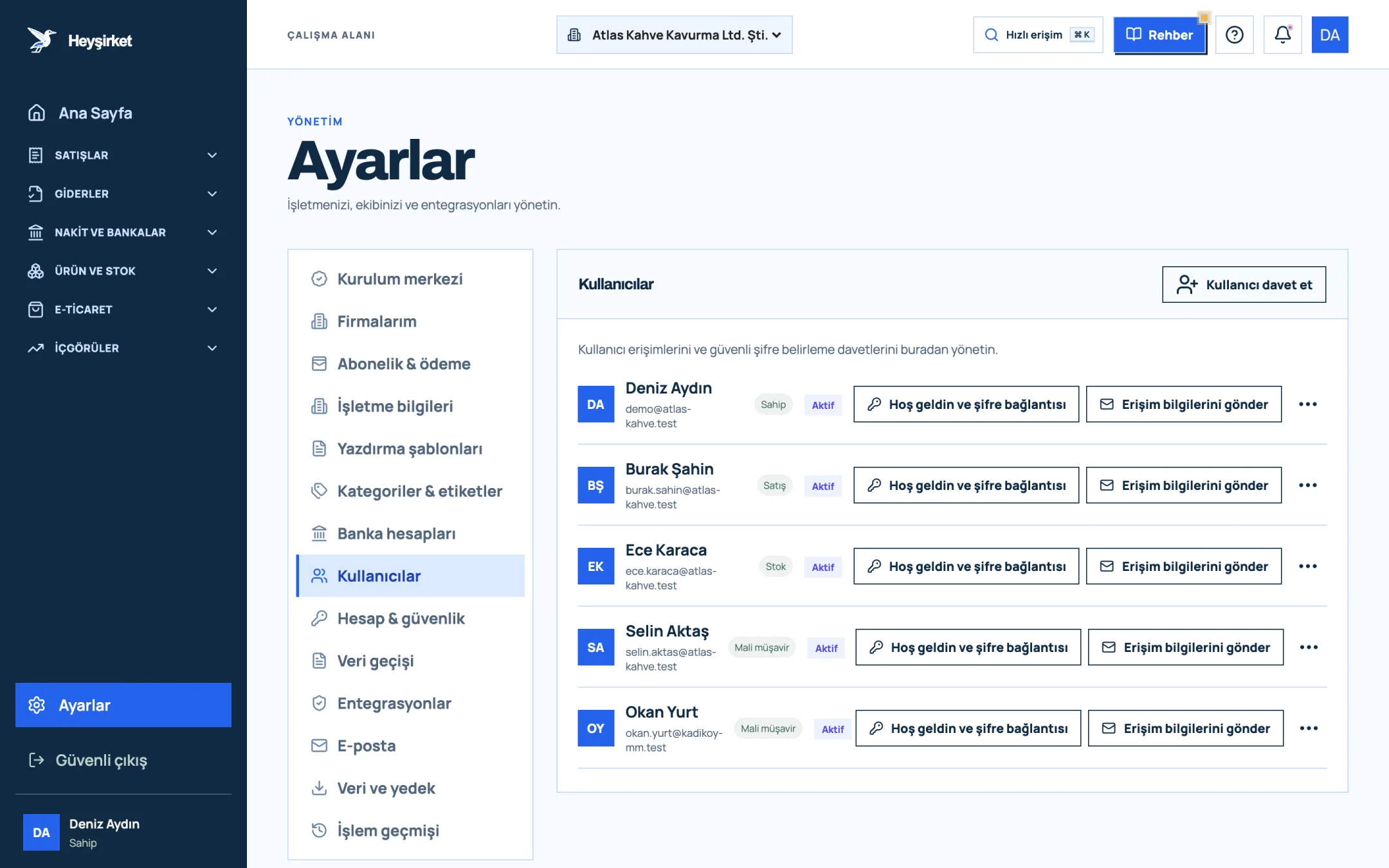
- 1. Invite user
- 2. User role (Owner, Sales, Stock, Accountant)
- 3. Send access details
In Heyşirket, the Setup center under Settings shows, in order, the steps a new company needs to complete: legal business details, bank accounts, user access, customer and product data, email sending, invoicing and the first data backup. Each step is explained in the company settings guide.
Set up the software in the first month, not once business has settled down. When records are in one place from the first invoice, you won't have to deal with moving data over from Excel later, and you'll do your first month-end close with your accountant from the same screen. Every new company starts with a 14-day free trial.
Part 10 · First invoice What should you check before issuing your first invoice?
Your first invoice is the first commercial document your company issues under its official identity, and every detail on it becomes the template for all later invoices. Once it's set up correctly, you won't need to think about it again.
- Company name and tax details: Do the company name, tax office and tax number on your tax certificate match the business details in the software exactly?
- Customer details: Are the customer's tax number, tax office and address complete? Are they registered for e-Fatura or not?
- VAT rate: Have you confirmed the KDV (VAT) rate for the goods or service you sell with your accountant?
- Payment details: Does the company IBAN appear on the invoice?
- Due date: Have you stated the payment due date on the invoice?
Atlas Kahve issued its first invoice to Nişantaşı Bistro for a barista training session. The training fee was 6.000 TL, or 7.200 TL with 20% VAT. Before the invoice was issued, the bistro's tax number was checked twice; because a document issued to a buyer registered for e-Fatura lands directly in their system, and a mistake requires a return process.
You'll find the first invoice steps screen by screen in the how to issue an invoice guide, and how to open a customer card in the how to add a customer guide.
Part 11 · Partners What happens when partners put money into the company or take it out?
Money a partner puts into or takes out of the company, other than capital payments, is usually tracked in a partner-related current account (cari). How these movements are recorded and their tax consequences are your accountant's domain.
What you need to do is make every money movement through the bank with a description, such as “Loan from partner X to the company” or “Payment to partner Y”. Cash handed over with no record becomes the hardest item to explain at the end of the first year.
Purchases made with partners' personal cards are especially common in the first weeks after setup. Ask for those invoices to be issued in the company's name, and send the list to your accountant in one go at the end of the first month.
Part 12 · The habit What's the habit people discover in month six?
The habit many new companies discover in their sixth month is the month-end close. That means “closing” the previous month on the first working day of each month: checking the bank balance, open receivables and expense documents, and handing them over to your accountant.
Do this close once at the end of the first month; it takes about an hour. In the second month it drops to half an hour. By the sixth month you'll notice that the answer to “what did we earn this month?” is always ready. The step-by-step list is in the month-end closing checklist.
How often should I check the e-Tebligat inbox?
At least once a week. An electronic notification is deemed served at the end of the fifth day after it reaches your address; a weekly check ensures you don't miss objection and response deadlines.
What should be done first after setting up a company?
Open a bank account in the company's name and put the document delivery schedule with your accountant in writing. These two steps are the foundation for everything else.
Does a newly established company have to issue e-Fatura invoices right away?
The obligation depends on revenue, sector and some special circumstances. Even if it isn't mandatory, you can switch voluntarily. Confirm your company's situation against current GİB (Turkish Revenue Administration) rules and with your accountant.
Who should check e-Tebligat?
It should be one person's responsibility in the business and checked at least once a week. Agree with your accountant on who notifications are routed to.
Which documents should I keep in the first month?
Setup paperwork, the lease agreement, invoices for your first purchases, bank receipts and every invoice you issue. Books and documents are kept for five years under the Tax Procedure Law and ten years under the Turkish Commercial Code.
I paid the company's first expenses with my personal card; what should I do?
Make sure the invoices are issued in the company's name and let your accountant know. Make future purchases from the company account.
Start from the setup center See the steps your new company needs to complete in a single list; each row takes you to the relevant setting. Open setup center
Author: Heyşirket Editorial Team